pengenalan
Terima kasih kerana membeliasing the Eureka Wet and Dry Vacuum Cleaner WD X2. This versatile appliance is designed for efficient cleaning of both wet spills and dry debris, featuring a powerful 1300W motor and a blower function. Please read this manual carefully before operating the appliance to ensure safe and optimal performance. Keep this manual for future reference.
Arahan Keselamatan Penting
Sentiasa ikuti langkah berjaga-jaga keselamatan asas apabila menggunakan peralatan elektrik untuk mengurangkan risiko kebakaran, renjatan elektrik atau kecederaan.
- Baca semua arahan sebelum digunakan.
- Jangan biarkan perkakas tanpa pengawasan apabila dipasang. Cabut plag dari saluran keluar apabila tidak digunakan dan sebelum diservis.
- Jangan gunakan di luar atau di permukaan basah.
- Jangan biarkan digunakan sebagai mainan. Perhatian yang rapi diperlukan apabila digunakan oleh atau berhampiran kanak-kanak.
- Gunakan hanya seperti yang diterangkan dalam manual ini. Gunakan hanya lampiran yang disyorkan pengilang.
- Jangan gunakan dengan kord atau palam yang rosak. Jika perkakas tidak berfungsi sebagaimana mestinya, telah terjatuh, rosak, ditinggalkan di luar rumah, atau terjatuh ke dalam air, kembalikannya ke pusat servis.
- Jangan tarik atau bawa dengan kord, gunakan kord sebagai pemegang, tutup pintu pada kord, atau tarik kord di sekeliling tepi atau sudut yang tajam. Jangan jalankan perkakas di atas kord. Jauhkan kord dari permukaan yang dipanaskan.
- Jangan cabut plag dengan menarik kord. Untuk mencabut palam, pegang palam, bukan kordnya.
- Jangan pegang palam atau perkakas dengan tangan yang basah.
- Jangan letakkan sebarang objek ke dalam bukaan. Jangan gunakan dengan mana-mana bukaan yang disekat; jauhkan daripada habuk, serabut, rambut dan apa sahaja yang boleh mengurangkan aliran udara.
- Jauhkan rambut, pakaian longgar, jari dan semua bahagian badan daripada bukaan dan bahagian yang bergerak.
- Jangan ambil apa-apa yang terbakar atau berasap, seperti rokok, mancis, atau abu panas.
- Jangan gunakan untuk mengambil cecair mudah terbakar atau mudah terbakar, seperti petrol, atau gunakan di kawasan yang mungkin terdapat.
- Jangan ambil bahan toksik, seperti peluntur klorin, ammonia atau pembersih longkang.
- Jangan gunakan tanpa penapis di tempatnya.
- Matikan semua kawalan sebelum mencabut plag.
- Gunakan lebih berhati-hati semasa membersihkan di tangga.
Komponen Produk
The Eureka Wet and Dry Vacuum Cleaner WD X2 comes with the following components:
- Unit utama
- Hos sedutan
- Tiub Sambungan (2)
- Berus Lantai
- Alat Celah
- Other 8 specialized accessories (total 13 accessories)
- Penapis Kering
- Penapis HEPA
- Penapis Basah

Image: The main unit of the Eureka WD X2 vacuum cleaner, showing the canister design, attached hose, and various cleaning attachments.

Imej: Bahagian atas dari dekat view of the Eureka WD X2 vacuum cleaner, highlighting the power dial, auto-clean switch, and power cord input.
Persediaan
- Membongkar: Keluarkan semua komponen dari pembungkusan dengan berhati-hati. Simpan pembungkusan untuk penyimpanan atau pengangkutan masa hadapan.
- Pemasangan Roda (jika diperlukan): Attach the wheels to the base of the main unit if they are not pre-assembled. Ensure they click securely into place.
- Pemasangan Penapis:
- Untuk Vacuuming Kering: Ensure the Dry Filter and HEPA Filter are correctly installed inside the canister. Refer to the diagram inside the unit for proper placement.
- Untuk Vacuuming Basah: Remove the Dry Filter and HEPA Filter. Install the Wet Filter. Never use dry filters for wet vacuuming.
- Sambungan Hos:
- Untuk sedutan: Connect the suction hose to the inlet port on the front of the main unit. Twist to secure.
- Untuk Fungsi Blower: Connect the suction hose to the outlet port located on the rear or top of the main unit (refer to specific model design). Twist to secure.
- Attachment Connection: Attach the desired cleaning accessory (e.g., extension tubes, floor brush, crevice tool) to the end of the suction hose. Ensure a snug fit.

Imej: Bahagian belakang view of the Eureka WD X2 vacuum cleaner, showing the power cord neatly wrapped around integrated storage hooks.
Arahan Operasi
1. Penyedutan Kering
- Ensure the Dry Filter and HEPA Filter are correctly installed.
- Connect the hose to the suction inlet.
- Palamkan kord kuasa ke salur keluar elektrik yang sesuai.
- Turn the power dial to the "On" position.
- Adjust the suction power using the dynamic dial control as needed for different surfaces.
- Mulakan pembersihan.
2. Pemvakum Basah
- Remove the Dry Filter and HEPA Filter. Install the Wet Filter.
- Connect the hose to the suction inlet.
- Palamkan kord kuasa ke salur keluar elektrik yang sesuai.
- Turn the power dial to the "On" position.
- Begin cleaning wet spills. Do not overfill the tank. The vacuum has an automatic shut-off when the liquid reaches maximum capacity.
3. Fungsi Peniup
- Ensure the canister is empty and clean.
- Connect the hose to the blower outlet port (usually at the rear or top of the unit).
- Palamkan kord kuasa ke salur keluar elektrik yang sesuai.
- Turn the power dial to the "On" position.
- Use the blower to clear debris from pathways, workshops, or hard-to-reach areas.
4. Dynamic Dial Power Control
The vacuum cleaner features a dynamic dial power control. Rotate the dial to increase or decrease the suction power. This allows for precise adjustment based on the cleaning task and surface type.
5. Auto Clean Switch
The Smart Auto Clean Switch helps maintain the vacuum cleaner's performance. When activated, it assists in clearing dust and debris from the filter, extending its lifespan and ensuring consistent suction.
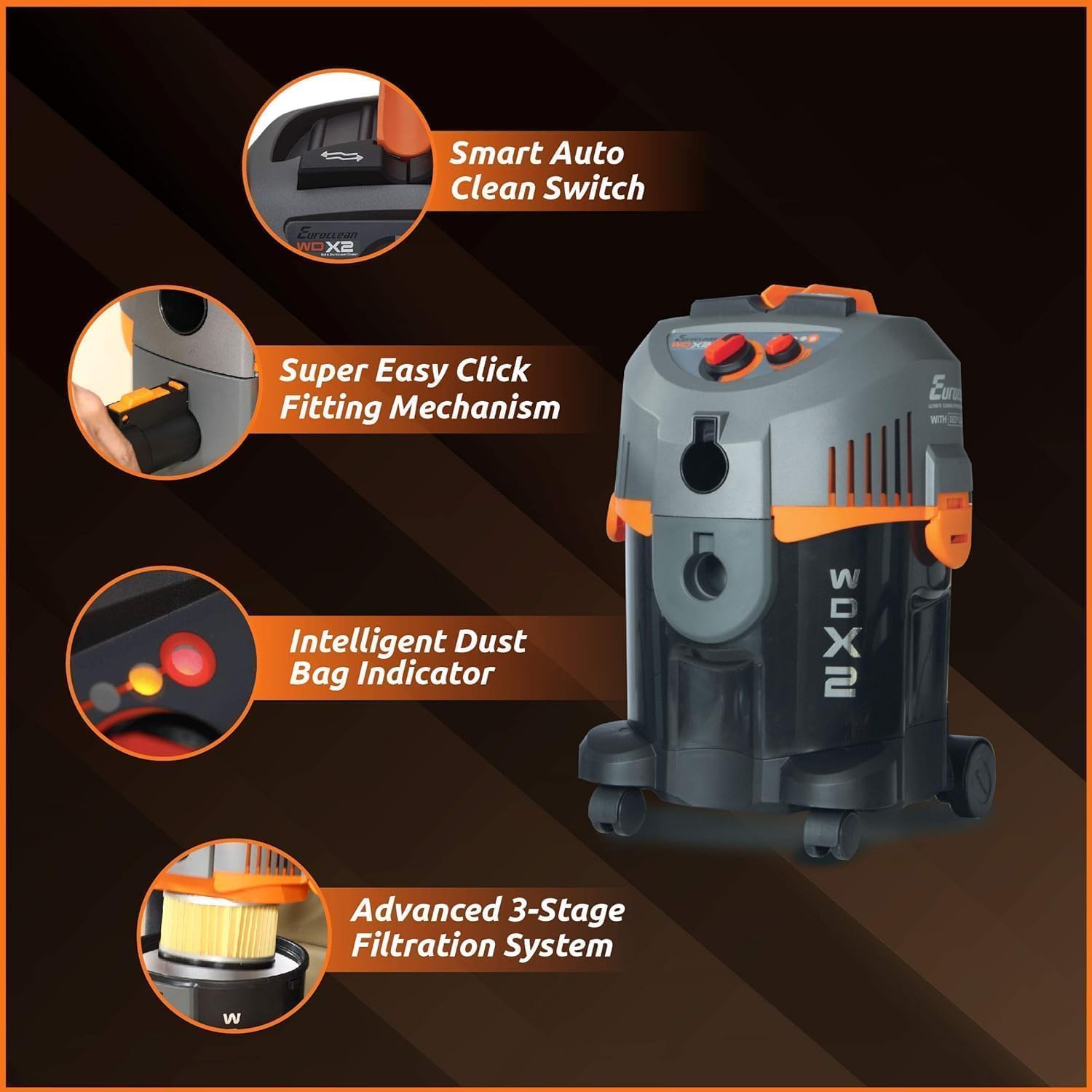
Image: A diagram illustrating key features of the Eureka WD X2, including the Smart Auto Clean Switch, Easy Click Fitting Mechanism, Intelligent Dust Bag Indicator, and Advanced 3-Stage Sistem Penapisan.
Penyelenggaraan
Penyelenggaraan yang kerap memastikan ketahanan dan prestasi optimum pembersih vakum anda.
1. Emptying the Canister
- Sentiasa cabut plag pembersih vakum sebelum mengosongkan.
- Release the latches securing the motor head to the canister.
- Carefully lift the motor head.
- Dispose of dry debris or empty liquids into a suitable drain.
- Clean the inside of the canister with a damp kain jika perlu.
- Reattach the motor head and secure the latches.
2. Pembersihan dan Penggantian Penapis
- Dry Filter & HEPA Filter: Tap off loose dust. If heavily soiled, wash with mild soap and water, rinse thoroughly, and allow to air dry completely before reinstallation. Do not use wet filters for dry vacuuming.
- Penapis Basah: Rinse with water after each wet use. Allow to air dry completely before storage.
- Replace filters periodically or when performance noticeably decreases.
3. Pembersihan Aksesori
Wash accessories with mild soap and water as needed. Ensure they are dry before storing.
4. Penyimpanan Kord
Wrap the power cord neatly around the integrated cord storage hooks on the unit to prevent damage.
Menyelesaikan masalah
| Masalah | Kemungkinan Punca | Penyelesaian |
|---|---|---|
| Vakum tidak dihidupkan. | Tiada bekalan kuasa. Suis kuasa dimatikan. | Periksa sambungan kord kuasa dan salur keluar dinding. Turn power switch to "On". |
| Kuasa sedutan rendah. | Canister is full. Penapis tersumbat. Hos atau lampiran disekat. Hose is not securely connected. | Kosongkan kanister. Bersihkan atau gantikan penapis. Check and clear any blockages in hose or attachments. Ensure hose is firmly attached to the inlet. |
| Air bocor semasa menyedut habuk basah. | Wet filter not installed correctly. Canister is overfilled. Seal rosak. | Ensure wet filter is properly seated. Do not exceed maximum liquid capacity. Periksa pengedap dan ganti jika rosak. |
| Fungsi blower tidak berfungsi. | Hos tidak disambungkan ke port peniup. Blower port is blocked. | Connect hose to the designated blower outlet. Check and clear any blockages in the blower port or hose. |
Jika masalah berterusan selepas mencuba penyelesaian ini, sila hubungi sokongan pelanggan.
Spesifikasi
- Nama Model: Eureka Select WD X2
- Kuasa: 1300 Watt
- Kuasa sedutan: 22.5 kPa
- kapasiti: 8 liter
- Panjang hos: 2 Meter
- Voltage: 230 Volt
- Amppemadaman: 5.7 A
- Tahap Bunyi: 80 Desibel
- Dimensi Produk: 35L x 30W x 35H Sentimeter
- Berat Barang: 6 kg
- Jenis penapis: Dry Filter, HEPA Filter, Wet Filter
- Ciri Khas: Auto Clean, Blower Function, Dynamic Dial Power Control, High Suction Power, Wet And Dry Cleaning
- Kaedah Kawalan: Push Button, Dial Control
- Ketersambungan: Elektrik Bertali
- Pengeluar: Aquacity Pvt Ltd
Waranti dan Sokongan
This Eureka Wet and Dry Vacuum Cleaner WD X2 comes with a Waranti 1 Tahun dari tarikh pembelian.
For warranty claims, technical support, or service inquiries, please contact the manufacturer or authorized service center. Keep your purchase receipt as proof of purchase.
Pengeluar: Aquacity Pvt Ltd


