1. Pengenalan
Terima kasih kerana membeliasing the ZEBRONICS Juke BAR 200A Soundbar. This manual provides essential information for the safe and correct operation of your device. Please read it thoroughly before use and retain it for future reference.
Kandungan Pakej
- Sound Bar - 1 unit
- Subwoofer - 1 unit
- QR Code Guide - 1 unit
- Power Adapter - 1 unit
- Remote Control - 1 unit
2. Arahan Keselamatan
Untuk memastikan operasi yang selamat dan mengelakkan kerosakan, sila patuhi langkah berjaga-jaga keselamatan berikut:
- Jangan dedahkan peranti kepada hujan atau lembapan.
- Jangan sekat sebarang bukaan pengudaraan.
- Letakkan peranti pada permukaan yang stabil dan rata.
- Use only the power adapter supplied by the manufacturer.
- Jangan buka casing; merujuk semua perkhidmatan kepada kakitangan yang berkelayakan.
- Jauhkan peranti daripada cahaya matahari langsung, sumber haba dan medan magnet yang kuat.
- Bersihkan hanya dengan kain kering.
3. Produk Lebihview
The ZEBRONICS Juke BAR 200A is a compact soundbar system designed to enhance your audio experience. It features a soundbar with dual drivers and a dedicated subwoofer for powerful bass.
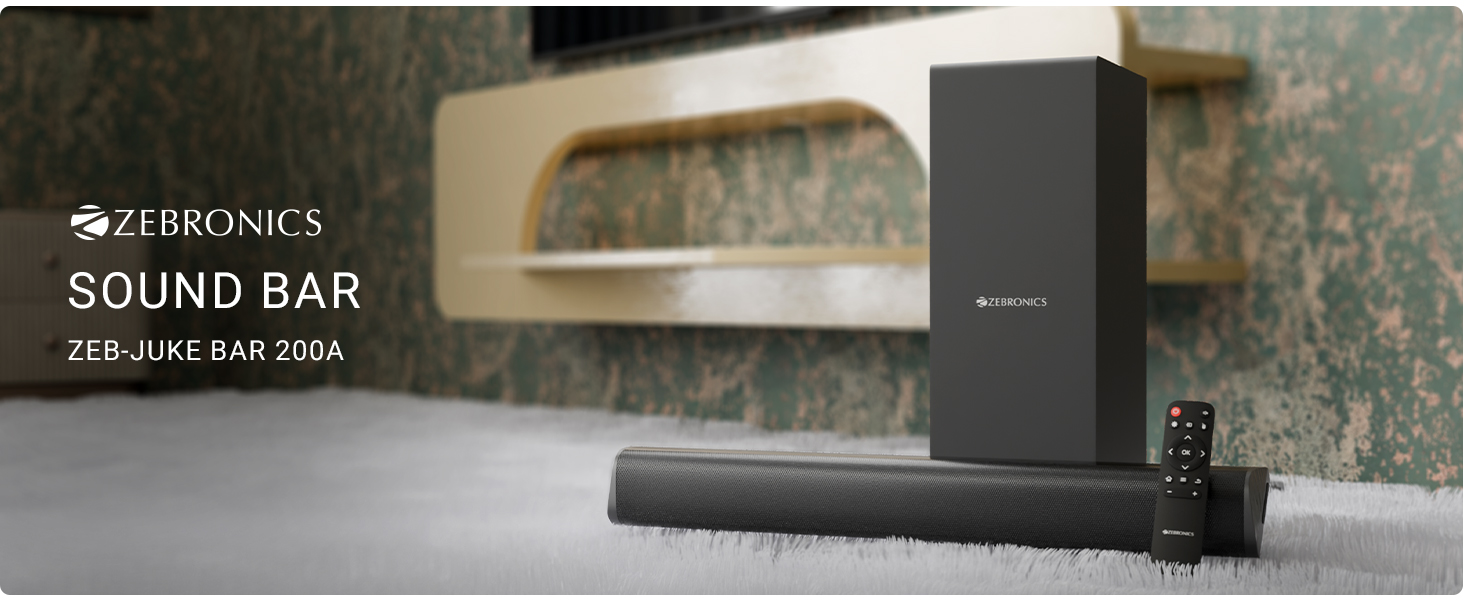
Rajah 3.1: ZEBRONICS Juke BAR 200A Soundbar, Subwoofer, and Remote Control. This image displays the complete sound system, including the main soundbar unit, the separate subwoofer, and the remote control, providing a visual representation of all primary components.
Ciri-ciri Utama
- 90W RMS Output: Delivers powerful and clear audio.
- Dual Driver Soundbar: Equipped with 5.08cm x 2 drivers for balanced sound.
- 11.43cm Subwoofer: Provides deep, rich bass.
- Kesambungan berbilang: Supports Bluetooth v5.1, HDMI ARC, and USB.
- Dolby Audio Decoding: Built-in Dolby Digital and Dolby Digital+ decoding for versatile audio.
- Boleh Dipasang di Dinding: Designed for flexible placement options.
- Kawalan Jauh: Full control over audio settings.

Rajah 3.2: Soundbar Media and Volume Controls and Remote Control. This image highlights the physical control buttons on the soundbar for power, volume up, and volume down, alongside a detailed view of the included remote control, illustrating all available buttons for comprehensive audio management.

Rajah 3.3: Soundbar Rear Panel with Connectivity Ports. This image provides a close-up view of the soundbar's rear panel, clearly labeling the HDMI ARC, USB, DC IN, and SW OUT ports, essential for understanding connection options.
4. Persediaan
4.1 Penempatan
Place the soundbar on a stable surface in front of your television or mount it on the wall below your TV. Position the subwoofer on the floor, ideally near the soundbar, for optimal bass performance.
4.2 Menyambungkan Subwoofer
Connect the subwoofer to the soundbar using the provided SW OUT cable. Ensure a secure connection.
4.3 Sambungan Kuasa
- Sambungkan penyesuai kuasa ke port DC IN pada bar bunyi.
- Palamkan penyesuai kuasa ke salur keluar dinding yang sesuai.
4.4 Sambungan Audio
Pilih salah satu daripada kaedah berikut untuk menyambungkan sumber audio anda:
- ARC HDMI: For optimal audio quality and control, connect an HDMI cable from your TV's HDMI ARC port to the HDMI ARC port on the soundbar. This allows your TV remote to control the soundbar's volume.
- Bluetooth: For wireless connection, refer to the "Bluetooth Pairing" section in Operating Instructions.
- USB: Masukkan pemacu USB yang mengandungi audio fileke dalam port USB untuk main balik terus.
5. Arahan Operasi
5.1 Hidupkan/Mati Kuasa
- Tekan ke kuasa butang pada bar bunyi atau alat kawalan jauh untuk menghidupkan atau mematikan unit.
- The LED indicator on the soundbar will illuminate when powered on.
5.2 Pemilihan Mod Input
Tekan ke Input button on the remote control to cycle through available input modes: Bluetooth (BT), HDMI ARC, and USB.
5.3 Berpasangan Bluetooth
- Turn on the soundbar and select Bluetooth mode. The LED indicator will flash, indicating pairing mode.
- Enable Bluetooth on your mobile device or computer and search for "ZEB-JUKE BAR 200A".
- Select the device to pair. Once connected, the LED indicator will glow steadily.
5.4 Kawalan Kelantangan
- Gunakan Kelantangan Naik (+) dan Perlahankan suara (-) buttons on the soundbar or remote control to adjust the volume.
- Tekan ke bisu button on the remote to mute or unmute the audio.
5.5 Main Semula USB
Insert a USB flash drive into the USB port. The soundbar will automatically switch to USB mode and begin playing compatible audio files. Use the remote control for playback functions (Play/Pause, Next/Previous Track).
6. Pemasangan Dinding
The ZEBRONICS Juke BAR 200A is designed to be wall-mountable. Ensure you use appropriate screws and wall plugs for your wall type. It is recommended to consult a professional for wall mounting to prevent damage or injury.
- Measure the distance between the mounting holes on the back of the soundbar.
- Mark the corresponding positions on the wall.
- Gerudi lubang dan masukkan palam dinding (jika perlu).
- Secure the soundbar to the wall using suitable screws.
7. Penyelenggaraan
- Pembersihan: Gunakan kain lembut dan kering untuk membersihkan permukaan bar bunyi dan subwufer. Jangan gunakan pembersih cecair atau bahan yang melelas.
- Storan: Jika menyimpan unit untuk tempoh yang lama, putuskan sambungannya daripada kuasa dan simpan di tempat yang sejuk dan kering.
- Pengudaraan: Pastikan bukaan pengudaraan tidak disekat untuk mengelakkan terlalu panas.
8. Penyelesaian masalah
| Masalah | Kemungkinan Punca | Penyelesaian |
|---|---|---|
| Tiada kuasa | Penyesuai kuasa tidak disambungkan atau alur keluar rosak. | Periksa sambungan kuasa. Cuba soket lain. |
| Tiada bunyi | Incorrect input mode, low volume, or incorrect cable connection. | Select the correct input mode. Increase volume. Check audio cables. |
| Bluetooth tidak bersambung | Soundbar not in pairing mode, device too far, or previously paired. | Ensure soundbar is in BT pairing mode. Move device closer. Forget device on your phone and re-pair. |
| Alat kawalan jauh tidak berfungsi | Bateri lemah atau halangan. | Replace remote batteries. Ensure no obstructions between remote and soundbar. |
9. Spesifikasi
| Ciri | Perincian |
|---|---|
| Nama Model | Zeb - Juke Bar 200A |
| Jenis Pembesar Suara | Bar bunyi dengan Subwufer |
| Jumlah Kuasa Keluaran | 90 Watts RMS (Soundbar: 20W x 2, Subwoofer: 50W) |
| Diameter Subwoofer | 11.43 Sentimeter |
| Soundbar Driver Size | 5.08cm x 2 |
| Ketersambungan | Bluetooth v5.1, HDMI ARC, USB |
| Saluran Bunyi Sekeliling | 2.1 |
| Penyahkodan Audio | Dolby Digital, Dolby Digital+ |
| Kaedah Kawalan | Remote, Control Buttons |
| Dimensi Produk | 6.3D x 50W x 6.3H Centimeters (Soundbar) |
| Berat Barang | 2.5 kg |
| Komponen yang Disertakan | Sound Bar, Subwoofer, QR Code Guide, Power Adapter, Remote |
10. Maklumat Waranti
This product is covered by a manufacturer's warranty. Please refer to the QR Code Guide included in your package or visit the official ZEBRONICS website for detailed warranty terms and conditions. Retain your purchase receipt as proof of purchase for warranty claims.
For extended warranty options, please check with your retailer or the ZEBRONICS official channels.
11. Sokongan
For technical assistance, product inquiries, or service requests, please contact ZEBRONICS customer support:
- rasmi Webtapak: www.zebronics.com
- Perkhidmatan Pelanggan: Refer to the QR Code Guide or the official website for the latest contact information (phone numbers, email support).
Please have your product model number (Juke BAR 200A) and purchase details ready when contacting support.


