pengenalan
This manual provides detailed instructions for the assembly, operation, and maintenance of your FLEXISPOT One-Piece Standing Desk with Rattan Drawers. Please read this manual thoroughly before installation and use to ensure proper function and safety. Keep this manual for future reference.

Image: The FLEXISPOT One-Piece Standing Desk in black with rattan drawers, featuring a monitor shelf and an integrated control panel.
Maklumat Keselamatan Penting
Untuk mengelakkan kecederaan atau kerosakan pada produk, patuhi garis panduan keselamatan berikut:
- Sentiasa ikut arahan pemasangan dengan teliti.
- Jauhkan kanak-kanak dan haiwan peliharaan dari kawasan perhimpunan.
- Use appropriate tools and safety gear during assembly.
- Pastikan semua sambungan selamat sebelum mengendalikan meja.
- Jangan bebankan meja secara berlebihan. Kapasiti berat maksimum ialah 110 paun.
- Pastikan tangan dan objek bebas daripada bahagian yang bergerak semasa melaraskan ketinggian.
Kandungan Pakej
Verify that all components are present before beginning assembly. The desk ships in two separate packages.
- Desktop with integrated monitor shelf and rattan drawers
- Bingkai dan kaki meja
- Panel kawalan
- Penyesuai kuasa dan kabel
- Perkakasan pemasangan (skru, bolt, alat)
- Manual Pengguna

Image: A diagram illustrating the dimensions of the desk components and indicating that the product ships in two separate packages.
Arahan Perhimpunan
Assembly typically takes approximately one hour. Refer to the separate detailed assembly guide included in your package for step-by-step instructions and diagrams. Ensure all fasteners are correctly identified and used in their designated locations.
- Buka bungkusan semua komponen dan sahkan terhadap senarai kandungan pakej.
- Attach the desk legs to the desktop frame using the provided hardware.
- Connect the control panel and motor cables as instructed.
- Secure any cable management components.
- Place the desk in its desired location.
Persediaan
After assembly, connect the desk to a power source.
- Plug the power adapter into the desk's control box.
- Palamkan kord kuasa ke soket elektrik standard.
- The desk is now ready for initial use.
Arahan Operasi
Pelarasan Ketinggian
The desk features an electric motor system for smooth height transitions.
- Tekan ke Anak panah atas butang untuk menaikkan meja.
- Tekan ke Anak panah ke bawah butang untuk menurunkan meja.
- The desk can adjust between 28.9 inches (minimum) and 46.5 inches (maximum).
- The motor operates quietly, typically below 50dB.

Image: The desk shown at its minimum (28.9") and maximum (46.5") adjustable heights.
Pratetap Memori
Program up to three preferred height settings for quick adjustments.
- Laraskan meja mengikut ketinggian yang anda inginkan.
- Tekan ke M button, then press one of the numbered preset buttons (1, 2, atau 3) dalam masa 3 saat untuk menyimpan ketinggian semasa.
- Untuk mengingat semula ketinggian yang disimpan, hanya tekan butang pratetap bernombor yang sepadan.

Imej: Dari dekat view of the desk's control panel, highlighting the up/down arrows and memory preset buttons.
Rak Monitor
The integrated monitor shelf is designed to elevate screens to an ergonomic eye level.
- Place your monitor(s) on the shelf to reduce neck and back strain.
- This helps maintain proper posture during extended work sessions.

Image: Visual comparison of poor posture versus ergonomic sitting and standing postures facilitated by the adjustable desk.
Rattan Drawers
The desk includes both sliding-door desktop compartments and an under-desk drawer for organized storage.
- Use the desktop compartments (47.2"x8.7"x5.5") for easy access to frequently used items.
- The under-desk drawer (23.6"x11.8"x3.9") provides discreet storage for documents or books.
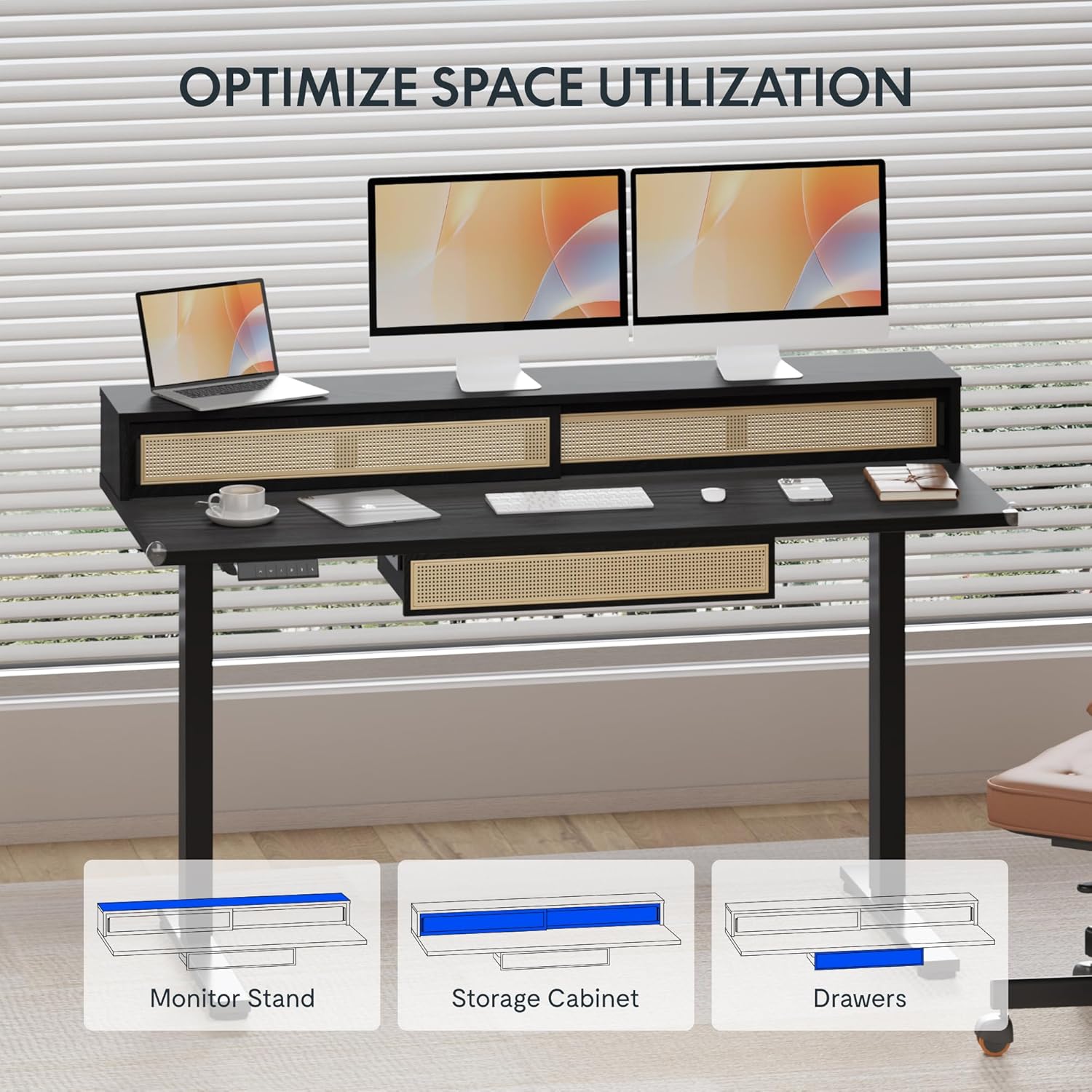
Image: An illustration demonstrating the various storage options, including the monitor stand, storage cabinet, and drawers, for optimal space utilization.
Penyelenggaraan
Penyelenggaraan yang kerap memastikan jangka hayat dan prestasi optimum meja anda.
- Pembersihan: Lap permukaan meja dengan lembut, damp kain. Elakkan pembersih yang melelas atau bahan kimia keras yang boleh merosakkan kemasan.
- Pemeriksaan: Periksa semua skru dan bolt secara berkala untuk memastikan ia ketat. Ketatkan semula jika perlu.
- Pengurusan Kabel: Ensure cables are neatly organized and not interfering with the desk's movement.
Menyelesaikan masalah
If you encounter issues with your desk, refer to the following common solutions:
| Masalah | Kemungkinan Punca | Penyelesaian |
|---|---|---|
| Meja tidak bergerak atau bertindak balas terhadap kawalan. | Power connection issue, cable disconnected, motor error. | Check power cord connection to outlet and desk. Ensure all motor cables are securely connected. Unplug and replug the power for 10 seconds to reset. |
| Meja bergerak tidak sekata atau mengeluarkan bunyi yang luar biasa. | Beban tidak sekata, sambungan longgar, halangan. | Ensure weight is evenly distributed. Check for any obstructions under the desk. Verify all assembly screws are tight. |
| Memory presets are not working. | Pratetap tidak disimpan dengan betul. | Re-save the desired height settings by pressing 'M' then the preset number within 3 seconds. |
Spesifikasi
| Ciri | Perincian |
|---|---|
| Jenama | FLEXISPOT |
| Dimensi Produk (D x W x H) | 23.6"D x 47.2"W x 29"H (at lowest point) |
| warna | Hitam |
| Bahan Asas | Keluli Aloi |
| Jenis Bahan Atas | kayu |
| Ketinggian Minimum | 28.9 Inci |
| Ketinggian Maksimum | 46.5 Inci |
| Bilangan Laci | 1 (under-desk) |
| Enclosed Shelves | 2 (sliding-door desktop compartments) |
| Ciri Khas | Corded electric height adjustment, Memory Presets |
| Perhimpunan yang Diperlukan | ya |
Waranti dan Sokongan
FLEXISPOT provides comprehensive warranty coverage for your standing desk:
- Kerangka dan Motor: 5-year coverage.
- Elektronik: 2-year coverage.
This warranty ensures lasting security for your workspace investment. For customer support, technical assistance, or warranty claims, please refer to the contact information provided in your product packaging or visit the official FLEXISPOT webtapak.


