1. Pengenalan
This manual provides instructions for the setup, operation, maintenance, and troubleshooting of your CRUA 27-inch 240Hz QHD IPS Gaming Monitor. This monitor features a 2560x1440 QHD resolution, a 240Hz refresh rate, an IPS panel for wide viewing angles, AMD FreeSync support, a blue light filter for eye protection, and built-in speakers. Please read this manual thoroughly before using the product.
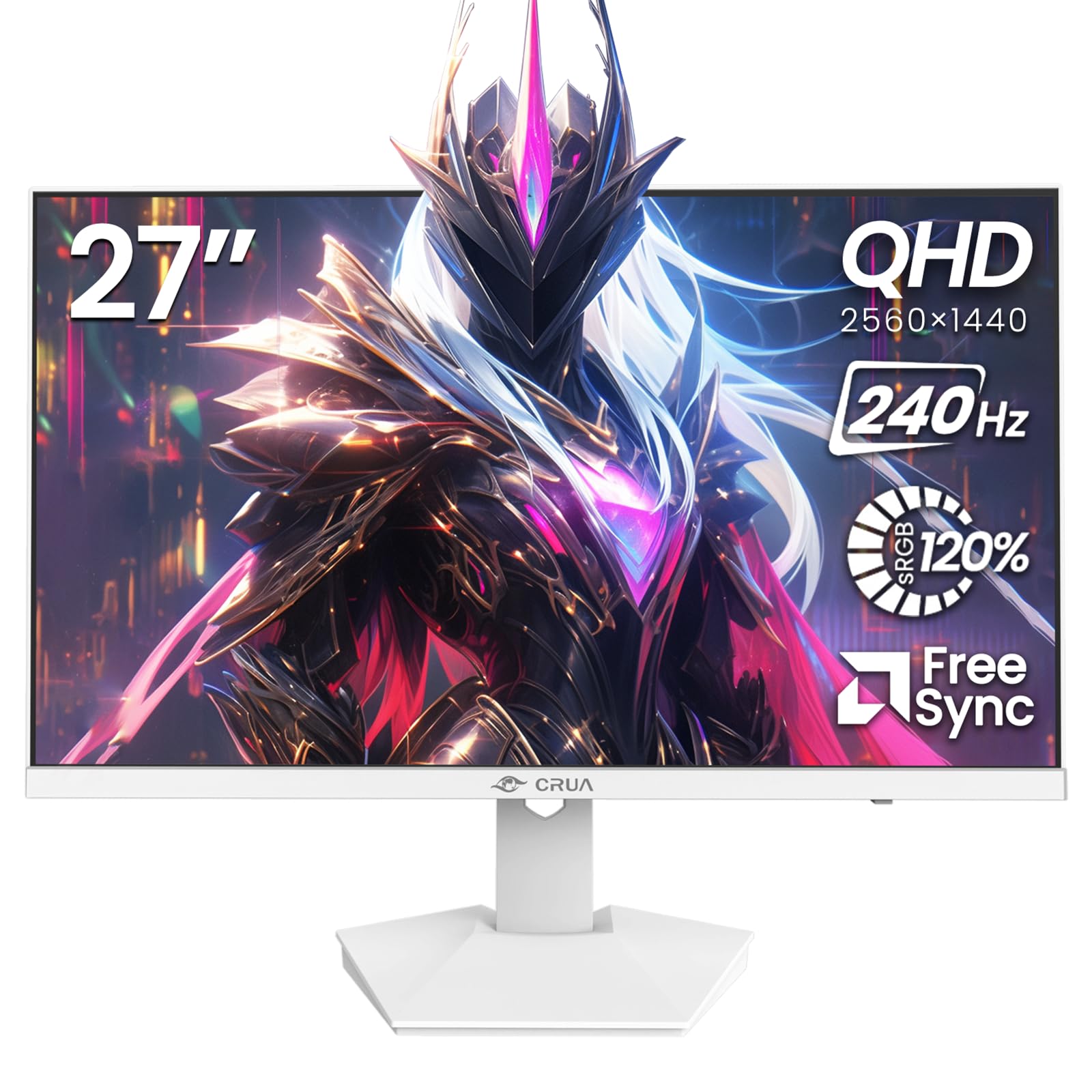
Imej: Depan view of the CRUA 27-inch 240Hz QHD IPS Gaming Monitor.
2. Kandungan Pakej
Sahkan bahawa semua item terdapat dalam pakej:
- CRUA 27-inch 240Hz QHD IPS Gaming Monitor
- Stand Monitor (Asas dan Leher)
- Penyesuai Kuasa dan Kabel
- Kabel HDMI
- Kabel DisplayPort (DP).
- Manual Pengguna (dokumen ini)
3. Persediaan
3.1 Perhimpunan Berdiri
- Keluarkan monitor dari pembungkusnya dengan berhati-hati, letakkannya menghadap ke bawah di atas permukaan yang lembut dan bersih untuk mengelakkan calar.
- Pasangkan leher pendirian pada panel monitor. Pastikan ia mengklik pada tempatnya dengan selamat.
- Attach the stand base to the stand neck. Tighten any screws if provided.
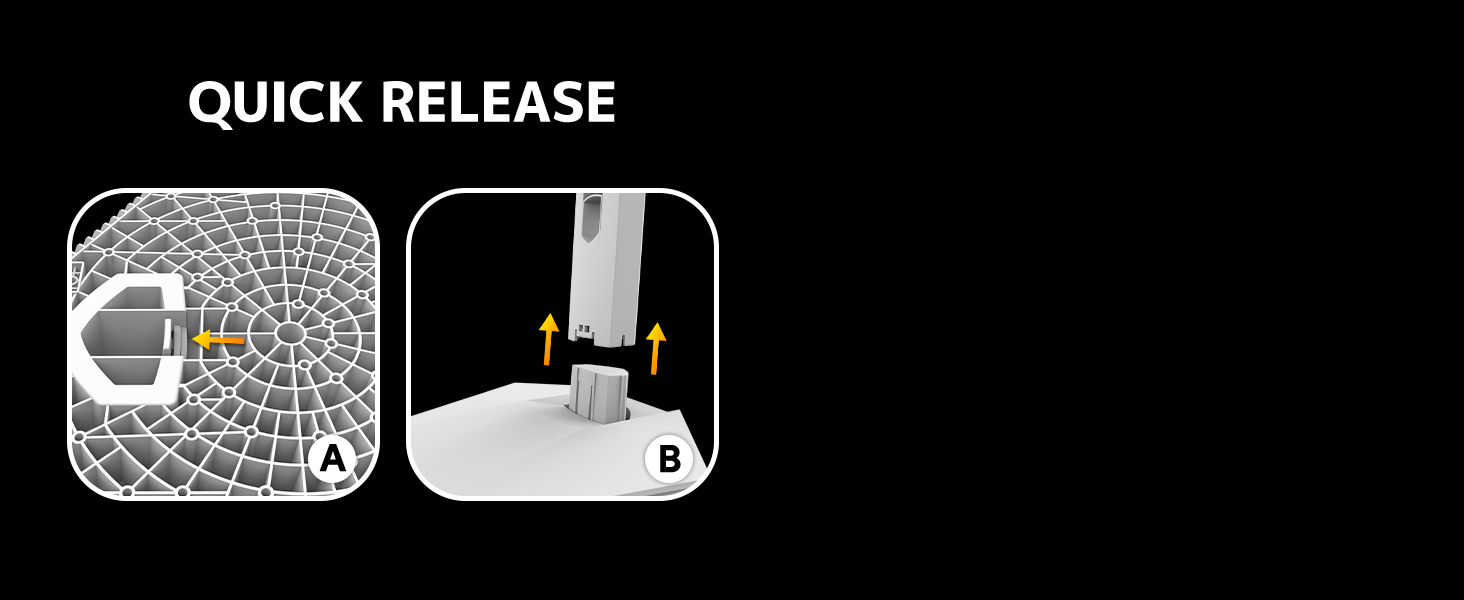
Image: Diagram illustrating the quick release stand assembly.
3.2 Pemasangan Dinding (Pilihan)
The monitor supports VESA wall mounting (75mm x 75mm). To wall mount:
- Remove the stand from the monitor if it is already attached.
- Attach a VESA-compatible wall mount bracket (not included) to the monitor using appropriate screws.
- Follow the instructions provided with your wall mount for secure installation.

Imej: Belakang view of the monitor showing VESA mount points (75x75mm) and built-in speakers.
3.3 Menyambung ke Komputer
Sambungkan monitor ke komputer anda menggunakan salah satu kaedah berikut:
- DisplayPort (DP 1.4): For optimal performance, especially at 240Hz QHD resolution, use the included DisplayPort cable.
- HDMI (HDMI 2.0): Use an HDMI cable for QHD resolution at up to 144Hz.
Sambungkan penyesuai kuasa ke input kuasa monitor dan kemudian pasangkannya ke soket kuasa.

Imej: Belakang view of the monitor displaying the input ports, including HDMI and DisplayPort.
4. Arahan Operasi
4.1 Hidupkan/Mati Kuasa
Press the power button located on the back of the monitor to turn it on or off. The power button may resemble a joystick for OSD navigation.
4.2 Menu Paparan Pada Skrin (OSD).
The OSD menu allows you to adjust various monitor settings. Use the joystick-like button on the back of the monitor to navigate the menu:
- Tekan butang: Membuka menu OSD.
- Bergerak ke Atas/Bawah: Menavigasi melalui pilihan menu.
- Bergerak ke Kiri/Kanan: Adjusts selected settings or enters sub-menus.
- Tekan lagi: Confirms selection or exits a sub-menu.
4.3 Tetapan Paparan
Dalam menu OSD, anda boleh melaraskan:
- Kecerahan/Kontras: Laraskan nisbah pencahayaan dan kontras keseluruhan.
- Tetapan Warna: Fine-tune color temperature, hue, and saturation. The monitor offers 120% sRGB color coverage for accurate and vibrant visuals.
- Sumber Input: Manually select between HDMI and DisplayPort inputs.

Image: Details on true color accuracy, including 120% sRGB, 8-bit color depth, and 16.7 million colors.
4.4 Ciri-ciri Permainan
- Kadar Segar Semula: The monitor supports up to 240Hz refresh rate for smooth motion. Ensure your graphics card and cable support this rate.
- AMD FreeSync: Enable FreeSync in the OSD menu and on your AMD graphics card settings to eliminate screen tearing and stuttering.

Image: Visual comparison demonstrating the smoothness of 240Hz refresh rate versus 60Hz.

Image: Illustrates the effect of Adaptive Sync (FreeSync) on reducing screen tearing and stuttering.
4.5 Eye Protection
The monitor includes a built-in blue light filter to reduce eye strain during extended use. This feature can be enabled or adjusted through the OSD menu.
5. Penyelenggaraan
Untuk mengekalkan prestasi dan penampilan monitor anda:
- Membersihkan Skrin: Lap skrin perlahan-lahan dengan kain lembut yang tidak berbulu. Untuk kesan degil, gunakan penyelesaian pembersihan khusus monitor yang digunakan pada kain, bukan terus ke skrin.
- Membersihkan Casing: Gunakan kain lembut dan kering untuk mengelap monitor casing. Elakkan pembersih atau pelarut yang melelas.
- Matikan: Always turn off the monitor and unplug it from the power outlet before cleaning.
6. Penyelesaian masalah
| Masalah | Kemungkinan Punca | Penyelesaian |
|---|---|---|
| Tiada gambar di skrin | Monitor is off or not receiving signal. | Ensure power cable is connected and monitor is on. Check video cable connection (HDMI/DP) to both monitor and computer. Select correct input source via OSD. |
| Imej berkelip atau koyak | FreeSync not enabled or incompatible settings. | Enable FreeSync in the monitor OSD and your graphics card control panel. Ensure your graphics card drivers are up to date. |
| Poor picture quality (blurry, incorrect colors) | Incorrect resolution, color settings, or faulty cable. | Set display resolution to 2560x1440. Adjust brightness, contrast, and color settings in the OSD. Try a different video cable. |
| Tiada bunyi daripada pembesar suara terbina dalam | Volume too low, incorrect audio output selected. | Increase monitor volume via OSD. Ensure the monitor is selected as the audio output device in your computer's sound settings. |
| Piksel mati | Kecacatan pembuatan. | Refer to warranty information for pixel policy. Contact customer support if within warranty. |
7. Spesifikasi
| Ciri | Spesifikasi |
|---|---|
| Nombor Model | CR270I |
| Saiz Skrin | 27 Inci |
| Jenis Panel | IPS |
| Resolusi | 2560 x 1440 (QHD) |
| Kadar Segar Semula | 240Hz |
| Nisbah Aspek | 16:9 |
| Warna Gamut | 120% sRGB |
| Kecerahan | 300 cd/m² |
| Nisbah Kontras | 1000:1 |
| Viewsudut | 178° (Mendatar/Menegak) |
| Input Video | HDMI 2.0, DisplayPort 1.4 |
| Audio | Pembesar Suara Terbina dalam |
| Gunung VESA | 75mm x 75mm |
| Dimensi Produk | 1.78 x 24 x 14 inci |
| Berat Barang | 12.62 paun |
8. Waranti dan Sokongan
CRUA provides high-quality computer monitors and premium services. If you have any questions or require assistance, please contact CRUA customer support. Refer to your purchase documentation for specific warranty terms and contact information.


