pengenalan

Image: Hamilton 1.1 cu ft Countertop Touchscreen Microwave Oven.
This manual provides essential information for the safe and efficient operation of your Hamilton 1.1 Cu. Ft. Countertop Touchscreen Microwave Oven. Please read this manual thoroughly before use and retain it for future reference.
Arahan Keselamatan Penting
Apabila menggunakan peralatan elektrik, langkah berjaga-jaga keselamatan asas hendaklah sentiasa diikuti untuk mengurangkan risiko kebakaran, renjatan elektrik dan kecederaan kepada orang, termasuk yang berikut:
- Baca semua arahan sebelum menggunakan perkakas.
- Jangan kendalikan ketuhar jika pintu atau pengedap pintu rosak.
- Jangan panaskan cecair atau makanan lain dalam bekas tertutup kerana ia boleh meletup.
- Hanya benarkan kanak-kanak menggunakan ketuhar tanpa pengawasan apabila arahan yang mencukupi telah diberikan supaya kanak-kanak dapat menggunakan ketuhar dengan cara yang selamat dan memahami bahaya penggunaan yang tidak betul.
- Refer to the "Child Safety Lock" section for specific instructions on this feature.
Ciri-ciri Produk
- Powerful 1000W output for efficient cooking.
- 10 adjustable power levels for versatile cooking and reheating.
- User-friendly touchscreen control panel with LED display.
- Convenience cooking controls for popular foods (e.g., potatoes, popcorn, frozen dinners, pizza, beverages).
- 8 Smart Sensor auto cooking menus for precise results.
- Integrated child safety lock for enhanced security.
- Sleek white finish with stainless-steel accents.
Spesifikasi
| Atribut | Perincian |
|---|---|
| Jenama | Hamilton |
| Nombor Model | HB8436193153-02 |
| Kapasiti | 1.1 Kaki Kubik |
| Wattage | 1000 watt |
| Voltage | 120 Volt (AC) |
| Dimensi (D x W x H) | 21" x 12" x 19" |
| Jenis Pemasangan | Atas meja |
| Bahan (Luar) | Keluli |
| Bahan (Dalaman) | Keluli Tahan Karat |
| Komponen yang Disertakan | Meja Putar Kaca |
Persediaan
- Membongkar: Carefully remove the microwave oven and all packing materials from the carton. Check for any damage, such as dents or a misaligned door. Do not operate if damaged.
- penempatan: Place the microwave on a flat, stable surface that can support its weight. Ensure adequate ventilation by leaving at least 4 inches of space around the sides, back, and top of the oven. Do not block air vents.
- Pemasangan Meja Putar: Place the turntable ring in the center of the oven cavity. Then, place the glass turntable securely on top of the turntable ring. Ensure it rotates freely.
- Sambungan Kuasa: Plug the microwave oven into a grounded 120V AC electrical outlet.

Imej: Dalaman view of the Hamilton microwave, highlighting the removable glass turntable for easy cleaning.
Arahan Operasi
Operasi Asas
- Menetapkan Jam:
- Tekan ke JAM butang.
- Gunakan pad nombor untuk memasukkan masa semasa.
- Tekan ke JAM butang sekali lagi untuk mengesahkan.
- Memasak gelombang mikro:
- Letakkan makanan dalam bekas selamat gelombang mikro di atas meja putar kaca.
- Tutup pintu dengan selamat.
- Enter the desired cooking time using the number pads.
- Tekan ke TAHAP KUASA button to adjust power if needed (default is 100%). Use number pads to select power level (1-10).
- Tekan MULA/+30SEK untuk mula memasak.
- Tukang Masak Ekspres: For quick cooking, simply press the 1 MIN, 2 MIN, atau 3 MIN buttons for instant cooking at full power. Press Jeda / BATAL to stop or clear settings. Press + 30SEC to add 30 seconds to cooking time.
- Pencairan api:
- Tekan ke DEFROST BERAT or DEFROST MASA butang.
- Follow the prompts on the LED display to enter weight or time.
- Tekan MULA/+30SEK.
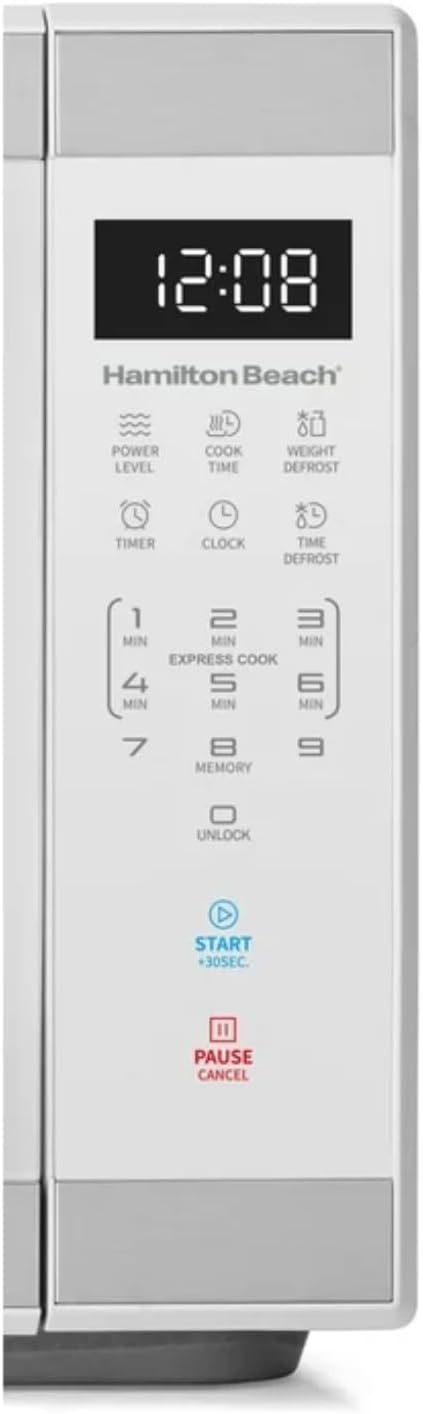
Imej: Terperinci view of the intuitive touchscreen control panel and LED display.
Kunci Keselamatan Kanak-kanak
This microwave features a child safety lock to prevent unintended operation. The door automatically locks when cooking starts.
To Open Microwave During or After Use:
- Tekan ke 0/BUKA KUNCI or Jeda / BATAL pad.
- Grasp the handle and open the door.
To Deactivate the Child Safety Lock:
- Tekan ke 0/BUKA KUNCI pad for 3 seconds. The display will indicate "Loc".
- Tekan ke 7 pad.
- Tekan ke 9 pad. The display will show "ULoc".
To re-activate the child safety lock, repeat the above steps.
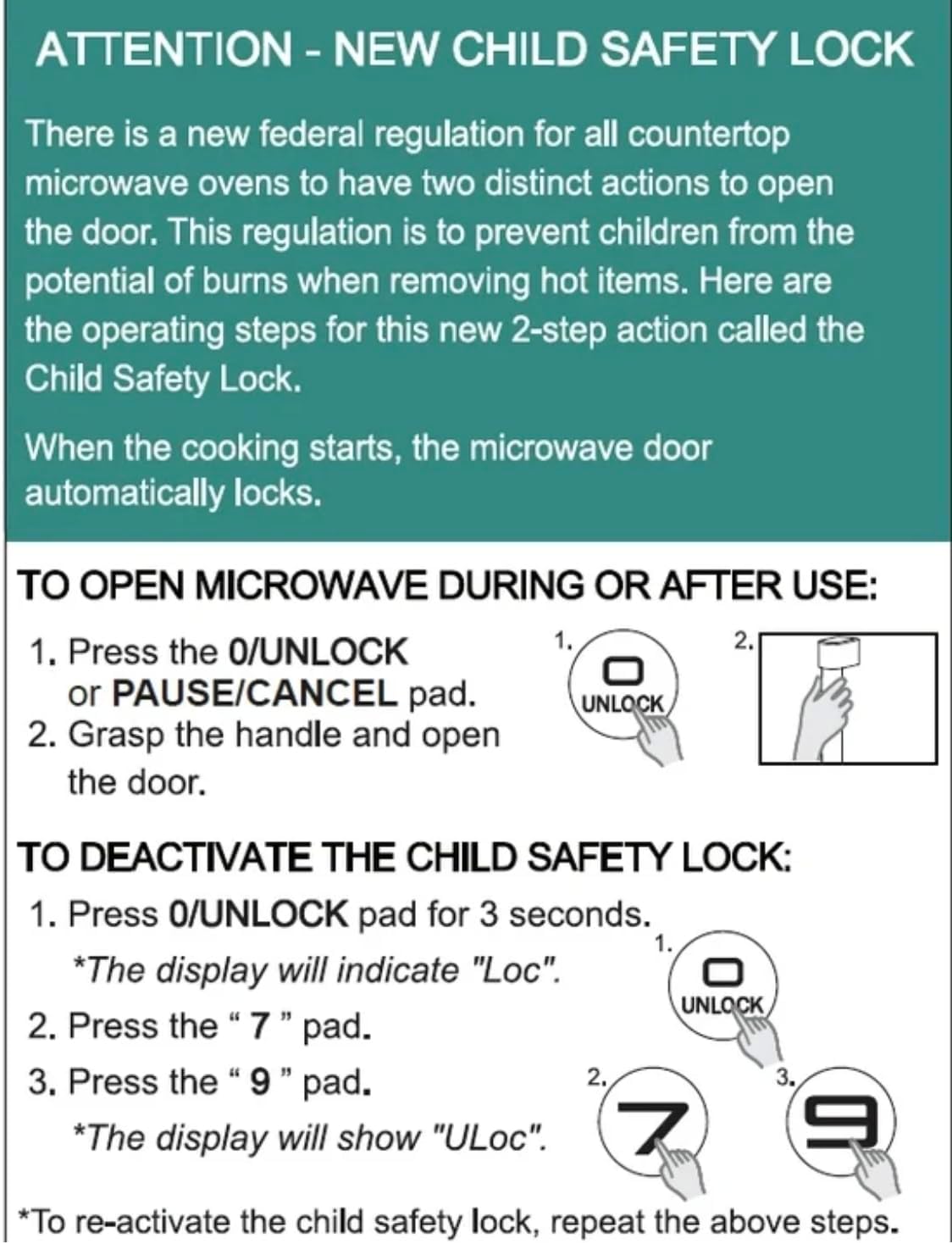
Image: Instructions for the new child safety lock feature, including how to open the door and deactivate the lock.
Penyelenggaraan dan Pembersihan
- Pembersihan Dalaman: Lap bahagian dalam ketuhar dengan iklanamp cloth after each use. For stubborn stains, use a mild detergent. Ensure the interior is dry before next use.
- Pembersihan Luaran: Bersihkan permukaan luar dengan lembut, damp kain. Jangan gunakan pembersih yang melelas atau bahan kimia yang keras.
- Pembersihan Meja Putar: The glass turntable and turntable ring can be removed for cleaning. They are dishwasher safe or can be hand-washed with warm, soapy water.
- Pengedap Pintu: Regularly inspect the door seals and surrounding areas for any damage or food residue. Clean as needed to ensure proper sealing.
Menyelesaikan masalah
| Masalah | Kemungkinan Punca / Penyelesaian |
|---|---|
| Oven tidak akan bermula. |
|
| Makanan tidak masak sekata. |
|
| Light bulb is out. | Contact customer support for bulb replacement. Do not attempt to replace it yourself. |
| Display shows "Loc". | Child safety lock is activated. Follow instructions in the "Child Safety Lock" section to deactivate. |
Waranti dan Sokongan
For warranty information or technical support, please refer to the warranty card included with your purchase or contact Hamilton customer service. Keep your proof of purchase for warranty claims.
Perkhidmatan Pelanggan: Sila lawati pengilang weblaman web atau rujuk pembungkusan produk anda untuk butiran perhubungan.


