1. Pengenalan
Thank you for choosing the Portronics Conch Kappa Wired Earphones. These earphones are designed to provide a high-quality audio experience with powerful sound and convenient in-line controls. This manual provides instructions for proper setup, operation, maintenance, and troubleshooting to ensure optimal performance and longevity of your device.
Kandungan Pakej
- 1N Wired Earphone (Portronics Conch Kappa)
2. Produk Lebihview
The Portronics Conch Kappa earphones feature a 3.5mm audio jack for universal compatibility, 14.2mm dynamic drivers for powerful audio, and an in-line HD microphone with control buttons for easy management of music and calls.

Image: Portronics Conch Kappa Wired Earphones, showing the earbuds and the 3.5mm jack.
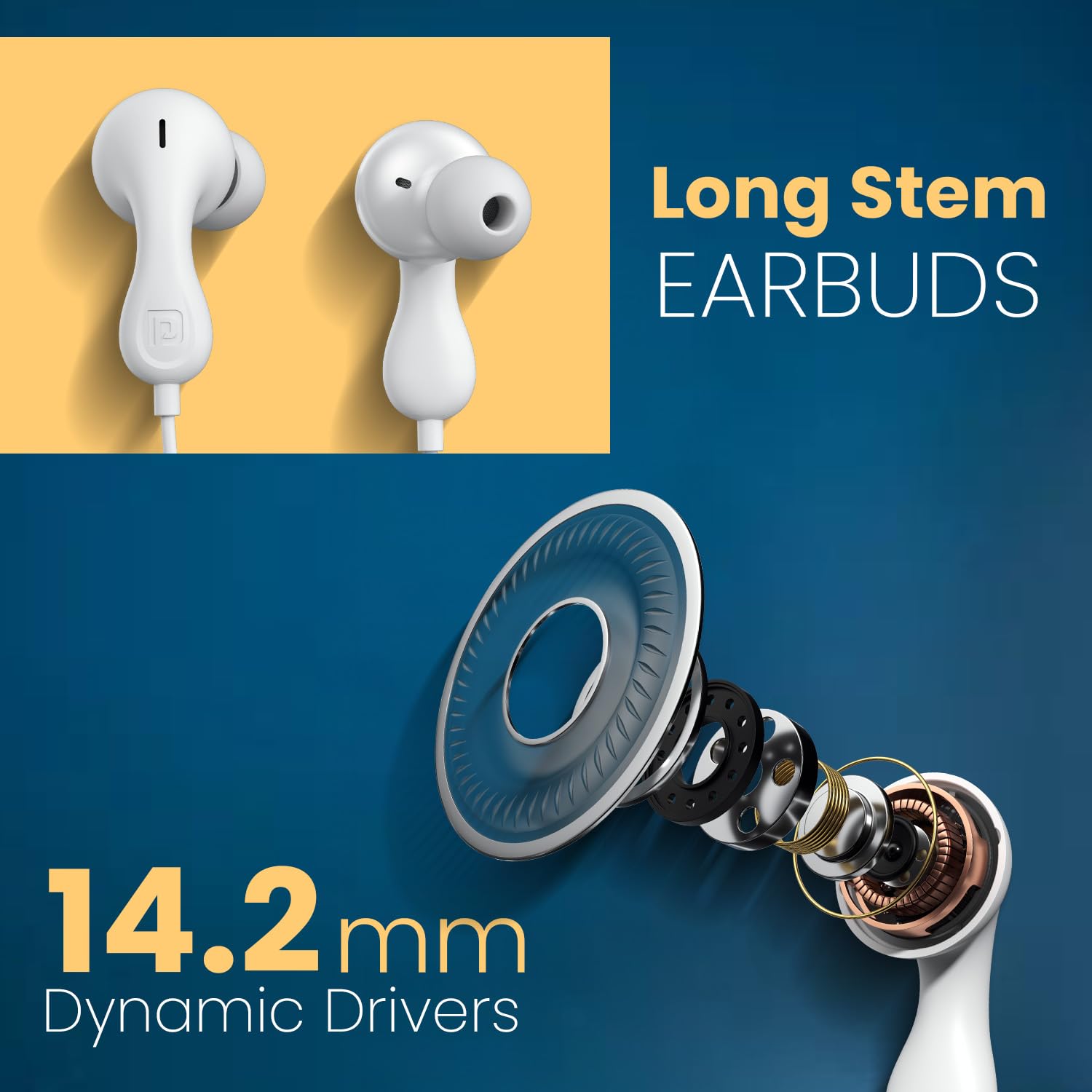
Image: Close-up of the long stem earbuds and an exploded view of the 14.2mm dynamic driver components.
Ciri-ciri Utama
- Pemacu Dinamik 14.2mm: For deep bass and clear audio.
- Built-in HD Mic with Control Button: For hands-free calls and music control.
- Bicu Audio 3.5mm: Ensures wide compatibility with various devices.
- Ergonomic Earbud Design: Memberikan kesesuaian yang selamat dan selesa.
- TPE Anti-Tangle Wire: Durable and flexible cable material.
3. Persediaan
Connecting the Earphones
- Locate the 3.5mm audio jack on your device (smartphone, laptop, tablet, PC).
- Insert the 3.5mm connector of the Portronics Conch Kappa earphones firmly into the audio jack.
- Ensure the connection is secure for optimal sound transmission.

Image: The 3.5mm AUX audio jack connected to a smartphone, illustrating wide compatibility with laptops, phones, and tablets.
Memakai Fon Telinga
- Gently insert the earbuds into your ears. The unique ergonomic design is intended for a comfortable and secure fit.
- Adjust the position until the sound is clear and the fit is snug, but not uncomfortable.

Image: Close-up of the unique earbud design, highlighting its shape for comfortable wear.
4. Arahan Operasi
Kawalan Dalam Talian
The earphones feature an in-line remote with buttons to manage audio playback and calls.

Image: Diagram illustrating the functions of the in-line control buttons, including volume up/down, play/pause, answer/end/reject call, and next track.
- Kelantangan: Tekan butang '+'.
- Perlahankan suara: Tekan butang '-'.
- Main/Jeda Muzik: Tekan butang tengah sekali.
- Lagu Seterusnya: Tekan butang tengah dua kali dengan cepat.
- Jawab/Tamatkan Panggilan: Press the center button once during an incoming or active call.
- Tolak Panggilan: Long press the center button during an incoming call.
Using the HD Microphone
The integrated HD microphone is positioned to capture your voice clearly during calls.

Image: A person using the earphones, highlighting the in-line HD microphone's position for clear voice capture.
5. Penyelenggaraan
Pembersihan
- Wipe the earbuds and cable with a soft, dry cloth.
- Jangan gunakan bahan kimia atau pembersih kasar.
- Ensure no moisture enters the earphone drivers or the 3.5mm jack.
Penyimpanan
- Simpan fon telinga di tempat yang bersih dan kering apabila tidak digunakan.
- Elakkan suhu yang melampau.
- Do not wrap the cable too tightly to prevent damage. The TPE cable is designed to be anti-tangle, but proper storage extends its life.
6. Penyelesaian masalah
| Masalah | Kemungkinan Punca | Penyelesaian |
|---|---|---|
| Tiada suara atau kelantangan rendah |
|
|
| Mikrofon tidak berfungsi |
|
|
| Kawalan tidak bertindak balas |
|
|
7. Spesifikasi
| Ciri | Perincian |
|---|---|
| Nama Model | Conch Kappa |
| Nombor Model | POR-2930 |
| Teknologi Ketersambungan | berwayar |
| Jenis Pemacu Audio | Pemandu Dinamik |
| Saiz Pemandu | 14.2mm |
| Jack Fon Kepala | Jack 3.5 mm |
| Penempatan Telinga | Di Telinga |
| Kaedah Kawalan | Remote (In-line) |
| bahan | ABS Plastic (earbuds), TPE (cable) |
| Peranti Serasi | Smartphones, Laptops, Tablets, PCs |
| Berat Barang | 40 Gram |
| Dimensi Produk (LxWxH) | 7 x 7 x 2 Sentimeter |
| Negara Asal | China |
| Komponen yang Disertakan | 1N Wired Earphone |
8. Waranti dan Sokongan
Maklumat Waranti
Portronics products are covered by a limited warranty against manufacturing defects. Please refer to the warranty card included with your purchase or visit the official Portronics webtapak untuk terma dan syarat jaminan terperinci.
Sokongan Pelanggan
For any technical assistance, product inquiries, or warranty claims, please contact Portronics customer support:
- e-mel: help@portronics.com
- telefon: +91 9555-245-245
- Alamat Pengilang: Portronics Digital Pvt ltd, First Floor Property No D 8 Upper Basement Sector 8 Noida Uttar Pradesh 201301


