1. Pengenalan
The IRRADIO IR-203 Sound+ is a compact and portable wireless speaker designed for high-quality audio playback. Featuring Bluetooth 5.0 connectivity and a USB port for external media, it offers versatile listening options. Its robust design and long-lasting battery make it ideal for both home use and on-the-go entertainment.

Rajah 1.1: IRRADIO IR-203 Sound+ Wireless Speaker. This image shows the speaker from an angled perspective, highlighting its compact size and fabric grille.
2. Maklumat Keselamatan
Sila baca semua arahan keselamatan dengan teliti sebelum menggunakan peranti ini. Simpan manual ini untuk rujukan pada masa hadapan.
- Do not expose the speaker to water or excessive moisture. This product is not waterproof.
- Avoid extreme temperatures. Do not place near heat sources or in direct sunlight.
- Do not disassemble, repair, or modify the device. This will void the warranty and may cause damage or injury.
- Gunakan hanya volum pengecasan yang dinyatakantage (DC 5V/2A).
- Jauhkan daripada kanak-kanak.
3. Kandungan Pakej
Pastikan semua item ada dalam pakej:
- IRRADIO IR-203 Sound+ Wireless Speaker
- Kabel Pengecas USB
- Manual Pengguna (dokumen ini)
4. Produk Lebihview
4.1. Kawalan dan Pelabuhan

Rajah 4.1: sebelah view of the speaker showing control buttons. From left to right: Mode button (M), Volume Down (-), Volume Up (+), Play/Pause/Next Track button (▶).

Rajah 4.2: belakang view of the speaker showing connectivity ports. From left to right: TF (MicroSD) card slot, USB-A port, ON/OFF switch, DC 5V charging port.
The speaker features intuitive controls on its top edge and essential connectivity ports on its rear panel.
- Butang Mod (M): Press to switch between Bluetooth and USB playback modes.
- Perlahankan suara (-): Tekan untuk mengurangkan kelantangan.
- Kelantangan Naik (+): Tekan untuk menambah kelantangan.
- Play/Pause/Next Track (▶): Press to play or pause audio. Long press to skip to the next track.
- Slot Kad TF: Insert a MicroSD card for direct audio playback.
- Port USB-A: Masukkan pemacu kilat USB untuk main balik audio secara langsung.
- Suis ON / OFF: Slide to power the speaker on or off.
- Port 5V DC: Connect the USB charging cable here to charge the speaker.
5. Persediaan
5.1. Mengisi Speaker
Before first use, fully charge the speaker. The battery capacity is 400 mAh.
- Sambungkan kabel pengecas USB yang disediakan ke port DC 5V pada pembesar suara.
- Connect the other end of the USB cable to a compatible USB power adapter (DC 5V/2A recommended) or a computer USB port.
- Lampu penunjuk pengecasan akan menyala (warna mungkin berbeza) untuk menunjukkan bahawa pembesar suara sedang dicas.
- Pengecasan biasanya mengambil masa kira-kira 2 jam untuk cas penuh. Lampu penunjuk akan bertukar atau padam setelah pengecasan selesai.
A full charge provides approximately 2 hours and 40 minutes of continuous playback at 50% volume.
5.2. Menghidupkan/Mematikan
To power on the speaker, slide the ON/OFF switch to the 'ON' position. You will hear an audible prompt. To power off, slide the switch to the 'OFF' position.
6. Arahan Operasi
6.1. Berpasangan Bluetooth
The speaker uses Bluetooth 5.0 for stable wireless connection up to 10 meters.
- Ensure the speaker is powered on and in Bluetooth mode. If not, press the 'M' (Mode) button to switch to Bluetooth mode. The speaker will enter pairing mode, indicated by a flashing LED light and an audible prompt.
- Pada peranti anda (telefon pintar, tablet, komputer riba), dayakan Bluetooth dan cari peranti yang tersedia.
- Select "IRRADIO IR-203 Sound+" from the list of found devices.
- Once paired, the speaker will provide an audible confirmation, and the LED light will stop flashing.
- Anda kini boleh memainkan audio daripada peranti anda melalui pembesar suara.
Nota: Pembesar suara secara automatik akan cuba menyambung semula ke peranti pasangan terakhir apabila dihidupkan.
6.2. Main Semula Kad USB/TF
The speaker supports direct audio playback from a USB flash drive or a MicroSD (TF) card.
- Insert a USB flash drive into the USB-A port or a MicroSD card into the TF card slot.
- The speaker will automatically switch to USB/TF card mode and begin playing audio files (MP3, WAV, etc.) from the inserted storage device. If it does not switch automatically, press the 'M' (Mode) button to select the correct mode.
- Use the Play/Pause/Next Track button (▶) to control playback.
6.3. Kawalan Kelantangan
Use the '+' and '-' buttons on the speaker to adjust the volume. You can also control the volume from your connected device.
7. Penyelenggaraan
Untuk memastikan jangka hayat dan prestasi optimum pembesar suara anda, ikuti garis panduan penyelenggaraan ini:
- Pembersihan: Gunakan kain lembut dan kering untuk mengelap permukaan pembesar suara. Jangan gunakan pembersih yang kasar, alkohol atau pelarut kimia.
- Storan: Apabila tidak digunakan untuk tempoh yang lama, simpan pembesar suara di tempat yang sejuk dan kering jauh dari cahaya matahari langsung dan suhu yang melampau.
- Penjagaan Bateri: Untuk menjimatkan hayat bateri, elakkan daripada kerap mencas bateri sepenuhnya. Cas pembesar suara secara berkala, walaupun tidak digunakan.
8. Penyelesaian masalah
If you encounter issues with your IRRADIO IR-203 Sound+ speaker, refer to the following common problems and solutions:
| Masalah | Kemungkinan Punca | Penyelesaian |
|---|---|---|
| Speaker tidak dihidupkan. | Bateri habis. | Cas pembesar suara selama sekurang-kurangnya 30 minit. |
| Tiada bunyi. | Kelantangan terlalu rendah atau diredam. Mod yang dipilih salah. | Increase volume on both speaker and connected device. Press 'M' button to switch modes. |
| Tidak boleh berpasangan melalui Bluetooth. | Pembesar suara tidak dalam mod berpasangan. Peranti terlalu jauh. Gangguan. | Ensure speaker is in Bluetooth pairing mode (flashing LED). Move device closer to speaker (within 10m). Turn off other Bluetooth devices. |
| Kad USB/TF tidak dimainkan. | tak betul file format. Kad/pemacu tidak dimasukkan dengan betul. | Pastikan audio files are in supported format (e.g., MP3). Reinsert the USB drive or TF card firmly. Press 'M' button to select USB/TF mode. |
Jika masalah berterusan selepas mencuba penyelesaian ini, sila hubungi sokongan pelanggan.
9. Spesifikasi
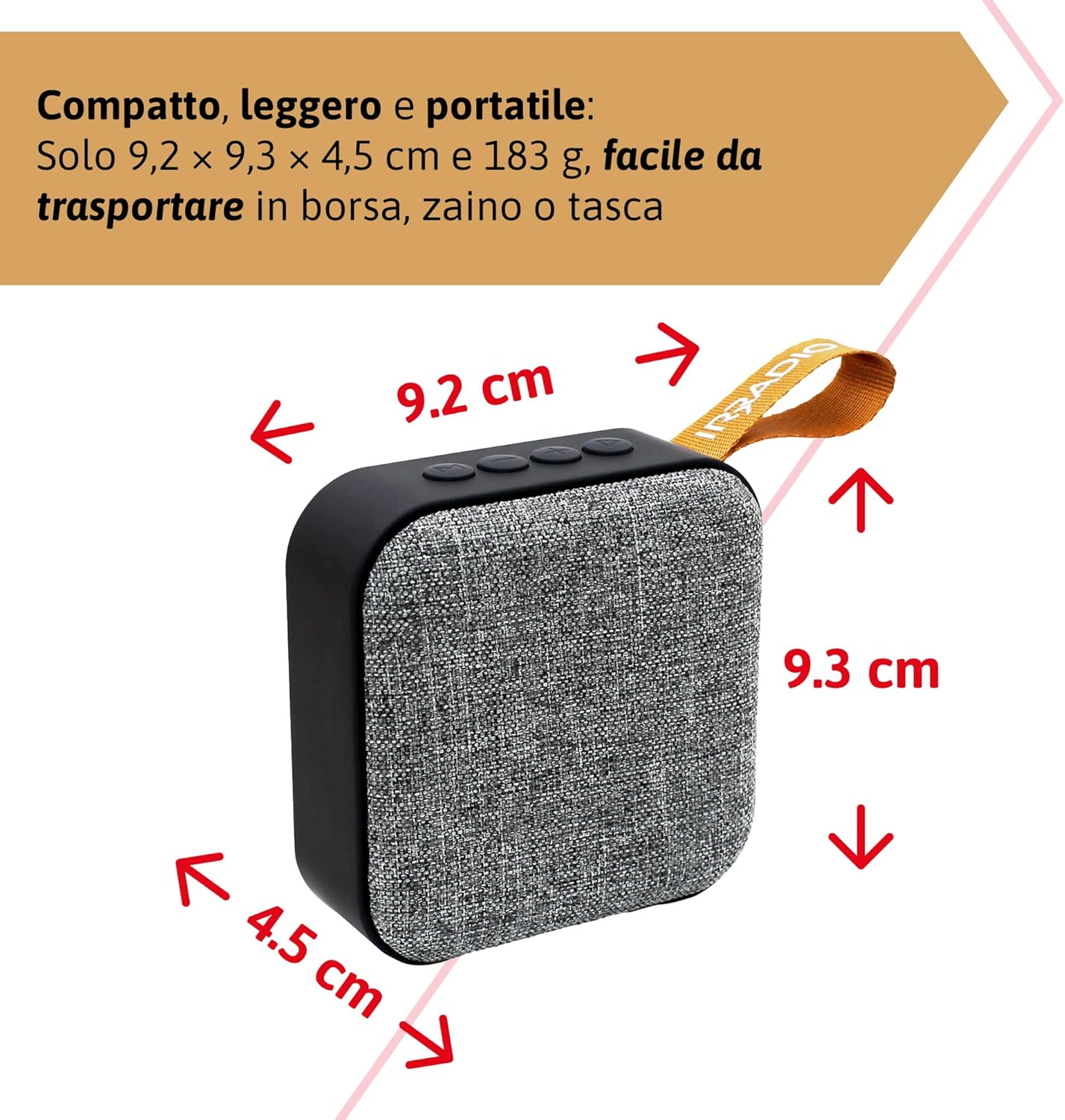
Rajah 9.1: Dimensions of the IRRADIO IR-203 Sound+ speaker: 9.2 cm (width) x 9.3 cm (height) x 4.5 cm (depth).
| Ciri | Perincian |
|---|---|
| Nama Model | IR-203 Sound+ |
| Nombor Model Item | 550922126 |
| Jenama | IRRADIO |
| Dimensi Produk | 9.2 x 9.3 x 4.5 cm |
| Berat badan | 183 gram |
| Jenis Pembesar Suara | Woofer (Full Range 50mm Driver + Passive Radiator) |
| Kuasa Output Pembesar Suara Maks | 3.5 Watt RMS |
| Teknologi Ketersambungan | Bluetooth 5.0, USB |
| Jarak Penghantaran Tanpa Wayar | Sehingga 10 meter (tanpa halangan) |
| Mod Keluaran Audio | Stereo |
| Kapasiti Bateri | 400 mAh (3.7V, 1.48 Wj) |
| Hayat Bateri | Approx. 2 hours 40 minutes (at 50% volume) |
| Masa Mengecas | lebih kurang 2 jam |
| Input Pengecasan | DC 5V/2A |
| Peranti Serasi | Smartphones, Tablets, Laptops, Desktop Computers, MP3 Players, USB Flash Drives |
| warna | Kelabu |
| Kalis air | Tidak |
10. Waranti dan Sokongan
10.1. Maklumat Waranti
For information regarding warranty and returns, please refer to the purchase platform's policies. Typically, products purchased on Amazon.it can be returned within 30 days of receipt if you change your mind. For defective or damaged products, specific return policies apply.
For specific information on purchases made through the Marketplace, please consult the relevant help page on the platform.
10.2. Sokongan Pelanggan
For further assistance, technical support, or inquiries about your IRRADIO IR-203 Sound+ speaker, please visit the official IRRADIO store page:


