1. Pengenalan
Thank you for choosing the JENNOV HS4007 Outdoor WiFi Security Camera. This manual provides essential information for the proper installation, operation, and maintenance of your device. Please read it thoroughly before use and retain it for future reference.

Image 1.1: JENNOV HS4007 Outdoor WiFi Security Camera
The JENNOV HS4007 is an outdoor WiFi security camera designed for comprehensive surveillance. It features a durable, weather-resistant casing and offers advanced functionalities for home and business security.
2. Kandungan Pakej
Sahkan bahawa semua item yang disenaraikan di bawah disertakan dalam pakej anda. Jika ada item yang hilang atau rosak, sila hubungi sokongan pelanggan.

Imej 2.1: Kandungan Pakej
This image displays the JENNOV WiFi camera, power adapter, mounting screws, and user manual included in the package.
- JENNOV WiFi Camera
- Penyesuai Kuasa 5V1A
- Skru Pemasangan
- Manual Pengguna
- Pelekat Kedudukan
- Pelekat Amaran
3. Persediaan
3.1 Muat Turun dan Pemasangan Apl
To use the camera, you need to download the AJCloud app on your smartphone or tablet.
- Scan the QR code provided in the package or search for "AJCloud" in your device's app store.
- Download and install the AJCloud app.
- Buat akaun atau log masuk jika anda sudah mempunyai akaun.

Image 3.1: AJCloud App Download
This image shows QR codes for downloading the AJCloud app from the App Store and Google Play, along with the app icons.
pautan muat turun: AJCloud for iOS, AJCloud for Android
3.2 Pemasangan Kamera
The camera is designed for wall mounting. Ensure the installation location has a stable WiFi signal and a power outlet.
- Use the positioning sticker to mark the drill holes on the desired surface.
- Gerudi lubang dan masukkan palam dinding.
- Secure the camera bracket to the wall using the provided screws.
- Pasang kamera pada kurungan.
- Sambungkan kamera ke penyesuai kuasa.
3.3 Tatarajah Awal
Follow the in-app instructions to connect your camera to your WiFi network. The camera supports both 2.4GHz and 5GHz WiFi bands.
- Open the AJCloud app and tap the '+' icon to add a new device.
- Select your camera model and follow the on-screen prompts.
- Ensure your smartphone is connected to the same WiFi network you intend to connect the camera to.
- The app will guide you through the process of scanning a QR code with the camera or connecting via Bluetooth.
4. Arahan Operasi
4.1 Pan/Tilt and Auto-Tracking
The camera features Pan/Tilt functionality, allowing for a wide surveillance area. It can rotate horizontally 0-355 degrees and vertically 0-90 degrees.

Image 4.1: 360-Degree Pan and 90-Degree Tilt
This image illustrates the camera's ability to pan horizontally and tilt vertically, covering a wide area, with a smartphone displaying the live feed.
The auto-tracking feature enables the camera to automatically follow detected movement within its field of view. When an intruder is detected, the camera will track their movement and trigger an alarm.
4.2 Mod Penglihatan Malam
The camera offers three night vision modes for optimal visibility in low-light conditions:
- Penglihatan Malam Pintar: Automatically switches between infrared and color night vision based on detected motion and lighting conditions.
- Penglihatan Malam Warna: Utilizes built-in white LED lights to provide full-color video even in complete darkness.
- Penglihatan Malam Inframerah: Uses infrared lights for clear black-and-white video in dark environments.
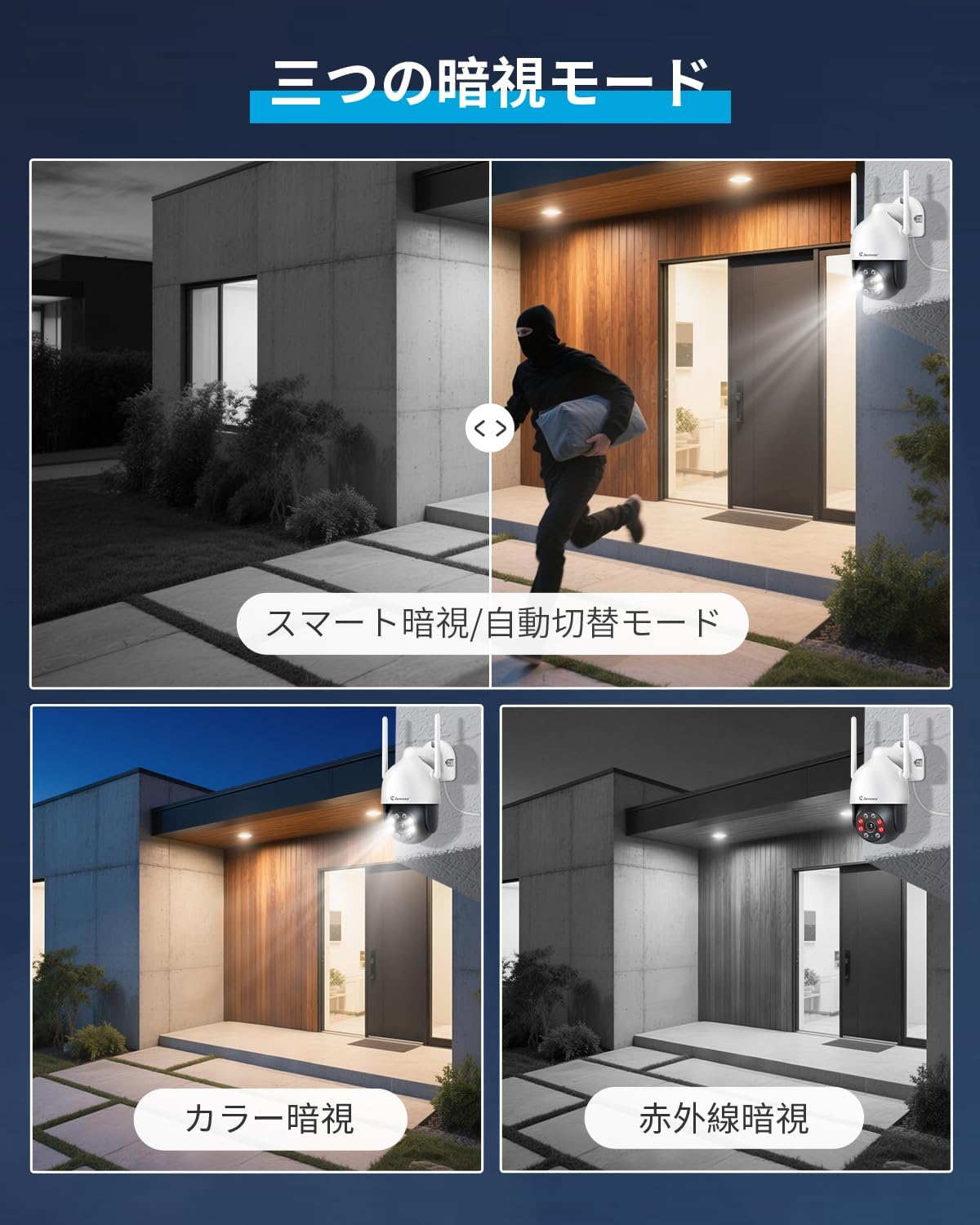
Image 4.2: Night Vision Modes
This image demonstrates the three available night vision modes: Smart Night Vision (automatic), Color Night Vision (using floodlights), and Infrared Night Vision (black and white).
4.3 Audio Dua Hala
The camera is equipped with a microphone and speaker, enabling two-way communication. You can speak through the camera using the AJCloud app and hear audio from the camera's location.
Image 4.3: Two-Way Audio Communication
This image illustrates the two-way audio feature, showing a user speaking into their phone and a person at the camera's location hearing the message.
4.4 Motion Detection and Alarms
The camera features advanced motion detection. When motion is detected, the camera can:
- Send alert notifications to your smartphone.
- Trigger a sound alarm from the camera.
- Activate its built-in floodlight to deter intruders.

Image 4.4: Human Motion Detection and Alarm Notification
This image shows the camera detecting a person, triggering a floodlight and sound alarm, and sending a notification to the AJCloud app.
You can customize motion detection areas and schedules within the app to minimize false alarms.
4.5 Pilihan Rakaman
The camera supports 24-hour continuous recording and offers two storage methods:
- Storan Kad SD Mikro: Supports up to 64GB Micro SD cards (not included). When the card is full, older footage akan ditulis ganti secara automatik.
- Storan Awan: An optional paid subscription service for secure cloud backup of your recordings. This ensures footage is safe even if the camera is stolen or damaged.

Image 4.5: 24-Hour Recording with SD Card and Cloud Options
This image illustrates the camera's 24-hour recording capability, highlighting both TF card (Micro SD) and cloud storage options, with a smartphone displaying the app interface.
Recorded videos can be played back at up to 4x speed, saving time when reviewing footage.
5. Connectivity & App Features
5.1 Multi-Device Monitoring
The JENNOV HS4007 camera can be monitored from multiple devices simultaneously, including smartphones, tablets, and computers. You can share camera access with family members, allowing up to 4 devices to view the same feed concurrently. A single smartphone can manage up to 64 cameras.

Image 5.1: Simultaneous Monitoring on Multiple Devices
This image shows the camera feed being viewed on a laptop, tablet, and smartphone simultaneously, demonstrating multi-device compatibility.
5.2 RTSP Support
The camera supports the open RTSP protocol, allowing integration with third-party surveillance software like Blue Iris or iSpy for advanced monitoring capabilities. Note that PC software is for monitoring only; camera settings cannot be adjusted via PC software.
5.3 Integrasi Alexa
The JENNOV HS4007 is compatible with Amazon Alexa. You can use voice commands to view the camera feed on compatible Alexa-enabled devices (e.g., Echo Show).

Image 5.2: Alexa Voice Control
This image shows a person using an Alexa-enabled device to view the camera feed with a voice command.
To enable Alexa integration:
- Buka apl Amazon Alexa.
- Navigate to the Skills & Games section and search for "AJCloud".
- Enable the AJCloud skill and link your AJCloud account.
- Discover devices. Once detected, you can assign the camera to a group (e.g., "Office") for easy control.
6. Penyelenggaraan
- Pembersihan: Bersihkan lensa kamera dengan kerap menggunakan kain lembut dan kering untuk memastikan kualiti imej yang jelas. Jangan gunakan bahan kimia yang keras.
- Kemas kini Firmware: Check the AJCloud app periodically for firmware updates. Keeping your camera's firmware updated ensures optimal performance and security.
- Bekalan Kuasa: Ensure the power adapter and cable are free from damage.
- Perlindungan Cuaca: While the camera is IP66 waterproof, ensure it is installed in a location that minimizes direct exposure to extreme weather conditions for extended durability.

Image 6.1: IP66 Outdoor Waterproof Rating
This image highlights the camera's IP66 waterproof rating, showing it functioning in various weather conditions like rain and snow, and its operating temperature range from -20°C to 50°C.
7. Penyelesaian masalah
- Kamera tidak bersambung ke WiFi:
- Ensure your WiFi password is correct.
- Verify the camera is within range of your WiFi router.
- Check if your router is operating on 2.4GHz or 5GHz, and ensure the camera is configured for the correct band.
- Restart your router and the camera. - Kualiti imej yang lemah:
- Clean the camera lens.
- Ensure there are no obstructions in front of the lens.
- Check your internet connection speed. - Pengesanan gerakan tidak berfungsi:
- Verify motion detection is enabled in the app.
- Adjust the sensitivity settings.
- Ensure the detection area is correctly configured. - Tiada audio atau kualiti audio yang lemah:
- Semak tetapan mikrofon dan pembesar suara dalam aplikasi.
- Ensure there are no obstructions blocking the microphone or speaker. - Kad SD tidak merakam:
- Pastikan kad SD dimasukkan dengan betul.
- Format the SD card via the app (this will erase all data).
- Check if the SD card is damaged or full.
8. Spesifikasi
| Ciri | Spesifikasi |
|---|---|
| Jenis Pemasangan | Lekap di dinding |
| Resolusi Tangkapan Video | 1440p |
| warna | Putih & Hitam |
| Bilangan Item | 1 |
| Komponen yang Disertakan | 5V1A Power Adapter, Camera Body, Mounting Screws, User Manual |
| Kiraan Saluran | 1 |
| Teknologi Komunikasi Tanpa Wayar | Wi-Fi (2.4GHz & 5GHz compatible) |
| Faktor Bentuk | Kubah |
| Bidang View | 80 darjah |
| Jenis Pemasangan | Skru masuk |
| Julat Penglihatan Malam | 30 meter |
| bahan | plastik |
| Dimensi Produk (LxWxH) | 17 x 14 x 10 cm |
| Tahap Ketahanan Air | Kalis air (IP66) |
| Nombor Model Produk | HS4007 |
| Berat Produk | 570 g |
| Penggunaan yang Disyorkan | Baby Monitor, Pet Monitor, Indoor Security, Outdoor Security |
| Peranti Serasi | Smartphone, Tablet, Desktop, Laptop |
| Sumber Kuasa | Elektrik Bertali |
| Protokol Sambungan | Wi-Fi |
| Jenis Pengawal | iOS, Android |

Image 8.1: Camera Dimensions
Imej ini memberikan yang terperinci view of the camera's dimensions, including height, width, and depth.
9. Waranti dan Sokongan
JENNOV is committed to providing reliable outdoor security cameras. This product comes with a one-year warranty from the date of purchase and lifetime customer support.
If you have any questions or encounter issues with your product, please contact us with your order number and model number at:
e-mel: jnwjp@jennov.com (Tindak balas 24 jam)
Support Hours: Monday - Friday, 10:00 - 13:00, 14:30 - 19:00 (excluding Saturdays, Sundays, and public holidays)


