1. Pengenalan
The ANBERNIC RG34XXSP is a portable retro handheld game console designed for an immersive gaming experience. Featuring a flip design, a 3.4-inch IPS screen, and a powerful H700 quad-core processor, it supports a wide range of classic game formats. This manual provides essential information for setting up, operating, and maintaining your device.
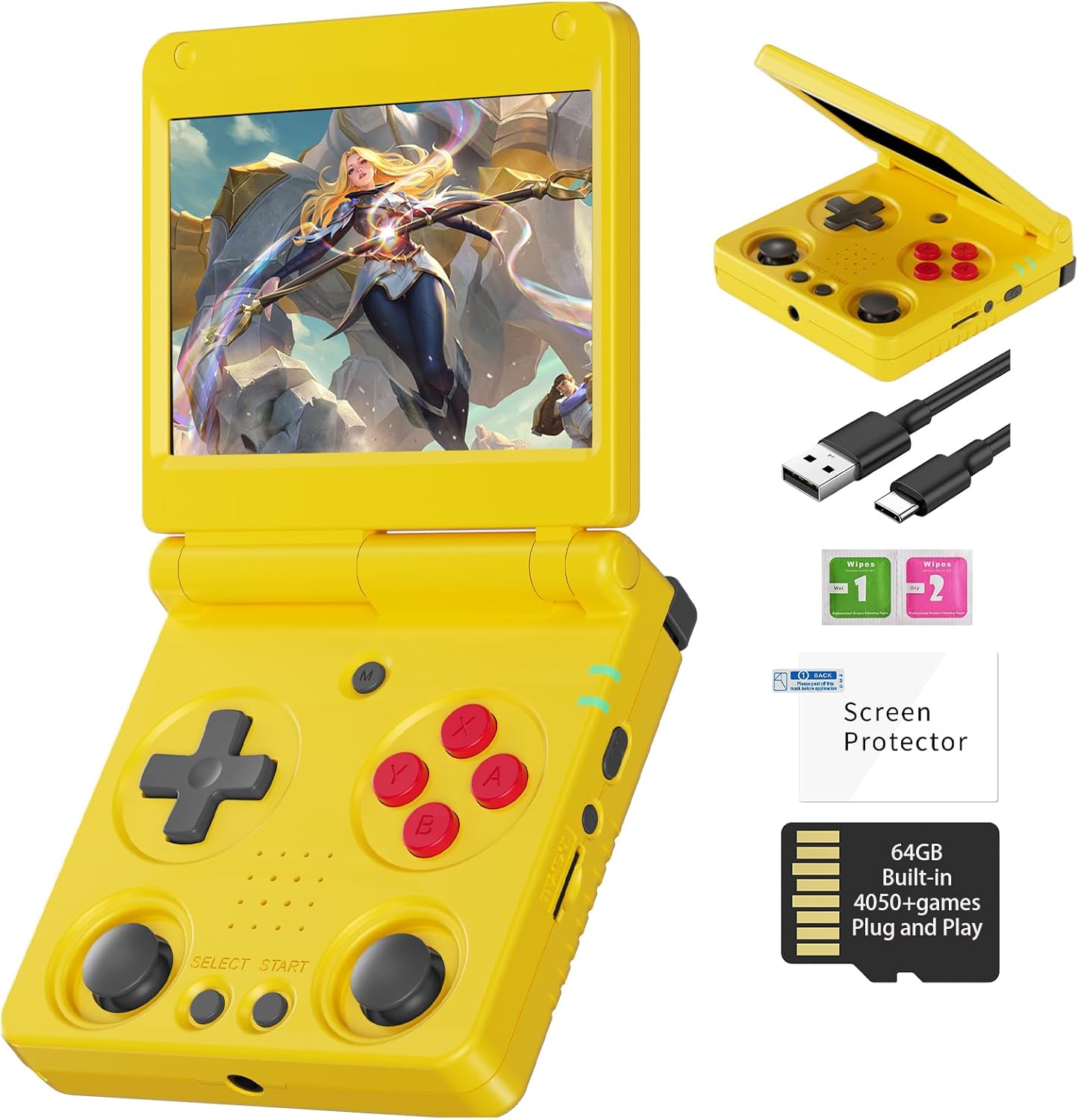
Image 1.1: The ANBERNIC RG34XXSP Retro Handheld Game Console in yellow.
2. Maklumat Keselamatan
- Jauhkan peranti daripada air dan kelembapan.
- Elakkan suhu yang melampau dan cahaya matahari langsung.
- Jangan cuba membuka atau membaiki peranti sendiri. Hubungi sokongan pelanggan untuk mendapatkan bantuan.
- Use only the provided charging cable or a certified USB Type-C charger.
- Jauhkan daripada kanak-kanak kecil kerana terdapat bahagian-bahagian kecil.
- Prolonged use at high volume may cause hearing damage.
3. Kandungan Pakej
Sahkan bahawa semua item terdapat dalam pakej:
- RG34XXSP Game Console
- Kabel Pengecas USB
- Pelindung Skrin
- Manual Pengguna
- Kotak Hadiah

Image 3.1: Included accessories with the RG34XXSP console.
4. Reka Letak Peranti
Familiarize yourself with the buttons, ports, and features of your RG34XXSP console.
Image 4.1: Detailed diagram of the RG34XXSP console layout.
- D-Pad: Directional input for navigation and gameplay.
- Game Keys (A, B, X, Y): Primary action buttons.
- Kayu Joy Kiri/Kanan: Analog input for movement and camera control in supported games.
- Butang PILIH/MULAKAN: Game-specific functions, menu navigation.
- Butang MENU: Accesses the console's main menu or in-game options.
- Kekunci Kuasa: Turns the console on/off.
- Lampu Penunjuk: Shows power and charging status.
- TF1/INT. Slot: Main TF card slot for system and games.
- TF2/EXT. Slot: Secondary TF card slot for additional storage.
- Butang VOL+/-: Melaraskan kelantangan.
- OTG/USB Port: For connecting external devices or charging.
- Port HDMI: Connects to a TV or external display.
- L1/L2/R1/R2 Shoulder Buttons: Additional action buttons, typically used for triggers or modifiers.
5. Persediaan
- Unpack the Console: Carefully remove the RG34XXSP console and all accessories from its packaging.
- Cas Konsol: Connect the provided USB Type-C cable to the console's charging port and a compatible USB power adapter (not included). Charge the console until the battery indicator shows full. The 3300mAh Li-Polymer battery provides approximately 7-8 hours of gameplay on a full charge.
- Masukkan Kad TF: The console comes with a 64GB TF card pre-installed in the TF1/INT. slot. This card contains the operating system and pre-loaded games. If you wish to expand storage, insert an additional TF card (up to 512GB) into the TF2/EXT. slot.
- Hidupkan kuasa: Open the console by flipping the upper cover. The magnetic suction function will hold it open. Press and hold the Power Key until the screen illuminates.
- Initial Navigation: Upon startup, use the D-Pad or joysticks to navigate the main menu. Press the 'A' button to select options and 'B' to go back.
6. Arahan Operasi
6.1 Operasi Asas
- Menghidupkan/Mematikan: Press and hold the Power Key to turn the console on or off.
- Mod tidur: Closing the console's lid will activate sleep mode, thanks to the built-in Hall switch chip. Opening the lid will resume operation.
- Pelarasan Kelantangan: Use the VOL+/- buttons on the side of the console.
- Navigasi Menu: Use the D-Pad or joysticks to move through menu options. Press 'A' to confirm, 'B' to cancel or go back.
6.2 Bermain Permainan
- From the main menu, navigate to the desired emulator or game list.
- Select a game using the 'A' button.
- Once the game loads, use the D-Pad, joysticks, and game keys (A, B, X, Y, L1, L2, R1, R2) to play. Refer to the game's specific controls if available.
- To exit a game or access in-game options, press the MENU button.
6.3 In-Game Menu Shortcuts
The RG34XXSP supports various in-game shortcuts for enhanced control:
- Menu: Accesses the in-game menu.
- Menu + R2: Cepat Ke Hadapan.
- Menu + L2: Slow Motion.
- Menu + R1: Save State.
- Menu + L1: Load State.
- Menu + Y: Display Frame Rate.
- Menu + B: Tangkapan skrin.
- Menu + X: jeda.
- Menu + START: Quit Game.
- Menu + VOL+: Laraskan Kecerahan.
- Menu + Left/Right Direction: Select Save State Slot.
7. Pengurusan Permainan
The RG34XXSP supports over 30 game formats. You can add more games by transferring compatible ROM files to the TF card. The console supports dual card slots and TF card expansion up to 512GB.
7.1 Adding Games
- Matikan konsol.
- Carefully remove the TF card (TF1/INT. or TF2/EXT.) from its slot.
- Insert the TF card into a computer's card reader.
- Locate the appropriate emulator folder (e.g., 'GBA', 'PS1', 'PSP') on the TF card.
- Copy your game ROM files into the respective folders. Ensure the ROMs are in compatible formats.
- Safely eject the TF card from your computer and reinsert it into the console.
- Power on the console. The new games should now appear in the corresponding emulator's game list.
The console is compatible with third-party software like RixeIHK, which allows for one-click game downloads and management.

Image 7.1: Supported game formats and console models.
8. Ketersambungan
The RG34XXSP offers multiple connectivity options for enhanced gaming and entertainment.
8.1 Wi-Fi dan Bluetooth
- Wi-Fi (2.4G/5G 802.11a/b/g/n/ac): Connect to a wireless network for online multiplayer games, streaming, and system updates.
- Bluetooth (Bluetooth 4.2): Connect wireless controllers or other Bluetooth-enabled accessories.
8.2 TV Output (HDMI)
Connect your RG34XXSP to a TV or monitor using an HDMI cable (not included) for a larger screen gaming experience. This mode is ideal for family gatherings or parties.

Image 8.1: RG34XXSP connected to a TV for screen casting.
8.3 External Controllers
The console supports 2.4G wireless controllers and wired controllers, as well as Bluetooth controllers, for versatile gameplay options.
9. Penyelenggaraan
- Pembersihan: Use a soft, dry cloth to clean the console's exterior. Do not use liquid cleaners or abrasive materials.
- Penjagaan Skrin: Apply the included screen protector to prevent scratches. Clean the screen with a microfiber cloth.
- Storan: When not in use, close the console's lid to protect the screen. Store in a cool, dry place away from direct sunlight.
- Bateri: To prolong battery life, avoid fully discharging the battery frequently. Charge regularly, even if not in active use.
10. Penyelesaian masalah
- Console not turning on: Ensure the battery is charged. Connect the charger and try again. If the issue persists, perform a hard reset by pressing the reset button (if available) or holding the power button for an extended period.
- Permainan tidak dimuatkan: Verify that the TF card is properly inserted. Check if the game ROM file is in a supported format and placed in the correct emulator folder.
- Masalah skrin (kelipan, tiada paparan): Ensure the console is fully open and the screen connection is stable. If connected to a TV, check the HDMI cable and TV input.
- Isu bunyi: Check the volume level using the VOL+/- buttons. Ensure headphones are properly connected if in use.
- Controls unresponsive: Restart the console. If using external controllers, ensure they are properly paired via Bluetooth or connected via USB.
11. Spesifikasi
| Ciri | Perincian |
|---|---|
| Nombor Model | RG34XXSP |
| Dimensi | 3.45"L x 2.49"W x 0.71"H |
| Berat badan | 0.28 Kilogram (9.9 auns) |
| Saiz Skrin | 3.4 Inches IPS Full Viewing Angle, OCA Full Lamination |
| Resolusi Skrin | 720*480 |
| CPU | H700 Quad-core ARM Cortex-A53, 1.5GHz |
| GPU | Dual-core G31 MP2 |
| RAM | LPDDR4 2GB |
| Penyimpanan | 64GB TF/MicroSD (boleh dikembangkan sehingga 512GB) |
| Sistem Operasi | Linux 64-bit |
| Wi-Fi | 2.4G/5G 802.11a/b/g/n/ac |
| Bluetooth | Bluetooth 4.2 |
| Bateri | 3300mAh Li-Polymer, up to 8 hours battery life |
| Mengecas | USB Type-C (5V/1.5A, supports C2C charger) |
| Ketersambungan | HDMI Output, USB OTG |
| Jenis Pengawal | Joystick, D-Pad, Buttons |
| bahan | plastik |
| Umur Disyorkan | 15 tahun dan ke atas |
12. Video Produk Rasmi
Video 12.1: Tayangan video produk rasmicasing the ANBERNIC RG34XXSP handheld gaming console and its features.
13. Waranti dan Sokongan
For warranty information, technical support, or service inquiries, please refer to the warranty card included in your package or contact the retailer where you purchased the product. You may also visit the official ANBERNIC webtapak untuk bantuan lanjut dan sumber sokongan yang dikemas kini.
Sila simpan bukti pembelian anda untuk sebarang tuntutan waranti.


