pengenalan
This manual provides detailed instructions for the SGIN Android Tablet SGIN-T12. It covers setup, operation, maintenance, and troubleshooting to ensure optimal use of your device. The SGIN-T12 features a 10.51-inch Full HD IPS display, an Octa-Core processor, 6GB RAM, 128GB internal storage, and runs on Android 13. It supports 5G WiFi, Bluetooth 5.0, and GPS functionality.
1. Persediaan
1.1 Kandungan Pakej
Sahkan bahawa semua item terdapat dalam pakej:
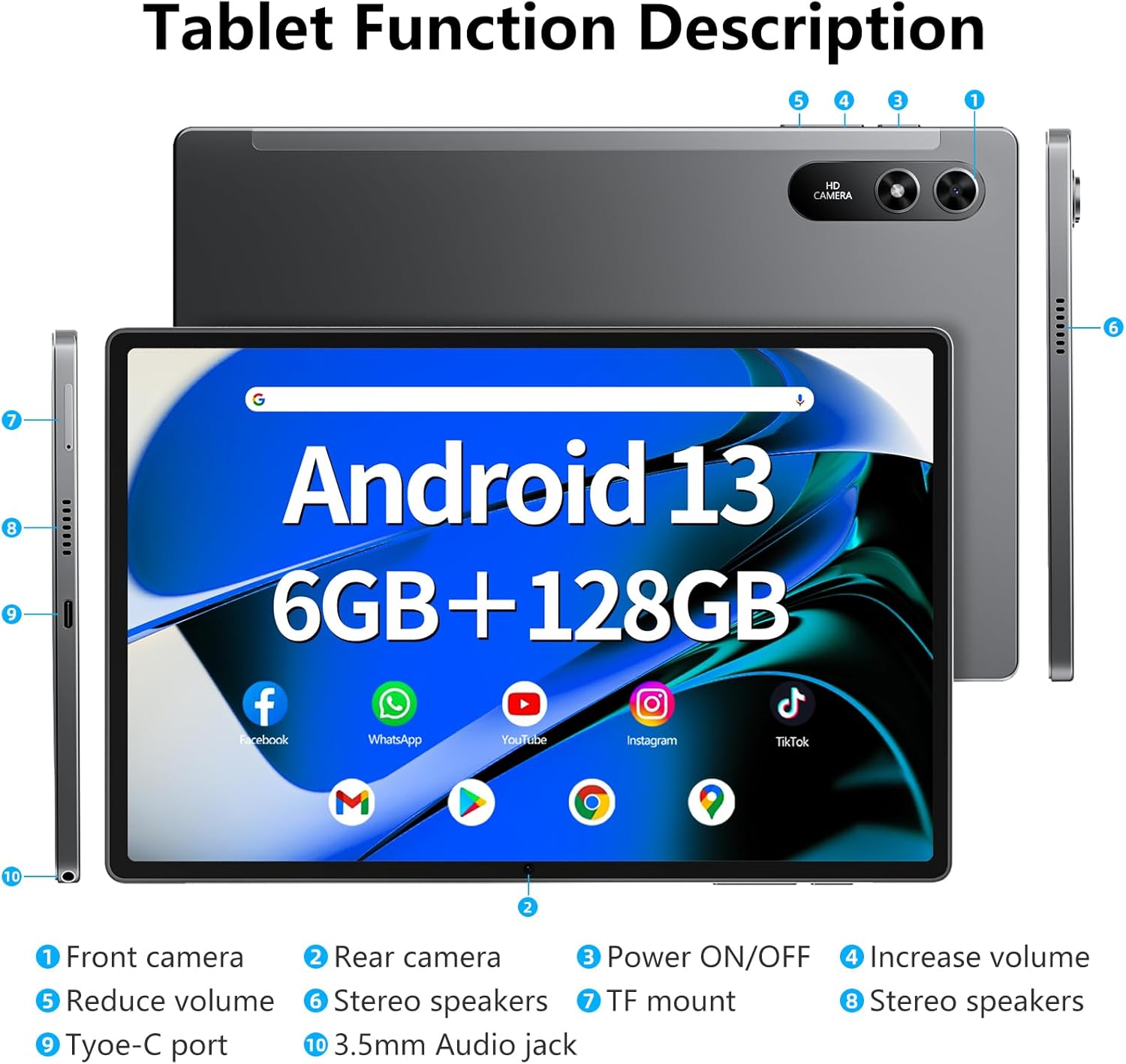
Image: The SGIN-T12 tablet, power adapter, USB-C charging cable, SIM ejector tool, and user manual.
- SGIN Android Tablet SGIN-T12
- Penyesuai Kuasa
- Kabel Pengecas USB-C
- Alat Ejector SIM
- Manual Pengguna
1.2 Susun atur Peranti
Familiarize yourself with the physical components and ports of your tablet.

Image: Labeled diagram of the SGIN-T12 tablet indicating the location of the front camera, rear camera, power ON/OFF button, volume increase/decrease buttons, stereo speakers, TF card slot, Type-C charging port, and 3.5mm audio jack.
- Kamera hadapan
- Kamera belakang
- Butang HIDUP/MATI kuasa
- Tambah butang kelantangan
- Kurangkan butang kelantangan
- Pembesar suara stereo
- TF mount (MicroSD card slot)
- Pembesar suara stereo
- Port jenis-C
- Bicu audio 3.5mm
1.3 Pengecasan Awal
Before first use, fully charge the tablet. Connect the USB-C charging cable to the tablet's Type-C port and the power adapter to a wall outlet. The charging indicator will show the charging status.
1.4 Hidupkan/Mati Kuasa
- Untuk Menghidupkan: Press and hold the Power ON/OFF button until the SGIN logo appears.
- Untuk Mematikan: Press and hold the Power ON/OFF button until the power options appear on the screen. Select "Power off" and confirm.
- Untuk Mulakan Semula: From the power options, select "Restart."
1.5 Wizard Persediaan Awal
Setelah dihidupkan pertama, tablet akan membimbing anda melalui proses persediaan awal:
- Pilih bahasa pilihan anda.
- Sambung ke rangkaian Wi-Fi.
- Review dan terima terma dan syarat.
- Log masuk dengan akaun Google anda atau buat yang baharu. Ini diperlukan untuk mengakses Gedung Google Play dan perkhidmatan Google yang lain.
- Sediakan kunci skrin (PIN, corak atau kata laluan).
- Configure other settings as prompted.
2. Arahan Operasi
2.1 Navigasi Asas
- Ketik: Sentuh skrin sekali untuk memilih item atau membuka aplikasi.
- Ketik dan Tahan: Touch and hold an item to access contextual menus or move icons.
- Leret: Seret jari anda merentasi skrin untuk menatal halaman atau senarai.
- Cubit: Gunakan dua jari untuk mengezum masuk atau keluar pada imej dan web muka surat.
2.2 Sambungan Wi-Fi
Untuk menyambung ke rangkaian wayarles:
- Pergi ke tetapan > Rangkaian & internet > Wi-Fi.
- Togol Wi-Fi On.
- Pilih rangkaian yang anda inginkan daripada senarai.
- Masukkan kata laluan jika digesa dan ketik Sambung.
2.3 Berpasangan Bluetooth
To pair with a Bluetooth device (e.g., headphones, keyboard):
- Pergi ke tetapan > Peranti yang disambungkan > Bluetooth.
- Togol Bluetooth On.
- Pastikan peranti Bluetooth anda berada dalam mod berpasangan.
- Select the device from the "Available devices" list and follow any on-screen prompts to complete pairing.
2.4 Operasi Kamera
The tablet features a 5MP front camera and a 13MP rear camera.

Image: The SGIN-T12 tablet showcasing its front camera for video calls and rear camera for capturing images.
- Buka Kamera permohonan.
- Tap the camera switch icon to alternate between the front and rear cameras.
- Ketik butang pengatup untuk mengambil foto atau memulakan/menghentikan rakaman video.
- Access various camera modes and settings within the app.
2.5 Pengurusan Storan
The tablet comes with 128GB of internal storage and supports expansion up to 256GB via a TF (MicroSD) card.

Image: Visual representation of the tablet's memory specifications, highlighting 6GB RAM, 128GB ROM, and support for up to 512GB external storage expansion.
- Memasukkan Kad TF: Use the provided SIM ejector tool to open the TF card slot. Insert the MicroSD card with the gold contacts facing down, then close the tray.
- Mengurus Storan: Pergi ke tetapan > Penyimpanan kepada view storage usage and manage files.
2.6 Tetapan Audio
The tablet features dual stereo speakers and a 3.5mm audio jack.

Image: The SGIN-T12 tablet illustrating its four-speaker stereo system for an immersive audio experience.
- Kawalan Kelantangan: Use the physical volume buttons on the side of the tablet or adjust volume in tetapan > Bunyi & getaran.
- Jack fon kepala: Sambungkan fon kepala standard 3.5mm untuk mendengar secara peribadi.
2.7 Kefungsian GPS
The tablet includes GPS for navigation and location-based services.
- pastikan Lokasi services are enabled in tetapan > Lokasi.
- Use pre-installed mapping applications or download others from the Google Play Store for navigation.
3. Penyelenggaraan
3.1 Penjagaan Bateri

Image: The SGIN-T12 tablet highlighting its 6200mAh battery, designed for extended use.
- Elakkan menyahcas sepenuhnya bateri dengan kerap.
- Do not expose the tablet to extreme temperatures.
- Gunakan hanya pengecas yang disediakan atau pengecas serasi yang diperakui.
- If the tablet will not be used for an extended period, charge it to about 50% before storing.
3.2 Membersihkan Peranti
- Gunakan kain lembut dan tidak berbulu untuk membersihkan skrin dan badan.
- Untuk calitan degil, sedikit dampen kain dengan air atau pembersih skrin yang direka untuk elektronik.
- Elakkan menggunakan bahan kimia yang keras, bahan yang melelas atau kelembapan berlebihan.
3.3 Kemas Kini Perisian
Semak dan pasang kemas kini perisian secara kerap untuk memastikan prestasi dan keselamatan yang optimum.
- Pergi ke tetapan > Sistem > Kemas kini sistem.
- Ikut arahan pada skrin untuk menyemak dan memasang sebarang kemas kini yang tersedia.
4. Penyelesaian masalah
| Masalah | Penyelesaian |
|---|---|
| Tablet tidak dihidupkan. | Pastikan bateri dicas. Sambungkan tablet ke pengecas dan tunggu beberapa minit sebelum cuba menghidupkan semula. |
| Skrin tidak bertindak balas. | Perform a forced restart by pressing and holding the Power ON/OFF button for approximately 10-15 seconds until the device restarts. |
| Isu sambungan Wi-Fi. | Restart your Wi-Fi router. On the tablet, toggle Wi-Fi off and then on again. Forget the network and reconnect. |
| Applications are crashing or freezing. | Close and reopen the application. Clear the app's cache in tetapan > Apl > [Nama Apl] > Storan & cacheJika masalah berterusan, nyahpasang dan pasang semula aplikasi tersebut. |
| Prestasi perlahan. | Close unused applications. Clear cache and temporary files. Consider performing a factory reset if performance issues are severe and persistent (back up data first). |
| "Reboot errors" or "Failed to load" messages. | Attempt multiple restarts. If the issue persists, a factory reset may be required. Warning: A factory reset will erase all data on the device. Back up important files sebelum meneruskan. If the problem continues after a factory reset, contact customer support. |
5. Spesifikasi
| Ciri | Perincian |
|---|---|
| Model | SGIN-T12 |
| Sistem Operasi | Android 13 |
| Saiz Skrin | 10.51 Inci |
| Resolusi Skrin | 1920 x 1200 Pixels (FHD IPS) |
| Pemproses | Octa-Core (2 GHz ARM_Cortex_A5) |
| RAM | 6 GB DDR4 SDRAM |
| Storan Dalaman | 128 GB |
| Storan Boleh Dikembangkan | Supports up to 256GB TF card (MicroSD) |
| Kamera Depan | 5 MP |
| Kamera Belakang | 13 MP |
| Kapasiti Bateri | 6200 mAh Litium Ion |
| Purata Hayat Bateri | Sehingga 6 jam |
| Kesambungan Wayarles | 5G Wi-Fi (802.11bgn), Bluetooth 5.0 |
| Navigasi | GPS |
| Pelabuhan | Type-C, 3.5mm Audio Jack, TF Card Slot |
| Dimensi (LxWxH) | 10.51 x 6.36 x 0.3 inci |
| Berat Barang | 2.2 paun |
6. Waranti dan Sokongan
6.1 Waranti Produk
The SGIN Android Tablet SGIN-T12 comes with a Waranti terhad 1 tahun dari tarikh pembelian. Waranti ini meliputi kecacatan pembuatan dan mutu kerja di bawah penggunaan biasa. Ia tidak meliputi kerosakan yang disebabkan oleh salah guna, kemalangan, pengubahsuaian tanpa kebenaran atau bencana alam.
Sila simpan bukti pembelian anda untuk tuntutan waranti.
6.2 Sokongan Pelanggan
For technical assistance, troubleshooting not covered in this manual, or warranty inquiries, please contact SGIN customer support. Refer to the contact information provided on the SGIN official webtapak atau dokumentasi pembelian anda.
Anda juga boleh melawat SGIN Store on Amazon untuk maklumat dan sumber produk tambahan.


