Bunn 0009-G06A

Bunn 0009-G06A Transformer Instruction Manual

Model: 0009-G06A | Input: 120V | Output: 12V | Power: 10VA | Frequency: 60Hz

pengenalan

This manual provides essential information for the safe and effective installation, operation, and maintenance of the Bunn 0009-G06A Transformer. This component is designed to convert 120 Volt AC input to 12 Volt AC output, suitable for specific Bunn equipment requiring 10VA power at 60Hz. Please read this manual thoroughly before proceeding with any installation or service.

Maklumat Keselamatan Penting

Persediaan dan Pemasangan

The Bunn 0009-G06A Transformer is an OEM replacement part. Refer to the specific equipment's service manual for detailed installation instructions. The following are general guidelines:

  1. Pemutusan Kuasa: Before beginning, ensure the main power supply to the Bunn equipment is completely disconnected and locked out.
  2. Locate Existing Transformer: Identify the location of the old transformer within the equipment.
  3. Putuskan Sambungan Pendawaian: Carefully disconnect the input (120V) and output (12V) wiring from the old transformer. Note the color coding and connection points for accurate reinstallation.
  4. Remove Old Transformer: Unmount and remove the old transformer.
  5. Install New Transformer: Mount the new Bunn 0009-G06A Transformer in the same location, ensuring it is securely fastened.
  6. Sambungan Pendawaian: Connect the input (120V) wires to the primary side of the new transformer and the output (12V) wires to the secondary side. Ensure all connections match the original configuration and are tight. Refer to the equipment's wiring diagram if available.
  7. Sahkan Sambungan: Periksa semula semua sambungan pendawaian untuk ketepatan dan keselamatan.
  8. Pulihkan Kuasa: Once installation is complete and verified, restore power to the equipment.
  9. Kefungsian Ujian: Test the equipment to ensure the transformer is functioning correctly and providing the specified 12V output.
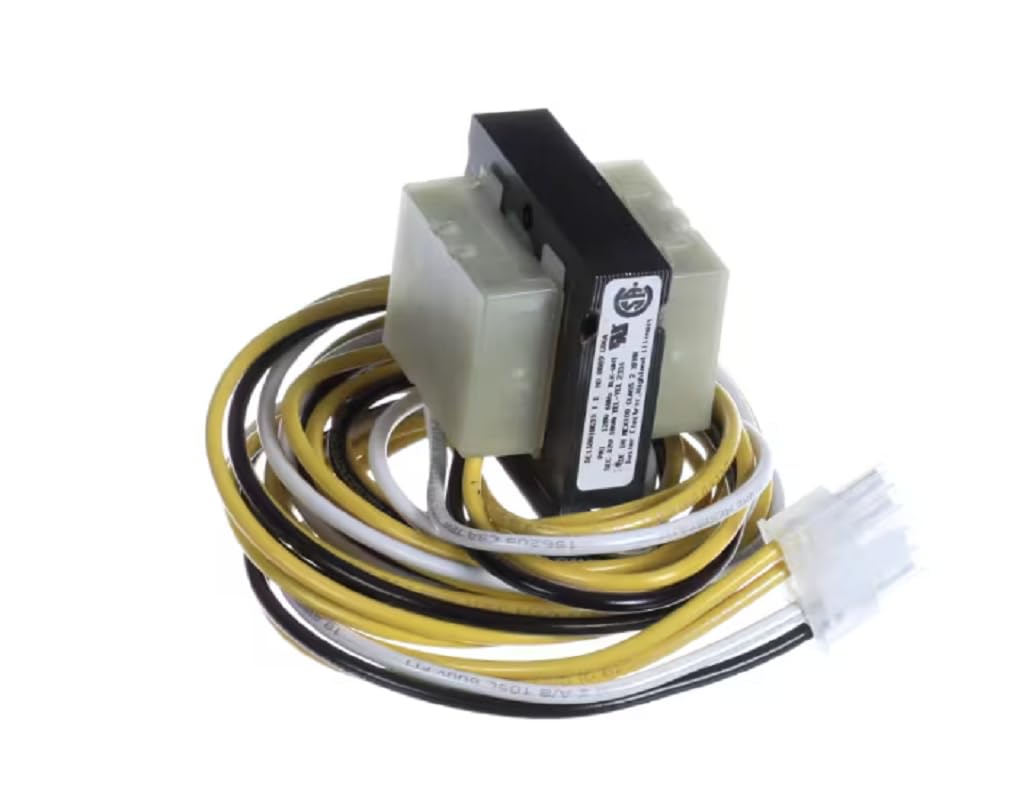
Bunn 0009-G06A Transformer with wires

Imej 1: The Bunn 0009-G06A Transformer. This image displays the compact transformer unit with its primary and secondary wiring harnesses, featuring various colored wires (yellow, black, white) and a white multi-pin connector on one end. The transformer itself is a rectangular block with a black label indicating specifications and certifications.

Operasi

The Bunn 0009-G06A Transformer operates automatically once installed and power is supplied to the equipment. Its function is to step down the incoming 120V AC line voltage to a stable 12V AC output, which powers the low-voltage components of the Bunn machine it is integrated into. There are no user-adjustable settings on the transformer itself.

Ensure the equipment it is installed in is operating within its specified parameters to prevent undue stress on the transformer.

Penyelenggaraan

The Bunn 0009-G06A Transformer is a sealed unit and requires minimal maintenance. Regular inspection is recommended as part of the overall equipment maintenance schedule.

Menyelesaikan masalah

If the equipment powered by the transformer is not functioning correctly, consider the following troubleshooting steps. Always disconnect power before inspecting electrical components.

simptomKemungkinan PuncaTindakan
No power to low-voltagkomponen e.
  • Tiada vol inputtage to transformer.
  • Transformer rosak.
  • Pendawaian yang longgar atau terputus.
  • Check main power supply to equipment.
  • Sahkan input voltage at transformer terminals (120V AC).
  • Sahkan keluaran voltage at transformer terminals (12V AC).
  • Inspect all wiring connections for security.
  • Sekiranya tiada keluaran voltage with correct input, replace transformer.
Transformer is excessively hot.
  • Overload on secondary side.
  • Internal fault in transformer.
  • Pengudaraan yang lemah.
  • Check current draw on 12V circuit; ensure it does not exceed 10VA rating.
  • Ensure adequate airflow around the transformer.
  • If overheating persists without overload, replace transformer.
Burning smell from transformer.Internal winding damage.Immediately disconnect power. Replace transformer.

If troubleshooting steps do not resolve the issue, contact a qualified service technician or Bunn customer support.

Spesifikasi

Sokongan dan Waranti

For technical support or warranty inquiries regarding the Bunn 0009-G06A Transformer, please refer to the documentation provided with your specific Bunn equipment or contact Bunn customer service directly. As an OEM part, its warranty may be covered under the larger equipment warranty.

Always ensure you are using genuine Bunn replacement parts to maintain equipment performance and warranty validity.

Dokumen Berkaitan - 0009-G06A

Praview Muat semula BUNN Panduan Pemasangan dan Pengendalian
Dokumen ini menyediakan arahan pemasangan dan pengendalian yang komprehensif untuk dispenser minuman segar semula BUNN. Ia merangkumi prosedur persediaan penting, keperluan elektrik dan paip, sambungan CO2, pengisian dan pembersihan awal, penggunaan dispenser, pembersihan dan penyelenggaraan, penunjuk fungsi dan skema sistem. Termasuk maklumat waranti dan butiran hubungan untuk Bunn-O-Matic Corporation.
Praview BUNN NITRON® Gas Module, 120V (55660.0008) - Technical Specifications
Explore the BUNN NITRON® Gas Module, 120V (55660.0008), a compact and efficient solution for generating an unlimited gas supply for Nitron dispensers. This document details its features, specifications, installation compatibility, and maintenance guidelines.
Praview BUNN TU3 Illustrated Parts Catalog and Warranty Information
Comprehensive illustrated parts catalog and warranty details for the BUNN TU3 coffee brewer. Includes part numbers, descriptions, and assembly diagrams for various components.
Praview Manual Perkhidmatan BUNN U3/SRU | Panduan Teknikal
Manual perkhidmatan terperinci untuk pembuat kopi komersial BUNN U3 dan SRU. Termasuk penyelesaian masalah, akses komponen, prosedur ujian dan gambar rajah pendawaian.
Praview Buku Panduan Pemilik Pembuat Kopi Speed ​​Brew BUNN
Manual pemilik yang komprehensif untuk pembuat kopi BUNN Speed ​​Brew, meliputi persediaan, operasi, pembersihan, penyelesaian masalah dan maklumat waranti untuk model GRX, BX, SBS, CSB1, CSB2, BTX dan CSB3T.
Praview Manual Pemilik BUNN Speed ​​Brew: Panduan Persediaan, Operasi dan Penyelenggaraan
Manual pemilik yang komprehensif untuk pembuat kopi BUNN Speed ​​Brew (model GRX, BX, SBS, CSB1, CSB2, BTX, CSB3T). Meliputi persediaan, pembuatan bir, pembersihan, penyelesaian masalah dan keselamatan.