1. Pengenalan
Thank you for choosing the GOBOULT Astra Neo Bluetooth In-Ear Earbuds. This manual provides essential information for setting up, operating, and maintaining your earbuds to ensure optimal performance and longevity. Please read this manual thoroughly before use.
2. Maklumat Keselamatan
- Jangan dedahkan fon telinga atau bekas pengecasan kepada suhu, kelembapan atau cecair yang melampau.
- Elakkan daripada menjatuhkan, menjejaskan atau membuka peranti.
- Gunakan hanya kabel pengecasan yang disediakan atau kabel Jenis-C yang diperakui untuk mengecas.
- Dengar pada tahap kelantangan sederhana untuk mengelakkan kerosakan pendengaran.
- Jauhkan daripada kanak-kanak dan haiwan peliharaan.
3. Kandungan Pakej
Sahkan bahawa semua item terdapat dalam pakej anda:
- GOBOULT Astra Neo Earbuds (Left and Right)
- Kes Pengecasan
- Kabel Pengecasan Jenis-C
- Kusyen Telinga (pelbagai saiz)
- Manual Pengguna
- Kad Waranti
4. Produk Lebihview
The GOBOULT Astra Neo earbuds feature a sleek design with touch controls and a compact charging case. The case includes breathing LED lights for status indication.

Image: GOBOULT Astra Neo Earbuds and Charging Case. The image displays the black earbuds removed from their charging case, which features a glowing blue LED strip.

Image: GOBOULT Astra Neo Comfort Grip Case and Earbuds. This image highlights the textured surface of the charging case and earbuds, along with the breathing case lights.
5. Persediaan
5.1 Mengecas Fon telinga dan Sarung
Sebelum penggunaan pertama, cas sepenuhnya fon telinga dan bekas pengecas.
- Letakkan fon telinga ke dalam bekas pengecasan. Pastikan mereka duduk dengan betul.
- Sambungkan kabel pengecas Jenis-C ke port pengecasan pada kes dan ke sumber kuasa.
- The LED indicator on the case will illuminate during charging and turn off or change color when fully charged.
A 10-minute charge provides approximately 100 minutes of playtime.

Image: GOBOULT Astra Neo Fast Charging Feature. This image illustrates the 70-hour playtime and the fast charging capability: 10 minutes of charge equals 100 minutes of playtime.
5.2 Pairing with a Device (Bluetooth 5.4)
The Astra Neo uses Bluetooth 5.4 with Blink & Pair technology for quick and stable connections.
- Buka bekas pengecas. Fon telinga akan memasuki mod berpasangan secara automatik.
- Pada peranti anda (telefon pintar, tablet, komputer riba), dayakan Bluetooth.
- Cari untuk available Bluetooth devices and select "GOBOULT Astra Neo" from the list.
- Setelah disambungkan, gesaan suara akan mengesahkan gandingan yang berjaya.

Image: GOBOULT Astra Neo Bluetooth 5.4 Pairing. This image shows a smartphone screen displaying a successful Bluetooth 5.4 connection to 'Astra Neo', emphasizing power efficiency and stable connection.
6. Arahan Operasi
6.1 Kawalan Sentuhan
The Astra Neo earbuds feature intuitive touch controls on each earbud:
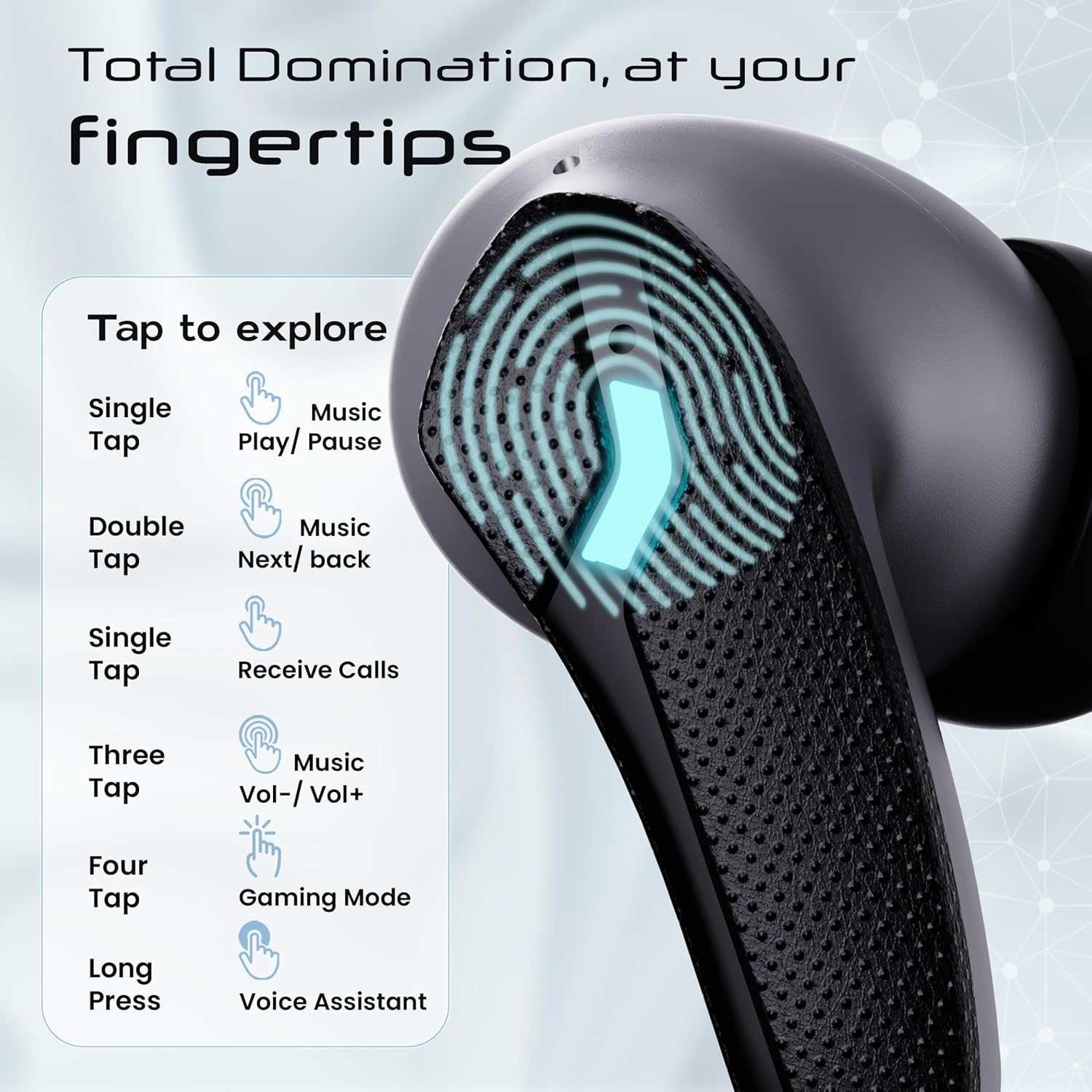
Image: GOBOULT Astra Neo Touch Controls Guide. This graphic details the various touch gestures for controlling music, calls, gaming mode, and voice assistant.
- Ketuk tunggal: Play/Pause music, Receive Calls.
- Tekan dua kali: Music Next/Back (specific earbud for each function).
- Three Tap: Music Volume Up/Down (specific earbud for each function).
- Four Tap: Activate Gaming Mode.
- Tekan lama: Activate Voice Assistant (Google Assistant/Siri).
6.2 Gaming Mode (40ms Low Latency)
Activate Gaming Mode for a synchronized audio experience during gameplay, reducing audio delay to 40ms.
- To activate: Four tap on either earbud.
- To deactivate: Four tap again on either earbud.

Image: GOBOULT Astra Neo Gaming Mode with 40ms Low Latency. This image depicts a user playing a mobile game with the earbuds, highlighting the ultra-low latency feature for an immersive gaming experience.
6.3 ZEN Quad Mic ENC for Calls
The ZEN Quad Mic Environmental Noise Cancellation (ENC) system ensures clear voice calls by filtering out background noise.

Image: GOBOULT Astra Neo ZEN Quad Mic ENC Technology. This image illustrates the internal components and the function of the 4 microphones for clear in-game communication and crystal-clear calling with Acoustic Echo Cancellation (AEC).
6.4 Mod EQ
The Astra Neo earbuds support 4 EQ modes for customized audio experiences. Refer to the product packaging or official GOBOULT website for specific instructions on how to switch between these modes, as this functionality is typically managed via a companion app or specific touch gestures not detailed here.
7. Penyelenggaraan
7.1 Pembersihan
- Lap perlahan fon telinga dan bekas pengecas dengan kain lembut, kering dan tidak berbulu.
- Jangan gunakan bahan kimia yang keras, pelarut pembersih atau detergen yang kuat.
- Clean the charging contacts on both the earbuds and the case regularly to ensure proper charging.
7.2 Rintangan Air (IPX5)
The Astra Neo earbuds are IPX5 water-resistant, meaning they are protected against sweat, rain, and splashes. They are not designed for submersion in water.
- Jangan sengaja menenggelamkan fon telinga ke dalam air.
- If exposed to sweat or rain, wipe them dry before placing them back in the charging case.

Image: GOBOULT Astra Neo IPX5 Water Resistance and Voice Assistant. This image highlights the earbuds' sweatproof, rainproof, and splashproof capabilities, along with compatibility with Google Assistant and Hey Siri.
7.3 Penyimpanan
Apabila tidak digunakan, simpan fon telinga dalam bekas pengecasnya untuk melindunginya dan memastikan ia dicas.
8. Penyelesaian masalah
- Fon telinga tidak berpasangan: Pastikan kedua-dua fon telinga berada di dalam bekas pengecas, kemudian buka penutup untuk memasuki semula mod berpasangan. Semak tetapan Bluetooth peranti anda dan cuba sambungkan semula.
- Hanya satu fon telinga berfungsi: Letakkan kedua-dua fon telinga kembali ke dalam bekas, tutup penutupnya, tunggu beberapa saat, kemudian bukanya semula. Ini selalunya akan menyegerakkannya semula.
- Tiada bunyi: Periksa tahap kelantangan pada kedua-dua peranti dan fon telinga anda. Pastikan fon telinga disambungkan dengan betul ke peranti anda.
- Isu pengecasan: Clean the charging contacts on the earbuds and inside the case. Ensure the charging cable is securely connected and the power source is active.
- Kualiti panggilan yang lemah: Ensure the microphones are not obstructed. Try moving to a quieter environment.
9. Spesifikasi
Key technical specifications for the GOBOULT Astra Neo Earbuds:
| Ciri | Spesifikasi |
|---|---|
| Nama Model | Astra Neo |
| Versi Bluetooth | 5.4 |
| Masa bermain | Hingga 70 jam (dengan cas pengecasan) |
| Pengecasan Cepat | Caj 10 minit = 100 minit masa main |
| Latensi Rendah | 40ms (Mod Permainan) |
| Saiz Pemandu | 13mm BoomX Drivers |
| Mikrofon | ZEN Quad Mic ENC |
| Tahan Air | IPX5 |
| Kaedah Kawalan | Sentuh |
| Teknologi Ketersambungan | Bluetooth, Wayarles |
| Jack Fon Kepala | Bicu Pengecas Cepat Jenis-C |
| Berat Barang | 47 Gram |
| Dimensi Produk | 6.2 x 5.3 x 3.2 cm |
| Jenis Bateri | Polimer Litium |
| Julat Bluetooth | 10 Meter |
| Impedans | 32 Ohm |

Image: GOBOULT Astra Neo 13mm BoomX Drivers. This image highlights the 13mm BoomX drivers, emphasizing crystal clear sound and support for MSBC, SBC, and AAC codecs.
10. Waranti dan Sokongan
The GOBOULT Astra Neo Earbuds come with a Waranti pengilang 1 tahun from the date of purchase. This warranty covers manufacturing defects. For warranty claims or technical support, please refer to the contact information provided on your warranty card or visit the official GOBOULT webtapak.


