1. Pengenalan
Thank you for choosing the Kinglucky ClipFree Open-Ear Headphones Model A8. These innovative headphones combine high-quality audio with a unique jewelry-inspired design, featuring detachable butterfly earrings. Designed for comfort and awareness, they provide a secure fit without blocking your ear canal, allowing you to enjoy your audio while staying connected to your surroundings. This manual will guide you through the setup, operation, and maintenance of your new headphones.
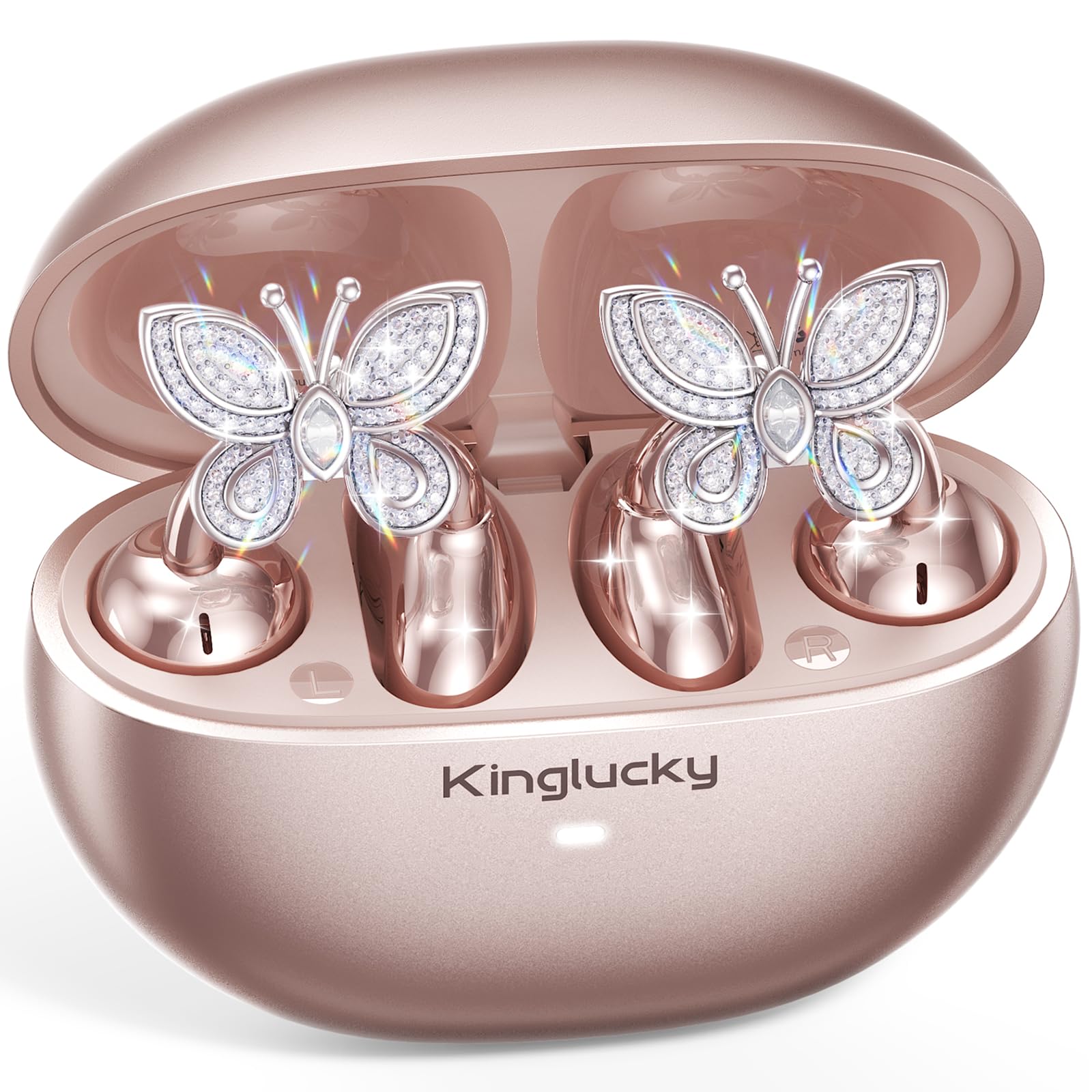
Image: Kinglucky ClipFree Open-Ear Headphones Model A8 in Rose Gold charging case.
2. Apa yang ada di dalam Kotak
Your Kinglucky ClipFree Open-Ear Headphones package includes the following items:
- Kinglucky OpenEarRing A8 Headphones (Rose Gold)
- Kes Pengecasan
- Crystal Butterfly Ear Clip Charms (Detachable)
- Kabel Pengecas USB-C
- Manual Pengguna (dokumen ini)

Image: All components included in the Kinglucky ClipFree Open-Ear Headphones package.
3. Setup: First-Time Pairing
Follow these steps to pair your Kinglucky headphones with your device for the first time:
- Keluarkan Filem Pelindung: Carefully remove any protective films from the charging contacts on the earbuds.
- Place in Charging Case: Place both ear clips into the charging case and close the lid. Ensure they are seated correctly.
- Open Lid & Pair: Open the charging case lid. The earbuds will automatically enter pairing mode. On your device (smartphone, tablet, etc.), go to Bluetooth settings and select "Kinglucky Earbuds" from the list of available devices to connect.

Image: Visual guide for the initial pairing process of the earbuds.
4. Wearing the Earbuds & Attaching Charms
The Kinglucky ClipFree headphones are designed for an open-ear fit, resting gently on your ear without entering the ear canal. This ensures comfort and situational awareness.
4.1 Memakai Fon Telinga
Gently place the ear clip over the helix (the outer rim) of your ear. Adjust for a secure and comfortable fit. The speaker component should be positioned near your ear canal for optimal sound delivery.

Image: The C-shaped design ensures a comfortable and stable fit on the ear.
4.2 Attaching the Butterfly Charms
To personalize your headphones, you can attach the included crystal butterfly charms:
- Gently Open Ear Cuff: Locate the small opening on the earbud's cuff.
- Clip onto Earphone Stem: Carefully clip the butterfly charm onto the stem of the earphone.
- jawatan: Place the earbud with the attached charm over your ear. Ensure the charm is securely fastened.
The silicone pad helps secure the charm. The charms are detachable and not stored in the charging case.

Image: Step-by-step guide to attaching the butterfly charms to your earbuds.
5. Arahan Operasi
5.1 Kawalan Sentuhan
Fon telinga ini mempunyai kawalan sentuh intuitif untuk mengurus audio dan panggilan anda:
- Main/Jeda: Ketik sekali pada salah satu fon telinga.
- Jawab/Tamatkan Panggilan: Ketik sekali pada salah satu fon telinga.
- Lagu Seterusnya: Ketik dua kali pada fon telinga kanan.
- Trek Sebelumnya: Ketik dua kali pada fon telinga kiri.
- Kelantangan: Ketik tiga kali pada fon telinga kanan.
- Perlahankan suara: Ketik tiga kali pada fon telinga kiri.
- Aktifkan Pembantu Suara: Tekan lama (2 saat) pada mana-mana fon telinga.
5.2 Mengecas
Untuk mengecas fon telinga dan bekas pengecas anda:
- Earbud: Place the earbuds into the charging case. They will automatically begin charging. The indicator light on the case will show charging status.
- Sarung Pengecasan: Connect the provided USB-C charging cable to the port on the back of the charging case and to a power source. The indicator light will show charging progress.
Cas penuh menyediakan sehingga 50 jam masa bermain keseluruhan dengan bekas pengecas.

Image: The charging case provides extended battery life for your earbuds.
5.3 MultiPoint Pairing
Your Kinglucky headphones support MultiPoint Pairing, allowing seamless connection to two devices simultaneously. This enables you to effortlessly switch between your phone, tablet, smartwatch, or computer without re-pairing.

Image: MultiPoint Pairing allows connection to two devices simultaneously.
6. Features & Benefits
- Jewelry-Inspired Design: Unique clip-on open-ear earbuds with detachable crystal butterfly earrings, offering both audio and style.
- Secure & Comfortable Open-Ear Fit: Weighing just 4.0g each, they rest gently on the ear without blocking the canal, providing a pressure-free and stable fit. Ideal for small ears, long hair, or glasses.
- Kualiti Audio Jelas: Tuned for clear vocals and balanced sound, allowing you to enjoy podcasts, calls, and music without the fatigue of in-ear headphones.
- Bluetooth 6.0: Memastikan gandingan pantas dan sambungan wayarles yang stabil.
- Tahan Air IP56: Designed to withstand sweat and rain, making them suitable for daily commutes, office calls, and light workouts.
- Masa Main Dilanjutkan: Up to 50 hours of listening time with the portable charging case.
- AI-Powered Call Clarity: Equipped with 2 beamforming microphones and advanced noise-canceling technology for crisp conversations.

Image: The unique design blends elegance with everyday comfort and functionality.
7. Spesifikasi
| Ciri | Perincian |
|---|---|
| Nama Model | A8 |
| Jenama | Kinglucky |
| Teknologi Ketersambungan | Wayarles (Bluetooth 6.0) |
| Penempatan Telinga | Buka Telinga |
| Faktor Bentuk | Wayarles Benar |
| Hayat Bateri | Sehingga 50 Jam (dengan kes pengecasan) |
| Tahap Ketahanan Air | IP56 (Sweat and Rain Resistant) |
| Kaedah Kawalan | Sentuh |
| bahan | Plastic, Metal, Rhinestones |
| Berat Barang | 3.17 Auns |
| Komponen yang Disertakan | Kabel USB-C |
8. Penyelenggaraan
To ensure the longevity and optimal performance of your Kinglucky headphones, follow these maintenance guidelines:
- Pembersihan: Use a soft, dry cloth to clean the earbuds and charging case. Avoid using harsh chemicals or abrasive materials.
- Mengecas Kenalan: Periodically clean the charging contacts on both the earbuds and inside the case with a dry cotton swab to ensure a good connection.
- Storan: Apabila tidak digunakan, simpan fon telinga dalam bekas pengecasnya untuk melindunginya daripada habuk dan kerosakan.
- Pendedahan Air: While IP56 rated for sweat and rain, avoid submerging the headphones in water. Dry them thoroughly if they get wet.
- Charms: Handle the detachable charms with care to prevent damage to the crystals or clips.
9. Penyelesaian masalah
If you encounter any issues with your Kinglucky headphones, refer to the following common solutions:
- Fon telinga tidak berpasangan:
- Pastikan kedua-dua fon telinga dicas sepenuhnya.
- Matikan Bluetooth pada peranti anda, kemudian hidupkan semula.
- Forget "Kinglucky Earbuds" from your device's Bluetooth list and attempt to re-pair.
- Place earbuds back in the case, close the lid for 5 seconds, then open to reset pairing mode.
- Tiada bunyi atau kelantangan rendah:
- Check the volume levels on both your device and the earbuds (using touch controls).
- Ensure earbuds are correctly seated on your ears.
- Confirm the earbuds are connected to the correct device.
- Satu fon telinga tidak berfungsi:
- Letakkan kedua-dua fon telinga kembali ke dalam bekas pengecas, tutup penutupnya, kemudian bukanya semula.
- Pastikan kedua-dua fon telinga dicas.
- Cuba tetapkan semula fon telinga (rujuk manual penuh untuk arahan tetapan semula khusus jika tersedia).
- Isu pengecasan:
- Pastikan kabel USB-C disambungkan dengan selamat pada kedua-dua bekas dan sumber kuasa.
- Check if the charging contacts on the earbuds and case are clean and free of debris.
- Cuba kabel USB-C atau penyesuai kuasa yang lain.
10. Waranti & Sokongan
Kinglucky is committed to providing quality products and customer satisfaction. Your Kinglucky ClipFree Open-Ear Headphones Model A8 come with the following:
- Waranti 18 Bulan: Scan the QR code on the product packaging to activate your warranty within 14 days of purchase.
- Jaminan 180 Hari: Enjoy peace of mind with our extended guarantee.
- Penggantian Percuma: In case of eligible issues, a free replacement will be provided.
- Sokongan Pantas 24/7: For any questions, concerns, or assistance, please contact Kinglucky customer support.
If you encounter issues such as a used item, no sound, inability to pair, or charging problems, please reach out to our support team for hassle-free assistance.

Image: Kinglucky customer care details for support and warranty.