Corehan Double Din Car Stereo User Manual
Model: CDI-JD-AACP-A3
1. Pengenalan
Thank you for choosing the Corehan Double Din Car Stereo. This unit is designed to provide a superior in-car entertainment and connectivity experience, featuring wireless Apple CarPlay, Android Auto, a vibrant 7-inch touch screen, Bluetooth, and various multimedia options. This manual will guide you through the installation, operation, and maintenance of your new car stereo.

Rajah 1: Depan view of the Corehan Double Din Car Stereo, showcasing its 7-inch display, alongside a depiction of its wireless CarPlay/Android Auto capabilities and the rear panel with various input/output ports.
2. Persediaan dan Pemasangan
Proper installation is crucial for optimal performance. It is recommended that installation be performed by a qualified professional. Before beginning, ensure your vehicle is compatible with a double din head unit.
2.1. Pemeriksaan Pra-Pemasangan
- Verify product suitability for your car model using compatibility tools if available.
- Acquire any necessary aftermarket dash kits, wiring harnesses, or interfaces specific to your vehicle.

Figure 2: Important tips for installation, emphasizing the need to check product compatibility with your car model and to purchase additional aftermarket accessories like dash kits and wiring harnesses.
2.2. Sambungan Pendawaian
Refer to the wiring diagram provided with your unit and the specific wiring harness for your vehicle. Ensure all connections are secure to prevent electrical issues.
- Sambungan Kuasa: Connect the constant 12V (yellow), accessory/ignition (red), and ground (black) wires.
- Sambungan Pembesar Suara: Connect all speaker wires (e.g., white/white-black for front left, grey/grey-black for front right, green/green-black for rear left, purple/purple-black for rear right).
- Sambungan Bantu: Connect subwoofer output, audio outputs (L-OUT, R-OUT), video outputs (V-OUT1, V-OUT2), audio input (L-IN, R-IN), and backup camera input (F-CAM, R-CAM).
- Kawalan Roda Stereng (SWC): If your vehicle supports SWC, connect the SWC adapter/interface to the stereo's main harness. This typically involves a 3.5mm adapter. Follow the adapter's instructions for programming.

Figure 3: Detailed wiring diagram for the car stereo, illustrating connections for power, speakers, and various audio/video inputs and outputs. Also shown are the physical dimensions of the unit.
2.3. Memasang Unit
Secure the stereo into your vehicle's double din dash opening using the mounting brackets and screws provided with your dash kit. Ensure the unit is firmly in place and does not obstruct any vehicle controls or airbags.
2.4. Hidupkan Kuasa Awal
Once installed, the stereo features an instant startup, powering on quickly when your vehicle starts. This ensures minimal downtime before use.
3. Arahan Operasi
3.1. Apple CarPlay & Android Auto Tanpa Wayar
Connect your smartphone wirelessly to access navigation, make calls, send texts, manage schedules, and play music. Use voice controls via Siri or Google Assistant for hands-free operation.
- Pastikan Bluetooth dan Wi-Fi didayakan pada telefon pintar anda.
- On the stereo, select the CarPlay or Android Auto icon.
- Ikut gesaan pada skrin untuk memasangkan peranti anda.

Figure 4: Demonstration of wireless CarPlay and Android Auto functionality, showing voice command integration for navigation and messaging.
3.2. Audio Processing (DSP)
The built-in DSP chip with 10-band sound control allows for precise audio customization. Access the equalizer settings to adjust frequencies and optimize sound quality for various music genres or personal preferences.

Figure 5: Visual representation of the integrated DSP chip and its 10-band sound control interface, along with a diagram detailing the comprehensive audio and video output options.
3.3. 7-Inch HD IPS Display
The 1024x600 pixel HD IPS screen provides vivid colors and sharp contrast, ensuring clear visibility in various lighting conditions. Navigate menus and view content with excellent clarity.

Figure 6: Close-up of the 7-inch HD IPS screen, highlighting its fidelity color restoration and sharp contrast for clear viewsiang dan malam.
3.4. Kesambungan Bluetooth
Utilize Bluetooth 5.0 for hands-free calling and wireless music streaming. Pair your device through the Bluetooth settings menu on the stereo.

Figure 7: Illustration of Bluetooth 5.0 capabilities for hands-free phone calls and music playback, alongside the rapid 1-second instant boot feature of the stereo.
3.5. Wireless MirrorLink (Airplay & Miracast)
Share your smartphone screen directly to the stereo display using wireless MirrorLink, compatible with both Airplay (for iOS) and Miracast (for Android). This feature allows passengers to view content from your phone on the larger screen.

Figure 8: Depiction of wireless Airplay and Miracast (MirrorLink) functionality, allowing smartphone screen mirroring. Also shown are the front panel's USB, AUX, and SD card slots for versatile media input.
3.6. Front Panel Connectivity
The front panel includes an AUX input, SD card slot, and USB port for connecting external music or video media. Simply insert your device or card, and the stereo will detect and play compatible files.
3.7. FM Radio Tuner
Access your favorite radio stations using the built-in FM tuner. Scan for available stations or manually tune to specific frequencies.
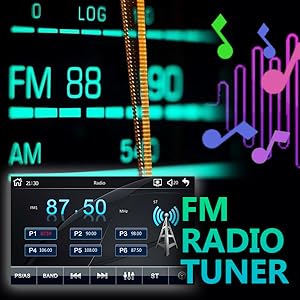
Figure 9: The user interface for the integrated FM radio tuner, displaying frequency selection and station presets.
3.8. Kawalan Stereng
If connected and configured during installation, use your vehicle's steering wheel controls to manage volume, tracks, and other functions without taking your hands off the wheel.
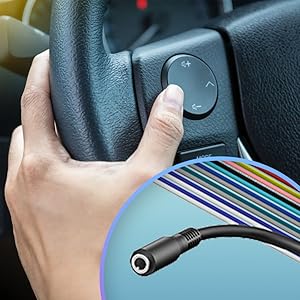
Figure 10: Diagram illustrating the connection point for steering wheel controls, enabling remote operation of the stereo.
4. Penyelenggaraan
- Pembersihan: Gunakan kain lembut dan kering untuk membersihkan skrin dan unit. Elakkan pembersih atau pelarut yang melelas.
- Kemas kini Firmware: Periksa pengeluar secara berkala website for continuous firmware upgrades to ensure optimal performance and access to new features.
Figure 11: An icon representing the availability of continuous firmware upgrades for the device, indicating ongoing support and feature enhancements.
5. Penyelesaian masalah
Jika anda menghadapi masalah, rujuk kepada masalah dan penyelesaian biasa berikut:
- Tiada Kuasa:
- Check all power connections (yellow, red, black wires) for secure contact.
- Verify the vehicle's fuse box and the stereo's inline fuse are intact.
- Tiada Audio:
- Pastikan semua wayar pembesar suara disambungkan dengan betul dan tidak litar pintas.
- Semak tahap kelantangan dan tetapan redam pada stereo.
- Verify the audio source is correctly selected (e.g., Bluetooth, AUX, Radio).
- CarPlay/Android Auto Tidak Bersambung:
- Ensure Bluetooth and Wi-Fi are enabled on your phone and the stereo.
- Forget the device on both the phone and stereo, then attempt to re-pair.
- Check for any software updates for your phone's operating system or the stereo's firmware.
- USB Charging is Slow/Insufficient:
- The USB port is primarily for data transfer and may provide standard charging output. For faster charging, use a dedicated car charger.
- Skrin Sentuh Tidak Responsif:
- Perform a soft reset by pressing the RST (reset) button, usually a small pinhole on the front panel.
- Pastikan skrin bersih dan bebas daripada serpihan.
6. Spesifikasi
| Ciri | Spesifikasi |
|---|---|
| Jenama | Corehan |
| Nombor Model | CDI-JD-AACP-A3 |
| Saiz Paparan | 7 inci |
| Jenis Paparan | Skrin Sentuh IPS HD |
| Resolusi | 1024x600 piksel |
| Teknologi Ketersambungan | Auxiliary, Bluetooth, USB, Wireless Android Auto, Wireless Carplay |
| Versi Bluetooth | 5.0 |
| Ciri Khas | Android Auto, Apple CarPlay, FM Tuner, Screen Mirroring, Voice Control |
| Jenis Pengawal | Pembantu Google, Siri |
| Mod Keluaran Audio | Stereo (Konfigurasi Saluran Bunyi Sekeliling 2.1) |
| Berat Barang | 1.68 paun |
| Dimensi Pakej | 8.23 x 6.06 x 4.37 inci |
| warna | Hitam |
7. Waranti dan Sokongan
7.1. Maklumat Waranti
This Corehan product comes with a standard manufacturer's warranty. Please refer to the warranty card included in your product packaging for specific terms, conditions, and duration. Keep your proof of purchase for warranty claims.
7.2. Sokongan Pelanggan
For technical assistance, troubleshooting beyond this manual, or warranty inquiries, please contact Corehan customer support through the following channels:
- Sokongan dalam talian: Visit the official Corehan webtapak untuk Soalan Lazim, sumber sokongan dan borang hubungan.
- Sokongan E-mel: Rujuk kepada pembungkusan produk anda atau pegawai rasmi webtapak untuk alamat e-mel perkhidmatan pelanggan.


