1. Produk Lebihview
This GT POWER AC Adapter (Model 307) is designed to provide reliable power to compatible Binary HDMI Splitters. It features a threaded locking power supply connector for secure attachment and a 48-inch heavy-duty power cable. The adapter supports a wide input voltage range of 100-240VAC, 50/60Hz, making it suitable for international use.
Key protective features include:
- OVP (Lebih Voltage Perlindungan): Safeguards connected devices from excessive voltage.
- OCP (Perlindungan Atas Semasa): Prevents damage from overcurrent conditions.
- SCP (Perlindungan Litar Pintas): Protects against short circuits, ensuring safe operation.

Image 1.1: The GT POWER AC Adapter, showing the main unit and the threaded locking DC output connector.
2. Maklumat Keselamatan
Sila baca dan fahami semua arahan keselamatan sebelum menggunakan produk ini. Kegagalan untuk mengikut arahan ini boleh mengakibatkan renjatan elektrik, kebakaran atau kerosakan pada produk atau peranti yang disambungkan.
- Use this adapter only with devices specified as compatible.
- Pastikan volum penyesuaitage and current ratings match the requirements of your device.
- Jangan dedahkan penyesuai kepada air, lembapan atau suhu yang melampau.
- Do not disassemble or attempt to repair the adapter. Refer servicing to qualified personnel.
- Jauhkan penyesuai daripada kanak-kanak.
- Cabut plag penyesuai daripada salur keluar kuasa apabila tidak digunakan untuk tempoh yang lama.
- Pastikan pengudaraan yang betul di sekeliling penyesuai semasa operasi.
3. Kandungan Pakej
Pakej termasuk:
- 1 x GT POWER AC/DC Power Adapter (Model 307) with integrated 48-inch heavy-duty power cable and threaded locking DC connector.
4. Arahan Persediaan
- Sahkan Keserasian: Ensure your Binary HDMI Splitter (e.g., B-240-HDSWTCH-5x1, B-260-444-HDR-SP12SA, B-260-444-HDR-SP14, B-260-444-HDR-SP18) requires a 12V DC power input and is compatible with a threaded locking connector.
- Connect DC Output: Locate the DC power input port on your Binary HDMI Splitter. Insert the threaded locking DC connector from the GT POWER adapter into this port. Gently twist the threaded collar clockwise until it is finger-tight to secure the connection.
- Sambungkan Input AC: Plug the AC prongs of the GT POWER adapter into a standard wall power outlet (100-240VAC, 50/60Hz).
- Hidupkan kuasa: Once both connections are secure, your Binary HDMI Splitter should receive power. Refer to your splitter's manual for specific power-on procedures.

Imej 4.1: Jarak dekat view of the threaded locking DC connector, designed for a secure power connection.
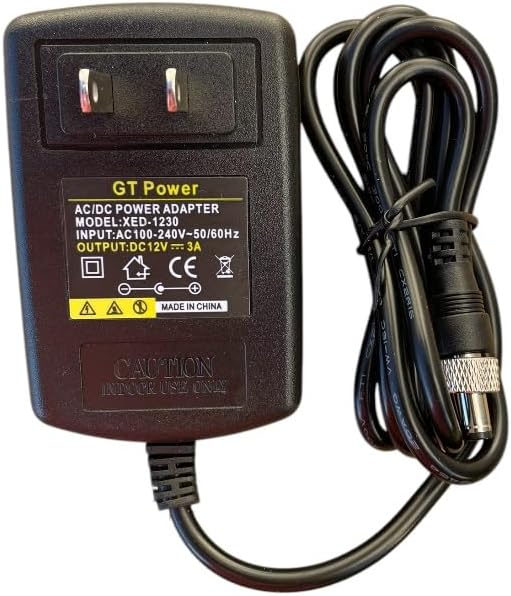
Image 4.2: The GT POWER AC Adapter with its AC prongs ready for connection to a wall outlet.
5. Arahan Operasi
The GT POWER AC Adapter operates automatically once connected to a power source and a compatible device. It provides a stable 12V DC output. There are no user-adjustable settings on the adapter itself.
- Ensure the adapter is always connected to a properly grounded power outlet.
- Avoid placing the adapter in enclosed spaces where heat can build up.
- Do not pull the cable to disconnect the adapter from the wall outlet; always grasp the adapter body.
6. Penyelenggaraan
The GT POWER AC Adapter requires minimal maintenance.
- Pembersihan: Putuskan sambungan penyesuai daripada semua sumber kuasa sebelum membersihkan. Gunakan kain lembut dan kering untuk mengelap bahagian luar. Jangan gunakan pembersih cecair atau pelarut.
- Storan: Apabila tidak digunakan, simpan penyesuai di tempat yang sejuk dan kering, jauh dari cahaya matahari langsung dan kelembapan. Elakkan daripada melilit kabel dengan ketat untuk mengelakkan kerosakan.
- Pemeriksaan: Periodically inspect the power cable and adapter housing for any signs of damage, such as cuts, fraying, or cracks. If damage is found, discontinue use and replace the adapter.
7. Penyelesaian masalah
| Masalah | Kemungkinan Punca | Penyelesaian |
|---|---|---|
| No power to device. | Penyesuai tidak dipalamkan. Loose DC connector. Kepincangan alur keluar kuasa. Penyesuai rosak. | Ensure AC adapter is fully plugged into a live wall outlet. Securely tighten the threaded DC connector to the device. Uji saluran keluar dengan peranti lain. Hentikan penggunaan dan gantikan penyesuai jika rosak. |
| Device not functioning correctly after connecting adapter. | Incorrect adapter used. Kerosakan peranti. | Verify the adapter's output voltage (12V DC) and connector type match your device's requirements. Consult your device's manual or manufacturer for further troubleshooting. |
| Adapter feels excessively hot. | Pengudaraan yang lemah. Lebihan beban. Kesalahan dalaman. | Ensure the adapter is in a well-ventilated area. Verify the connected device's power requirements do not exceed the adapter's capacity. Discontinue use immediately and replace the adapter. |
8. Spesifikasi
| Jenama | GT POWER |
| Nombor Model | 307 |
| Input Voltage | 100-240VAC, 50/60Hz |
| Keluaran Voltage | 12 Volt (DC) |
| Jenis Penyambung | Threaded Locking DC Connector |
| Panjang Kabel | 48 inci (lebih kurang 1.2 meter) |
| Ciri Khas | OVP, OCP, SCP Protection |
| Peranti Serasi | Binary B-240-HDSWTCH-5x1, B-260-444-HDR-SP12SA, B-260-444-HDR-SP14, B-260-444-HDR-SP18 HDMI Splitters |
| UPC | 800185029601 |
9. Waranti dan Sokongan
This GT POWER AC Adapter comes with a Waranti Setahun dari tarikh pembelian. Selain itu, a Jaminan Wang Dikembalikan 30 Hari ditawarkan.
For technical support, warranty claims, or further assistance, please contact GT POWER customer service through your retailer or the official GT POWER support channels.
Sila simpan bukti pembelian anda untuk tujuan waranti.


