1. Pengenalan
The NuStar 65x by 3nStar is a rugged handheld data collector designed for demanding environments. This device is powered by Android 14 and features a 6.5" sunlight-readable touchscreen, a 2D barcode scanner, and IP67 sealing for protection against water and dust. It is built to withstand drops up to 1.5 meters and operates effectively in extreme temperatures. Equipped with a powerful Octa-Core processor, 6GB RAM, and 64GB storage (expandable to 2TB), the NuStar 65x also includes 4G LTE, Wi-Fi, Bluetooth 5.2, GPS/Glonass/Beidou/Galileo, dual SIM slots, NFC, and a removable 5000mAh battery offering over 8 hours of usage. This manual provides essential information for setting up, operating, and maintaining your device.
2. Produk Lebihview
Familiarize yourself with the components and features of your NuStar 65x handheld data collector.
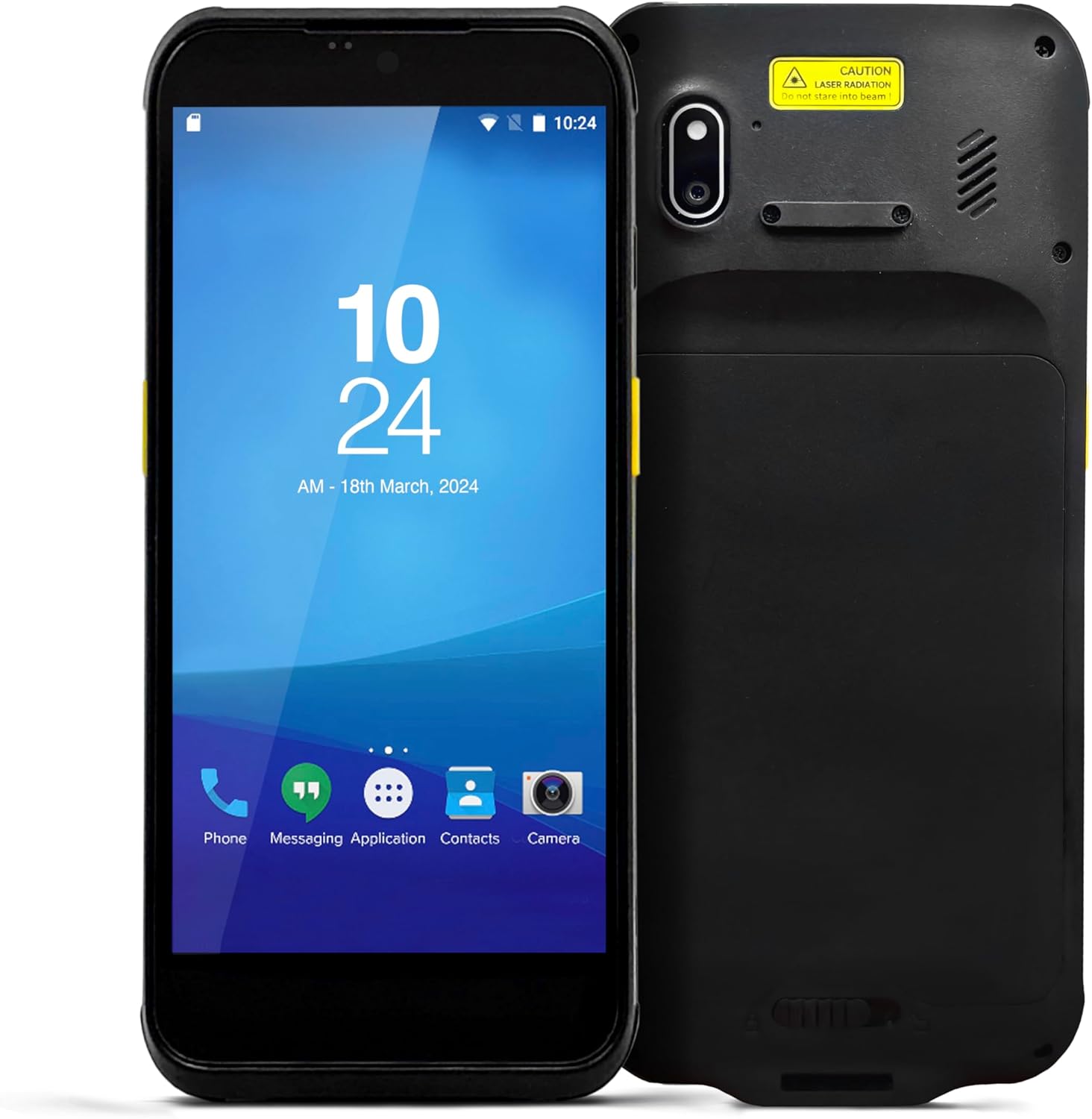
Rajah 2.1: Depan dan belakang view of the NuStar 65x device, showing the display, camera, and barcode scanner area.

Rajah 2.2: Depan view of the NuStar 65x, highlighting the 6.5-inch touchscreen display with Android interface.

Rajah 2.3: sebelah view of the NuStar 65x, showing the physical buttons for power and volume control.

Rajah 2.4: Bawah view of the NuStar 65x, illustrating the integrated 2D barcode imager.
Ciri-ciri Utama:
- OS Android 14: Seamless performance with Google-certified Android 14.
- 6.5" Sunlight-Readable Touchscreen: HD (720x1600) IPS display with glove and wet-hand mode for versatile use.
- Rugged & Durable: IP67 rated, resisting dust and water ingress, and designed to survive 1.5m drops to concrete.
- Prestasi Tinggi: Equipped with 6GB RAM, 64GB storage, and an Octa-Core MT6769 processor for efficient operation.
- Advanced Scanning & Connectivities: Integrated 2D imager for barcode scanning, along with 4G LTE, Wi-Fi, Bluetooth 5.2, GPS/Glonass/Beidou/Galileo, dual SIM slots, and NFC.
3. Persediaan
3.1 Pemasangan Bateri
The NuStar 65x uses a removable 5000mAh Lithium-Ion battery. Ensure the device is powered off before installing or removing the battery.
- Cari penutup petak bateri di bahagian belakang peranti.
- Gently slide or unlatch the cover to open the compartment.
- Align the battery with the contacts inside the compartment and insert it firmly until it clicks into place.
- Replace the battery compartment cover, ensuring it is securely latched to maintain the device's IP67 rating.

Rajah 3.1: belakang view of the NuStar 65x with the battery compartment open, showing the battery slot.
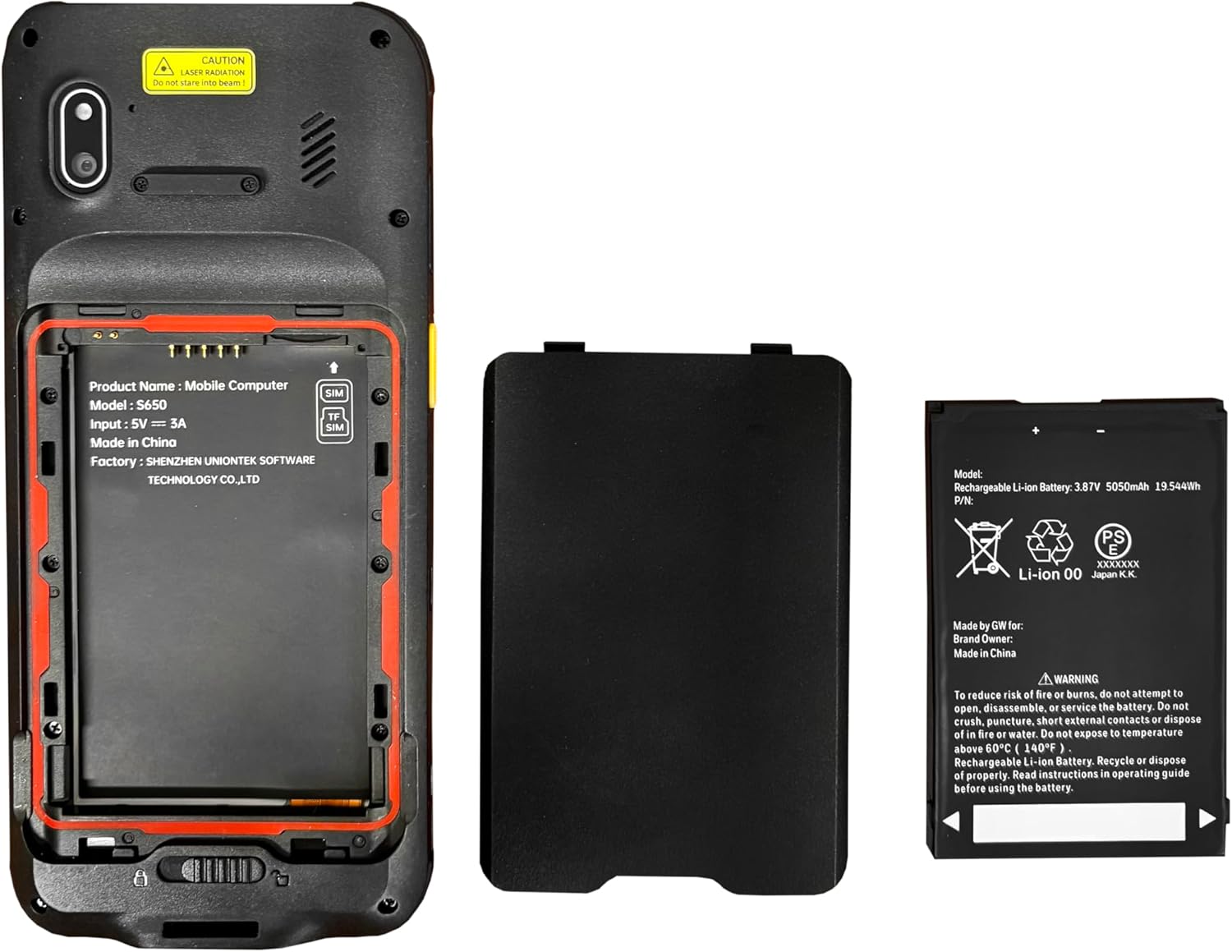
Rajah 3.2: The NuStar 65x device alongside its removable 5000mAh Lithium-Ion battery, ready for installation.
3.2 Pengecasan Awal
Before first use, fully charge the device. Connect the provided USB-C cable to the charging port on the device and the other end to a compatible power adapter. A full charge typically takes several hours.
3.3 Menghidupkan/Mematikan
- Untuk Menghidupkan: Press and hold the power button (located on the side) until the screen illuminates and the device vibrates.
- Untuk Mematikan: Press and hold the power button until the power options menu appears on the screen. Select "Power off" and confirm.
4. Arahan Operasi
4.1 Antara Muka Android 14
The NuStar 65x runs on Android 14, providing a familiar and intuitive user experience. Navigate the interface using the touchscreen, similar to a standard Android smartphone.
- Navigasi skrin sentuh: Tap to select, swipe to scroll, pinch to zoom. The screen supports glove and wet-hand operation.
- Skrin Utama: Access frequently used applications and widgets.
- Panel Pemberitahuan: Leret ke bawah dari bahagian atas skrin ke view pemberitahuan dan tetapan pantas.
4.2 Pengimbasan Kod Bar
The integrated 2D imager allows for efficient barcode and QR code scanning.
- Open the scanning application or a compatible application that requires barcode input.
- Point the scanner at the barcode, ensuring the entire code is within the scanning beam/area.
- Press the dedicated scan button (if available) or activate scanning through the software interface.
- The device will provide an audible or visual confirmation upon successful scan.
PERHATIAN: This device contains a laser radiation component for scanning. Do not stare into the beam.
4.3 Ketersambungan
The NuStar 65x supports various connectivity options:
- Wi-Fi: Sambung ke rangkaian wayarles untuk akses internet.
- 4G LTE: Insert a SIM card for cellular data and communication.
- Bluetooth 5.2: Pair with Bluetooth-enabled devices such as headsets or printers.
- GPS/Glonass/Beidou/Galileo: Utilize integrated GNSS for location services.
- NFC: Untuk aplikasi komunikasi medan dekat.
5. Penyelenggaraan
5.1 Membersihkan Peranti
Untuk mengekalkan prestasi dan penampilan yang optimum:
- Gunakan kain lembut dan tidak berbulu sedikit dampened with water or a mild, non-abrasive cleaner to wipe the exterior.
- For the touchscreen, use a screen-specific cleaner and a microfiber cloth.
- Do not use harsh chemicals, abrasive cleaners, or immerse the device in liquid.
- Ensure all ports are closed and sealed before cleaning to maintain water and dust resistance.
5.2 Penjagaan Bateri
Proper battery care extends its lifespan:
- Avoid exposing the battery to extreme temperatures (above 60°C / 140°F).
- Do not puncture, short circuit, or disassemble the battery.
- Jika peranti tidak akan digunakan untuk tempoh yang lama, cas bateri sehingga kira-kira 50% dan simpan di tempat yang sejuk dan kering.
- Buang bateri dengan betul mengikut peraturan tempatan.
6. Penyelesaian masalah
This section addresses common issues you might encounter with your NuStar 65x.
| Masalah | Kemungkinan Punca | Penyelesaian |
|---|---|---|
| Peranti tidak dihidupkan. | Low or depleted battery; battery not properly installed. | Charge the device for at least 30 minutes. Ensure the battery is correctly seated in its compartment. |
| Skrin sentuh tidak bertindak balas. | Software glitch; screen protector interference; extreme temperature. | Restart the device. Remove any thick screen protectors. Ensure device is within operating temperature range. |
| Pengimbas kod bar tidak berfungsi. | Scanning application not open; dirty scanner window; barcode damaged. | Ensure the scanning application is active. Clean the scanner window with a soft cloth. Try scanning a different, known-good barcode. |
| Isu sambungan Wi-Fi/Bluetooth. | Network issues; device settings. | Toggle Wi-Fi/Bluetooth off and on. Restart the device. Check network settings and ensure correct passwords. |
7. Spesifikasi
Detailed technical specifications for the NuStar 65x handheld data collector.
| Ciri | Perincian |
|---|---|
| Dimensi Produk | 0.57 x 3.07 x 6.69 inci |
| Berat Barang | 10.1 auns |
| ASIN | B0F5BSZMQJ |
| Nombor Model Item | DC0509-2D |
| Bateri | 1 bateri Lithium Ion diperlukan (termasuk) |
| Tarikh Mula-mula Tersedia | 15 Julai 2022 |
| Pengeluar | 3nStar |
| Peranti Serasi | Desktop, Laptop, POS systems |
| Sumber Kuasa | Dikuasakan Bateri |
| Jenama | 3nStar |
| Kadar Imbasan | 60 bingkai sesaat |
8. Waranti dan Sokongan
For warranty information, technical support, or service inquiries, please refer to the documentation provided with your purchase or visit the official 3nStar webtapak. Pelan perlindungan juga mungkin tersedia untuk perlindungan lanjutan.
For additional support, you may contact the seller directly through the platform where the product was purchased.


