pengenalan
Terima kasih kerana memilih Blackview W50PRO Smartwatch. This manual provides essential information for setting up, operating, and maintaining your device. Please read it carefully to ensure optimal performance and a safe user experience. Keep this manual for future reference.
Kandungan Pakej
Sahkan bahawa semua item terdapat dalam pakej anda:
- Hitamview W50PRO Smartwatch
- Tali Silikon
- Replacement Nylon Braided Strap
- Kabel Pengecasan Magnetik
- Manual Pengguna (dokumen ini)

Image: Package contents and product dimensions.
Produk Selesaiview
Si Hitamview W50PRO Smartwatch features a 1.45-inch HD touchscreen display, function buttons, a powerful flashlight, and a comfortable silicone strap. Its robust design is suitable for various activities.

Image: Blackview W50PRO Smartwatch with its key features labeled.
Persediaan
1. Mengecas Peranti
Before first use, fully charge your smartwatch. Connect the magnetic charging cable to the charging points on the back of the watch and plug the USB end into a power adapter (not included) or a computer's USB port. The watch will display a charging indicator.
- Pengecasan penuh biasanya mengambil masa lebih kurang 3 jam.
- The 960mAh battery provides up to 30 days of typical use and 100 days of standby time.

Image: Battery capacity and charging information.
2. Pemasangan Apl
Muat turun dan pasang "Da Fit" application on your smartphone. You can find it in the App Store (iOS) or Google Play Store (Android).
3. Device Pairing and Bluetooth Calls
To connect your smartwatch and enable Bluetooth calling:
- Download the Da Fit app from your phone's app store.
- Dayakan Bluetooth pada telefon pintar anda.
- Open the Da Fit app and add your device.
- Confirm the pairing request on your phone and watch.
- Grant necessary notification permissions within the Da Fit app for calls and messages.
- Setelah dipasangkan, anda boleh membuat dan menerima panggilan terus dari jam tangan anda.

Image: Connection and calling setup guide.
Arahan Operasi
1. Navigasi Asas
- Skrin sentuh: Leret ke kiri/kanan, ke atas/bawah untuk menavigasi menu dan mengakses ciri. Ketik untuk memilih.
- Butang Fungsi: Use the physical buttons on the side of the watch for quick access to specific functions or to return to the home screen.
2. Flashlight and Compass
The W50PRO includes a built-in flashlight and compass for outdoor activities.
- Lampu suluh: Activate the flashlight feature from the watch's menu. It offers fixed and intermittent modes for various situations.
- Kompas: Access the compass feature from the watch's menu for accurate directional guidance.
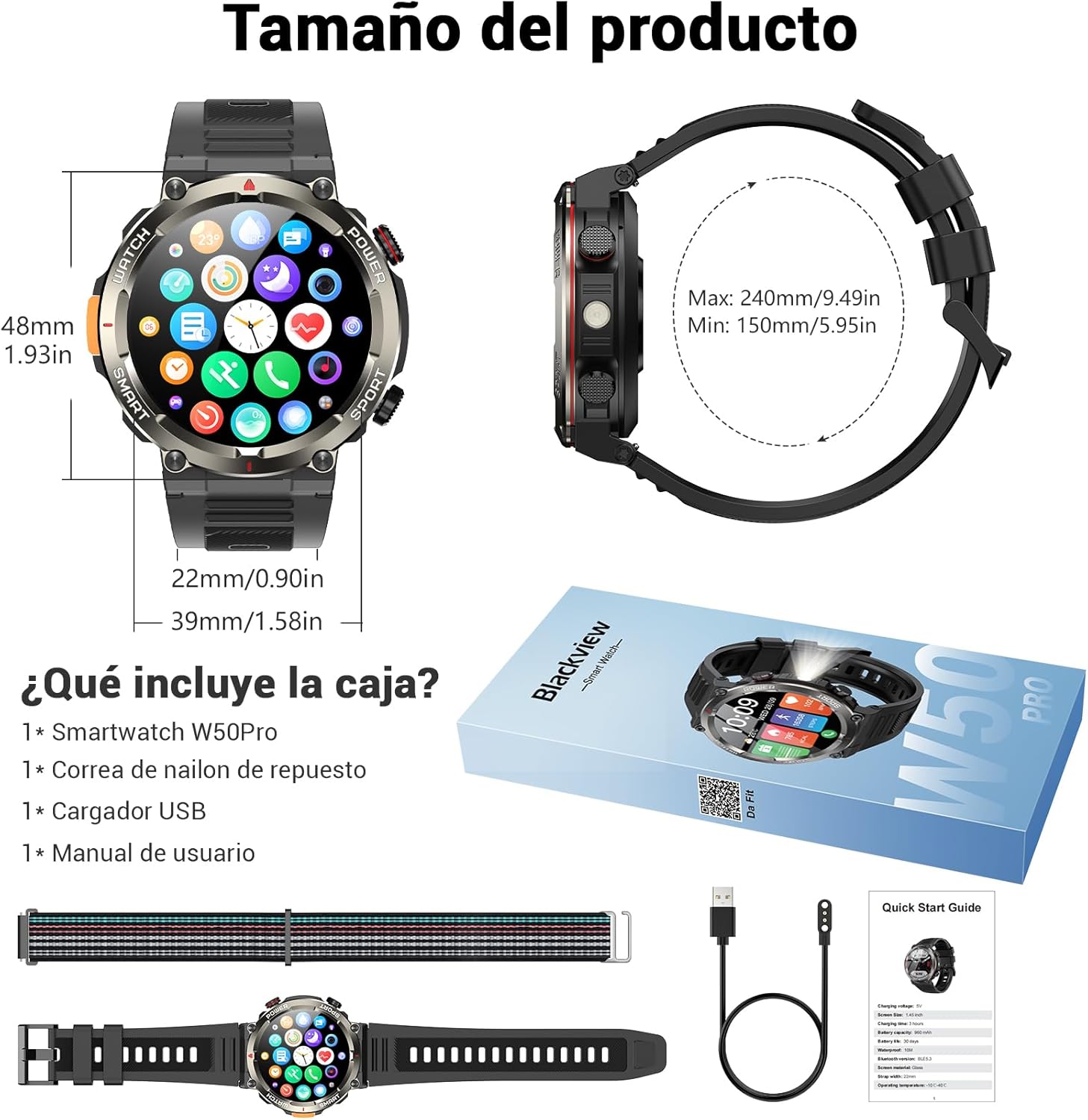
Image: Compass feature for outdoor navigation.

Image: Powerful LED flashlight in action.
3. Panggilan dan Pemberitahuan Bluetooth
Once paired with your smartphone, the W50PRO allows you to manage calls and notifications directly from your wrist.
- Make/Receive Calls: Use the integrated speaker and microphone to make or answer calls.
- Pemberitahuan: Receive real-time alerts for text messages, emails, and social media apps.
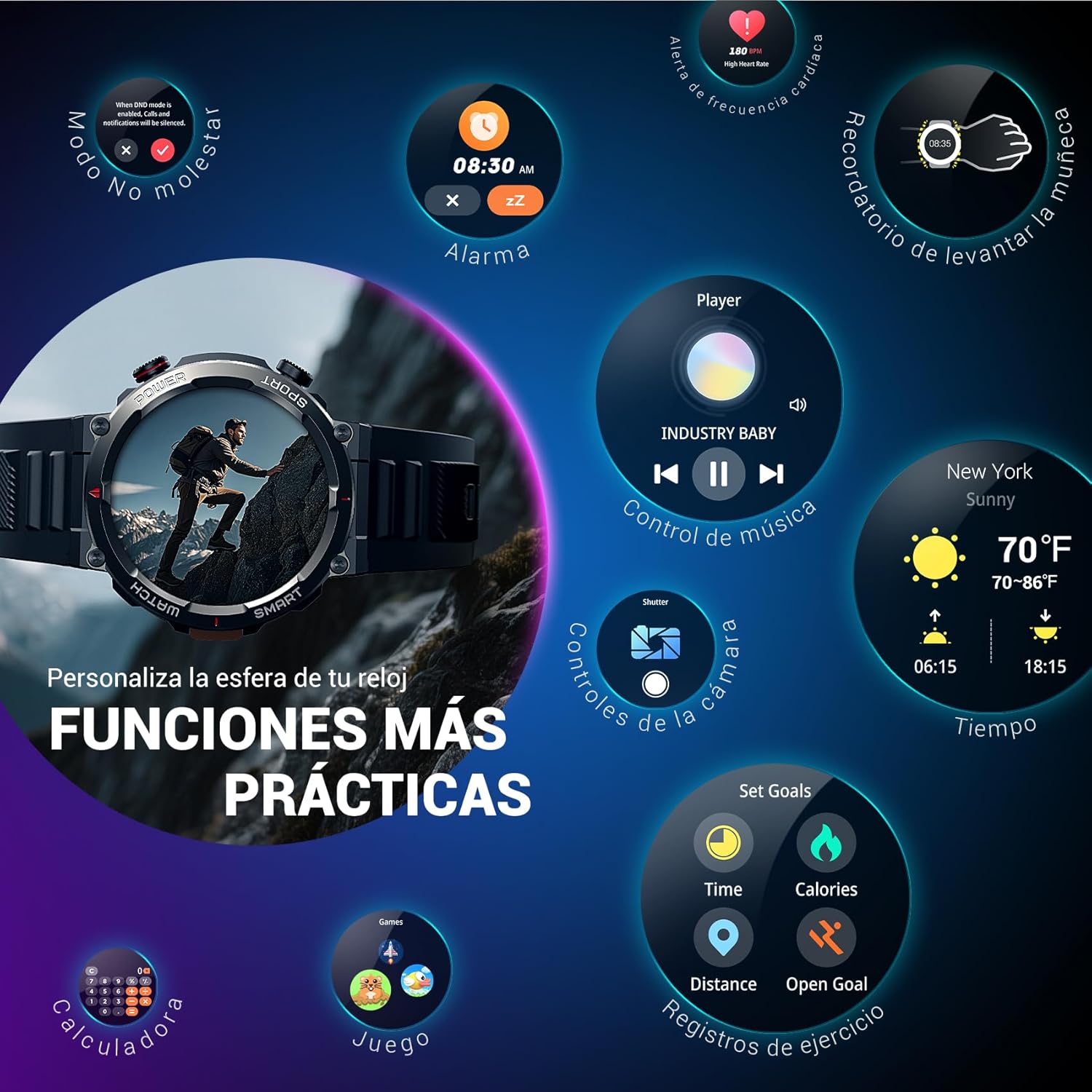
Image: Bluetooth calling and notification features.
4. Pemantauan Kesihatan
The smartwatch is equipped with high-precision sensors to monitor various health indicators:
- Kadar Jantung: Pemantauan kadar denyutan jantung masa nyata.
- Oksigen Darah (SpO2): Pantau tahap oksigen darah anda.
- Monitor Tidur: Tracks sleep quality and patterns.
- Tahap Tekanan: Memberikan gambaran tentang tahap tekanan anda.
All health data synchronizes with the Da Fit app for detailed analysis and trend tracking.

Image: Real-time health monitoring features.
5. Mod Sukan
The W50PRO offers over 100 integrated sports modes, including running, cycling, climbing, rope skipping, football, and basketball. It accurately records exercise time, distance, steps, calorie consumption, and heart rate changes, providing clear and intuitive performance data. Detailed data can be viewed dalam apl Da Fit.

Imej: Selesaiview of 100+ sports modes.
6. Menyesuaikan Muka Jam
The Da Fit app provides a wide selection of watch faces to suit various styles. You can also upload personal photos as wallpaper and adjust text color and widget layout to create a unique watch interface.

Image: Customizable watch faces.
7. Fungsi Praktikal Lain
Si Hitamview W50PRO includes additional features for daily convenience:
- Ramalan Cuaca
- Kawalan Muzik
- Kawalan Jauh Kamera
- Penggera
- Peringatan Sedentari
- Peringatan Air Minum
- Jam randik
- Pemasa Undur
- Cari Telefon
- Kalkulator
- Permainan
- Pelarasan Kecerahan

Image: Multiple smart functions available on the smartwatch.
Penyelenggaraan
1. Pembersihan
Bersihkan jam tangan pintar dan tali anda secara berkala untuk mengelakkan kerengsaan kulit dan mengekalkan fungsi peranti. Gunakan kain lembut danamp cloth to wipe the screen and casing. For the strap, follow the manufacturer's cleaning recommendations based on the material (silicone or nylon).
2. Tahan Air
Si Hitamview W50PRO Smartwatch features an IP68 water resistance rating. This means it is protected against dust ingress and can withstand immersion in water up to 1.5 meters for up to 30 minutes. It is suitable for daily use, such as hand washing or light rain. Avoid using it in hot water, saunas, or during diving, as steam and high pressure can compromise the seals.

Image: Durability features including IP68 water resistance.
3. Penjagaan Bateri
Untuk memanjangkan hayat bateri:
- Elakkan suhu yang melampau.
- Jangan biarkan bateri habis sepenuhnya dengan kerap.
- Charge the device using the provided magnetic charging cable.
Menyelesaikan masalah
Jika anda menghadapi masalah dengan Hitam andaview W50PRO Smartwatch, try the following:
- Peranti tidak dihidupkan: Pastikan jam tangan dicas sepenuhnya.
- Tidak boleh berpasangan dengan telefon: Check if Bluetooth is enabled on both devices. Restart both the watch and phone. Ensure the Da Fit app has necessary permissions.
- Data kesihatan tidak tepat: Ensure the watch is worn snugly on your wrist. Clean the sensors regularly.
- Pemberitahuan tidak diterima: Verify that notification permissions are granted in the Da Fit app and your phone's settings. Ensure the app is running in the background.
- Hayat bateri pendek: Reduce screen brightness, disable unnecessary features, and limit frequent heart rate monitoring.
For persistent issues, refer to the Da Fit app's help section or contact customer support.
Spesifikasi
| Ciri | Spesifikasi |
|---|---|
| Jenama | Hitamview |
| Model | W50PRO |
| Saiz Paparan | 1.45 inci |
| Jenis Paparan | LCD |
| Resolusi | 360 x 360 piksel |
| Kapasiti Bateri | 960 mAh |
| Hayat Bateri Biasa | Sehingga 30 hari |
| Masa Tunggu Sedia | Sehingga 100 hari |
| Masa Mengecas | lebih kurang 3 jam |
| Ketersambungan | Bluetooth |
| Input Antara Muka Manusia | Buttons, Microphone |
| Tahan Air | IP68 |
| Model Telefon yang Serasi | iOS dan Android |
| Dimensi Produk | 8.8 x 2.2 x 18.1 cm |
| Berat Produk | 136 g |
Waranti dan Sokongan
For warranty information and technical support, please refer to the documentation included with your purchase or visit the official Blackview webtapak. Simpan bukti pembelian anda untuk tuntutan waranti.


