1. Pengenalan
This manual provides detailed instructions for the setup, operation, maintenance, and troubleshooting of your NIMO Mini PC Desktop, Model DNB1. Please read this manual thoroughly before using the device to ensure proper functionality and to maximize your user experience. Keep this manual for future reference.

Image 1.1: The NIMO Mini PC Desktop DNB1, a compact and powerful computing device.
2. Apa yang ada di dalam Kotak
Carefully unpack your NIMO Mini PC Desktop and verify that all items listed below are included:
- NIMO Mini PC Desktop (DNB1)
- Manual Pengguna (dokumen ini)
- Pendakap Pemasangan
- Penyesuai Kuasa

Image 2.1: Contents of the NIMO Mini PC Desktop packaging, including the Mini PC, user manual, VESA mount, and power adapter.
3. Produk Lebihview
The NIMO Mini PC Desktop DNB1 is designed for versatility and performance. Familiarize yourself with its various ports and features.
3.1. Front and Rear Panel Interfaces

Imej 3.1: Terperinci view of the NIMO Mini PC Desktop DNB1's interfaces, including USB, HDMI, LAN, Type-C, and power ports.
- Port DC-IN: Menyambung kepada penyesuai kuasa.
- USB 3.2 Type-A Ports (x3): Untuk menyambung peranti seperti papan kekunci, tetikus dan peranti storan luaran.
- Port HDMI 2.0 (x2): For connecting to displays, supporting up to 4K resolution.
- Port LAN (Ethernet Gigabit): Untuk sambungan rangkaian berwayar.
- Port Audio: Untuk menyambungkan fon kepala atau pembesar suara luaran.
- Type-C Port (Multifunction): Supports data transfer and display output.
- Pembaca Kad SD: Untuk membaca dan menulis ke kad memori SD.
- Butang Kuasa: Untuk menghidupkan atau mematikan peranti.
- Butang Tetapkan Semula: To restart the device.
4. Panduan Persediaan
Follow these steps to set up your NIMO Mini PC Desktop.
4.1. Sambungan Awal
- Sambung Peranti: Sambungkan papan kekunci, tetikus anda dan mana-mana peranti USB lain ke port USB 3.2 yang tersedia.
- Connect Display(s): Connect your monitor(s) to the HDMI 2.0 ports. The Mini PC supports up to three 4K displays simultaneously.
- Sambungkan Rangkaian (Pilihan): For a wired internet connection, connect an Ethernet cable to the LAN port. For wireless, ensure your WiFi network is available during initial setup.
- Sambungkan Kuasa: Plug the power adapter into the DC-IN port on the Mini PC, then plug the adapter into a power outlet.
4.2. Pemasangan Pemasangan VESA
The included VESA mount allows you to attach the Mini PC to the back of a compatible monitor or to a wall, saving desk space.
- Attach the VESA bracket to the back of your monitor using the provided screws. Ensure the monitor has VESA mounting holes (typically 75x75mm or 100x100mm).
- Slide the NIMO Mini PC Desktop onto the mounted bracket until it clicks securely into place.
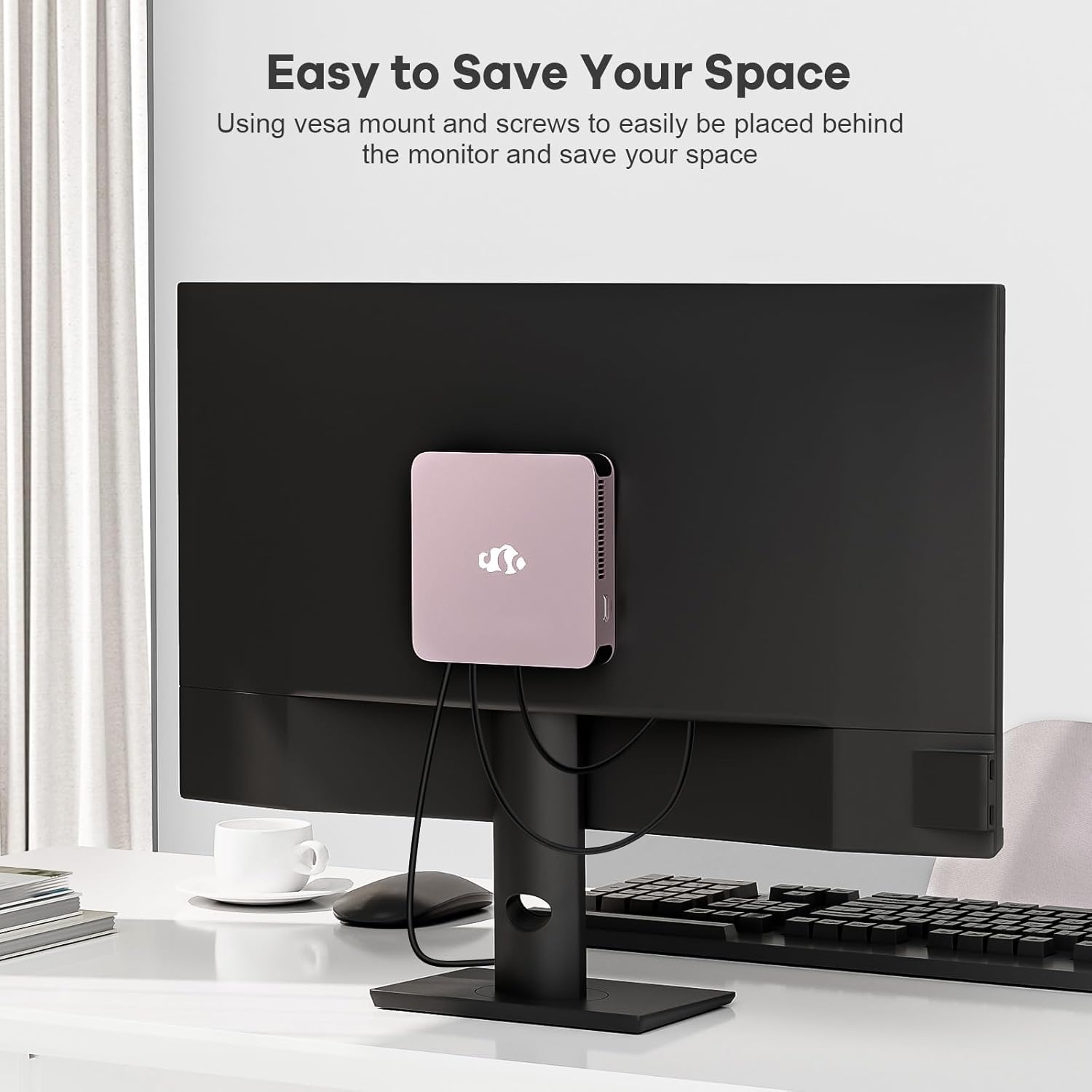
Image 4.1: The NIMO Mini PC Desktop DNB1 mounted on the back of a monitor using the VESA bracket, demonstrating space-saving placement.
5. Arahan Operasi
5.1. Menghidupkan/Mematikan
- Untuk Menghidupkan: Press the Power Button once. The power indicator light will illuminate.
- Untuk Mematikan: From the operating system, select 'Shut Down'. Alternatively, press and hold the Power Button for 5-7 seconds to force a shutdown (use only when necessary).
5.2. Initial Boot and Windows 11 Setup
Upon first power-on, the system will guide you through the Windows 11 setup process. Follow the on-screen prompts to configure language, region, network, and user accounts.
5.3. Menyambung ke Rangkaian
- Sambungan Berwayar: If an Ethernet cable is connected to the LAN port, the system will automatically detect and connect to the wired network.
- Sambungan Wayarles (WiFi 6): Access the network settings in Windows 11, select your desired WiFi network, and enter the password.
- Sambungan Bluetooth (Bluetooth 5.2): Enable Bluetooth in Windows 11 settings, search for devices, and pair with your Bluetooth peripherals.
5.4. Using Multiple Displays
The NIMO Mini PC supports up to three 4K displays. Connect your monitors to the available HDMI and Type-C ports. Windows 11 display settings allow you to extend, duplicate, or show only on one display.

Image 5.1: The NIMO Mini PC Desktop DNB1 supporting a triple monitor 4K display setup, enhancing productivity and multimedia experiences.
6. Penyelenggaraan
Penyelenggaraan yang betul memastikan jangka hayat dan prestasi optimum Mini PC anda.
- Pembersihan: Use a soft, dry cloth to clean the exterior of the Mini PC. For dust in vents, use compressed air. Do not use liquid cleaners directly on the device.
- Pengudaraan: Ensure the ventilation openings are not blocked to prevent overheating. Operate the device in a well-ventilated area.
- Kemas Kini Perisian: Regularly update your Windows operating system and drivers to maintain security and performance.
- Sandaran Data: Sandarkan data penting secara berkala ke pemacu luaran atau storan awan.
7. Penyelesaian masalah
Bahagian ini menangani isu biasa yang mungkin anda hadapi.
7.1. Tiada Kuasa
- Pastikan penyesuai kuasa disambungkan dengan selamat ke PC Mini dan salur keluar kuasa yang berfungsi.
- Sahkan alur keluar kuasa berfungsi dengan memasang peranti lain.
- Periksa penyesuai kuasa untuk sebarang kerosakan yang boleh dilihat.
7.2. Tiada Output Paparan
- Confirm that the monitor is powered on and set to the correct input source (HDMI, Type-C).
- Check that the HDMI or Type-C cable is securely connected to both the Mini PC and the monitor.
- Cuba kabel paparan atau monitor lain jika tersedia.
7.3. Tiada Sambungan Internet
- Berwayar: Ensure the Ethernet cable is properly connected and your router/modem is working.
- wayarles: Check WiFi settings in Windows 11, ensure WiFi is enabled, and you are connected to the correct network with the correct password. Restart your router/modem if necessary.
7.4. Peripherals Not Responding
- Cuba sambungkan persisian ke port USB yang berbeza.
- Pastikan pemacu peranti periferal dipasang dan dikemas kini.
- Test the peripheral on another computer if possible.
8. Spesifikasi
Detailed technical specifications for the NIMO Mini PC Desktop DNB1.
| Ciri | Spesifikasi |
|---|---|
| Model | DNB1 |
| Pemproses | Intel 12th Gen N100 (up to 3.4 GHz) |
| Teras/Benang | 4 Teras / 4 Benang |
| Grafik | Grafik Intel UHD |
| RAM | 16 GB DDR5 |
| Penyimpanan | 512 GB PCIe SSD |
| Resolusi Skrin Maks | 3840x2160 Piksel (4K) |
| Paparan Output | 2x HDMI 2.0, 1x Type-C (supports triple display) |
| Port USB | 3x USB 3.2 Type-A, 1x USB Type-C |
| Rangkaian | Gigabit Ethernet (LAN), WiFi 6 |
| Bluetooth | Bluetooth 5.2 |
| Sistem Operasi | Windows 11 |
| Berat Barang | 1.76 paun |
| Sumber Kuasa | DC |

Image 8.1: Summary of key features including Intel 12th Gen N100 processor, 4K Ultra HD support, Bluetooth 5.2, LPDDR5, WiFi 6, and PCIe SSD.
9. Waranti dan Sokongan
NIMO is committed to providing excellent customer service and product reliability.
- Polisi Pemulangan: You may request a return or exchange within 90 days of purchase.
- Sokongan Teknikal: The NIMO Mini PC Desktop comes with 2 years of technical support. If you encounter any issues, please contact our dedicated customer support team for assistance.
For support, please refer to the contact information provided with your purchase or visit the official NIMO webtapak.


