1. Pengenalan
The ILIFE W90 Smart Cordless Vacuum Cleaner is an all-in-one device designed for efficient cleaning of hard floors and pet hair. It combines vacuuming and mopping functionalities, providing a lightweight and self-cleaning solution for various floor types. This manual provides essential information for the safe and effective use of your ILIFE W90.

Image 1.1: The ILIFE W90 Smart Cordless Vacuum Cleaner, a white and grey upright unit with a transparent dirty water tank.
2. Komponen Produk
The ILIFE W90 package includes the following components:
- Main Unit (Cordless Vacuum Cleaner)
- Dok Pengecasan
- Alat Pembersihan
- Penapis Span
- Cleanser (Cleaning Solution)
- Penyesuai Kuasa
- Manual Pengguna
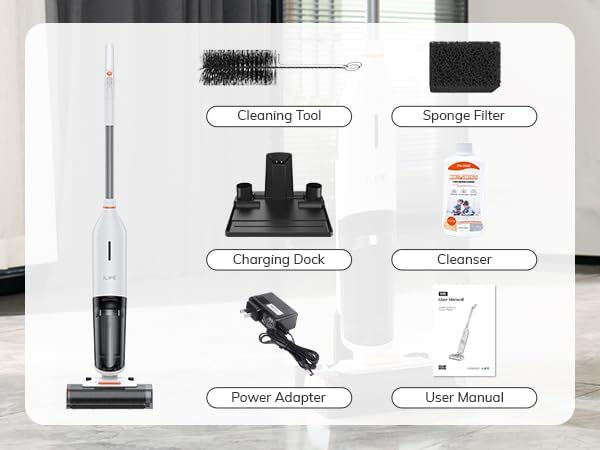
Imej 2.1: Tamatview of all components included with the ILIFE W90, laid out on a floor, showing the main unit, charging dock, cleaning tool, sponge filter, cleanser, power adapter, and user manual.
3. Persediaan
3.1 Pengecasan Awal
- Buka bungkusan semua komponen daripada pembungkusan.
- Letakkan dok pengecasan pada permukaan yang rata dan stabil berhampiran alur keluar kuasa.
- Connect the power adapter to the charging dock and plug it into the power outlet.
- Place the ILIFE W90 main unit onto the charging dock. Ensure the charging contacts align.
- Allow the unit to fully charge before first use. The battery indicator will show charging status.
3.2 Mengisi Tangki Air Bersih
- Cari tangki air bersih pada unit utama.
- Keluarkan tangki dan buka penutupnya.
- Fill the tank with clean water. For enhanced cleaning, add a small amount of the provided cleanser according to instructions. Do not overfill.
- Securely close the cap and reattach the clean water tank to the main unit.

Imej 3.1: Gambar jarak dekat view of the ILIFE W90's dual tank system, highlighting the 700ml clean water tank and the 500ml dirty water tank, designed to keep clean and dirty water separate.
4. Arahan Operasi
4.1 Powering On and Cleaning
- Pastikan tangki air bersih diisi dan tangki air kotor kosong.
- Tekan butang kuasa yang terletak pada pemegang untuk menghidupkan unit.
- The ILIFE W90 will begin vacuuming and mopping simultaneously.
- Guide the cleaner across the floor surface. The ergonomic handle design enhances user comfort.
- The unit is suitable for various hard surfaces, including hardwood, marble, laminate, and tile floors.

Image 4.1: A person operating the ILIFE W90 on a tiled kitchen floor, demonstrating its ability to clean both dry messes (pet hair, debris, footprints) and wet messes (eggs, milk, yogurt, coffee) simultaneously.

Imej 4.2: Overhed view illustrating the ILIFE W90 cleaning various floor types including hardwood, marble, laminate, and tile, highlighting its multi-surface cleaning capability.
4.2 Smart Voice & Light Reminders
The ILIFE W90 features an intelligent voice prompting system and light indicators to provide real-time status updates and error alerts. These reminders assist in operation and maintenance, indicating:
- Bateri Rendah
- Checking Roller Brush
- Clean Water Tank Shortage
- Tangki Air Kotor Kosong

Image 4.3: The ILIFE W90 standing upright, with speech bubbles indicating various voice and light reminders such as 'Low Battery Indicator', 'Checking Roller Brush', 'Clean Water Tank Shortage', and 'Empty Dirty Water Tank'.
5. Penyelenggaraan
5.1 One-Click Self-Cleaning
After each cleaning session, utilize the self-cleaning function:
- Place the ILIFE W90 back on its charging dock.
- Press the dedicated self-cleaning button.
- The unit will initiate a one-minute self-cleaning cycle to automatically clean the roller brush, ensuring it is odor-free and ready for the next use.

Image 5.1: A visual representation of the ILIFE W90's self-cleaning process, showing water flowing through the roller brush and a hand pressing the 'Self-cleaning button' on the handle.
5.2 Mengosongkan Tangki Air Kotor
It is crucial to empty the dirty water tank after each use to prevent odors and maintain hygiene. The voice prompt will alert you when the tank needs emptying.
- Keluarkan tangki air kotor dari unit utama.
- Buka tangki dengan berhati-hati dan buang air kotor.
- Bilas tangki dengan teliti dengan air bersih.
- Ensure the tank is dry before reattaching it to the unit.
5.3 Cleaning and Drying the Sponge Filter
The sponge filter should be cleaned regularly and allowed to dry completely before reinstallation to prevent unpleasant odors and maintain optimal performance.
6. Penyelesaian masalah
If you encounter issues with your ILIFE W90, refer to the following common solutions:
- Unit tidak dihidupkan: Ensure the unit is fully charged. Check if the power adapter is properly connected to the charging dock and power outlet.
- No water dispensing/poor cleaning: Check if the clean water tank is filled. Ensure the roller brush is clean and free from obstructions.
- Dirty water tank full: The voice prompt will indicate this. Empty and clean the dirty water tank as described in Section 5.2.
- Bau yang tidak menyenangkan: Ensure the dirty water tank is emptied and rinsed after each use. Clean and thoroughly dry the sponge filter and roller brush. Utilize the self-cleaning function.
- Bunyi luar biasa: Turn off the unit and check the roller brush for any tangled hair or debris. Remove any obstructions.
For persistent issues, please contact ILIFE customer support.
7. Spesifikasi
| Ciri | Spesifikasi |
|---|---|
| Jenama | iLife |
| Model | W90 |
| warna | putih |
| Dimensi Produk | 87 x 19.99 x 34.49 cm |
| Berat Barang | 7.34 kg |
| Masa jalan | Sehingga 30 minit |
| Jenis Penapis | Penapis Span |
| Tanpa wayar | ya |
| Penggunaan yang Disyorkan | Lantai Keras |
8. Waranti dan Sokongan
For warranty information, please refer to the warranty card included with your ILIFE W90 product. For technical support, replacement parts, or further assistance, please contact ILIFE customer service through their official webtapak atau butiran hubungan yang disediakan dalam dokumentasi produk anda.


