pengenalan
This user manual provides detailed instructions for the FJFJOPK 4K Video Camera Camcorder, Model HDV-3051L. Please read this manual thoroughly before operating the device to ensure proper usage and to maximize its performance. Keep this manual for future reference.

Figure 1: FJFJOPK 4K Video Camera Camcorder with included accessories like external microphone, handheld stabilizer, and remote control.
Kandungan Pakej
Sahkan bahawa semua item yang disenaraikan di bawah disertakan dalam pakej anda. Jika ada item yang hilang atau rosak, sila hubungi sokongan pelanggan.
- Kamera Video 4K
- Penstabil Tangan
- Alat Kawalan Jauh
- Mikrofon
- Tudung Lensa
- Kad SD 32GB
- 2 x Bateri Boleh Dicas Semula
- Kabel Pengecasan
- Manual Pengguna
- Beg Kamera
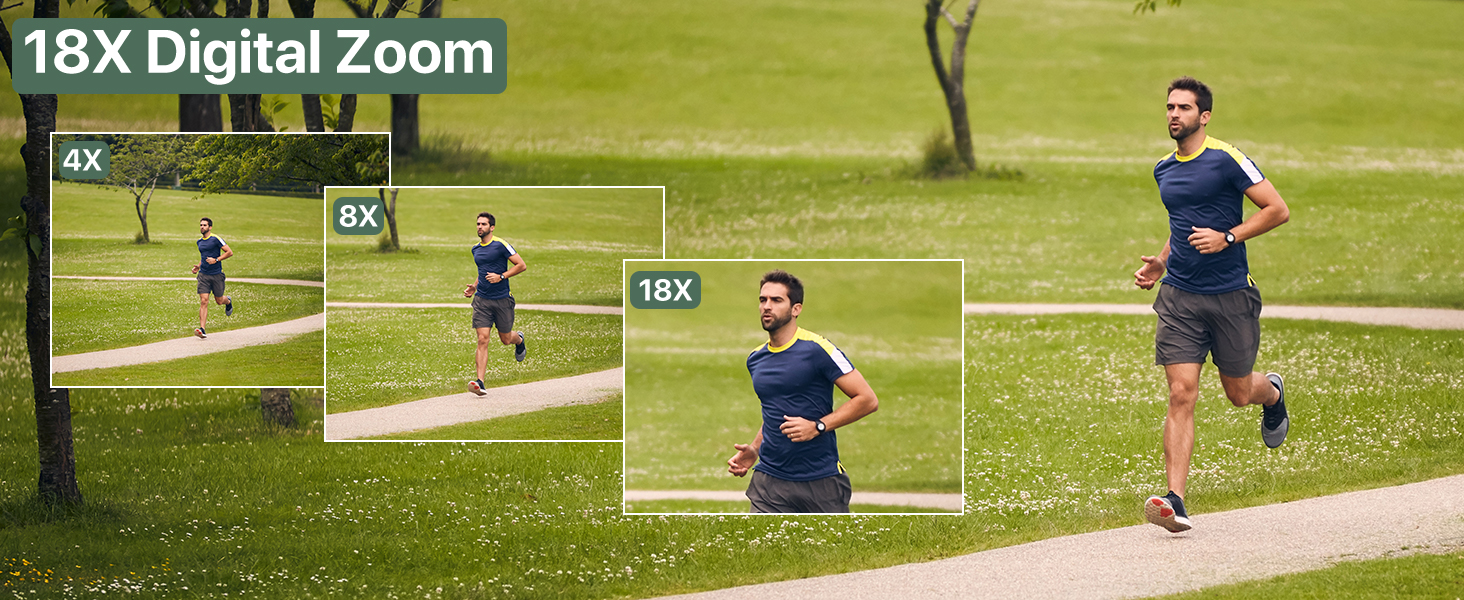
Figure 2: Visual representation of the complete packing list for the camcorder.
Panduan Persediaan
1. Pemasangan Bateri
The camcorder uses two long-lasting rechargeable batteries. Ensure batteries are fully charged before first use.
- Locate the battery compartment on the camcorder.
- Buka penutup petak bateri.
- Insert the charged batteries according to the polarity indicators inside the compartment.
- Tutup penutup petak bateri dengan selamat.

Figure 3: Proper insertion of batteries into the camcorder.
2. Pemasangan Kad SD
A 32GB SD card is included for immediate use. The camcorder supports SD cards for storing your videos and photos.
- Locate the SD card slot, typically near the battery compartment.
- Masukkan kad SD dengan kenalan logam menghadap ke bawah sehingga ia klik pada tempatnya.
- To remove, gently press the card until it pops out.
3. Memasang Aksesori
Enhance your recording experience by attaching the included accessories.
- External Stereo Microphone: Attach the microphone to the hot shoe mount on top of the camcorder. Connect the microphone cable to the designated audio input port. This ensures clear audio capture.
- Handheld Stabilizer: The anti-shake handheld stabilizer can be attached to the bottom tripod mount of the camcorder. This accessory helps in achieving smooth and steady shots, especially during movement.
- Tudung Lensa: Screw the lens hood onto the front of the camcorder's lens. The lens hood is designed to reduce glare and lens flare, improving image quality in bright outdoor conditions.

Figure 4: Handheld stabilizer attached for improved stability.

Figure 5: External microphone for enhanced audio recording.

Figure 6: The lens hood reduces glare for clearer outdoor shots.
Arahan Operasi
1. Menghidupkan/Mematikan
To power on the camcorder, open the LCD screen. To power off, close the LCD screen or press and hold the Power button.
2. Using the 3.0-inch Touch Screen
The camcorder features a 3.0-inch IPS touch screen that is 270° rotatable, allowing for versatile viewing angles, including selfie-angle recording.
- Navigasi: Tap on-screen icons to navigate menus and settings.
- Putaran: Gently rotate the screen to your desired angle for comfortable viewing or self-recording.

Figure 7: The 270° rotatable touch screen provides flexible viewing and recording options.
3. Merakam Video dan Mengambil Foto
The camcorder supports 4K Ultra HD video recording and 64MP still image capture.
- Rakaman Video: Press the Record button to start and stop video recording. The camcorder captures every detail with stunning clarity.
- Tangkapan Foto: Switch to photo mode and press the Shutter button to take 64MP high-definition photos.
- Zum Digital 18X: Use the zoom controls to magnify your subject up to 18 times. This feature allows for clear footage even from a distance.
- Penglihatan Malam IR: Activate IR Night Vision mode for clear recording in low-light conditions or complete darkness.

Figure 8: Experience superior image and video quality with 4K UHD and 64MP resolution.

Figure 9: The 18X digital zoom allows for detailed capture of distant subjects.

Figure 10: IR Night Vision provides clear visibility in low-light or dark environments.
4. Ciri Lanjutan
- Anti gegaran: The built-in anti-shake function, complemented by the handheld stabilizer, ensures smooth and stable footage even during dynamic movements.
- Fotografi Selang Masa: Capture stunning time-lapse videos by setting the desired interval in the camera settings.
- Pengesanan Muka: The camcorder can detect faces in the frame, optimizing focus and exposure for portraits and group shots.
- One-Click Live Streaming: Connect the camcorder to your computer via USB to use it as a webcam for live streaming.
- Merakam Semasa Mengecas: The camcorder supports recording while connected to a power source, ideal for extended shooting sessions.
- Kawalan Jauh Wayarles: Use the included remote control for convenient wireless operation, perfect for self-recording or group shots.

Figure 11: Explore various shooting modes including anti-shake, slow motion, and time-lapse.

Figure 12: Continuous recording is possible while the camcorder is charging.
Penyelenggaraan
- Pembersihan: Gunakan kain lembut dan kering untuk membersihkan badan kamera. Untuk kanta, gunakan kain dan larutan pembersih kanta khusus. Elakkan bahan yang melelas.
- Storan: Store the camcorder in a cool, dry place away from direct sunlight and extreme temperatures. Remove batteries if storing for extended periods.
- Penjagaan Bateri: Fully charge batteries before storage and recharge them every few months to maintain their lifespan.
Menyelesaikan masalah
If you encounter issues with your camcorder, refer to the following common solutions:
| Masalah | Kemungkinan Punca | Penyelesaian |
|---|---|---|
| Kamera tidak dihidupkan. | Low or uncharged battery; incorrectly inserted battery. | Charge batteries fully. Ensure batteries are inserted correctly. |
| Kualiti imej/video yang lemah. | Dirty lens; insufficient lighting; incorrect settings. | Clean the lens. Use IR Night Vision in low light. Adjust exposure settings. |
| Ralat kad SD. | SD card full; incorrectly inserted; incompatible card. | Padam files or use a new SD card. Reinsert card correctly. Ensure card is compatible (up to 32GB). |
| Tiada rakaman audio. | External microphone not connected properly or turned off. | Check microphone connection and ensure it is powered on if applicable. |
Spesifikasi
| Ciri | Perincian |
|---|---|
| Jenama | FJFJOPK |
| Nombor Model | HDV-3051L |
| Resolusi Tangkapan Video | 4K |
| Teknologi Penderia Foto | CMOS |
| Panjang Fokus Maksimum | 64 Milimeter |
| Apertur Maksimum | 7.36 f |
| Jenis Memori Denyar | SD (32GB included) |
| Format Tangkapan Video | AVI |
| Saiz Skrin | 3 Inches (270° Rotatable IPS Touch Screen) |
| Ciri Khas | Anti-Shake, Image Stabilization, IR Night Vision, 18X Digital Zoom, External Microphone Support, Webcam Function, Time-Lapse, Face Detection, Recording While Charging, Wireless Remote Control |
| Berat Barang | 2.05 paun |
| Dimensi Pakej | 7.48 x 5.87 x 4.21 inci |
Waranti dan Sokongan
For warranty information and customer support, please refer to the warranty card included in your package or contact FJFJOPK customer service directly. Optional protection plans are available for purchase to extend coverage beyond the standard manufacturer's warranty.
- Pelan Perlindungan 2 Tahun: Tersedia untuk perlindungan lanjutan.
- Pelan Perlindungan 3 Tahun: Tersedia untuk perlindungan lanjutan.
- Perlindungan Lengkap: Pelan bulanan yang meliputi pembelian lepas dan akan datang yang layak.


