1. Pengenalan
The iOCHOW C8 Dehumidifier is a high-efficiency, compressor-type unit designed for effective moisture removal in various environments. It features a powerful dehumidification capacity, versatile drainage options, and smart controls to maintain optimal humidity levels in your home or commercial space.
This manual provides essential information for the safe and efficient operation, maintenance, and troubleshooting of your iOCHOW C8 Dehumidifier. Please read it thoroughly before using the appliance and retain it for future reference.
2. Maklumat Keselamatan
Untuk memastikan operasi yang selamat, sentiasa patuhi garis panduan berikut:
- Pastikan unit diletakkan di atas permukaan yang stabil dan rata untuk mengelakkannya daripada terbalik.
- Maintain adequate clearance around the unit for proper airflow (at least 20 cm from walls or furniture).
- Jangan menyekat masuk atau keluar udara.
- Gunakan hanya bekalan kuasa yang dinyatakan voltage.
- Jangan kendalikan unit dengan kord kuasa atau palam yang rosak.
- Jauhkan kanak-kanak dan haiwan peliharaan dari perkakas semasa operasi.
- Cabut plag unit sebelum membersihkan atau melakukan sebarang penyelenggaraan.
- Jangan rendam unit ke dalam air atau cecair lain.
- Kosongkan tangki air dengan kerap untuk mengelakkan limpahan.
3. Komponen Produk
The iOCHOW C8 Dehumidifier package includes the following components:
- iOCHOW C8 Dehumidifier Unit
- 8L Water Tank (integrated)
- Hos Saliran
- Manual Pengguna (dokumen ini)

Gambar 3.1: Lebihview of the iOCHOW C8 Dehumidifier unit.
4. Persediaan
Ikuti langkah-langkah ini untuk menyediakan penyahlembap anda:
- Membongkar: Carefully remove the dehumidifier and all accessories from the packaging. Retain packaging for future transport or storage.
- penempatan: Place the unit on a firm, level surface in the desired location. Ensure there is at least 20 cm of space around the unit for optimal air circulation. The unit is equipped with casters for easy movement.
- Sambungan Kuasa: Palamkan kord kuasa ke salur keluar elektrik yang dibumikan. Pastikan voltage sepadan dengan spesifikasi unit.

Figure 4.1: The iOCHOW C8 Dehumidifier is suitable for various environments including homes, basements, and warehouses.
5. Arahan Operasi
The iOCHOW C8 Dehumidifier features an intuitive control panel for easy operation.
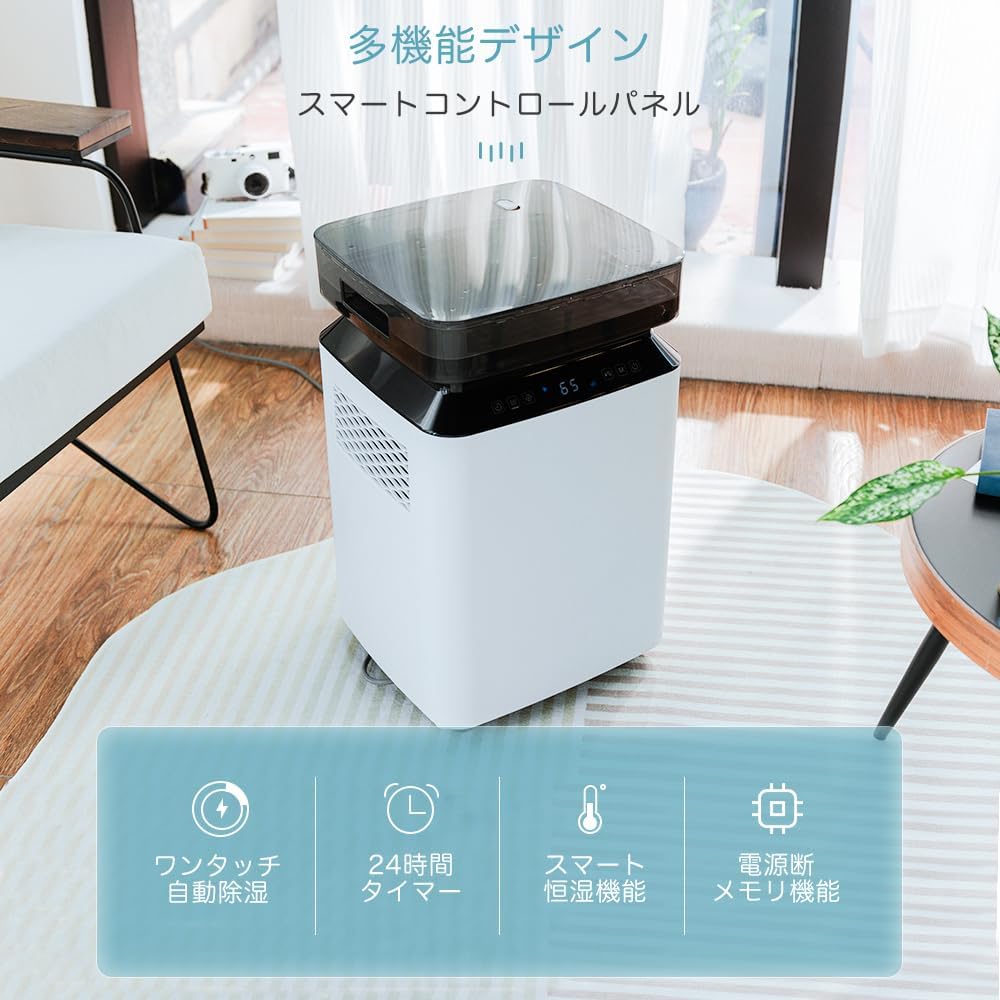
Figure 5.1: The digital control panel allows for easy adjustment of settings.
5.1 Panel Kawalan Selesaiview
Panel kawalan biasanya termasuk:
- Butang Kuasa: Untuk menghidupkan atau mematikan unit.
- Butang Mod: To select between Automatic Dehumidification and Continuous Dehumidification modes.
- Butang Tetapan Kelembapan: To adjust the desired humidity level (30-80% in 5% increments).
- Butang Pemasa: To set the 24-hour timer for delayed start or automatic shut-off.
- Internal Drying Button: To activate the internal drying function.
- Paparan Digital: Menunjukkan kelembapan semasa, menetapkan kelembapan atau tetapan pemasa.
5.2 Operasi Asas
- Hidupkan kuasa: Press the Power button to turn on the unit. The digital display will show the current room humidity.
- Pilih Mod: Tekan butang Mod untuk mengitar melalui mod yang tersedia.
- Penyahlembapan Automatik: The unit will operate to maintain the set humidity level.
- Penyahlembapan Berterusan: The unit will run continuously regardless of humidity, ideal for rapid drying.
- Tetapkan Kelembapan: In Automatic mode, use the humidity setting buttons to select your desired humidity level. The unit will automatically turn on and off to maintain this level.
- Tetapkan Pemasa: Press the Timer button to set an operating duration (e.g., 2 hours, 4 hours). The unit will turn off automatically after the set time.
Video 5.1: A short clip demonstrating the digital display of the iOCHOW C8 Dehumidifier, showing the current humidity level and fan icon.
6. Drainage Methods
The iOCHOW C8 Dehumidifier offers three convenient drainage options:
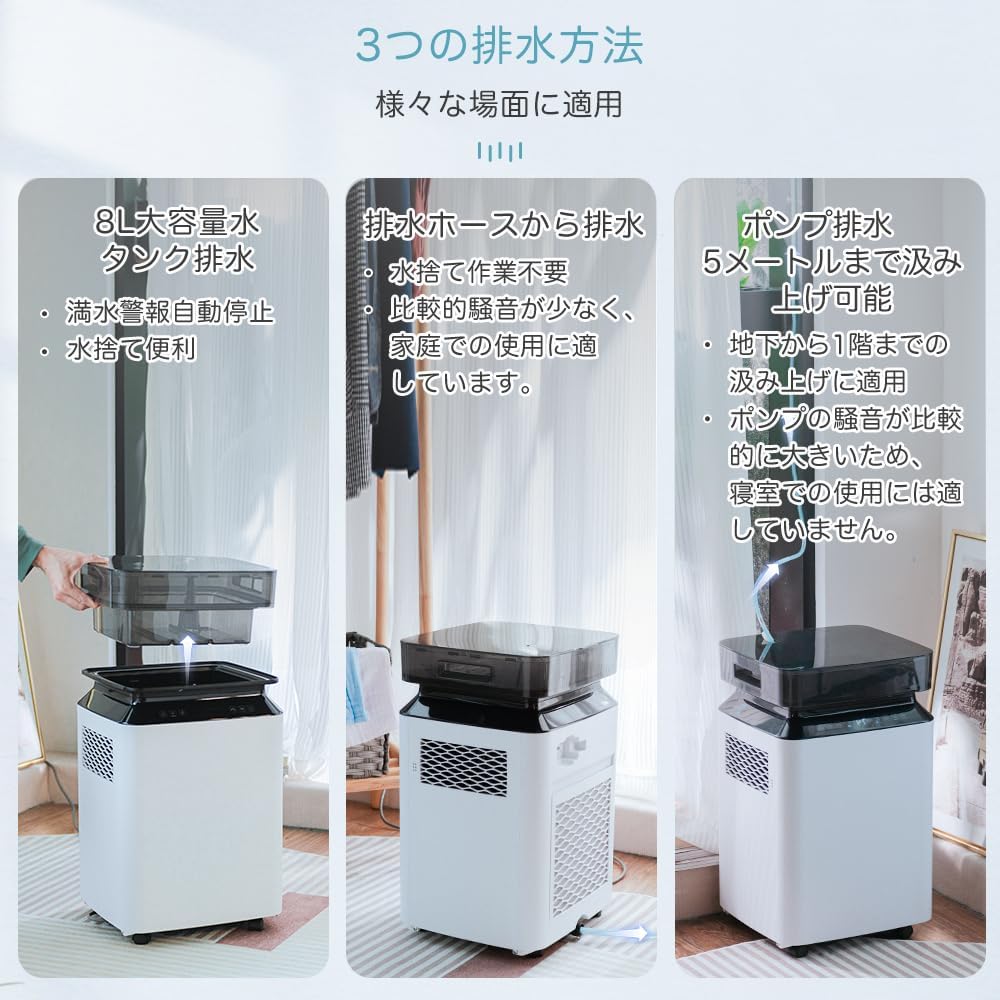
Figure 6.1: Illustration of the three drainage methods: 8L tank, continuous hose, and pump drainage.
6.1 8L Water Tank Drainage
The unit is equipped with an 8-liter water tank. When the tank is full, the dehumidifier will automatically shut off and an indicator light will illuminate. To empty the tank:
- Tarik keluar tangki air dari unit dengan berhati-hati.
- Tuangkan air yang terkumpul.
- Luncurkan tangki kosong kembali ke dalam unit sehingga ia berbunyi klik pada tempatnya. Unit akan menyambung semula operasi.
6.2 Continuous Hose Drainage
For uninterrupted operation, you can connect the included drainage hose for continuous drainage. This eliminates the need to manually empty the water tank.
- Locate the continuous drainage outlet on the back of the unit.
- Tanggalkan penyumbat getah (jika ada).
- Sambungkan satu hujung hos saliran ke saluran keluar.
- Direct the other end of the hose to a floor drain or a large container, ensuring the hose is sloped downwards to allow water to flow freely by gravity.
6.3 Pump Drainage
The iOCHOW C8 features an integrated pump for drainage, allowing water to be discharged upwards up to 5 meters. This is particularly useful for basement installations where a floor drain is not available or is higher than the unit.
- Connect the drainage hose to the pump drainage outlet (refer to the diagram in Figure 6.1).
- Ensure the hose is securely connected and directed to a suitable drainage point.
- Activate the pump drainage function via the control panel (if a dedicated button exists, otherwise it may activate automatically when the hose is connected and the tank is full).
Note on Pump Noise: When using pump drainage, the pump will operate intermittently for approximately 1 minute each time it activates to discharge water. This operation will produce a louder noise compared to normal dehumidification. This is a normal characteristic of compressor-type dehumidifiers with pump functionality. For quiet environments like bedrooms, it is recommended to use tank drainage or continuous gravity drainage instead of pump drainage.
7. Penyelenggaraan
Penyelenggaraan tetap memastikan prestasi optimum dan jangka hayat dehumidifier anda.
7.1 Pembersihan Penapis
The air filter should be cleaned regularly (e.g., every two weeks or as needed) to prevent dust buildup and maintain efficiency.
- Matikan: Cabut plag penyahlembap daripada salur keluar kuasa.
- Keluarkan Penapis: Locate the air filter cover (usually on the back or side of the unit) and remove it. Carefully pull out the filter.
- Penapis Bersih: Wash the filter with lukewarm water and a mild detergent. Rinse thoroughly and allow it to air dry completely before reinstallation. Do not use a brush or abrasive cleaners.
- Pasang semula Penapis: Once dry, place the filter back into its slot and secure the cover.
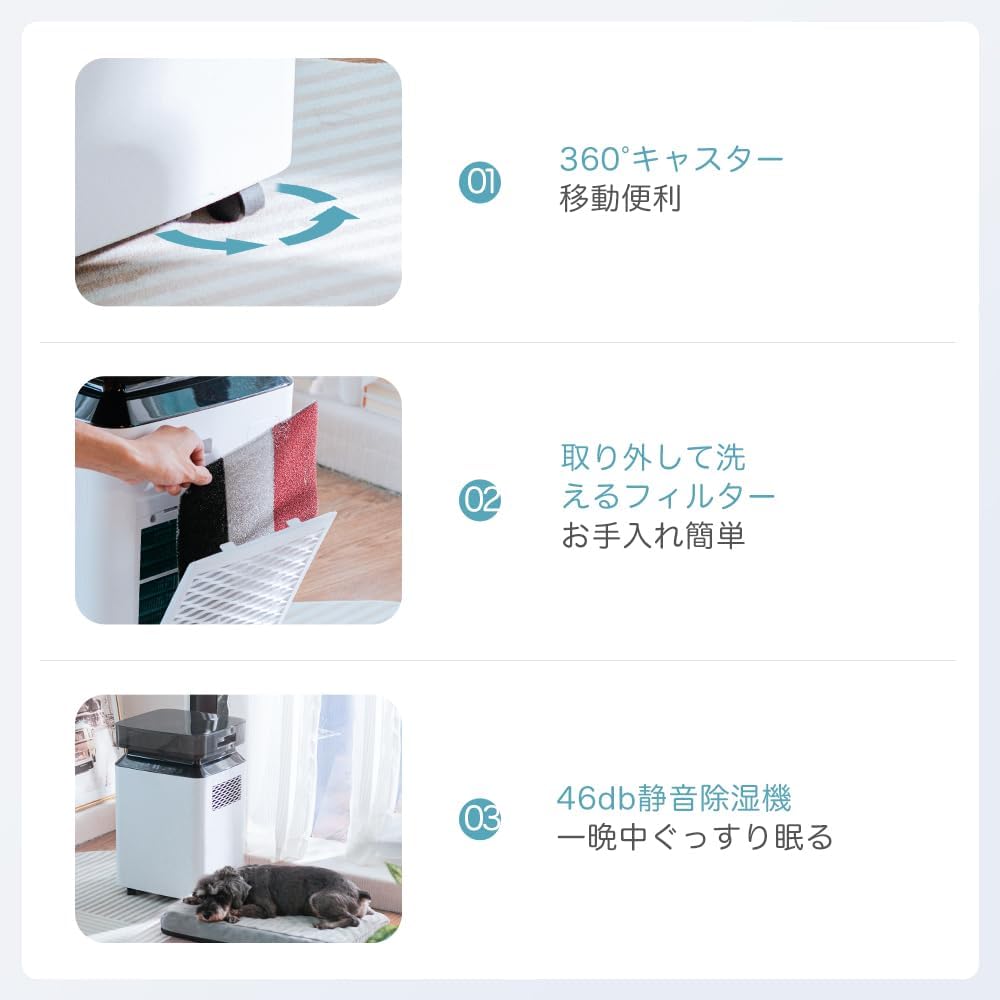
Figure 7.1: The removable and washable filter ensures easy maintenance.
7.2 Pembersihan Tangki Air
Clean the water tank periodically to prevent mold and mildew growth.
- Keluarkan tangki air seperti yang diterangkan dalam Bahagian 6.1.
- Basuh tangki dengan air suam dan detergen ringan. Bilas sehingga bersih.
- Dry the tank completely before placing it back into the unit.
7.3 Fungsi Pengeringan Dalaman
The unit features an internal drying function to remove moisture from its internal components, preventing mold and odors. It is recommended to use this function before storing the unit for an extended period.
- Refer to the control panel section for activating the internal drying function.
- The unit will run its fan for a set period to dry out the interior.
8. Spesifikasi
Key technical specifications for the iOCHOW C8 Dehumidifier:
| Ciri | Spesifikasi |
|---|---|
| Jenama | iOCHOW |
| Nombor Model | C8 |
| Dehumidification Capacity (30°C/80%RH) | 40 Liter/Hari |
| Dehumidification Capacity (27°C/60%RH) | 27 Liter/Hari |
| Kapasiti Tangki Air | 8 Liter |
| Penggunaan Kuasa | 320 W |
| Aliran udara | 360 m³/Jam |
| Dimensi (D x W x H) | 31 x 33 x 54.2 cm |
| Berat Produk | 14.6 kg |
| Kawasan Penggunaan yang Disyorkan | Up to 150 m² (approx. 90 tatami mats concrete / 40 tatami mats wood) |
| Tahap Kebisingan | Approx. 46 dB (normal operation) |
| Ciri Khas | Timer, Removable Tank, Digital Display, Built-in Pump, Continuous Drainage |

Figure 8.1: Product dimensions of the iOCHOW C8 Dehumidifier.
9. Penyelesaian masalah
Jika anda menghadapi masalah dengan penyahlembap anda, rujuk masalah dan penyelesaian biasa berikut:
| Masalah | Kemungkinan Punca | Penyelesaian |
|---|---|---|
| Unit tidak dihidupkan | No power, power cord loose, water tank full or incorrectly inserted. | Periksa sambungan kuasa. Pastikan tangki air kosong dan dipasang dengan betul. |
| No dehumidification or low efficiency | Air filter clogged, room temperature too low, humidity setting too high, unit too close to walls. | Clean air filter (Section 7.1). Ensure room temperature is above 5°C. Lower humidity setting. Ensure adequate clearance around the unit. |
| Bunyi luar biasa semasa operasi | Unit not on a level surface, pump drainage active, internal components vibrating. | Ensure unit is on a level surface. If pump drainage is active, this noise is normal (Section 6.3). If noise persists and is abnormal, contact support. |
| Kebocoran air dari unit | Water tank not properly inserted, drainage hose loose or blocked. | Reinsert water tank correctly. Check drainage hose for secure connection and obstructions. |
Jika masalah berterusan selepas mencuba penyelesaian ini, sila hubungi sokongan pelanggan.
10. Waranti dan Sokongan
Your iOCHOW C8 Dehumidifier comes with a standard manufacturer's warranty. Please refer to the warranty card included in your packaging for specific terms and conditions, including the warranty period and coverage details.
For technical support, service, or warranty claims, please contact iOCHOW customer service through the contact information provided on your warranty card or the official iOCHOW website. When contacting support, please have your model number (C8) and purchase date available.


