pengenalan
This manual provides detailed instructions for the assembly, operation, and maintenance of your Merax Modern Upholstered Platform Bed Frame. Please read this manual thoroughly before beginning assembly or use to ensure proper setup and to maximize the lifespan of your product. Keep this manual for future reference.
Maklumat Keselamatan
- Awas: This is a partial assembly product. Be cautious of sharp edges during assembly and use.
- Ensure all parts are securely fastened before use. Regularly check and tighten all connections.
- Jangan melebihi kapasiti berat 250 lbs.
- Jauhkan bahagian kecil daripada kanak-kanak semasa pemasangan untuk mengelakkan bahaya tercekik.
- Assemble the bed on a soft, clean surface to prevent damage to the product or your floor.
Kandungan Pakej
Verify that all components listed below are present before beginning assembly. If any parts are missing or damaged, please contact customer service.
- Twin Bed Frame Components
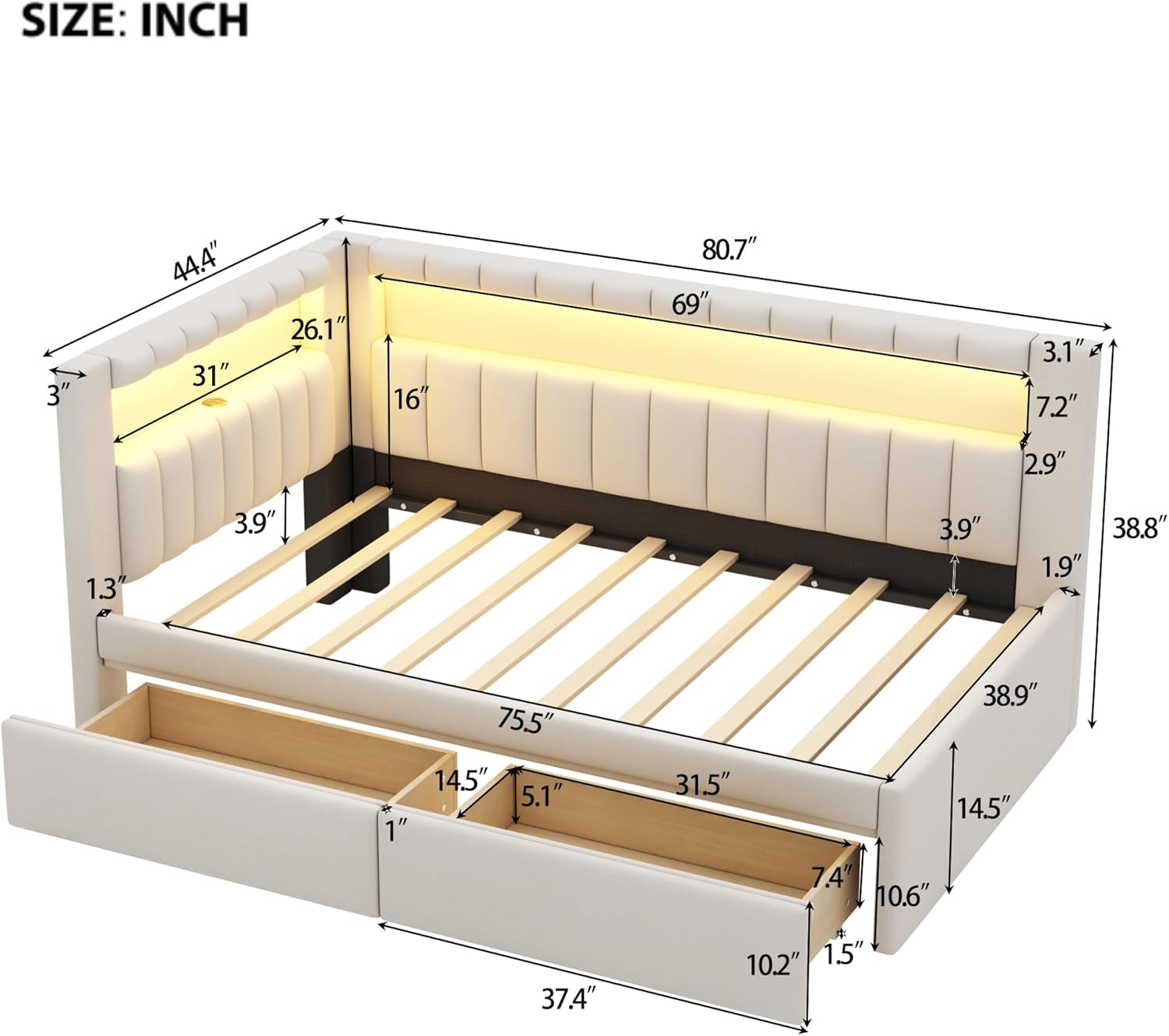
- Headboard with integrated USB Ports and LED Belt
- 2 Laci Penyimpanan
- All necessary Hardware (screws, bolts, washers, etc.)
- Alat Pemasangan (Sepana Allen, dll.)
- Panduan Arahan
Arahan Persediaan dan Pemasangan
Assembly is required for this product. It is recommended that two adults assemble the bed frame. Please follow the included step-by-step instruction guide carefully.
- Buka bungkus dan Kenalpasti Bahagian: Carefully remove all components from the packaging. Lay them out on a clean, soft surface. Refer to the parts list in your separate instruction guide to identify each piece.
- Pasang Kerangka Utama: Begin by connecting the side rails to the headboard and footboard using the provided hardware. Do not fully tighten screws until the entire frame is assembled.
- Pasang Bilah Sokongan: Place the wooden slats across the bed frame. Secure them according to the instructions to ensure proper mattress support.
- Attach Headboard Features: Connect any wiring for the USB ports and LED belt as directed in the separate guide. Ensure all connections are secure.
- Pasang dan Masukkan Laci: Assemble the two storage drawers following the specific instructions for drawer construction. Once assembled, slide them into their designated spaces beneath the bed frame.
- Pengetatan Akhir: Setelah semua komponen berada di tempatnya dan sejajar, ketatkan sepenuhnya semua skru dan bolt.


Arahan Operasi
Port Pengecasan USB
Your Merax bed frame is equipped with built-in USB ports located on the top of the headboard. To use them, simply plug your device's USB charging cable into the port. Ensure the bed frame is properly connected to a power source (if applicable, via an adapter or wall plug as per assembly instructions) for the USB ports to function.
Laci Storan
The two spacious drawers beneath the bed provide convenient storage. To access, gently pull the drawer handles. To close, push the drawers back into the frame until they are flush. Avoid overloading the drawers to ensure smooth operation and prevent damage.
Pencahayaan LED
The integrated LED belt in the headboard offers ambient lighting. Operation of the LED lights typically involves a remote control or a discreet switch located on the headboard or power cable. Refer to the specific LED light instruction sheet included in your package for details on changing colors, brightness, and modes.

Penyelenggaraan
- Pembersihan: For general cleaning, wipe the upholstered surfaces with a dry cloth. For minor spills or stains, use a damp cloth and mild soap, then wipe dry immediately. Avoid harsh chemicals or abrasive cleaners.
- Pemeriksaan perkakasan: Periodically inspect all bolts and screws to ensure they remain tight. Re-tighten as necessary to maintain stability and safety.
- Penjagaan Laci: Keep the drawer tracks clean and free of debris to ensure smooth operation.
Menyelesaikan masalah
- Goyangan Katil: Ensure all assembly hardware is fully tightened. Check that the bed is placed on a level surface.
- Port USB Tidak Berfungsi: Verify that the bed frame's power connection (if any) is securely plugged into a functional wall outlet. Check the USB cable for damage.
- Lampu LED Tidak Berfungsi: Confirm the power connection for the LED strip. If using a remote, check the battery. Refer to the LED light specific instructions for further troubleshooting.
- Drawers Stick or Don't Close: Check for obstructions in the drawer tracks. Ensure the drawers were assembled correctly and are aligned properly within the frame.
Spesifikasi
| Ciri | Perincian |
|---|---|
| Nombor Model | HA1912 |
| Saiz | Twin (Fixed) |
| warna | White/Drawers |
| Dimensi Produk | 80.7"L x 44"W x 38.8"H |
| bahan | Engineered Wood, Linen, Wood |
| Bahan Kepala Katil | Linen |
| Kapasiti Berat | 250 paun |
| Pilihan Storan | 2 Laci |
| Ciri Khas | Floor Bed, Modern, No Box Spring Needed, USB Port, Upholstered |
| Perhimpunan Diperlukan | ya |
| Berat Barang | 70 paun |
| UPC | 199193440691 |
Waranti dan Sokongan
Polisi Pemulangan
This product is eligible for a 90-day return for refund or replacement. Please refer to your purchase documentation for specific terms and conditions.
Perkhidmatan Pelanggan
If you have any questions, require assistance with assembly, or encounter any issues with your Merax bed frame, please do not hesitate to contact our customer service representatives. Contact information can typically be found on your purchase receipt or the retailer's webtapak.


