pengenalan
The Portronics Iron Beats IV is a powerful 250W party speaker designed to deliver high-quality audio for various events. Featuring dual 6-inch subwoofers, dynamic RGB LED lights, and a wireless karaoke microphone, it offers a comprehensive entertainment experience. This manual provides detailed instructions for setting up, operating, and maintaining your speaker to ensure optimal performance.
Apa yang ada dalam Kotak
Buka bungkusan kotak dengan berhati-hati dan pastikan semua item ada:
- Party Speaker (1 unit)
- Kabel Pengecas (1 unit)
- Wireless Microphone (1 unit)
- Alat Kawalan Jauh (1 unit)
- Penyesuai AC (1 unit)
- Documentation (1 unit)
Produk Selesaiview
Biasakan diri anda dengan komponen dan kawalan pembesar suara.
Panel Depan Pembesar Suara
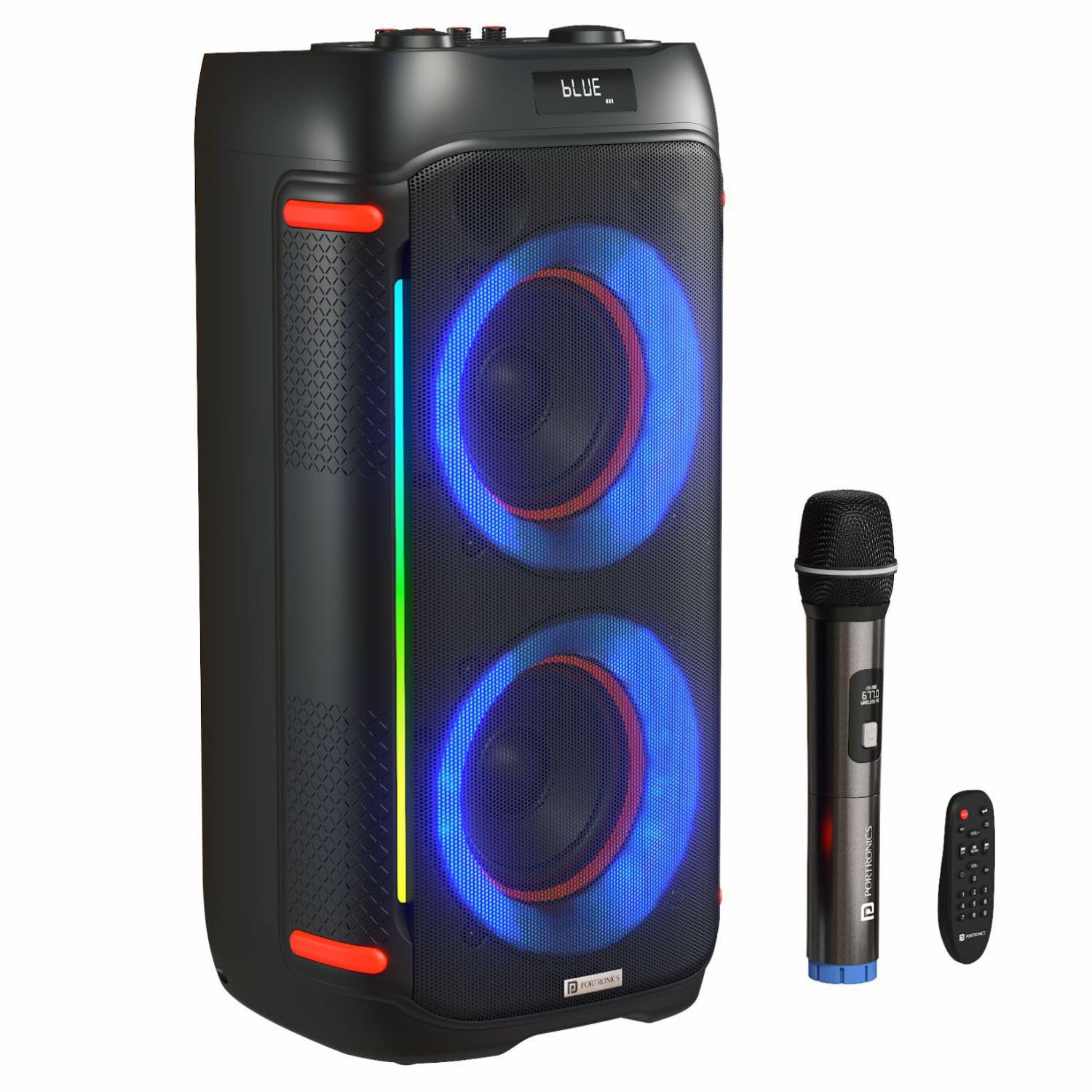
Imej: Depan view of the Portronics Iron Beats IV speaker, showcasing its dual subwoofers and active RGB LED lighting.
Panel Kawalan Bersepadu

Image: Close-up of the speaker's top control panel, showing knobs for Bass, Treble, Echo, and Delay, along with media playback buttons and input selection. The remote control is also pictured.
- Butang Kuasa: Menghidupkan atau mematikan pembesar suara.
- Kawalan Kelantangan: Melaraskan kelantangan induk.
- Tombol Bes/Treble: Melaraskan tahap bes dan treble.
- Echo/Delay Knobs: Controls echo and delay effects for the microphone.
- Butang Mod: Switches between input modes (Bluetooth, USB, TF Card, AUX).
- Butang Main/Jeda: Mengawal main balik media.
- Butang Trek Sebelumnya/Seterusnya: Menavigasi melalui trek.
- Input Mik: Connects wired microphones.
- Port USB: Untuk main balik pemacu USB.
- Slot Kad TF: For TF card playback.
- Input AUX: Untuk menyambungkan peranti audio luaran melalui kabel 3.5mm.
Persediaan
1. Mengisi Speaker
- Connect the AC adapter to the speaker's charging port.
- Palamkan penyesuai AC ke salur keluar kuasa.
- The charging indicator will illuminate. Allow approximately 4 hours for a full charge.
2. Menghidupkan/Mematikan
- Press and hold the Power button on the control panel to turn the speaker ON or OFF.
3. Berpasangan Bluetooth
- Turn on the speaker. It will automatically enter Bluetooth pairing mode, indicated by a flashing Bluetooth icon or voice prompt.
- Dayakan Bluetooth pada telefon pintar, tablet atau komputer riba anda.
- Cari untuk "Portronics Iron Beats IV" in the list of available devices.
- Pilih pembesar suara untuk dipasangkan. Bunyi pengesahan akan menunjukkan pasangan yang berjaya.
4. Connecting Other Audio Sources
- USB Drive/TF Card: Insert a USB drive or TF card into the respective slot. The speaker will automatically switch to USB/TF mode and begin playback.
- Input AUX: Connect an audio device using a 3.5mm AUX cable to the AUX input port. Press the Mode button to select AUX input.
5. Wireless Microphone Setup
- Ensure the wireless microphone has fresh batteries.
- Turn on the microphone. It should automatically connect to the speaker.
- Adjust the microphone volume, echo, and delay using the dedicated knobs on the speaker's control panel.
Arahan Operasi
1. Main Semula Audio Asas
- Gunakan Tombol kelantangan to adjust the overall sound level.
- Tekan ke Butang Main/Jeda to start or stop music.
- Gunakan Previous/Next Track buttons to skip songs.
2. EQ Modes and Sound Adjustment
- The speaker features various EQ modes to optimize sound for different music genres. Press the butang EQ (if available on the control panel or remote) to cycle through modes.
- Laraskan Bass dan Treble knobs to fine-tune the audio output to your preference.
3. Lampu LED RGB

Image: The Portronics Iron Beats IV speaker displaying various dynamic RGB LED light patterns.
- The speaker features dynamic RGB LED lights that sync with music.
- Tekan ke Butang Mod Cahaya (if available) to cycle through different light patterns or turn them off.
4. Fungsi TWS (True Wireless Stereo).

Image: An illustration demonstrating how two Portronics Iron Beats IV speakers can be paired together using TWS connectivity for a stereo sound experience.
If you have two Iron Beats IV speakers, you can pair them for a True Wireless Stereo experience:
- Hidupkan kedua-dua pembesar suara.
- Pada satu pembesar suara (ini akan menjadi pembesar suara utama), tekan dan tahan butang TWS (refer to the control panel diagram or remote).
- The primary speaker will search for the secondary speaker. Once connected, a confirmation sound will play.
- Connect your device via Bluetooth to the primary speaker. Both speakers will now play audio in stereo.
5. Menggunakan Alat Kawalan Jauh

Image: A person using the wireless karaoke microphone with the Portronics Iron Beats IV speaker, which is displaying colorful LED lights.
The included remote control allows convenient operation from a distance:
- Redam: Membisukan atau menyahredamkan audio.
- VOL +/-: Melaraskan kelantangan.
- CH +/-: Changes tracks.
- REKAM: Initiates recording (if supported and storage is available).
- EQ: Cycles through equalizer modes.
- Pad Nombor: Direct track selection (for USB/TF card mode).
Penyelenggaraan
- Pembersihan: Gunakan kain lembut dan kering untuk membersihkan bahagian luar pembesar suara. Jangan gunakan pembersih atau pelarut yang melelas.
- Storan: Simpan pembesar suara di tempat yang sejuk dan kering jauh dari cahaya matahari langsung dan suhu yang melampau.
- Penjagaan Bateri: Untuk memanjangkan hayat bateri, elakkan daripada menyahcas sepenuhnya bateri dengan kerap. Cas pembesar suara dengan kerap, walaupun tidak digunakan untuk tempoh yang lama.
- Pendedahan Air: Pembesar suara ini tidak kalis air. Elakkan pendedahan kepada air atau kelembapan yang tinggi.
Menyelesaikan masalah
| Masalah | Kemungkinan Punca | Penyelesaian |
|---|---|---|
| Speaker tidak dihidupkan. | Low battery; Power cable not connected. | Cas pembesar suara; Pastikan kabel kuasa disambungkan dengan kukuh. |
| Tiada keluaran bunyi. | Kelantangan terlalu rendah; Mod input salah; Peranti tidak disambungkan. | Increase volume; Press Mode button to select correct input; Re-pair Bluetooth or re-connect AUX/USB. |
| Gandingan Bluetooth gagal. | Pembesar suara tidak dalam mod berpasangan; Peranti terlalu jauh; Gangguan. | Pastikan pembesar suara berada dalam mod berpasangan; Alihkan peranti lebih dekat; Matikan peranti Bluetooth lain. |
| Mikrofon tidak berfungsi. | Microphone off; Low microphone battery; Microphone volume low. | Turn on microphone; Replace microphone batteries; Increase microphone volume on speaker. |
| Alat kawalan jauh tidak berfungsi. | Remote batteries low; Obstruction between remote and speaker. | Replace remote batteries; Ensure clear line of sight to speaker's IR receiver. |
Spesifikasi
| Ciri | Perincian |
|---|---|
| Nombor Model | POR-2344 |
| Output Audio | 250 Watt |
| Saiz Subwufer | Dwi 6 inci |
| Teknologi Ketersambungan | Bluetooth 5.3, USB, TF Card, AUX, Wireless Microphone |
| Masa bermain | Up to 4 Hours (Battery Powered) |
| Lampu LED | Dynamic RGB LED Modes |
| Mikrofon | UHF Wireless Karaoke Mic |
| Pelarasan Bunyi | Treble/Bass Adjustment, Echo Control, EQ Modes |
| Kawalan | Integrated Control Panel, Remote Control |
| Jenis Pemasangan | Lantai Berdiri |
| bahan | Plastik ABS |
| Berat Barang | 10 kg |
| Dimensi Produk (LxWxH) | 35 x 67.5 x 35 cm |
| Jenis Bateri | Lithium Polymer (1 C battery included) |
Waranti dan Sokongan
For warranty information and customer support, please refer to the documentation included in your product package or visit the official Portronics website. You may also contact Portronics customer service directly:
- e-mel: help@portronics.com
- telefon: +91 9555-245-245
- Alamat Pengilang: Portronics Digital Pvt ltd, First Floor Property No D 8 Upper Basement Sector 8 Noida Uttar Pradesh 201301


