1. Pengenalan
This manual provides essential instructions for the safe and efficient operation, maintenance, and troubleshooting of your DREAME L50 Ultra Robot Vacuum and Mop. Please read this manual thoroughly before using the product and retain it for future reference.
2. Maklumat Keselamatan
To reduce the risk of injury or damage, read and follow all safety precautions when setting up, using, and maintaining your robot. This appliance can be used by children aged 8 years and above and persons with reduced physical, sensory or mental capabilities or lack of experience and knowledge if they have been given supervision or instruction concerning use of the appliance in a safe way and understand the hazards involved. Children shall not play with the appliance. Cleaning and user maintenance shall not be made by children without supervision.
- Pastikan robot dicas sepenuhnya sebelum penggunaan pertama.
- Jangan gunakan robot ini di persekitaran basah atau berhampiran air.
- Remove loose cables, small objects, and fragile items from the floor before cleaning.
- Jauhkan rambut, pakaian longgar, jari dan semua bahagian badan daripada bukaan dan bahagian yang bergerak.
- Do not operate the robot in areas where there are open flames or explosive materials.
- Gunakan hanya penyesuai kuasa dan dok pengecas yang ditentukan oleh pengilang.
- Do not use the robot to pick up large debris, broken glass, or corrosive liquids.
3. Kandungan Pakej
Verify that all items are present and in good condition upon unboxing.

Imej: All components included in the DREAME L50 Ultra package. This includes the robot vacuum, base station, various brushes, mop pads, cleaning solution, and documentation.
- Vakum Robot x1
- Stesen Pangkalan x1
- Berus Utama (prapasang) x1
- Pelindung Berus (prapasang) x1
- Berus Sisi (prapasang) x1
- Scale Inhibitor (pre-installed) x1
- Dust Bags (pre-installed) x2
- Pemegang Pad Mop x2
- Pad Mop x2
- Kotak Habuk (prapasang, termasuk penapis) x1
- 200ml Penyelesaian Pembersihan x1
- Stesen Pangkalan Ramp Sambungan x1
- Panduan Mula Pantas x1
- Manual Pengguna x1
4. Produk Lebihview
The DREAME L50 Ultra is an advanced robot vacuum and mop designed for comprehensive floor cleaning. It features powerful suction, intelligent navigation, and an all-in-one PowerDock for automated maintenance.

Imej: The DREAME L50 Ultra robot vacuum docked with its white base station, alongside a smartphone displaying the companion app icon.
Ciri-ciri Utama:
- 19,500Pa Vormax Suction: Powerful suction for effective debris pickup.
- HyperStream Menghilangkan Kusut DuoBrush: Bristled rubber brush and TPU rubber brush for efficient hair removal and tangle prevention.
- ProLeap System: Retractable legs for seamless crossing over door tracks and thresholds up to 6cm.
- Tindakan AI dan Cahaya Berstruktur 3D: Precise obstacle avoidance for over 180 types of objects.
- Dual Flex Arm Technology: Extendable side brush and mop for comprehensive edge-to-corner cleaning.
- All-in-One PowerDock: Features auto-empty (up to 100 days), hot water mop self-cleaning, hot air drying, auto solution refilling, and auto water tank refilling.
- Customizable Carpet Cleaning: 5 modes via the Dreamehome App for tailored carpet care.
- On-Demand Voice Control: Compatible with Alexa, Siri, and Google Assistant.
5. Persediaan
5.1 Membuka Kotak dan Peletakan Awal
Carefully remove all components from the packaging. Place the base station on a hard, level surface against a wall, ensuring there is adequate clearance around it (at least 0.5m on both sides and 1.5m in front). Connect the power cable to the base station and plug it into a power outlet.
Video: A user unboxes the DREAME L50 Ultra, showing the components and initial setup of the robot and its base station. This video demonstrates the physical setup process.
5.2 Pemasangan dan Sambungan Apl
Download the "Dreamehome" app from your smartphone's app store. Follow the in-app instructions to connect your DREAME L50 Ultra to your home Wi-Fi network. This process typically involves scanning a QR code on the robot and following prompts for network selection.
5.3 Filling Water Tanks and Solution
Open the top cover of the base station to access the clean water tank and cleaning solution compartment. Fill the clean water tank with tap water and the solution compartment with the provided DREAME cleaning solution. Ensure both are securely closed before operation.
6. Operasi
6.1 Memulakan dan Menghentikan Pembersihan
- Mulakan: Press the power button on the robot or tap "Clean" in the Dreamehome app.
- Jeda: Press the power button during cleaning or tap "Pause" in the app.
- Sambung semula: Press the power button or tap "Resume" in the app.
- Return to Dock: Press the home button on the robot or tap "Dock" in the app.
6.2 Mod Pembersihan
The Dreamehome app allows you to select various cleaning modes:
- Vakum Sahaja: Untuk serpihan kering pada semua jenis lantai.
- Mop Sahaja: Untuk pembersihan basah pada lantai keras.
- Vakum & Mop: Vakum dan mop serentak.
- Pembersihan Tersuai: Define specific areas or rooms for cleaning with adjustable settings.
6.3 Pembersihan Berjadual
Set up recurring cleaning tasks through the Dreamehome app. You can specify start times, frequency (daily, weekly, custom), and cleaning parameters for the entire area or specific rooms.
Video: This video demonstrates how to set up scheduled cleaning tasks using the Dreamehome app, allowing the robot vacuum to clean automatically at predefined times.
6.4 Obstacle Avoidance and Dynamic Cleaning
The DREAME L50 Ultra utilizes AI Action and 3D structured light for precise obstacle avoidance. It can detect and navigate around over 180 types of objects, including shoes, furniture, and cables.

Imej: A DREAME L50 Ultra robot vacuum navigating around various obstacles like a teddy bear, slippers, and cables, illustrating its smart obstacle detection capabilities.
Enable "Dynamic Obstacle Area Cleaning" in the app settings to allow the robot to remember skipped areas due to dynamic obstacles (like pets or people) and clean them later.
Video: This video highlights the Dynamic Replenishment Sweeping Technology, showing how the robot avoids dynamic obstacles and then returns to clean those areas.
6.5 Edge and Corner Cleaning
The Dual Flex Arm technology with an extendable side brush and mop ensures thorough cleaning of corners and tight spots. Activate "AI-driven SideReach" and "AI-driven MopExtend" in the app settings for enhanced coverage.

Imej: A DREAME L50 Ultra robot vacuum cleaning along a wall and corner, demonstrating its ability to reach tight spaces with its extendable components.
Video: This video illustrates the DREAME robot's corner and edge cleaning feature, showing how it extends its brush and mop to clean along walls and around furniture legs.
6.6 Strategi Pembersihan Karpet
Customize carpet cleaning through the Dreamehome app with 5 available modes:
- Removable Mops: Detach mop pads to maintain dry carpets.
- Liftable Mops: Mops lift for low-pile carpets.
- Complete Carpet Avoidance: Robot avoids all carpets.
- Intensive Carpet Cleaning: Vacuums carpets twice for deeper cleaning.
- Suction Boost: Increases suction power on carpets.
6.7 Kawalan Suara
Manage your cleaning routine using voice commands with Alexa, Siri, or Google Assistant. Link your DREAME L50 Ultra to your preferred voice assistant through the Dreamehome app.
7. Penyelenggaraan
Regular maintenance ensures optimal performance and longevity of your DREAME L50 Ultra.
7.1 All-in-One PowerDock Maintenance
- Auto-Empty: The dock automatically empties the robot's dustbin for up to 100 days. Replace the dust bag in the dock when full.
- Mop Self-Cleaning: Mop pads are automatically rinsed with 167°F hot water.
- Pengeringan Udara Panas: Mop pads are dried with hot air to prevent odors and mildew.
- Solution & Water Refilling: The dock automatically refills the robot's water tank and cleaning solution.
- Base Station Cleaning: The AceClean DryBoard system helps prevent dirt buildup in the washboard area. Periodically check and clean the washboard filter.
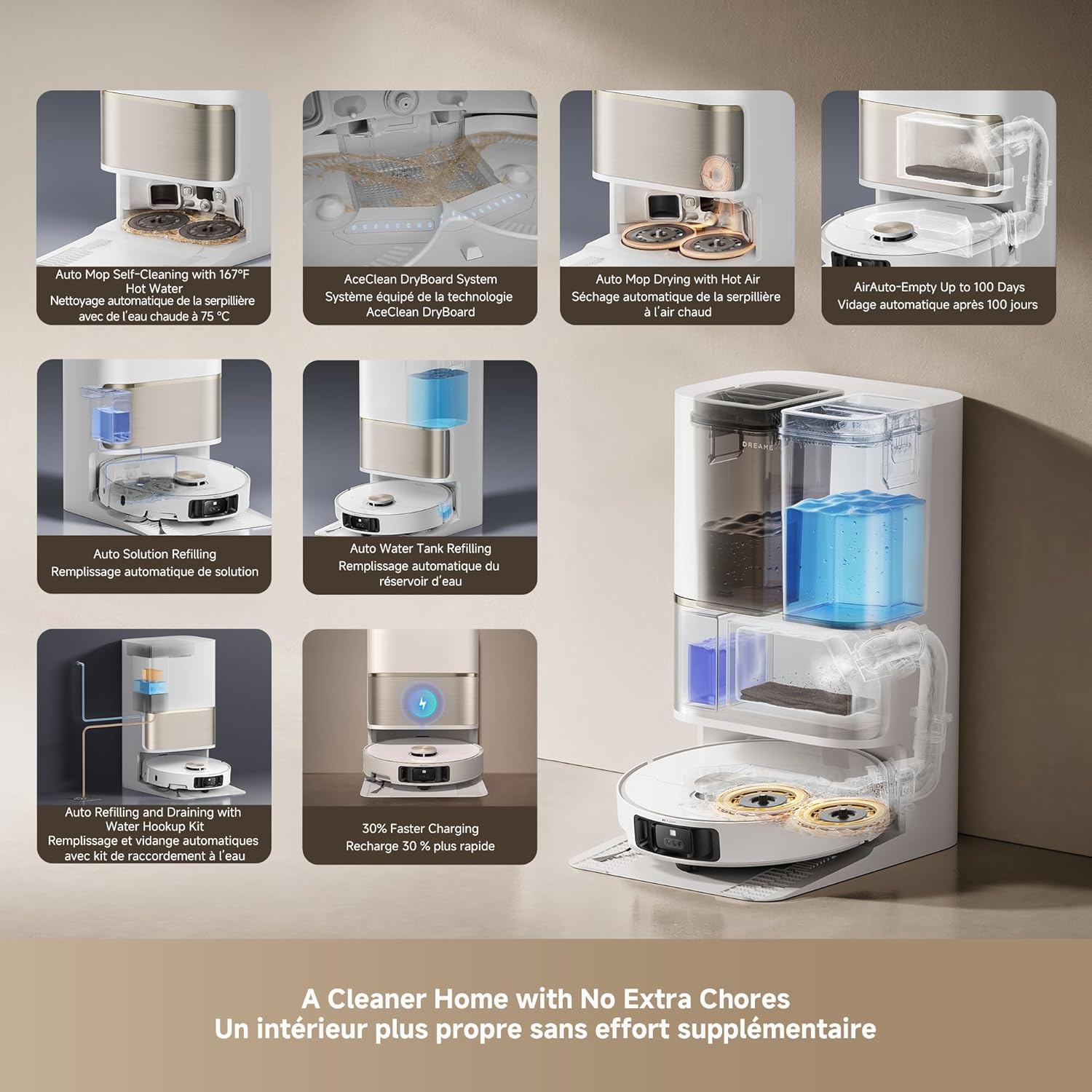
Imej: An infographic detailing the various automated functions of the DREAME L50 Ultra's PowerDock, including auto-empty, mop self-cleaning, hot air drying, and water/solution refilling.
7.2 Pembersihan Komponen Vakum Robot
- Tong sampah: Empty the robot's internal dustbin regularly, especially if not using the auto-empty feature.
- Berus Utama: Remove the main brush and clean any tangled hair or debris. The HyperStream Detangling DuoBrush is designed to minimize tangles.
- Berus Sisi: Check for and remove any tangled hair or debris from the side brush.
- Penapis: Clean the dustbin filter periodically by tapping out debris. Replace as needed.
- Penderia: Wipe all sensors (cliff sensors, wall sensors, charging contacts) with a clean, dry cloth to ensure proper function.
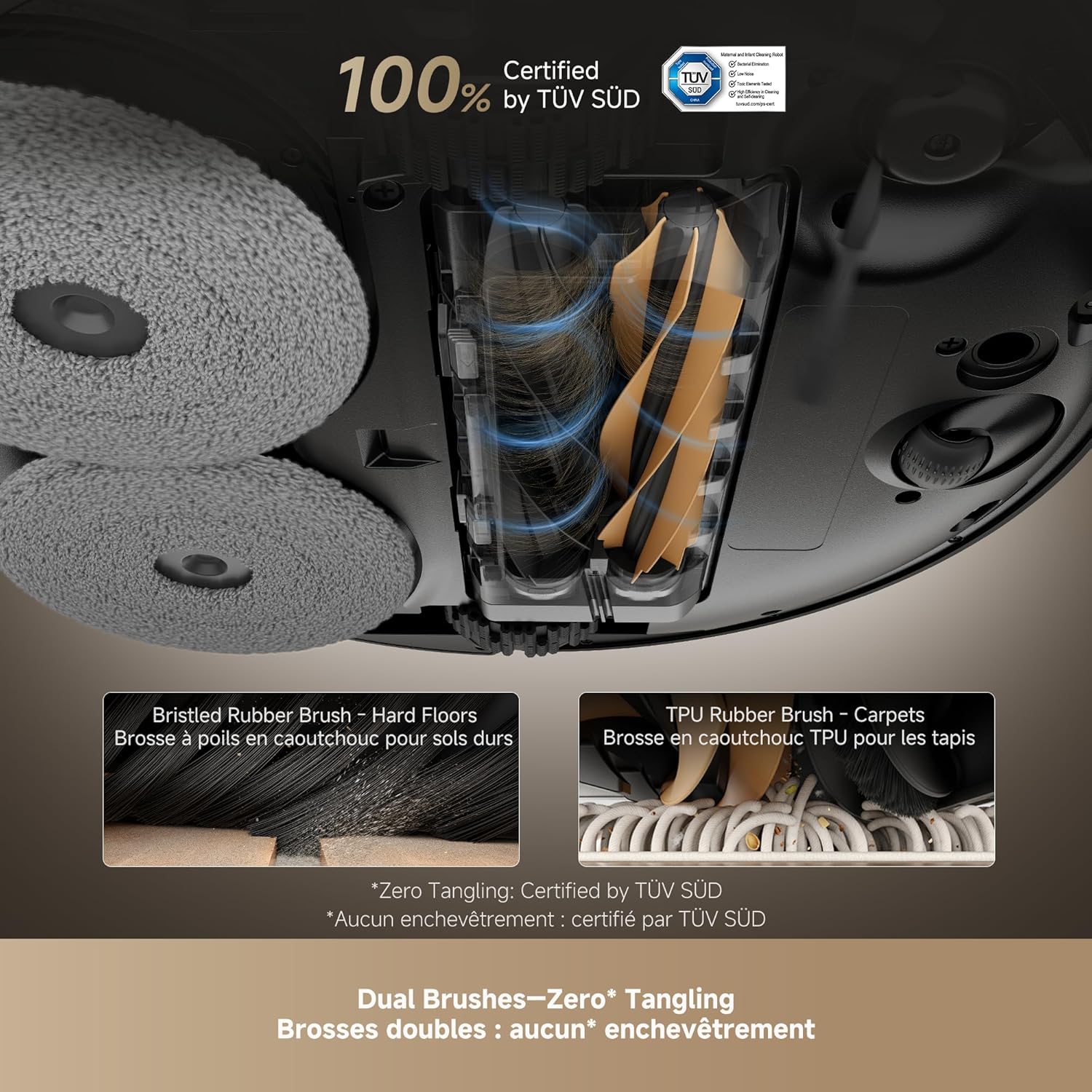
Imej: Satu jarak dekat view of the DREAME L50 Ultra's dual brush system, showing a bristled rubber brush for hard floors and a TPU rubber brush for carpets, designed for effective hair removal.
Video: This video shows the dirty water collected after two mopping cycles, demonstrating the effectiveness of the DREAME L50 Ultra's mopping function.
Video: This video measures the sound level of the DREAME L50 Ultra during its self-empty cycle, providing an indication of its operational noise.
8. Penyelesaian masalah
If your DREAME L50 Ultra encounters an issue, refer to the following common solutions. For persistent problems, contact customer support.
| Masalah | Kemungkinan Punca | Penyelesaian |
|---|---|---|
| Robot tidak dihidupkan. | Bateri lemah; Butang kuasa tidak ditekan dengan betul. | Place the robot on the charging dock; Press and hold the power button for 3 seconds. |
| Robot cannot charge. | Charging contacts are dirty; Power cable not connected. | Clean the charging contacts on both the robot and dock; Ensure the power cable is securely plugged in. |
| Robot kerap tersangkut. | Too many obstacles; Sensors are dirty. | Clear the cleaning area of clutter; Clean all sensors on the robot. |
| Prestasi pembersihan yang lemah. | Tong sampah penuh; Berus kusut; Penapis tersumbat. | Empty the dustbin; Clean the main and side brushes; Clean or replace the filter. |
| Pad mop tidak membersihkan dengan berkesan. | Mop pads dirty; Water tank empty; No cleaning solution. | Ensure mop pads are clean; Refill the clean water tank; Refill the cleaning solution. |
| Robot is too loud during self-empty. | Operasi biasa. | The self-empty function involves powerful suction and is inherently noisy. This is normal. |
8.1 Restarting the Robot
If the robot is unresponsive or behaving erratically, a simple restart may resolve the issue. Press and hold the power button on the robot for a few seconds until it powers off, then press it again to turn it back on.
Video: This video demonstrates how to perform a simple restart on the DREAME L50 Ultra robot vacuum by pressing and holding the power button.
8.2 Tetapan Semula Kilang
A factory reset will restore the robot to its original settings and delete all saved maps and Wi-Fi connections. This should be used as a last resort for persistent issues.
- Pastikan robot dihidupkan.
- Open the top cover of the robot.
- Locate the small reset button (often a pinhole) near the Wi-Fi indicator.
- Using a small tool (like a SIM ejector tool or paperclip), press and hold the reset button for approximately 5 seconds until you hear a voice prompt confirming the factory reset.
- The robot will then restart with factory settings.
Video: This video guides you through the process of performing a factory reset on the DREAME L50 Ultra robot vacuum, including locating the reset button and confirming the reset.
9. Spesifikasi
| Ciri | Perincian |
|---|---|
| Jenama | IMPIAN |
| Nama Model | Dreame L50 Ultra White |
| Nombor Model Item | RLL94CE |
| UPC | 810142561310 |
| warna | putih |
| Dimensi Produk | 17"L x 16"W x 27"H |
| Berat Barang | 42.1 paun |
| Kuasa Sedutan | 19,500Pa Vormax Suction |
| Hayat Bateri | 180 minit |
| Voltage | 110 Volt |
| Kaedah Kawalan | Apl, Jauh, Suara |
| Jenis Penapis | buih |
| Syor Permukaan | Wood, Marble, Tile |
10. Waranti dan Sokongan
DREAME products are covered by a limited warranty from the date of purchase. For specific warranty terms and conditions, please refer to the warranty card included in your package or visit the official DREAME webtapak.
Sokongan Pelanggan:
If you have any questions, require technical assistance, or need to report an issue, please contact DREAME customer support through the following channels:
- rasmi Webtapak: Lawati pegawai DREAME webtapak untuk Soalan Lazim, sumber sokongan dan maklumat hubungan.
- Apl Dreamehome: Access support directly through the app's help section.
- E-mel/Telefon: Refer to your product's quick start guide or the official webtapak untuk butiran hubungan khusus di rantau anda.
Please have your product model number (RLL94CE) and purchase information ready when contacting support.


