pengenalan
This manual provides detailed instructions for the installation, operation, and maintenance of your Extel Digital Connect Wired Video Intercom with Fingerprint Access, Model 720335. Please read this manual thoroughly before installation and use to ensure proper function and safety.
Maklumat Keselamatan
- Ensure all electrical connections are made by a qualified professional and comply with local electrical codes.
- Putuskan sambungan kuasa sebelum melakukan sebarang pemasangan atau penyelenggaraan.
- Do not expose the outdoor station to direct water spray or immerse it in water.
- Use only the power adapter and cables supplied or recommended by Extel.
- Keep the device away from sources of high heat or direct sunlight.
Kandungan Pakej
Sahkan bahawa semua komponen terdapat dalam pakej:
- Pemantauan Dalaman
- Outdoor Station with Fingerprint Reader
- Pendakap dan Skru Pemasangan
- Penyesuai Kuasa
- Kabel Sambungan
- Manual Pengguna (dokumen ini)
Produk Selesaiview
The Extel Digital Connect system consists of an indoor monitor, an outdoor station, and a mobile application for remote access and control.
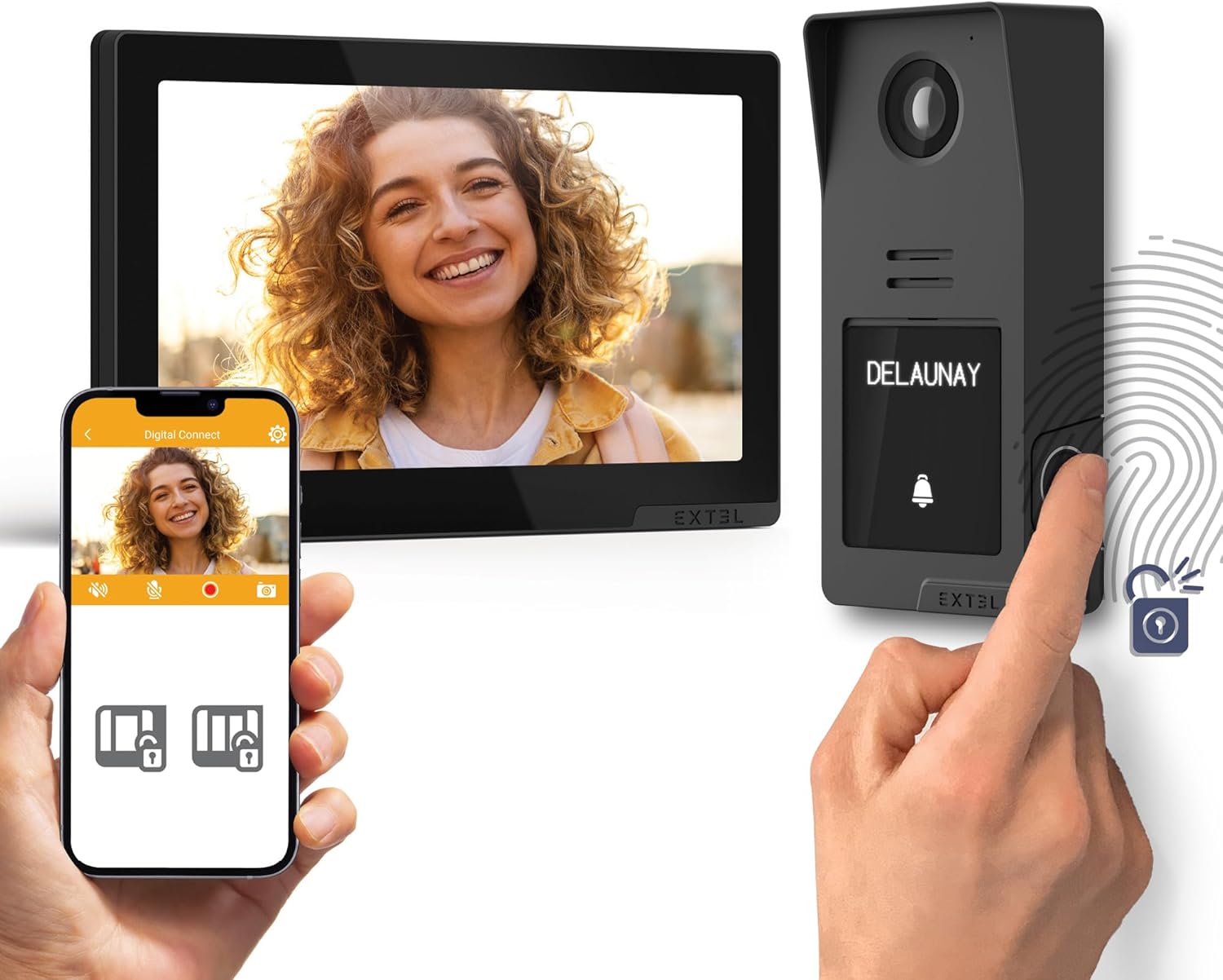
Berakhirview of the Extel Digital Connect video intercom system, showing the indoor monitor, outdoor station, and smartphone application interface.

The outdoor station of the Extel Digital Connect video intercom, illustrating the QR code for mobile application setup.

Diagram showing the modular design of the outdoor station, with optional color covers.
Persediaan
1. Pemasangan
The system requires wired connections between the indoor monitor and the outdoor station. Ensure proper cable selection based on distance:
- For distances up to 25m: Use 2 x 0.75mm² cables.
- For distances up to 100m: Use 2 x 1.5mm² cables.

Wiring diagram for the Extel Digital Connect video intercom, showing connections for the indoor monitor, outdoor station, and optional accessories, along with Wi-Fi connectivity.
2. Permulaan Kuasa
After all wired connections are securely made, connect the power adapter to the indoor monitor and plug it into a power outlet. The monitor should power on automatically.
3. Sambungan Rangkaian (Wi-Fi)
The indoor monitor supports 2.4GHz and 5GHz Wi-Fi networks. Follow the on-screen prompts on the indoor monitor to connect to your home Wi-Fi network. This is essential for smartphone app functionality.
4. Pemasangan Apl dan Berpasangan
- Download the 'Digital Connect' application from your smartphone's app store (iOS or Android).
- Buka aplikasi dan buat akaun atau log masuk.
- Follow the in-app instructions to add your Extel Digital Connect device. This typically involves scanning a QR code displayed on the indoor monitor or the outdoor station.

The Extel Digital Connect video intercom system, demonstrating the indoor monitor and outdoor station, with a smartphone displaying the connected mobile application.
5. Pendaftaran Cap Jari
To enable fingerprint access, you must register fingerprints through the indoor monitor or the mobile application. Refer to the on-screen menu for the 'Fingerprint Management' section. Follow the instructions to scan and save authorized fingerprints.

A hand interacting with the fingerprint sensor on the outdoor station for access control.
Arahan Operasi
Menjawab Panggilan
- From Indoor Monitor: When a visitor presses the call button on the outdoor station, the indoor monitor will ring and display the visitor's video. Press the 'Answer' button on the monitor to communicate.
- Daripada Aplikasi Mudah Alih: If connected to Wi-Fi, your smartphone will receive a notification when a visitor calls. Tap the notification to view the video feed and communicate remotely.
Opening Gates/Doors
- From Indoor Monitor: During a call, press the 'Unlock' button on the monitor to open a connected gate or door.
- Daripada Aplikasi Mudah Alih: During a remote call, use the 'Unlock' function within the app.
- Via Fingerprint: Authorized users can place their registered finger on the outdoor station's fingerprint reader to unlock the connected access point.
Pemantauan
awak boleh view the live feed from the outdoor station at any time:
- From Indoor Monitor: Select the 'Monitor' function on the indoor unit.
- Daripada Aplikasi Mudah Alih: Open the 'Digital Connect' app and select the live view option for your intercom.
Komunikasi Audio Dua Hala
The system supports two-way audio, allowing you to speak with visitors at the outdoor station from both the indoor monitor and the mobile application.
Penyelenggaraan
- Pembersihan: Use a soft, dry cloth to clean the indoor monitor and outdoor station. Do not use abrasive cleaners or solvents.
- Kemas Kini Perisian: Periodically check for firmware updates through the mobile application or the indoor monitor's settings menu to ensure optimal performance and security.
- Sensor cap jari: Pastikan sensor cap jari bersih dan kering untuk bacaan yang tepat.
Menyelesaikan masalah
| Masalah | Kemungkinan Punca | Penyelesaian |
|---|---|---|
| No power to indoor monitor | Power adapter unplugged or faulty; no power at outlet. | Check power connections; test outlet with another device; replace adapter if faulty. |
| No video from outdoor station | Wiring issue; outdoor station faulty. | Verify all wired connections are secure; contact support if issue persists. |
| Tidak dapat menyambung ke Wi-Fi | Incorrect password; weak signal; router issue. | Re-enter Wi-Fi password; move monitor closer to router; restart router. |
| Cap jari tidak dikenali | Finger not registered; sensor dirty; finger wet/damaged. | Ensure finger is registered; clean sensor; try a different registered finger. |
| Mobile app not receiving calls | No internet connection; app notifications disabled; app not paired. | Check Wi-Fi/mobile data; enable app notifications; re-pair device if necessary. |
Spesifikasi
- Jenama: EXTEL
- model: 720335
- Berat Barang: 950 g
- Ketersambungan: Wired (2-wire), Wi-Fi (2.4GHz / 5GHz)
- Ciri-ciri Utama: Video Intercom, Fingerprint Access, Smartphone Connectivity, Remote Control
- Jarak Pendawaian: Up to 25m (2 x 0.75mm²), Up to 100m (2 x 1.5mm²)
Waranti dan Sokongan
For warranty information and technical support, please refer to the documentation provided with your purchase or visit the official Extel webtapak. Simpan bukti pembelian anda untuk tuntutan waranti.


