1. Pengenalan
This manual provides essential information for the safe and effective operation of your OMTech 90W CO2 Laser Engraver, Model SH-G570. Please read all instructions carefully before operating the machine to ensure proper usage and to prevent injury or damage.

Figure 1: OMTech 90W CO2 Laser Engraver (Model SH-G570)
2. Garis Panduan Keselamatan
Operating a laser engraver requires adherence to strict safety protocols. Failure to follow these guidelines can result in serious injury or damage to the equipment.
- Perlindungan Mata: Never look directly into the laser beam. The machine features a widened viewing window made from flame-retardant material for safe observation.
- Pengudaraan: Ensure adequate ventilation to remove smoke and fumes generated during operation. The integrated air assist system helps keep the work area clear.
- Automatic Cover Interlock: The laser automatically shuts off when the lid is opened, preventing accidental exposure to the laser beam.
- Keserasian Bahan: Only engrave or cut materials approved for CO2 lasers. Refer to the material compatibility chart in Section 5.
- Hentian kecemasan: Biasakan diri anda dengan lokasi dan operasi butang berhenti kecemasan.

Figure 2: Flame-Retardant Viewing Window for Safe Observation
3. Persediaan
Persediaan yang betul adalah penting untuk prestasi dan keselamatan yang optimum.
3.1. penempatan
Place the machine on a stable, level surface in a well-ventilated area. Ensure sufficient space around the machine for operation and maintenance, especially considering the 4-way pass-through feature.
3.2. Sambungan
- Kuasa: Sambungkan mesin ke salur keluar kuasa yang dibumikan.
- Water Pump/Cooling System: Connect the external water pump to the machine and ensure it is filled with distilled water. This system is vital for cooling the laser tube during operation.
- Sistem Bantuan Udara: Connect the air assist pump. The integrated air assist system directs a stream of air to the cutting point, reducing flare-ups and removing debris.
- Pengudaraan: Connect the exhaust hose to the machine and vent it outdoors or to a dedicated fume extractor.

Figure 3: Built-in Air Assist System

Figure 4: Four-Way Pass-Through Capability
4. Arahan Operasi
4.1. Control Panel and Software
The machine features a digital control panel for easy operation. It is compatible with various software, including RDWorks, LightBurn, CorelDRAW, and AutoCAD, allowing for flexible design and control.

Figure 5: Digital Control Panel and Software Compatibility
4.2. Penyediaan Bahan
Place your material securely on the workbed. The spacious 28"x20" workspace accommodates a variety of project sizes. For longer items, utilize the four-way pass-through doors.
4.3. Operasi Laser
The 90W CO2 laser offers powerful cutting and engraving capabilities. It can achieve up to 0.4" deep cuts in wood and engrave on materials like glass, acrylic, and leather at speeds up to 600 mm/s.
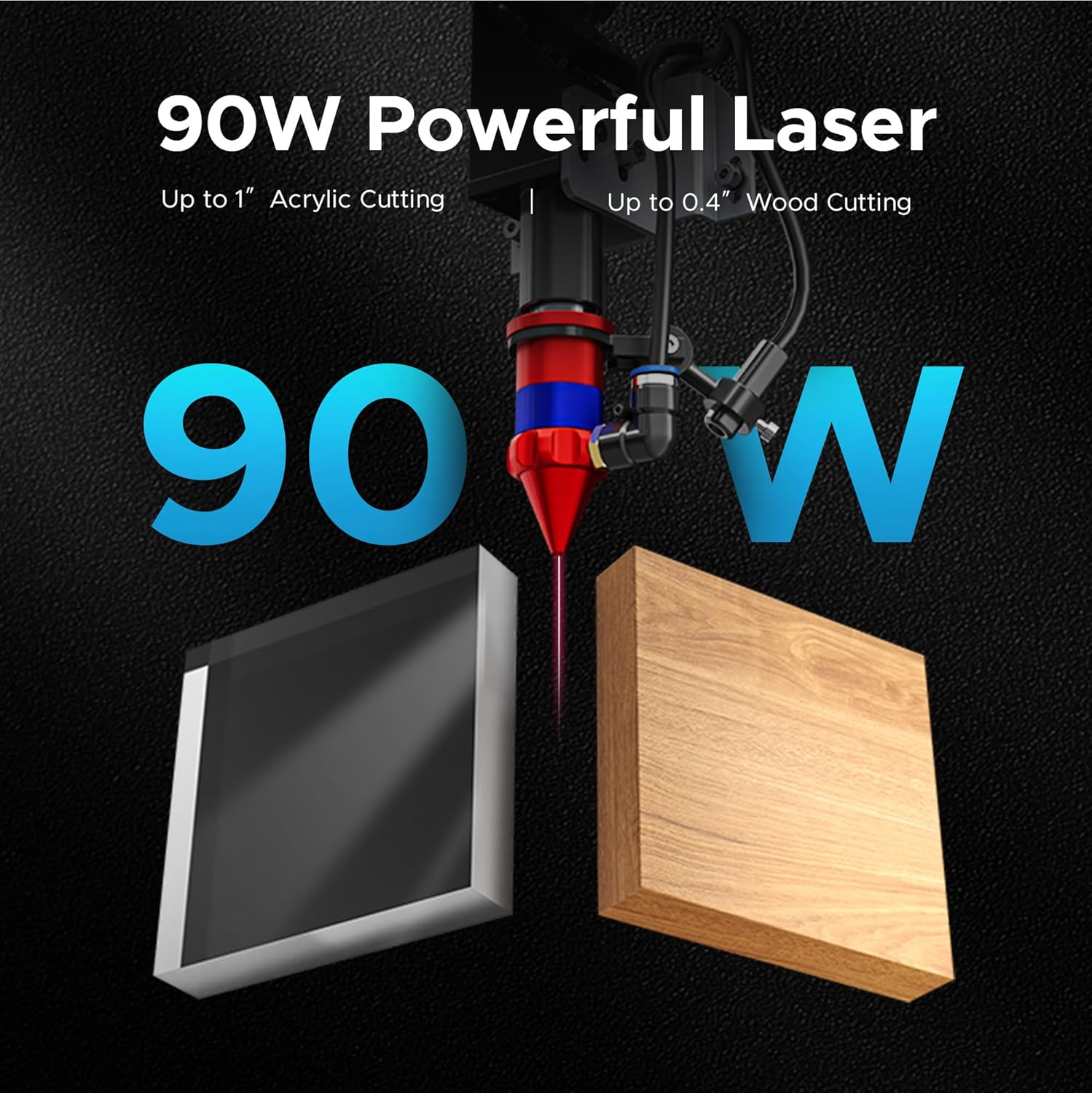
Figure 6: 90W Laser Power and Material Capabilities
Video 1: Laser Engraver in Operation
Video 2: Laser Cutting Demonstration
5. Keserasian Bahan
The OMTech 90W CO2 Laser Engraver is suitable for a wide range of materials. Refer to the table below for common materials and their compatibility with engraving and cutting functions.
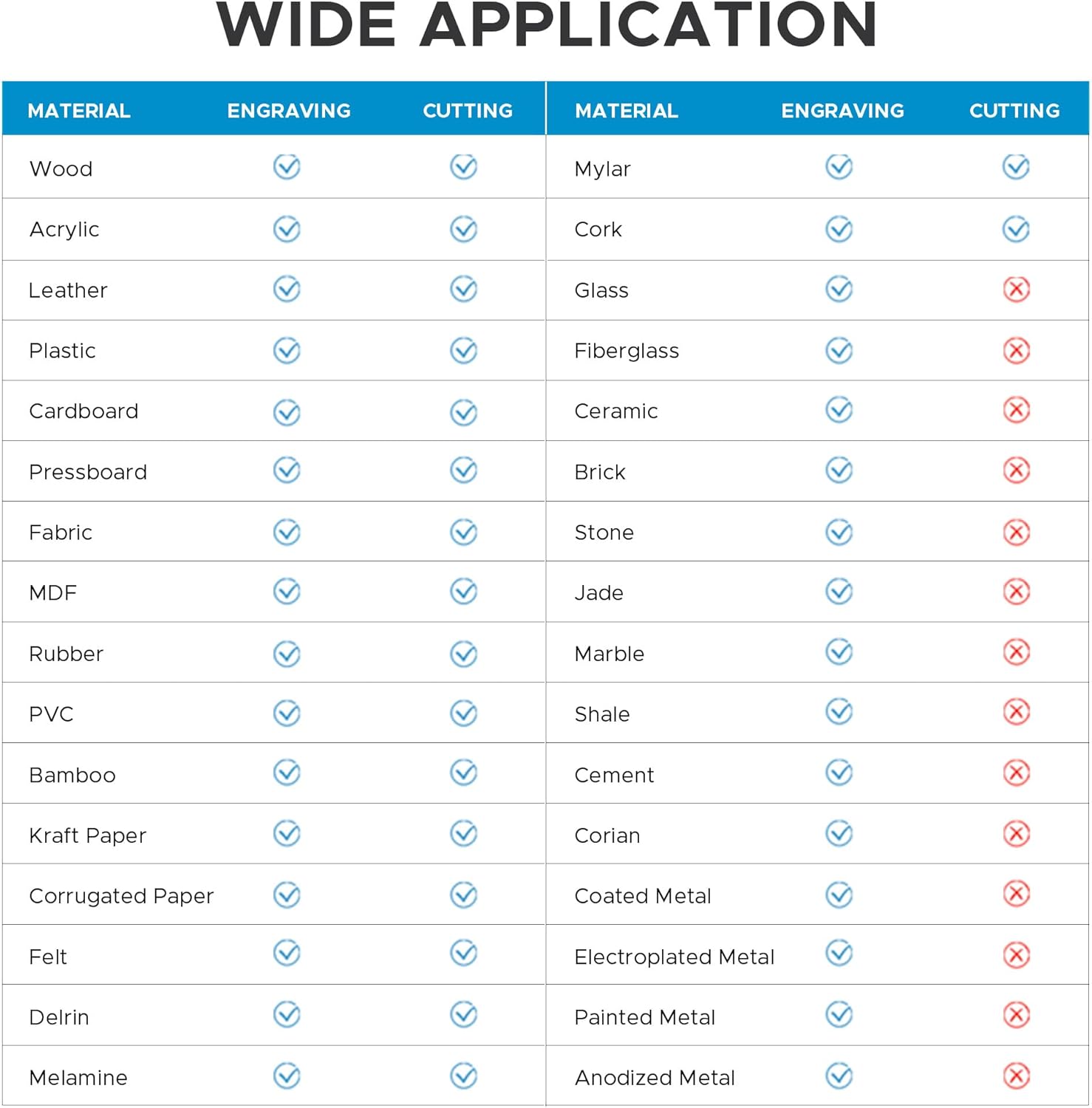
Figure 7: Material Compatibility Chart
6. Penyelenggaraan
Penyelenggaraan berkala memastikan jangka hayat dan prestasi optimum pengukir laser anda.
6.1. Pembersihan
- Lenses and Mirrors: Regularly inspect and clean the laser lenses and mirrors using appropriate cleaning solutions and lint-free wipes.
- Katil kerja: Clean the honeycomb and blade workbeds to remove debris and residue from cutting and engraving operations.
6.2. Sistem Penyejukan
Monitor the water pump and ensure the cooling water is clean and at the correct temperature to prevent overheating of the laser tube.
6.3. Air Assist System
Verify that the air assist system is functioning correctly to maintain clear visibility and prevent material scorching.
7. Spesifikasi
Key technical specifications for the OMTech 90W CO2 Laser Engraver (Model SH-G570):
- Nombor Model: SH-G570
- Kuasa Dinilai: 90W
- Maks. Kelajuan Ukiran: 600 mm/s
- Kawasan Kerja: 28" x 20"
- 4-Way Pass-Through: ya
- Laser Tube Lifespan: Up to 8,000 hours (can last longer at lower settings)
- Air Assist: Bersepadu
- Ciri-ciri Keselamatan: Kalis api viewing window, automatic cover interlock
- Keserasian Perisian: RDWorks, LightBurn, CorelDRAW, AutoCAD
- Berat Mesin: 227.1 lb.
- Side/Side Pass Size: 19.7" x 0.8"
- Front/Back Pass Size: 31.5" x 3.9"
- Dimensi Mesin: 57.1" x 34.3" x 36.6"

Rajah 8: Spesifikasi Produk Utama
8. Waranti dan Sokongan
OMTech provides comprehensive support for its products. This includes 24/7 global support, technical guidance, and local demonstrations by appointment. The product comes with 2 years of comprehensive service.