1. Produk Lebihview
The AGM M6 is a rugged 4G LTE feature phone designed for durability and essential communication. It features a large button and font interface, an ultra-loud speaker, and robust protection against water, dust, and drops, making it suitable for outdoor and demanding environments.

Imej: Depan dan belakang view of the AGM M6 Feature Phone, highlighting its robust design and large rear speaker.
Ciri-ciri Utama:
- 4G LTE Dual SIM: Supports T-Mobile network with dual Nano SIMs for reliable connectivity.
- Ketahanan Gred Tentera: IP68/IP69K waterproof and dustproof, MIL-STD-810H certified, withstands 2-meter drops and submersion up to 1.5 meters for 30 minutes.
- Reka Bentuk Mesra Pengguna: 2.4-inch screen with large font and buttons, including a clear 21-key layout and a dedicated green call key.
- Minimalist Operating System: Runs on Mocor RTOS, focusing on core phone functions like calls, texts, and FM radio, without GPS, apps, or Wi-Fi.
- Ultra-Loud Speaker: Equipped with a 3.5W 35mm 109dB speaker for clear calls and powerful audio.
- Bateri Tahan Lama: 2500mAh removable battery provides up to 360 hours of standby time, with Type-C charging and optional desktop dock support.
- Lampu suluh bersepadu: Top-mounted LED flashlight activated by an orange side-key.

Image: Demonstrates the phone's IP68/IP69K waterproof, 2-meter drop-proof, and 99% dust-proof features, with the phone submerged in water, dropped, and covered in dust.
2. Apa yang ada di dalam Kotak
Upon unboxing your AGM M6 Feature Phone, please ensure all the following items are present:
- AGM M6 Rugged Feature Phone
- Penyesuai Kuasa
- Kabel USB (Jenis-C)
3. Panduan Persediaan
3.1. Installing SIM Card and Battery
- Buka Penutup Bateri: Locate the notch on the bottom edge of the phone. Carefully pry open the battery access panel. This may require a thin, non-metallic tool to avoid damage.
- Masukkan Kad SIM: The AGM M6 supports dual Nano SIM cards. Insert your primary 4G Nano SIM into SIM slot 1 and an optional 2G Nano SIM into SIM slot 2, ensuring the gold contacts face downwards and the cut corner aligns with the slot.
- Masukkan Kad MicroSD (Pilihan): If you wish to expand storage, insert a MicroSD card (up to 128GB) into the dedicated slot.
- Pasang Bateri: Align the 2500mAh battery contacts with the phone's terminals and gently press it into place.
- Tutup Penutup Bateri: Securely close the battery cover until it clicks into place, ensuring a tight seal for water and dust resistance.
3.2. Mengecas Telefon
Sebelum penggunaan pertama, cas sepenuhnya bateri telefon.
- Connect the provided USB Type-C cable to the charging port on the phone. The Type-C port is reversible, allowing connection from either side.
- Sambungkan hujung kabel USB yang lain ke penyesuai kuasa.
- Palamkan penyesuai kuasa ke salur keluar dinding.
- The phone will indicate charging status on the screen.
- For convenient charging, an optional desktop charging dock is available (sold separately). Simply place the phone into the dock to charge.

Image: Illustrates the Type-C charging port on the phone and the phone placed in its optional desktop charging dock.
4. Arahan Operasi
4.1. Hidupkan/Mati Kuasa
- Untuk Menghidupkan: Tekan dan tahan butang Kuasa/Tamat Panggilan (butang merah) sehingga skrin menyala.
- Untuk Mematikan: Press and hold the Power/End Call button until the power-off options appear, then select "Power Off".
4.2. Membuat dan Menerima Panggilan
- Untuk Membuat Panggilan: Dial the number using the keypad and press the Green Call button.
- Untuk Menjawab Panggilan: Press the Green Call button when the phone rings.
- Untuk Menamatkan Panggilan: Press the Red End Call button.
4.3. Sending Text Messages
- Navigate to "Messages" from the main menu.
- Pilih "Tulis Mesej" atau "Mesej Baharu".
- Masukkan nombor penerima atau pilih daripada kenalan.
- Type your message using the keypad. The phone supports smart typing.
- Tekan "Hantar".

Image: A hand holding the AGM M6, demonstrating the large font on the screen and the prominent, easy-to-press buttons on the keypad.
4.4. Menggunakan Lampu Suluh
The AGM M6 features a powerful LED flashlight located at the top of the device.
- To turn on the flashlight, press the dedicated orange side-key located on the right side of the phone.
- Press the orange side-key again to turn off the flashlight.
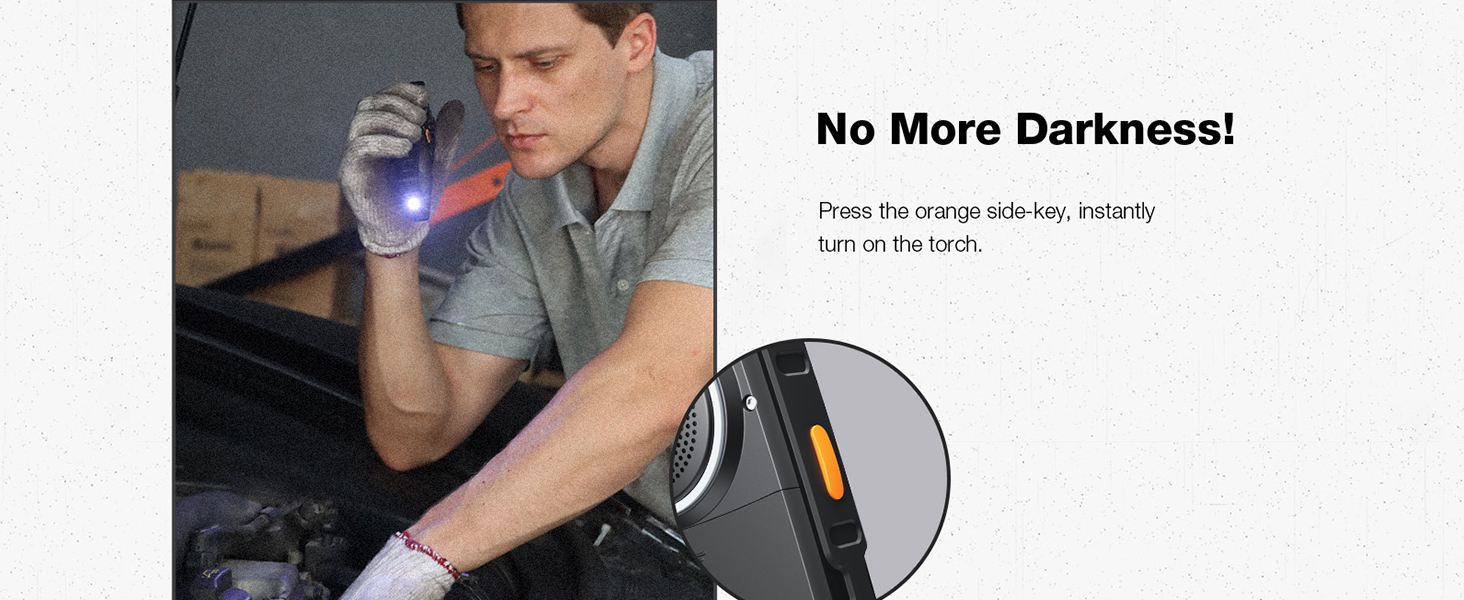
Image: A person using the AGM M6's top-mounted LED flashlight in a dark environment, highlighting its utility.
4.5. Radio FM
The phone includes a built-in FM radio. No headphones are required as the loud speaker can be used.
- Navigate to "FM Radio" from the main menu.
- Use the navigation keys to scan for stations or manually tune to a frequency.
- Adjust volume using the dedicated volume keys on the side.
4.6. Camera and Storage
The AGM M6 features a 0.3MP camera for basic photo capture and supports expandable storage up to 128GB via MicroSD card.
- To access the camera, navigate to "Camera" from the main menu.
- Press the center navigation key to take a photo.
- Photos are saved to the phone's internal memory or the inserted MicroSD card.
5. Penyelenggaraan
Proper maintenance ensures the longevity and optimal performance of your AGM M6 phone, especially given its rugged nature.
5.1. Membersihkan Telefon Anda
- After exposure to dust, dirt, or mud, wipe the phone with a soft, damp kain.
- If exposed to saltwater or chemicals, rinse the phone thoroughly with fresh water. Ensure all ports (USB-C, speaker) are closed before rinsing.
- Dry the phone completely with a clean, dry cloth before charging or opening any ports.
- Jangan gunakan bahan kimia yang keras, pelarut pembersih atau detergen yang kuat.
5.2. Penjagaan Bateri
- Avoid exposing the battery to extreme temperatures (below -4°F or above 140°F) as this can reduce its lifespan.
- Untuk kesihatan bateri yang optimum, elakkan daripada kerap menghabiskan bateri sepenuhnya atau mengekalkannya pada cas 100% untuk tempoh yang lama.
- Jika telefon tidak akan digunakan untuk tempoh yang lama, cas bateri sehingga kira-kira 50% sebelum menyimpannya.
5.3. Penyimpanan
- Simpan telefon di tempat yang sejuk dan kering, jauh daripada cahaya matahari langsung dan suhu yang melampau.
- Ensure the battery cover is securely closed to maintain its waterproof and dustproof integrity during storage.
6. Penyelesaian masalah
Bahagian ini membincangkan isu biasa yang mungkin anda hadapi dengan telefon AGM M6 anda.
| Masalah | Kemungkinan Punca | Penyelesaian |
|---|---|---|
| Telefon tidak dihidupkan. | Low battery; Battery not installed correctly; Software issue. | Charge the phone for at least 30 minutes. Ensure the battery is properly seated. Perform a soft reset by removing and reinserting the battery. |
| Tidak boleh membuat atau menerima panggilan. | No network signal; SIM card not inserted correctly; SIM card not activated. | Check network signal strength. Reinsert the SIM card(s). Contact your T-Mobile service provider to ensure your SIM is active. Move to an area with better reception. |
| Isu pengecasan. | Cable or adapter faulty; Charging port obstruction; Battery issue. | Try a different USB Type-C cable and power adapter. Check the charging port for debris and clean carefully if necessary. Ensure the battery is securely connected. |
| Speaker volume is low or distorted. | Volume settings; Speaker obstruction; Software glitch. | Increase volume using the side volume keys. Check the speaker grille for any blockages and clean gently. Restart the phone. |
| Difficulty opening battery cover. | Tight seal for water/dust proofing. | Use a thin, non-metallic tool (e.g., a plastic pry tool or guitar pick) to carefully pry down the battery panel from the designated notch. Apply firm, even pressure. |
7. Spesifikasi
Detailed technical specifications for the AGM M6 Feature Phone.
| Ciri | Spesifikasi |
|---|---|
| Nama Model | M6 |
| Jenama | AGM |
| Sistem Operasi | RTOS |
| Pembawa Tanpa Wayar | T-Mobile (4G LTE) |
| Teknologi Ketersambungan | 4G |
| Saiz Skrin | 2.4 Inci |
| Resolusi | 240 x 320 |
| Kapasiti Bateri | 2500 Miliamp Hours (removable) |
| Masa Tunggu Sedia | Sehingga 360 jam |
| Saiz Terpasang Memori RAM | 48 MB |
| Kapasiti Penyimpanan Memori | 0.12 GB (boleh dikembangkan sehingga 128GB melalui MicroSD) |
| Kamera | Belakang 0.3MP |
| Ciri Khas | Dual SIM, Expandable Memory, Rugged Body, Water Resistant, 109dB Speaker, LED Flashlight |
| Penilaian Ketahanan | IP68/IP69K Waterproof/Dustproof, MIL-STD-810H Drop-Proof |
| Berat Barang | 10 auns |
| Dimensi Pakej | 5.6 x 2.4 x 0.73 inci |
| warna | Hitam |
8. Waranti dan Sokongan
AGM is committed to providing reliable products and excellent customer service.
8.1. Jaminan Produk
For detailed warranty information, please refer to the warranty card included with your product or visit the official AGM website. AGM offers hassle-free replacement for eligible products.
8.2. Sokongan Pelanggan
Our dedicated team of experts is available 24/7 to assist you with any questions or issues regarding your AGM M6 phone. You can reach professional support through the contact information provided on the official AGM webtapak atau melalui platform pembelian anda.
Untuk maklumat lanjut dan sokongan, lawati laman web AGM Official Store on Amazon.


