1. Pengenalan
Thank you for choosing the KAIDI KD-780 True Wireless Earbuds. These earbuds are designed to provide a high-quality audio experience with advanced features such as Bluetooth 5.3 connectivity, active noise cancellation, and intuitive touch controls. Please read this manual carefully to ensure proper use and maintenance of your device.
2. Kandungan Pakej
- KAIDI KD-780 True Wireless Earbuds (Left and Right)
- Kes Pengecasan
- USB to Lightning Charging Cable
- Manual Pengguna
3. Produk Lebihview
Familiarize yourself with the components of your KAIDI KD-780 earbuds and charging case.

Image: The KAIDI KD-780 True Wireless Earbuds are shown in their open charging case, alongside a closed charging case. Both are white with the 'KAIDI' logo.
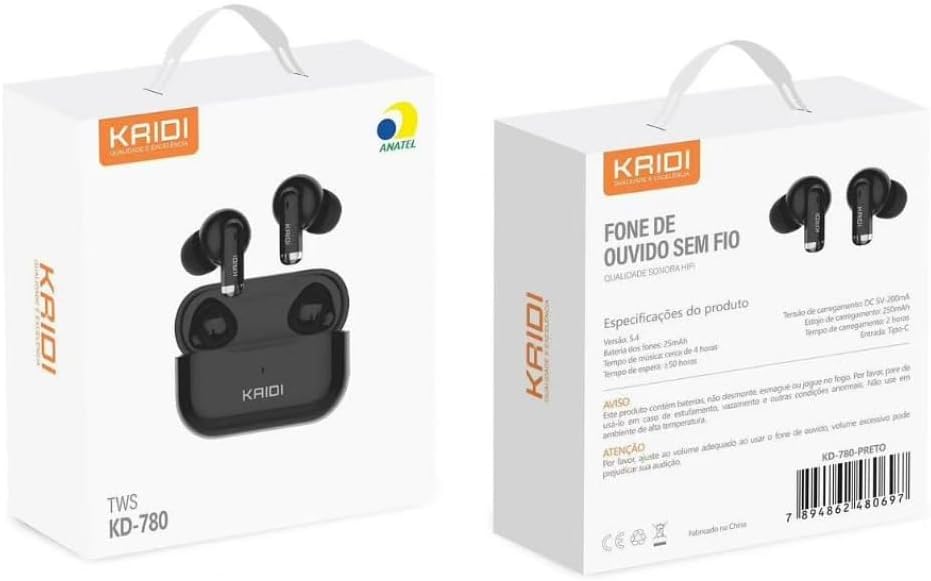
Image: The front and back of the KAIDI KD-780 product box, displaying the earbuds, charging case, and key features in Portuguese.
4. Persediaan
4.1. Mengecas Fon Telinga dan Sarung
- Letakkan fon telinga ke dalam bekas pengecasan. Pastikan mereka duduk dengan betul.
- Connect the USB to Lightning charging cable to the charging port on the case and a power source.
- The indicator light on the case will show charging status. A full charge takes approximately 2 hours for the case.
- The charging case provides multiple extra charges for the earbuds, extending total playback time up to 20 hours.
4.2. Berpasangan dengan Peranti Anda
Berpasangan kali pertama:
- Buka bekas pengecas. Fon telinga akan memasuki mod berpasangan secara automatik.
- Pada telefon pintar atau peranti berdaya Bluetooth anda, pergi ke tetapan Bluetooth.
- Cari untuk available devices and select "KD-780" (or similar name).
- Once connected, you will hear a confirmation tone, and the indicator light on the case may change.

Image: A hand holding the open charging case, with a phone screen showing Bluetooth settings and a 'Connected' status, illustrating the one-step pairing process.
Berpasangan Seterusnya:
- Once paired, the earbuds will automatically connect to the last paired device when removed from the charging case.
5. Arahan Operasi
5.1. Hidupkan/Mati Kuasa
- Hidupkan kuasa: Open the charging case, or take the earbuds out of the case.
- Matikan: Letakkan fon telinga kembali ke dalam bekas pengecasan dan tutup penutupnya.
5.2. Kawalan Sentuh
The KD-780 earbuds feature intuitive touch controls. Specific functions may vary slightly depending on your device and operating system.
- Main/Jeda: Ketik sekali pada salah satu fon telinga.
- Lagu Seterusnya: Ketik dua kali pada fon telinga kanan.
- Trek Sebelumnya: Ketik dua kali pada fon telinga kiri.
- Jawab/Tamatkan Panggilan: Ketik sekali pada salah satu fon telinga.
- Tolak Panggilan: Tekan dan tahan pada salah satu fon telinga.
- Aktifkan Pembantu Suara: Ketik tiga kali pada salah satu fon telinga.
- Kawalan Kelantangan: (Check device settings or app for specific volume control gestures if not default).
5.3. Pembatalan Bunyi Aktif (ANC)
The KD-780 earbuds feature Active Noise Cancellation to reduce ambient noise for a more immersive listening experience. The feature bullets mention 'Cancelamento de ruído ativo híbrido' indicate this functionality.
- Togol ANC: Press and hold the touch area on either earbud for approximately 2 seconds to switch between ANC On, Transparency Mode, and ANC Off.

Image: A diagram illustrating superior audio, physical noise reduction, and powerful volume, highlighting the sound quality features of the earbuds.
6. Penyelenggaraan
6.1. Pembersihan
- Gunakan kain lembut, kering dan tidak berbulu untuk membersihkan fon telinga dan bekas pengecas.
- Jangan gunakan pembersih, pelarut atau semburan aerosol yang kasar.
- Pastikan kanta pengecas pada kedua-dua fon telinga dan sarung bersih dan kering.
6.2. Penyimpanan
- Simpan fon telinga dalam bekas pengecasnya apabila tidak digunakan untuk melindunginya dan memastikan ia dicas.
- Avoid storing the device in extreme temperatures or high humidity.
6.3. Tahan Air
The earbuds are resistant to splashes (IPX4 rating), making them suitable for workouts and light rain. However, they are not fully waterproof and should not be submerged in water.
7. Penyelesaian masalah
- Fon telinga tidak berpasangan: Ensure both earbuds are in the charging case, open the lid, and check your device's Bluetooth settings. Try forgetting the device and re-pairing.
- Hanya satu fon telinga berfungsi: Letakkan kedua-dua fon telinga kembali ke dalam bekas, tutup penutup, tunggu beberapa saat, kemudian buka dan cuba lagi. Pastikan kedua-dua fon telinga telah dicas.
- Tiada bunyi: Check the volume on your device and the earbuds. Ensure the earbuds are properly connected to your device.
- Isu pengecasan: Ensure the charging cable is securely connected and the power source is working. Clean the charging contacts if necessary.
8. Spesifikasi
| Ciri | Perincian |
|---|---|
| Versi Bluetooth | 5.3 |
| Kapasiti Kes Pengecasan | 300mAh |
| Kapasiti Bateri Earbud | 30mAh (setiap satu) |
| Masa Main Semula | Sehingga 5 jam (earbud), sehingga 20 jam (dengan sarung pengecasan) |
| Masa Mengecas | lebih kurang 2 jam |
| Julat Bluetooth | Sehingga 10 meter |
| Respons Kekerapan | 20 Hz - 20 kHz |
| Tahan Air | IPX4 (tahan percikan) |
| Jenis Kawalan | Sentuh |
| Kawalan Bunyi | Pembatalan Bunyi Aktif |
| Jenis Penyambung | Lightning (for charging case) |

Image: A close-up of a microchip labeled '5.3', representing the advanced Bluetooth 5.3 technology for stable and continuous connection.

Image: A comparison graphic showing Bluetooth 5.0 vs. Bluetooth 5.3, highlighting 95% connection speed, stability, and sound quality for 5.3.
9. Video Produk Rasmi
9.1. Produk Lebihview: The Best Option for Earbuds
Video: Video ini memberikan penamatview of the KAIDI KD-780 True Wireless Earbuds, showcasing their design and features. It highlights why they are considered a top choice for wireless audio.
9.2. Product Details: Perfection in Every Detail
Video: This video focuses on the intricate details and craftsmanship of the KAIDI KD-780 Earbuds, emphasizing their premium build and aesthetic appeal.
9.3. Premium Bluetooth Earbuds
Video: Tayangan video promosicasing the KAIDI KD-780 as a premium Bluetooth earbud option, highlighting its features and user experience.
10. Waranti dan Sokongan
Your KAIDI KD-780 True Wireless Earbuds come with a manufacturer's warranty. Please refer to the warranty card included in your package for specific terms and conditions. For technical support or customer service, please contact your retailer or visit the official KAIDI webtapak.
Waranti Pengilang: 90 Hari


