1. Pengenalan
This manual provides detailed instructions for the QONBINK TG38 Smart Watch. It covers device setup, operation of various features, maintenance, and troubleshooting. Please read this manual thoroughly to ensure proper use and optimal performance of your smart watch.
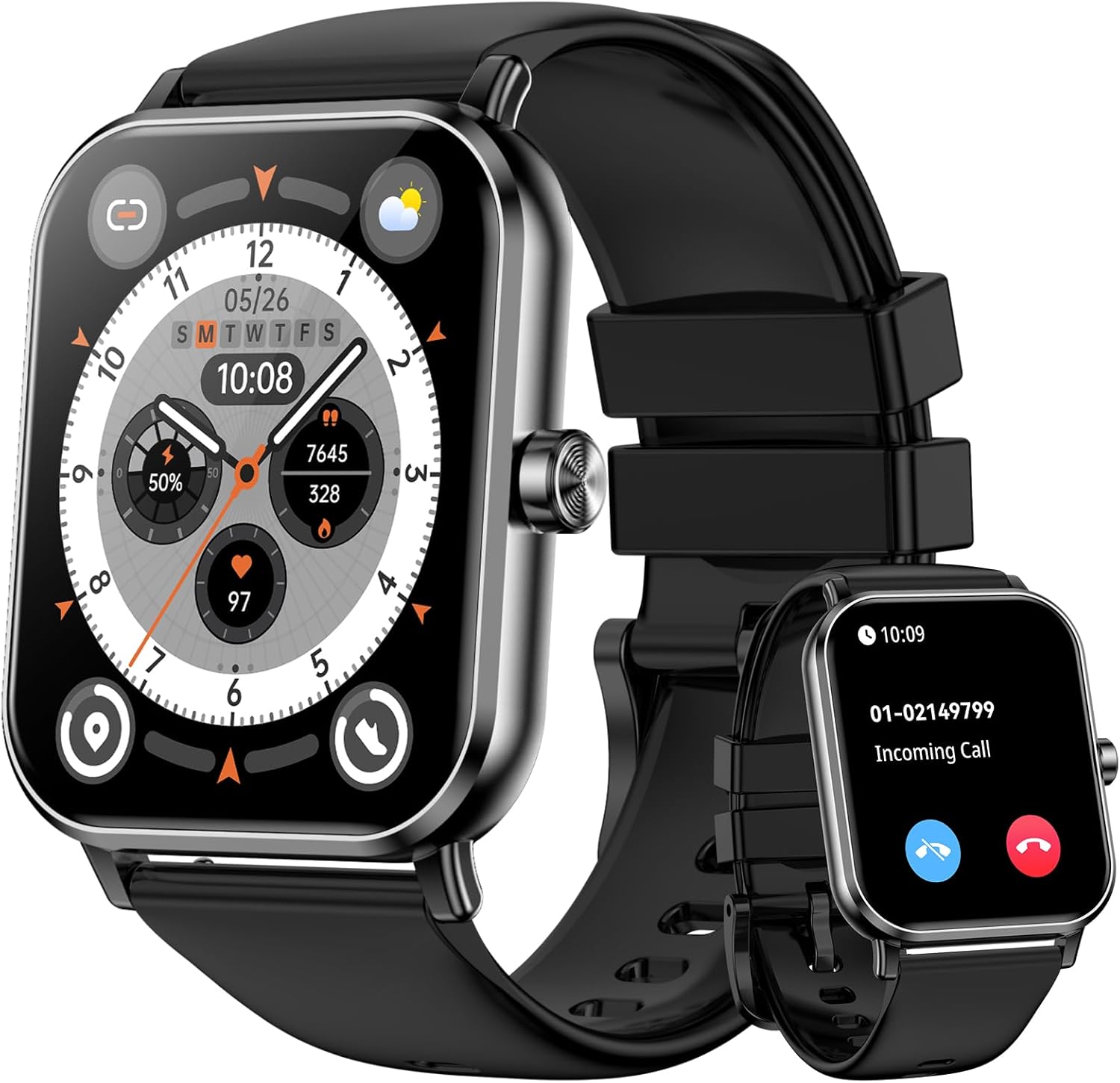
Image 1: QONBINK TG38 Smart Watch with its display showing time and various fitness metrics.
2. Kandungan Pakej
Pastikan semua item ada dalam pakej:
- QONBINK TG38 Smart Watch
- Kabel Pengecas (Magnetik)
- Manual Pengguna

Image 2: The QONBINK TG38 Smart Watch, its magnetic charging cable, and the user manual as included in the package.
3. Panduan Persediaan
3.1 Mengecas Peranti
Before first use, fully charge your QONBINK TG38 Smart Watch. Connect the magnetic charging cable to the charging points on the back of the watch and to a USB power source. A full charge typically takes approximately 2 hours.

Image 3: The QONBINK TG38 Smart Watch connected to its magnetic charger, indicating a 400 mAh battery.
3.2 Pemasangan Apl dan Berpasangan
To unlock the full functionality of your smart watch, download and install the "DA FIT" app on your smartphone. The app is compatible with iOS 9.0+ and Android 5.0+ devices.
- Download the "DA FIT" App: Cari untuk "DA FIT" in the App Store (iOS) or Google Play Store (Android) and install it.
- Dayakan Bluetooth: Hidupkan Bluetooth pada telefon pintar anda.
- Open the App and Add Device: Launch the "DA FIT" app, navigate to the device section, and select "Add Device".
- Cari dan Sambung: The app will search for available devices. Select "TG38" from the list.
- Sahkan Gandingan: A pairing request will appear on your phone. Confirm by tapping "Pair".

Image 4: Visual guide demonstrating the five steps to connect the smart watch to a smartphone using the DA FIT application.
4. Arahan Operasi
4.1 Navigasi Skrin Sentuh
The QONBINK TG38 Smart Watch features a 1.85" HD touch screen for intuitive navigation. Swipe left, right, up, or down to access different functions and menus. Tap to select options.

Image 5: The smart watch screen showing a digital watch face, emphasizing the 1.85-inch TFT touch screen.
4.2 Panggilan Bluetooth
The smart watch supports Bluetooth calls, allowing you to answer or make calls directly from your wrist. It features a built-in speaker and microphone.
- Menjawab Panggilan: Apabila panggilan masuk diterima, ketik ikon jawapan hijau pada skrin jam tangan.
- Membuat Panggilan: Access the phone function on the watch to dial numbers or select contacts.

Image 6: The smart watch on a wrist, showing an incoming call and the call interface, illustrating the Bluetooth call feature.
4.3 Pemberitahuan Pintar
Receive timely messages and social media notifications directly on your watch. The watch will vibrate to alert you.

Image 7: The smart watch showing a message notification, surrounded by icons representing various social media and messaging applications.
4.4 Muka Jam Tersuai
Personalize your watch with over 300 available watch faces through the "DA FIT" app. You can also customize watch faces using your own photos.

Image 8: The smart watch showcasing different watch face options, including the ability to use personal images for customization.
5. Pemantauan Kesihatan
The QONBINK TG38 Smart Watch provides 24-hour health tracking features to help you monitor your well-being.
5.1 Pemantauan Kadar Jantung
Track your heart rate in real-time. The watch can alert you if your heart rate exceeds a set threshold.
5.2 Pemantauan Oksigen Darah (SpO2)
Monitor your blood oxygen levels in real-time to gain insights into your respiratory health.
5.3 Pemantauan Tidur
The watch monitors your sleep quality at night, providing data on deep sleep, light sleep, awake time, and REM sleep.
5.4 Female Menstrual Cycle Tracking
Accurately record and receive timely reminders for women's menstrual cycles. This feature requires setup within the companion app.

Image 9: The smart watch screen showing real-time heart rate, blood oxygen (SpO2), and sleep data, illustrating its comprehensive 24-hour health tracking capabilities.
6. Mod Sukan dan Penjejakan Aktiviti
The QONBINK TG38 Smart Watch offers over 120 built-in sports modes to track your physical activities. It monitors distance, calories burned, and steps taken.

Image 10: A person skiing, demonstrating the smart watch's ability to track activity with icons representing various sports modes.
6.1 Memulakan Senaman
Navigate to the "Workout" section on your watch, select your desired activity (e.g., Walking, Running, Hiking, Treadmill), and tap to start. The watch will begin tracking your metrics.
7. Ciri Pintar Tambahan
Beyond health and fitness, the QONBINK TG38 Smart Watch offers several practical features for daily convenience:
- Ramalan cuaca: Dapatkan kemas kini cuaca masa nyata.
- Jam loceng: Tetapkan penggera terus dari pergelangan tangan anda.
- Kawalan Muzik: Kawal main balik muzik pada telefon pintar anda yang disambungkan.
- Kawalan Kamera: Gunakan jam tangan anda sebagai pengatup jauh untuk kamera telefon anda.
- Cari Telefon: Locate your misplaced smartphone by triggering an alert.
- Peringatan Sedentari: Terima makluman untuk menggalakkan pergerakan selepas tempoh tidak aktif.
- Peringatan Air: Get reminders to stay hydrated throughout the day.
- Lampu suluh: Gunakan skrin sebagai lampu suluh asas.
- Jam randik & Pemasa: Alatan penting untuk aktiviti penentuan masa.
- Kalkulator: Lakukan pengiraan asas pada pergelangan tangan anda.
- Pembantu Suara AI: Berinteraksi dengan peranti anda menggunakan arahan suara.

Image 11: The smart watch screen showing a grid of icons representing its various multifunctional features.
8. Rintangan Air (IP68)
The QONBINK TG38 Smart Watch is IP68 rated for water resistance, meaning it can withstand dust, splashes, rain, and brief immersion in water. It is suitable for daily use, including hand washing and light rain exposure. However, it is not recommended for swimming, diving, or hot water activities.

Image 12: A person washing their hands while wearing the smart watch, demonstrating its IP68 water resistance for everyday activities.
9. Penyelenggaraan
- Pembersihan: Regularly clean the watch screen and strap with a soft, dry cloth. If necessary, use a slightly damp kain dan keringkan dengan teliti.
- Port Pengecasan: Ensure the charging contacts on the back of the watch and the magnetic charger are clean and free of debris to ensure proper charging.
- Storan: Simpan jam tangan di tempat yang sejuk dan kering apabila tidak digunakan. Elakkan suhu yang melampau.
- Elakkan Bahan Kimia: Do not expose the watch to strong chemicals, detergents, or solvents, as these can damage the materials.
10. Penyelesaian masalah
- Tonton tidak dihidupkan: Pastikan jam tangan dicas sepenuhnya. Sambungkannya ke pengecas selama sekurang-kurangnya 30 minit.
- Tidak boleh berpasangan dengan telefon:
- Pastikan Bluetooth didayakan pada telefon anda.
- Pastikan jam tangan berada dalam julat Bluetooth (biasanya 10 meter).
- Mulakan semula telefon dan jam tangan anda.
- Clear the Bluetooth cache on your phone (if applicable) and try again.
- Data kesihatan tidak tepat:
- Pastikan jam tangan dipakai dengan kemas pada pergelangan tangan anda, tidak terlalu longgar atau terlalu ketat.
- Bersihkan penderia di belakang jam tangan.
- Elakkan pergerakan berlebihan semasa pengukuran.
- Pemberitahuan tidak muncul:
- Check app permissions on your phone to ensure the "DA FIT" app has access to notifications.
- Verify that notifications are enabled within the "DA FIT" app settings for specific applications.
- Pastikan jam tangan disambungkan melalui Bluetooth.
- Hayat bateri pendek:
- Kurangkan kecerahan skrin.
- Lumpuhkan pemantauan kadar denyutan jantung berterusan jika tidak diperlukan.
- Hadkan bilangan aplikasi yang menghantar pemberitahuan kepada jam tangan.
- Pastikan jam tangan dicas sepenuhnya setiap kali.
11. Spesifikasi
| Ciri | Perincian |
|---|---|
| Nombor Model | TG38 |
| Saiz Skrin | 1.85 Inci |
| Teknologi Ketersambungan | Bluetooth |
| Kapasiti Bateri | 400 mAh |
| Hayat Bateri (Penggunaan Biasa) | 5-7 Hari |
| Masa Tunggu Sedia | 30 Hari |
| Masa Mengecas | 2 Jam |
| Tahan Air | IP68 |
| Peranti Serasi | iOS 9.0+ and Android 5.0+ Smartphones |
| Jenis Bahan Band | silikon |
| Berat Barang | 2.89 auns (0.08 Kilogram) |
12. Waranti dan Sokongan
QONBINK is committed to providing high-quality service and support for its products.
- Waranti: The product includes a 1-year free replacement warranty.
- Sokongan Pelanggan: For any inquiries or assistance, please contact QONBINK customer service. We aim to provide a 24-hour quick reply.

Image 13: QONBINK's commitment to high-quality service, including 24-hour quick replies and a 1-year free replacement policy.


