1. Pengenalan
Welcome to the user manual for your new PELADN Mini PC Gaming WO7. This compact yet powerful desktop computer is designed for a wide range of applications, from gaming and multimedia to office productivity and professional tasks. Equipped with an AMD Ryzen 7 7735U processor, 16GB DDR5 RAM, and a 512GB NVMe SSD, it delivers exceptional performance and responsiveness. Please read this manual thoroughly to ensure proper setup, operation, and maintenance of your device.
2. Produk Lebihview
2.1 Ciri-ciri Utama
The PELADN Mini PC Gaming WO7 boasts a range of features designed for high performance and versatility:
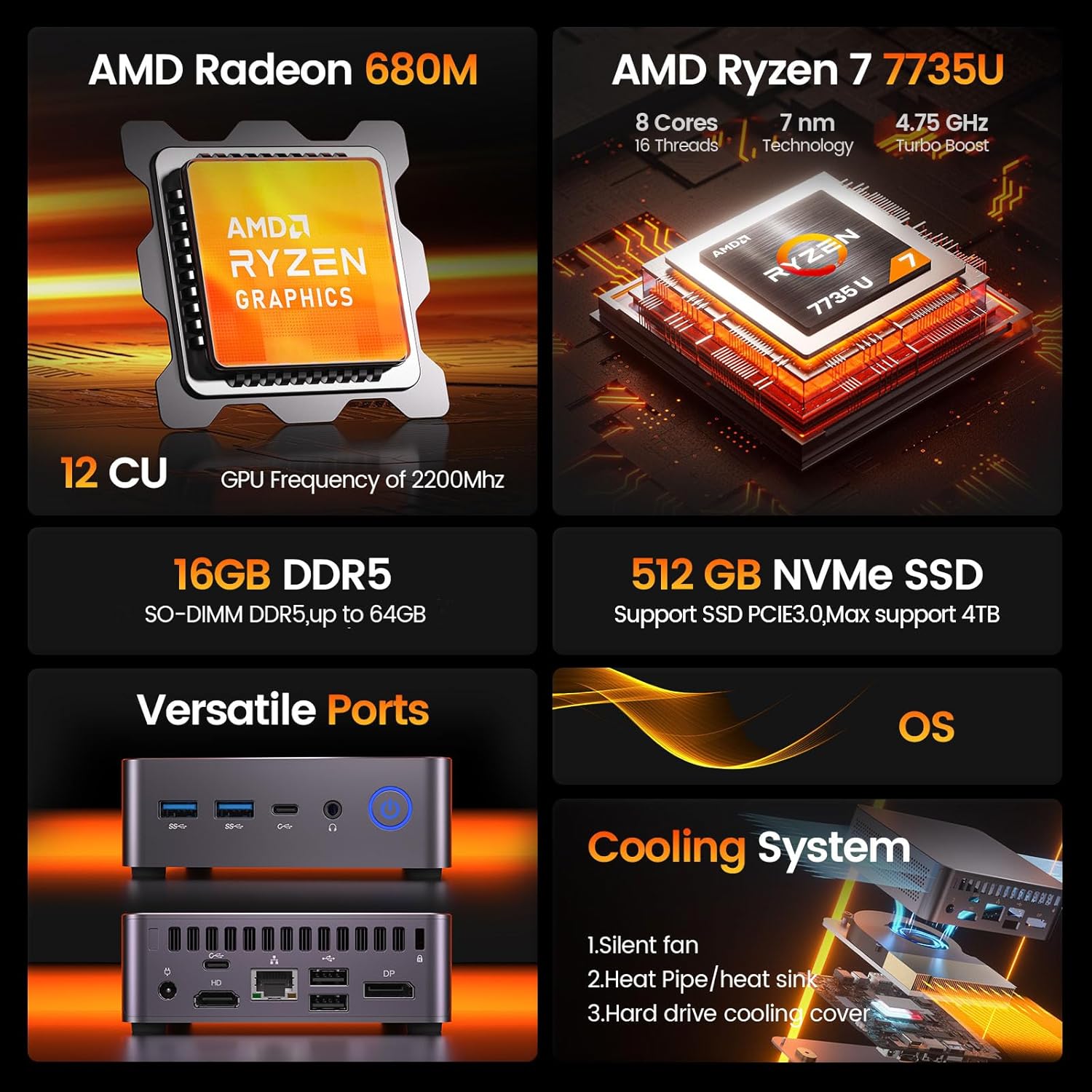
Rajah 2.1.1: Tamatview of the PELADN Mini PC WO7's core specifications, highlighting its AMD Ryzen 7 7735U processor, AMD Radeon 680M graphics, 16GB DDR5 RAM, 512GB NVMe SSD, versatile ports, and efficient cooling system.
- Pemproses: AMD Ryzen 7 7735U (8 Cores/16 Threads, up to 4.75Ghz)
- Grafik: Integrated AMD Radeon 680M GPU (12 CU, 2200 MHz)
- Ingatan: 16GB DDR5 RAM (expandable up to 64GB)
- Storan: 512GB NVMe SSD (PCIe 3.0, expandable up to 4TB)
- Output Paparan: Quadruple 4K/60Hz display support via DP, HD, and Dual Type-C ports
- Kesambungan Tanpa Wayar: WiFi 6 dan Bluetooth 5.2
- Sistem pengendalian: Pre-installed OS (supports Linux, Ubuntu)
- Sistem Penyejukan: Efficient Peladn IceBlast 1.5 Cooling Technology with triple copper heat pipes and silent fan.
- Reka bentuk padat: Small form factor (0.46L volume) for space-saving and portability.

Figure 2.1.2: Detailed specifications of the AMD Ryzen 7 7735U processor, including its 4.75 GHz turbo boost, 30W TDP, 8 cores, 16 threads, and 16MB L3 cache, alongside its Cinebench R23 multi-core and single-core performance benchmarks.

Figure 2.1.3: Information on the AMD Radeon 680M integrated graphics, highlighting its 12 compute units and 2200 MHz GPU frequency, designed for smooth gaming, entertainment, and multitasking.

Figure 2.1.4: Diagram illustrating the Peladn IceBlast 1.5 Cooling Technology, featuring triple copper heat pipes, multiple fan blades, and a top heat conductor for efficient thermal management.

Figure 2.1.5: Visual representation of the PELADN Mini PC WO7's compact dimensions (113mm x 113mm x 36mm) and design elements such as durable housing, smooth rounded edges, and responsive physical buttons.
2.2 Komponen dan Pelabuhan
Familiarize yourself with the various components and ports of your PELADN Mini PC WO7.
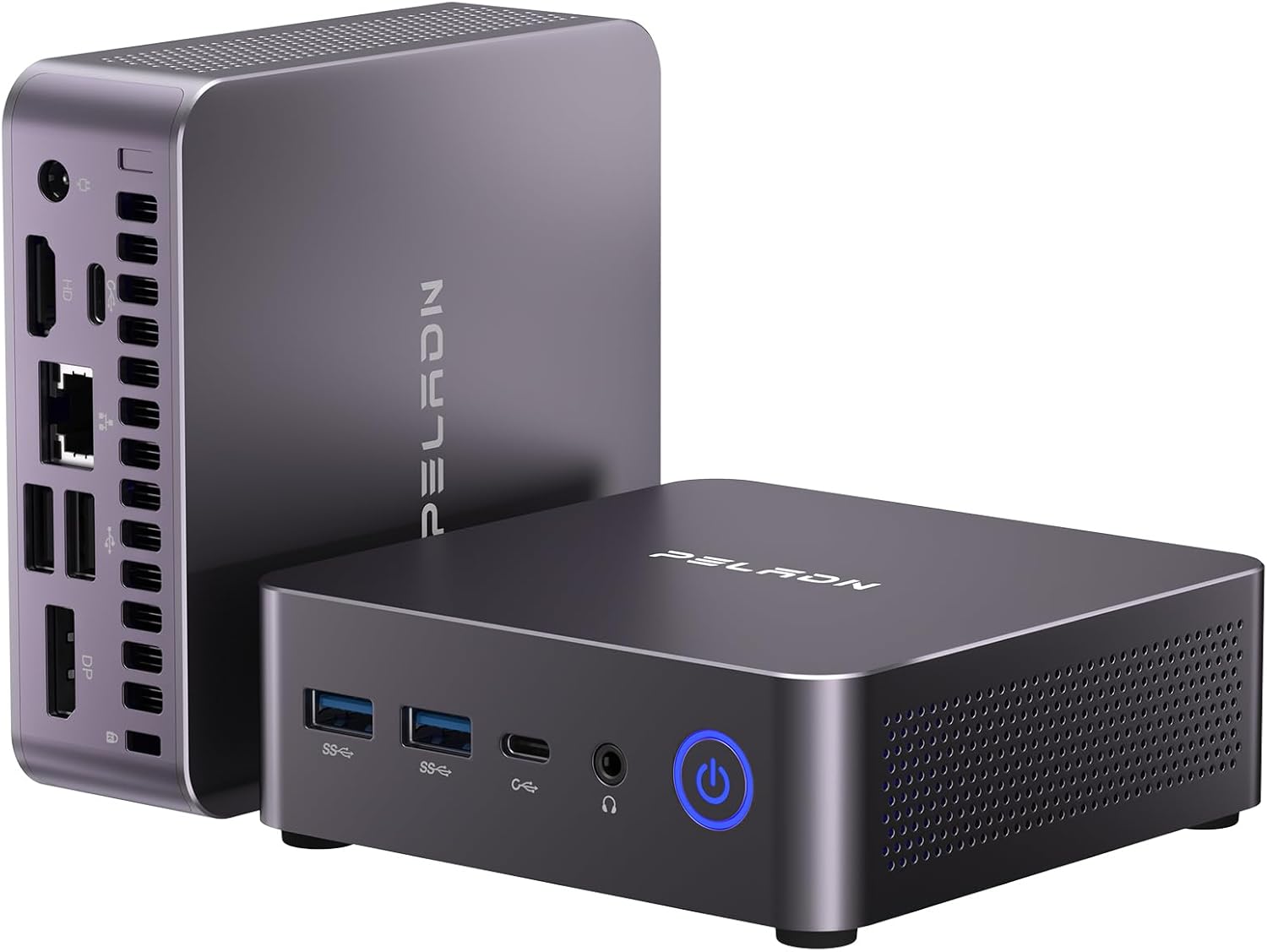
Rajah 2.2.1: Depan dan sisi view of the PELADN Mini PC WO7, showcasing its compact design and various connectivity options.

Rajah 2.2.2: Terperinci view of the front and rear ports of the PELADN Mini PC WO7. Front ports include 2x USB 3.2, 2x Type-C, 2-in-1 audio jack, and power button. Rear ports include DC power, HD, LAN (2.5G), 2x USB 2.0, DP, and anti-theft lock.
- Panel Depan:
- 2 x Port USB 3.2
- 2 x Type-C USB 3.2 Ports
- 1 x 2-in-1 Audio Jack (Headphone & Microphone)
- 1 x Butang Kuasa
- Panel belakang:
- 1 x DC Jack (Power Input)
- 1 x HD 2.0 Port
- 1 x RJ45 LAN Port (2.5G)
- 2 x Port USB 2.0
- 2 x DP 1.4 Ports
- 1 x Anti-theft Lock Slot
3. Panduan Persediaan
3.1 Apa yang ada di dalam Kotak
Sebelum anda mula, sila sahkan bahawa semua barang ada di dalam bungkusan:

Figure 3.1.1: Contents of the PELADN Mini PC WO7 package, including the PC unit, power adapter, HD cable, VESA mount with screws, and user manual.
- 1 x PELADN WO7 Mini PC
- 1 x Penyesuai Kuasa
- 1 x HD Cable
- 1 x VESA Mount dengan Skru
- 1 x Manual Pengguna (dokumen ini)
3.2 Menyambungkan PC Mini Anda
- Sambungan Kuasa: Connect the power adapter to the DC Jack on the rear panel of the Mini PC, then plug the adapter into a power outlet.
- Sambungan Paparan: Connect your monitor(s) to the Mini PC using the HD, DP, or Type-C ports. The Mini PC supports up to four 4K displays simultaneously.
- Peranti: Sambungkan papan kekunci, tetikus dan peranti USB anda yang lain ke port USB 3.2 atau USB 2.0 yang tersedia.
- Sambungan Rangkaian: For a wired connection, connect an Ethernet cable to the RJ45 LAN port. For wireless, the Mini PC supports WiFi 6.
- Peranti Audio: Connect headphones or speakers to the 2-in-1 audio jack on the front panel.

Figure 3.2.1: Illustration of the PELADN Mini PC WO7 supporting a quadruple 4K display setup, demonstrating its versatile video output capabilities for enhanced productivity or entertainment.
3.3 Kuasa Awal Hidup
Once all connections are secure, press the power button on the front panel to turn on the Mini PC. The system will boot into the pre-installed operating system. Follow the on-screen instructions for initial setup, including language, region, and network configuration.
4. Arahan Operasi
4.1 Sistem Operasi
Your PELADN Mini PC comes with an operating system pre-installed. It also supports other operating systems like Linux and Ubuntu. For detailed instructions on using the operating system, please refer to the respective OS documentation.
4.2 Storan dan Pengembangan Memori
The Mini PC is equipped with 16GB DDR5 RAM and a 512GB NVMe SSD. For users requiring more memory or storage, the system supports expansion:
- RAM: Expandable up to 64GB DDR5 RAM.
- SSD: Supports M.2 NVMe SSD expansion up to 4TB.

Gambar 4.2.1: Dalaman view highlighting the DDR5 RAM and NVMe SSD slots, illustrating the upgrade potential of the PELADN Mini PC WO7 for increased memory and storage capacity.

Figure 4.2.2: Comparison of speed increases for DDR5 RAM (up to 4800MHz) and NVMe SSD (up to 3500MB/s), demonstrating the performance benefits of these components in the PELADN Mini PC WO7.
Note: Upgrading internal components should be performed by users with technical expertise. Refer to the detailed upgrade guide (if available separately) or consult professional assistance to avoid damage.
4.3 Kesambungan Wayarles
The Mini PC features high-speed WiFi 6 and Bluetooth 5.2 for seamless wireless connections.
- WiFi 6: Provides faster internet speeds for browsing, streaming, and gaming. Access network settings in your operating system to connect to available WiFi networks.
- Bluetooth 5.2: Enables stable and efficient connection to various wireless devices such as keyboards, mice, headphones, and speakers. Pair devices through your operating system's Bluetooth settings.

Figure 4.3.1: Visual representation of the PELADN Mini PC WO7's advanced wireless capabilities, including WiFi 6 and Bluetooth 5.2 for enhanced connectivity and a smoother user experience.
5. Penyelenggaraan
5.1 Pembersihan
- Keep the Mini PC clean and free from dust. Use a soft, dry cloth for external surfaces.
- Periodically clean the ventilation holes to ensure proper airflow and prevent overheating. A can of compressed air can be used for this purpose.
- Jangan gunakan pembersih cecair atau semburan aerosol terus pada peranti.
5.2 Penempatan Optimum
- Place the Mini PC on a stable, flat surface.
- Pastikan pengudaraan yang mencukupi di sekitar peranti. Elakkan meletakkannya di ruang tertutup atau berhampiran sumber haba.
- The included VESA mount allows for discreet mounting behind a monitor or TV, optimizing desk space.

Figure 5.2.1: The PELADN Mini PC WO7 demonstrating its portability, easily fitting into a bag, and the option for VESA mounting to save space and create a clean workstation.
5.3 Kemas Kini Perisian
Regularly update your operating system and drivers to ensure optimal performance, security, and compatibility. Refer to your operating system's documentation for instructions on checking and installing updates.
6. Penyelesaian masalah
This section provides solutions to common issues you might encounter with your PELADN Mini PC.
| Masalah | Kemungkinan Punca | Penyelesaian |
|---|---|---|
| No power/System does not turn on | Power adapter not connected properly; Power outlet issue; Faulty power adapter. | Ensure power adapter is securely connected to both the PC and the outlet. Try a different power outlet. Test with another compatible power adapter if available. |
| Tiada paparan pada monitor | Display cable loose or incorrect; Monitor input not selected; Monitor faulty. | Check display cable connections (HD, DP, Type-C). Ensure the monitor is set to the correct input source. Test with a different monitor or cable. |
| Prestasi perlahan | Too many applications running; Insufficient RAM; Overheating. | Close unnecessary applications. Consider upgrading RAM if frequently experiencing slowdowns. Ensure proper ventilation and clean dust from vents. |
| Isu sambungan Wi-Fi/Bluetooth | Driver issues; Interference; Incorrect settings. | Check Wi-Fi/Bluetooth drivers in Device Manager. Restart the Mini PC and your router/Bluetooth device. Ensure no strong interference sources are nearby. |
| Sistem membeku atau ranap | Software conflict; Driver issues; Overheating; Hardware malfunction. | Update drivers and operating system. Check for malware. Monitor temperatures. If issues persist, consider a system restore or professional diagnosis. |
If the problem persists after trying these solutions, please contact PELADN customer support for further assistance.
7. Spesifikasi
Detailed technical specifications for the PELADN Mini PC Gaming WO7.
| Ciri | Spesifikasi |
|---|---|
| Model | WO7 |
| Pemproses | AMD Ryzen 7 7735U (8C/16T, up to 4.75Ghz) |
| Grafik | Integrated AMD Radeon 680M (12 CU, 2200 MHz) |
| RAM | 16GB DDR5 (Expandable to 64GB) |
| Penyimpanan | 512GB NVMe SSD (PCIe 3.0, Max 4TB) |
| Paparan Output | HD 2.0, DP 1.4, 2x Type-C (Supports Quadruple 4K/60Hz Displays) |
| Kesambungan Wayarles | WiFi 6, Bluetooth 5.2 |
| LAN | Ethernet RJ45 2.5G |
| Port USB | 2x USB 3.2, 2x USB 2.0, 2x Type-C USB 3.2 |
| Audio | 1x 2-in-1 Audio Jack (HP&MIC) |
| Sistem Operasi | Pre-installed OS (Supports Linux, Ubuntu) |
| Dimensi | Approx. 113mm x 113mm x 36mm (0.46L volume) |
| Berat badan | lebih kurang 2.4 paun |
8. Waranti dan Sokongan
8.1 Maklumat Waranti
Your PELADN Mini PC Gaming WO7 comes with a standard manufacturer's warranty. Please refer to the warranty card included in your package or visit the official PELADN webtapak untuk terma dan syarat jaminan terperinci. Simpan bukti pembelian anda untuk tuntutan waranti.
8.2 Sokongan Pelanggan
For technical support, troubleshooting assistance, or any inquiries regarding your PELADN Mini PC, please contact our customer support team:
- Sokongan dalam talian: Visit the official PELADN store on Amazon (PELADN Store on Amazon) for FAQs, driver downloads, and contact information.
- Sokongan E-mel: Rujuk kepada pembungkusan produk anda atau pegawai rasmi weblaman web untuk alamat e-mel sokongan khusus.
When contacting support, please have your product model (WO7) and purchase details ready.