pengenalan
Thank you for choosing the Nacon PCCH-380 Ergonomic Gaming Chair. This manual provides essential information for the safe and effective use of your new chair. Please read these instructions carefully before assembly and use, and retain them for future reference.
Maklumat Keselamatan
AMARAN:
- Do not use the chair for extended periods without taking adequate breaks.
- Always use the height adjustment function safely and follow the manufacturer's instructions to prevent injuries.
- Pastikan semua komponen diikat dengan selamat sebelum digunakan.
- Jangan berdiri di atas kerusi atau gunakannya sebagai bangku tangga.
- Jauhkan kanak-kanak dan haiwan peliharaan dari kerusi semasa perhimpunan.
Produk Selesaiview
The Nacon PCCH-380 is an ergonomic gaming chair designed for comfort and support during long sessions. It features 2D adjustable armrests, a lumbar cushion, and a reclinable backrest.
Ciri-ciri Utama:
- Ergonomic design for M-L users.
- 2D adjustable armrests.
- Adjustable lumbar cushion.
- Reclinable backrest up to 135°.
- Textile fabric in dark grey.
- 5-star base with smooth-rolling wheels.
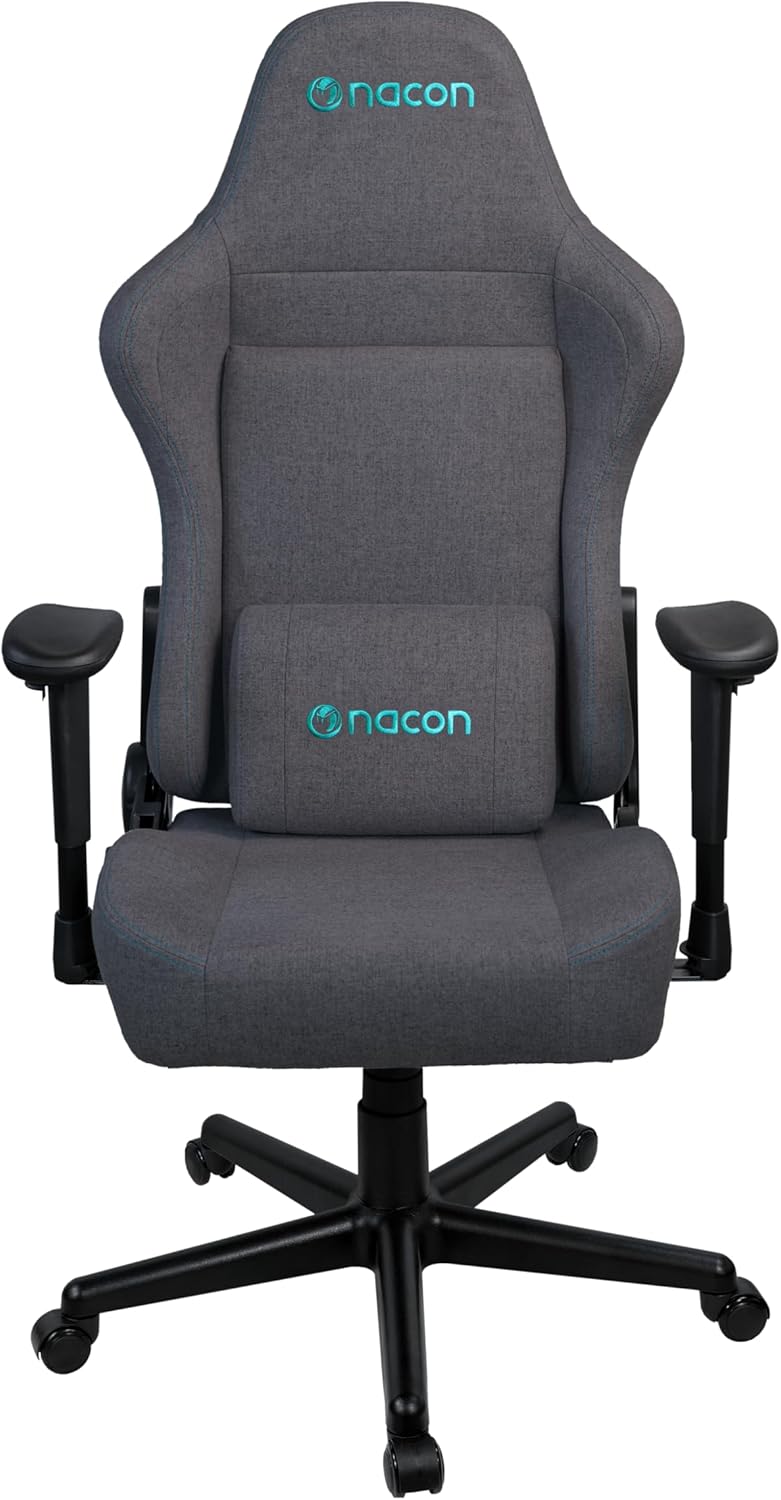
Rajah 1: Depan view of the Nacon PCCH-380 Ergonomic Gaming Chair in dark grey.

Rajah 2: Belakang view of the Nacon PCCH-380 Ergonomic Gaming Chair, highlighting the backrest design.
Arahan Perhimpunan
The Nacon PCCH-380 gaming chair requires assembly. Please follow the detailed instructions provided in the separate assembly guide included with your product packaging. Ensure all parts are present before beginning assembly.
Langkah Perhimpunan Agung:
- Buka bungkusan semua komponen dan sahkan terhadap senarai bahagian.
- Attach the wheels to the 5-star base.
- Masukkan silinder pengangkat gas ke tengah tapak.
- Attach the seat mechanism to the bottom of the seat.
- Secure the backrest to the seat assembly.
- Install the 2D armrests.
- Letakkan kerusi yang telah dipasang di atas silinder pengangkat gas.
- Attach the lumbar cushion as desired.

Figure 3: Packaging box for the Nacon PCCH-380 Gaming Chair, indicating assembly is required.
Arahan Operasi
Your Nacon PCCH-380 gaming chair offers several adjustment options to customize your seating experience for maximum comfort and ergonomic support.
1. Pelarasan Ketinggian:
To adjust the chair's height, locate the lever on the right side beneath the seat. While seated, pull the lever up to lower the chair. To raise the chair, stand up and pull the lever up. Release the lever at your desired height.
2. Backrest Recline:
The backrest can be reclined up to 135 degrees. Locate the recline lever on the left side of the chair. Pull the lever up and lean back to your desired angle. Release the lever to lock the backrest in position. To return to an upright position, pull the lever and lean forward slightly.

Figure 4: The Nacon PCCH-380 Gaming Chair shown in a reclined position, demonstrating its flexibility.
3. Armrest Adjustment (2D):
The 2D armrests can be adjusted in two dimensions: height and rotation. Use the buttons or levers on the armrests to adjust them to your preferred height and angle for optimal arm and wrist support.
4. Lumbar Cushion:
The included lumbar cushion provides additional support for your lower back. Position it along the backrest to align with the natural curve of your spine for enhanced comfort. The cushion can be removed if not desired.

Rajah 5: Jarak dekat view of the adjustable lumbar cushion on the Nacon PCCH-380 Gaming Chair.
5. Swivel Function:
Kerusi ini mempunyai fungsi pusing 360 darjah, membolehkan pergerakan dan akses mudah ke pelbagai kawasan ruang kerja anda tanpa perlu mengubah kedudukan keseluruhan kerusi.
Penyelenggaraan dan Penjagaan
Proper maintenance will ensure the longevity and appearance of your Nacon PCCH-380 gaming chair.
Pembersihan:
- For general cleaning, wipe the textile fabric with a damp kain.
- For stubborn stains, use a mild fabric cleaner and follow the product's instructions. Test on an inconspicuous area first.
- Avoid using harsh chemicals or abrasive cleaners, as these can damage the fabric and components.
- Vakum kerusi secara berkala untuk menghilangkan habuk dan serpihan.

Rajah 6: Terperinci view of the dark grey textile fabric used on the Nacon PCCH-380 Gaming Chair.
Penjagaan Am:
- Periksa semua skru dan bolt secara berkala untuk memastikan ia ketat. Ketatkan semula jika perlu.
- Elakkan mendedahkan kerusi kepada cahaya matahari langsung untuk tempoh yang lama bagi mengelakkan ia pudar.
- Do not place hot items directly on the chair's surface.
Menyelesaikan masalah
If you encounter any issues with your Nacon PCCH-380 gaming chair, refer to the following common problems and solutions:
1. Chair does not adjust height:
- Ensure the height adjustment lever is fully engaged.
- Check if the gas lift cylinder is properly installed and not damaged.
2. Backrest does not recline or lock:
- Verify that the recline lever is functioning correctly and not obstructed.
- Inspect the recline mechanism for any visible damage or loose connections.
3. Wheels are not rolling smoothly:
- Check for any debris (hair, dust, etc.) caught in the wheels and clean them.
- Ensure the wheels are securely attached to the base.
Jika penyelesaian ini tidak menyelesaikan isu tersebut, sila hubungi sokongan pelanggan.
Spesifikasi
| Ciri | Perincian |
|---|---|
| Nombor Model | PCCH-380 |
| Jenama | NACON |
| warna | Kelabu Gelap |
| bahan | Textile Fabric |
| Dimensi Produk (D x W x H) | 58 x 57 x 121-131 cm |
| Berat badan | 18 kg |
| Berat Pengguna Maksimum | 100 kg |
| Ketinggian Pengguna Disyorkan | Sehingga 170 cm |
| Tempat letak tangan | Boleh Laras 2D |
| Sudut Berbaring | Sehingga 135° |
| Sokongan Lumbar | Adjustable Lumbar Cushion Included |
| Perhimpunan Diperlukan | ya |
Waranti dan Sokongan
For warranty information and customer support, please refer to the documentation provided with your purchase or contact your retailer. You can also visit the official NACON webtapak untuk bantuan lanjut.
NACON is committed to providing high-quality products and support. If you have any questions or require service, please do not hesitate to reach out.


