pengenalan
Thank you for choosing the Micool Mini Sleep Earbuds Wireless. These earbuds are designed for ultimate comfort and discretion, especially for sensitive sleepers. Featuring IPX5 waterproofing, Bluetooth 5.3 connectivity, and a lightweight, invisible design, they provide a peaceful audio experience for relaxation, sleep, or discreet listening.

Image: Micool Mini Sleep Earbuds in their charging case.
Kandungan Pakej
- Micool Mini Sleep Earbuds (Left and Right)
- Kes Pengecasan
- Kabel Pengecas USB-C
- Manual Pengguna
Persediaan
1. Pengecasan Awal
- Letakkan kedua earbud ke dalam cas pengecasan.
- Connect the USB-C charging cable to the port on the charging case and to a power source.
- Paparan digital pada bekas pengecas akan menunjukkan peratusan bateritage. Ensure the earbuds are fully charged before first use.
2. Berpasangan Bluetooth
- Buka bekas pengecas. Fon telinga akan memasuki mod berpasangan secara automatik.
- On your device (e.g., smartphone, tablet, laptop), enable Bluetooth.
- Cari untuk available Bluetooth devices and select "Micool Q26" (or similar name) from the list.
- Sebaik sahaja disambungkan, anda akan mendengar gesaan audio dan fon telinga akan sedia untuk digunakan.
Arahan Operasi
Memakai Earbud
The Micool Mini Sleep Earbuds are designed to fit snugly and discreetly within your ear, making them ideal for side sleepers. Gently insert each earbud into your ear canal until it feels secure and comfortable. The soft silicone ear tips adapt to your ear shape, minimizing pressure for extended wear.
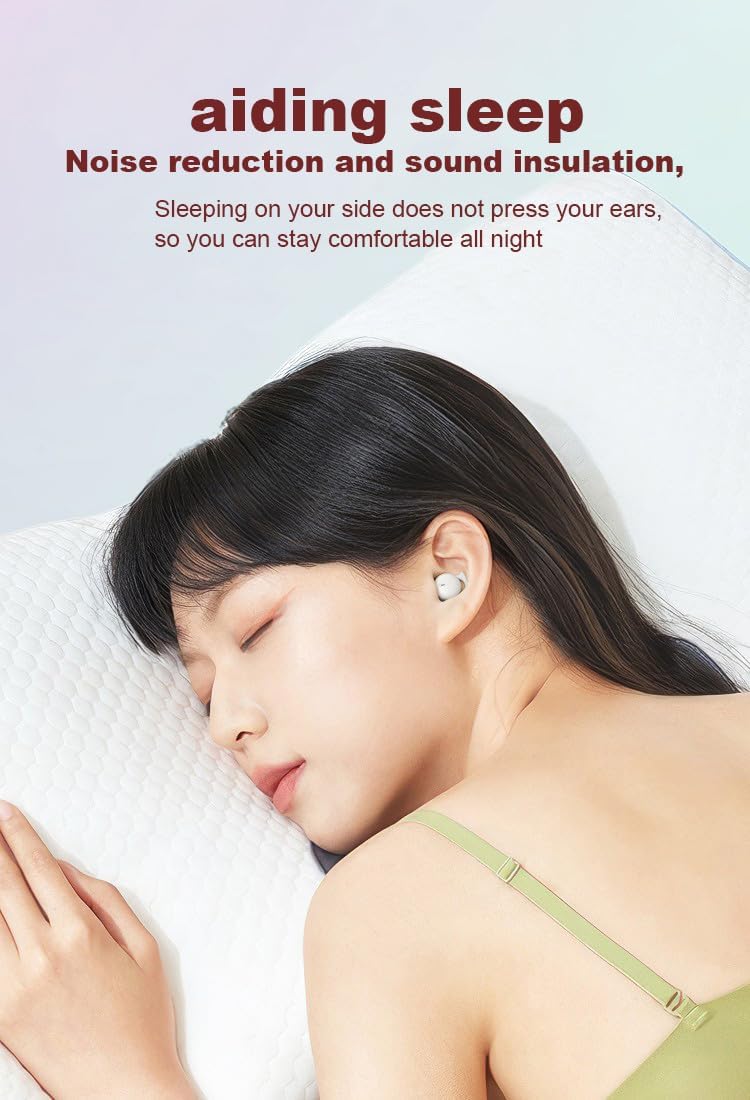
Image: Earbud worn discreetly for sleep.
Kawalan Sentuh
Each earbud features a touch-sensitive button for easy control of your audio and calls.

Image: Touch button controls diagram.
- Main/Jeda: Ketik sekali pada salah satu fon telinga.
- Jawab/Tutup Panggilan: Ketik sekali pada sama ada fon telinga semasa panggilan masuk atau panggilan aktif.
- Lagu Seterusnya: Ketik dua kali pada fon telinga kanan.
- Lagu Sebelumnya: Ketik dua kali pada fon telinga kiri.
- Tolak Panggilan: Tekan dan tahan salah satu fon telinga selama 2 saat semasa panggilan masuk.
- Aktifkan Pembantu Suara: Ketik tiga kali pada salah satu fon telinga.
Penggunaan Fon Telinga Bebas
Both earbuds can be used independently. You can use one earbud while the other charges in the case, effectively extending your listening time. Simply remove one earbud from the case to use it in mono mode.
Rintangan Air (IPX5)
The earbuds are rated IPX5 water-resistant, meaning they can withstand splashes of water and sweat. They are suitable for use during light rain or workouts, but should not be submerged in water.
Penyelenggaraan
- Bersihkan fon telinga dan bekas pengecas dengan kerap menggunakan kain lembut dan kering.
- Elakkan menggunakan pembersih atau pelarut yang kasar.
- Pastikan sentuhan pengecasan pada kedua-dua fon telinga dan sarung bersih untuk memastikan pengecasan yang betul.
- Simpan fon telinga dalam bekas pengecasnya apabila tidak digunakan untuk melindunginya dan mengekalkan hayat bateri.
Menyelesaikan masalah
Fon telinga Tidak Berpasangan
- Pastikan kedua-dua fon telinga dicas sepenuhnya.
- Matikan Bluetooth pada peranti anda, kemudian hidupkan semula.
- Forget/delete "Micool Q26" from your device's Bluetooth list and attempt to pair again.
- Place earbuds back in the case, close the lid, wait a few seconds, then open to re-initiate pairing mode.
Tiada Bunyi atau Kelantangan Rendah
- Semak tahap kelantangan pada kedua-dua peranti anda dan fon telinga.
- Pastikan fon telinga diletakkan dengan betul di telinga anda.
- Sambung semula fon telinga ke peranti anda.
Isu Pengecasan
- Sahkan kabel USB-C disambungkan dengan selamat pada kedua-dua bekas dan sumber kuasa.
- Pastikan sesentuh pengecasan pada fon telinga dan bahagian dalam kotak bersih dan bebas daripada serpihan.
- Cuba gunakan kabel USB-C atau penyesuai kuasa yang berbeza.
Spesifikasi
| Nama Model | Q26 |
| Jenama | Micool |
| Teknologi Ketersambungan | Wayarles (Bluetooth 5.3) |
| Tahan Air | IPX5 |
| Penempatan Telinga | Di Telinga |
| Faktor Bentuk | Di Telinga |
| bahan | plastik |
| Komponen yang Disertakan | Kabel, Manual Pengguna |
| UPC | 770029329733 |
| Pengeluar | MICOOL |
| Tarikh Mula-mula Tersedia | 12 Jun 2023 |
Waranti dan Sokongan
Specific warranty information for the Micool Mini Sleep Earbuds (Model Q26) is not provided in the product details. Please refer to the warranty card included in your package or contact Micool customer support for detailed warranty terms and conditions.
For further assistance, technical support, or inquiries, please visit the official Micool website or contact their customer service department. Contact information can typically be found in the included user manual or on the product packaging.


