1. Pengenalan
Thank you for choosing the EDUPLINK M6Pro Bluetooth Speaker. This portable wireless speaker is designed to deliver high-fidelity audio with deep bass, featuring IPX7 waterproofing, TWS stereo pairing, and a dynamic RGB light show. This manual provides detailed instructions to help you get the most out of your device.
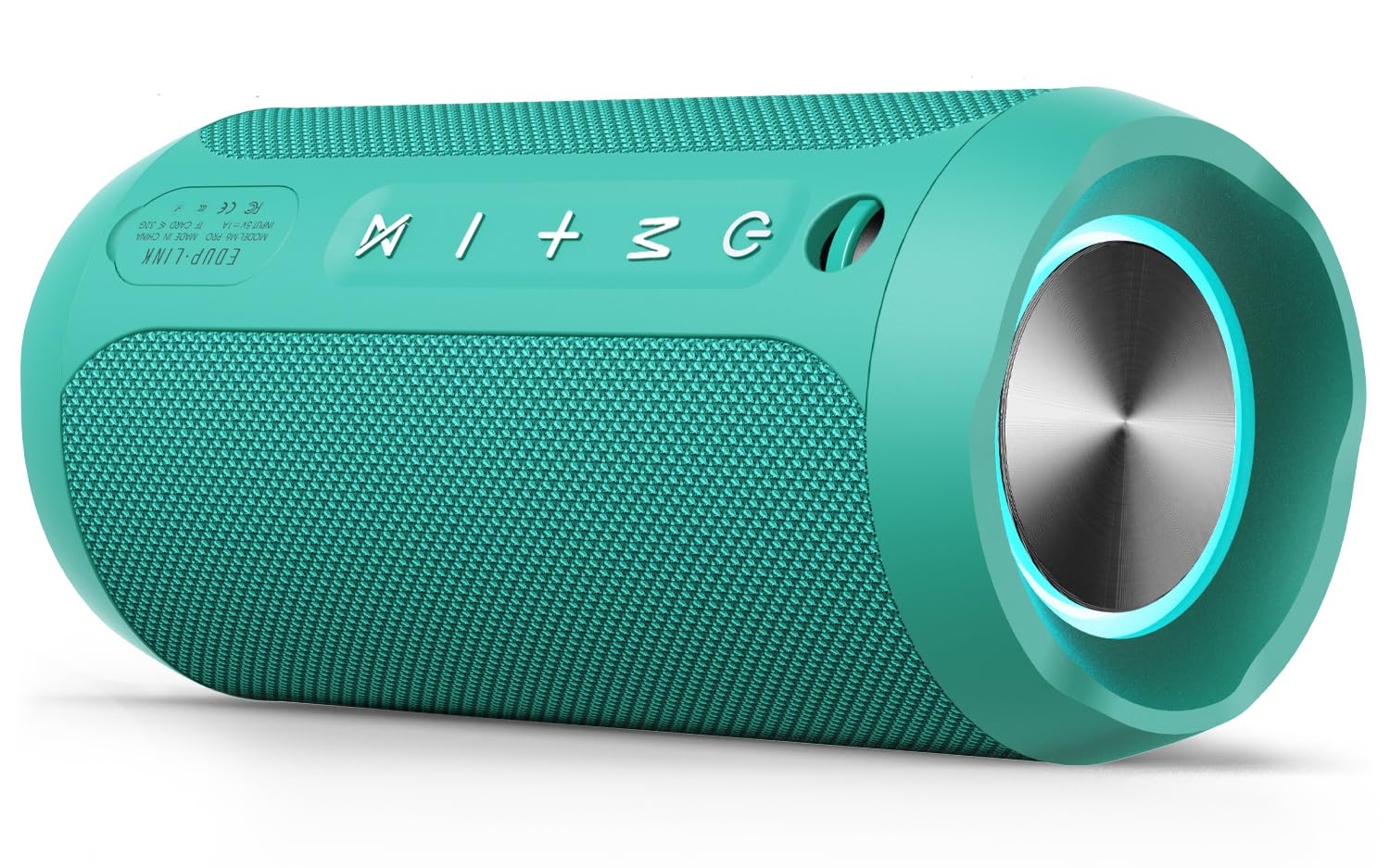
Image: The EDUPLINK M6Pro Bluetooth Speaker in teal, showcasing reka bentuk silindernya.
2. Kandungan Pakej
Sila tandai kotak untuk item berikut:
- 1 x Portable Bluetooth Speaker (M6Pro)
- 1 x Kabel Pengecas USB
- 1 x Kabel AUX
- 1 x Lanyard
- 1 x Manual Pengguna (dokumen ini)
3. Produk Lebihview & Kawalan
Biasakan diri anda dengan butang dan port pembesar suara untuk penggunaan yang optimum.

Imej: Sisi view of the EDUPLINK M6Pro speaker, highlighting the control panel with power, mode, volume, and TWS buttons.
Butang Kawalan:
- Butang kuasa (⏻):
- Long press: Power On/Off.
- Short press (while playing): Play/Pause music.
- Butang Mod (M):
- Short press: Switch between Bluetooth, TF Card, and AUX modes.
- Long press: Disconnect current Bluetooth device.
- Volume Up / Next Track (+):
- Tekan sebentar: Tingkatkan kelantangan.
- Tekan lama: Langkau ke trek seterusnya.
- Volume Down / Previous Track (-):
- Tekan sebentar: Kurangkan kelantangan.
- Tekan lama: Pergi ke trek sebelumnya.
- Butang TWS (⋈):
- Short press: Initiate TWS pairing (see Section 5).
- Long press: Disconnect TWS pairing.
Ports (under protective flap):
- Port Pengecasan USB-C: Untuk mengecas pembesar suara.
- Slot Kad TF: Insert a MicroSD card (up to 32GB) for direct music playback.
- Input AUX (3.5mm): Connect external audio devices using the provided AUX cable.
4. Setup & Basic Operation
4.1 Mengecas Speaker
- Buka kepak getah pelindung di sisi pembesar suara.
- Connect the provided USB-C charging cable to the speaker's charging port and the other end to a USB power adapter (not included).
- Penunjuk LED akan menunjukkan status pengecasan. Pengecasan penuh mengambil masa kira-kira 3 jam.
4.2 Menghidupkan/Mematikan
- To power on, long press the Power button (⏻) until you hear an audible prompt.
- To power off, long press the Power button (⏻) again until you hear an audible prompt.
4.3 Berpasangan Bluetooth
- Ensure the speaker is powered on and in Bluetooth mode (indicated by a flashing blue LED). If not, short press the Mode (M) button to switch.
- Pada peranti mudah alih anda, dayakan Bluetooth dan cari peranti yang tersedia.
- Select "EDUPLINK M6Pro" from the list.
- Setelah dipasangkan, penunjuk LED akan bertukar menjadi biru pekat dan anda akan mendengar bunyi pengesahan.
5. Penggandingan TWS (Stereo Tanpa Wayar Sejati)
To achieve a more immersive stereo sound experience, you can pair two EDUPLINK M6Pro speakers together.

Image: Two EDUPLINK M6Pro speakers positioned to illustrate True Wireless Stereo (TWS) pairing.
- Ensure both EDUPLINK M6Pro speakers are powered on and not connected to any Bluetooth device.
- On one speaker (this will be your primary speaker), short press the TWS button (⋈). Pembesar suara akan mengeluarkan bunyi yang menunjukkan ia sedang mencari pembesar suara lain.
- On the second speaker, short press the TWS button (⋈).
- Kedua-dua pembesar suara akan bersambung secara automatik antara satu sama lain. Anda akan mendengar bunyi pengesahan sebaik sahaja pasangan TWS berjaya.
- Now, connect your mobile device to the primary speaker via Bluetooth (as described in Section 4.3). Both speakers will play audio in stereo.
- To disconnect TWS pairing, long press the TWS button (⋈) on either speaker.
6. Hard Reset Procedure
If your speaker is experiencing connectivity issues, is stuck connected to an incorrect device, or is not pairing correctly, a hard reset can resolve these problems by clearing its connection history.
- Pastikan pembesar suara dihidupkan.
- Tekan dan tahan serentak Kelantangan Naik (+) dan Perlahankan suara (-) buttons for approximately 1-2 seconds until the speaker powers off.
- Once powered off, the speaker's connection history will be cleared.
- Power the speaker back on (long press Power button). It will enter Bluetooth pairing mode.
- On your mobile device, go to your Bluetooth settings and "forget" or "unpair" the "EDUPLINK M6Pro" device if it was previously connected.
- Proceed with Bluetooth pairing as described in Section 4.3 to connect the speaker as a new device.
7. Kalis Air (IPX7)
The EDUPLINK M6Pro speaker features an IPX7 waterproof rating, meaning it can be submerged in water up to 1 meter (3 feet) for 30 minutes. This makes it suitable for use by the pool, at the beach, or in the shower.

Image: The EDUPLINK M6Pro speaker partially submerged in water, demonstrating its IPX7 waterproof capability.
Penting: Ensure the protective rubber flap covering the charging, TF card, and AUX ports is securely closed before exposing the speaker to water.
8. Spesifikasi
| Ciri | Perincian |
|---|---|
| Nama Model | M6Pro |
| Jenama | EDUPLINK |
| Teknologi Ketersambungan | Bluetooth, Bantu |
| Versi Bluetooth | 5.0 |
| Julat Bluetooth | Sehingga 80 kaki (24 meter) |
| Tahap Ketahanan Air | IPX7 (kalis air) |
| Kuasa Output Maksimum Pembesar Suara | 24 Watt |
| Mod Keluaran Audio | Stereo (dengan gandingan TWS) |
| Masa bermain | Sehingga 20 Jam |
| Masa Mengecas | Lebih kurang 3 Jam |
| Kapasiti Bateri | 20 Amp Hours (2 Lithium Metal batteries) |
| Input Voltage | 5 Volt |
| Respons Kekerapan | 20 Hz - 20 KHz |
| Nisbah Isyarat-ke-Bunyi | 80 dB |
| Dimensi Produk | 2.76"D x 6.3"W x 2.76"H (7cm D x 16cm W x 7cm H) |
| Berat Barang | 14.8 auns (420 Gram) |
| bahan | Poliuretana Termoplastik (TPU) |
| Ciri Khas | LED Light, Portable, Shockproof, Stereo Pairing, Waterproof |
| Peranti Serasi | Desktop, Komputer Riba, Projektor, Telefon Pintar, Tablet |
| Kaedah Kawalan | Apl |
9. Penyelesaian masalah
- Pembesar suara tidak dapat dihidupkan: Pastikan bateri dicas. Sambungkan pembesar suara ke sumber kuasa menggunakan kabel USB-C.
- Tidak boleh berpasangan dengan peranti Bluetooth:
- Ensure the speaker is in Bluetooth pairing mode (flashing blue LED).
- Make sure the speaker is not already connected to another device. Long press the Mode (M) button to disconnect.
- Perform a hard reset (see Section 6).
- On your device, "forget" or "unpair" the speaker from your Bluetooth list and try pairing again.
- Ensure your device is within the 80-foot Bluetooth range.
- Tiada bunyi:
- Semak tahap kelantangan pada kedua-dua pembesar suara dan peranti anda yang disambungkan.
- Ensure the speaker is correctly paired via Bluetooth or the AUX/TF card is properly inserted and selected.
- Gandingan TWS gagal:
- Ensure both speakers are M6Pro models and are not connected to any other Bluetooth device.
- Letakkan pembesar suara rapat antara satu sama lain semasa berpasangan.
- Try performing a hard reset on both speakers before attempting TWS pairing again.
10. Waranti & Sokongan
The EDUPLINK M6Pro Bluetooth Speaker comes with a limited warranty. For specific warranty details, please refer to the product packaging or contact EDUPLINK customer support. For further assistance or technical support, please visit the official EDUPLINK webtapak atau hubungi saluran perkhidmatan pelanggan mereka.
Sokongan dalam talian: Visit the EDUPLINK Store on Amazon


