1. Pengenalan
Terima kasih kerana membeliasing the EDUPLINK M6Pro IPX7 Waterproof Portable Bluetooth Speaker. This manual provides essential information for the safe and effective use of your speaker. Please read it thoroughly before operation and retain it for future reference.
2. Maklumat Keselamatan
- Jangan dedahkan pembesar suara kepada suhu yang melampau atau cahaya matahari langsung untuk tempoh yang lama.
- Elakkan daripada menjatuhkan atau menundukkan pembesar suara kepada impak yang kuat.
- Jauhkan pembesar suara daripada peranti perubatan, kerana ia mengandungi magnet.
- Gunakan hanya kabel pengecasan yang disediakan atau setara yang diperakui.
- Jangan cuba membuka, membaiki atau mengubah suai pembesar suara. Ini akan membatalkan jaminan.
- Pastikan penutup port pengecasan ditutup rapat apabila menggunakan pembesar suara berhampiran air untuk mengekalkan penarafan kalis air IPX7nya.
3. Kandungan Pakej
Sahkan bahawa semua item terdapat dalam pakej anda:
- 1 x EDUPLINK M6Pro Portable Bluetooth Speaker
- 1 x Kabel Pengecas USB
- 1 x AUX Cord
- 1 x Lanyard
- 1 x Manual Pengguna (dokumen ini)
4. Produk Lebihview
Biasakan diri anda dengan komponen dan kawalan pembesar suara.
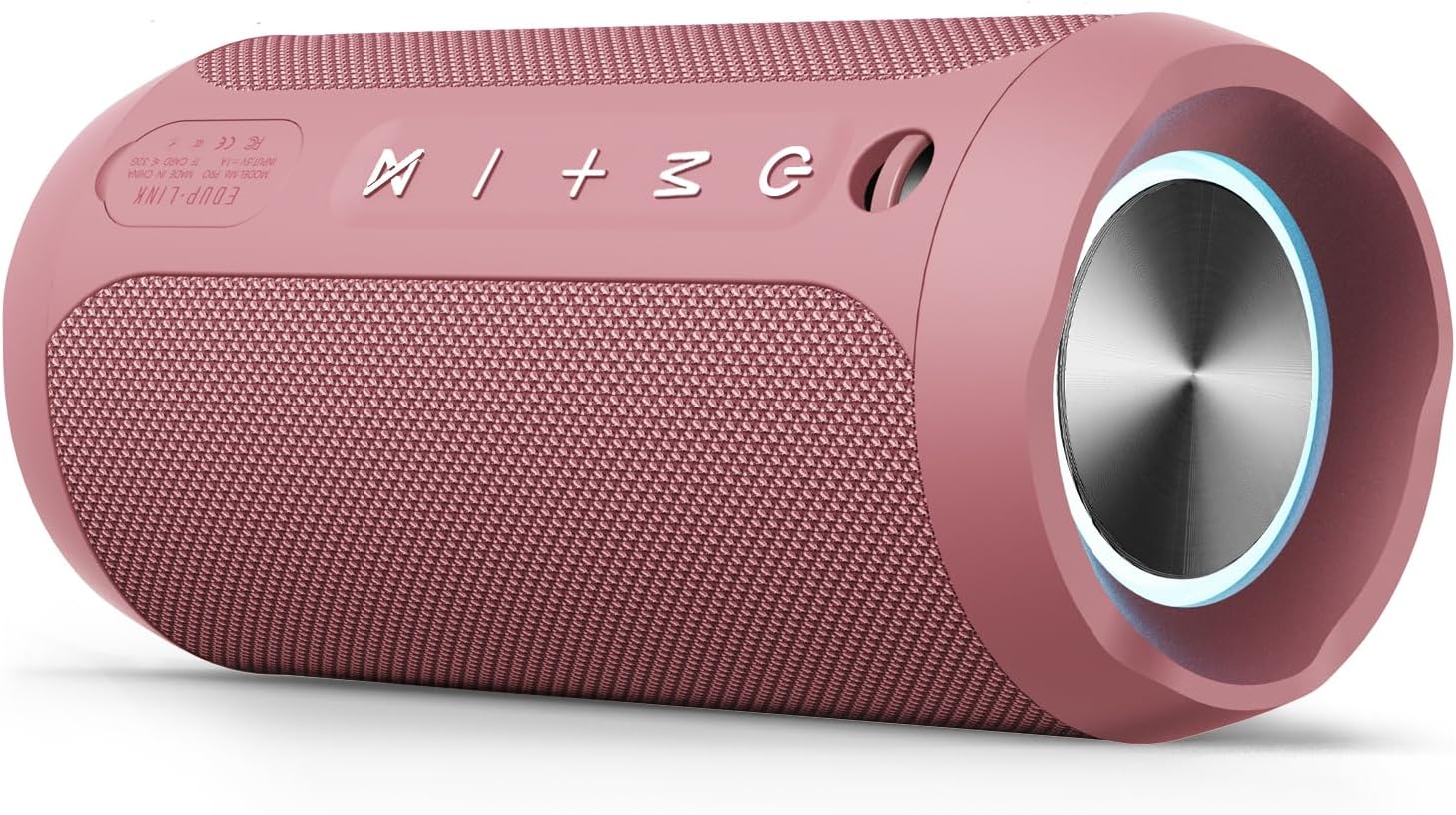
Imej: Depan view of the EDUPLINK M6Pro Bluetooth Speaker, showcasing its design and speaker grille.

Imej: Atas view of the EDUPLINK M6Pro Bluetooth Speaker, highlighting the control buttons and ports.
Butang Kawalan:
- Butang kuasa (⏻): Press and hold to power on/off. Short press to control RGB lights.
- Butang Mod (M): Short press to switch between Bluetooth, TF Card, and AUX modes.
- Kelantangan Naik (+): Tekan pendek untuk meningkatkan kelantangan. Tekan lama untuk trek seterusnya.
- Perlahankan suara (-): Tekan pendek untuk mengurangkan kelantangan. Tekan lama untuk trek sebelumnya.
- Play/Pause Button (⏵/⏸): Short press to play/pause. In Bluetooth mode, short press to answer/end calls. Long press to reject calls.
- TWS Pairing Button (⋈): Short press to activate TWS pairing mode.
Pelabuhan:
- Port Pengecasan USB-C: Untuk mengecas pembesar suara.
- Slot Kad TF: For playing music directly from a MicroSD card.
- Input AUX: For wired audio connection using the provided AUX cable.
5. Persediaan
5.1 Mengecas Speaker
- Buka penutup pelindung di sisi pembesar suara untuk mengakses port pengecasan.
- Connect the USB-C end of the charging cable to the speaker's charging port.
- Connect the USB-A end of the charging cable to a 5V/1A USB power adapter (not included) or a computer's USB port.
- The LED indicator will illuminate during charging and turn off when fully charged. A full charge takes approximately 3 hours.
- Ensure the protective cover is securely closed after charging to maintain waterproof integrity.
5.2 Menghidupkan/Mematikan
- Untuk Menghidupkan: Tekan dan tahan butang Kuasa (⏻) for 2-3 seconds until you hear an audible prompt and the LED indicator lights up.
- Untuk Mematikan: Tekan dan tahan butang Kuasa (⏻) for 2-3 seconds until you hear an audible prompt and the LED indicator turns off.
5.3 Berpasangan Bluetooth
- Ensure the speaker is powered on and in Bluetooth mode (the LED indicator will flash blue). If not, short press the Mode button (M) to switch to Bluetooth mode.
- Pada peranti mudah alih anda (telefon pintar, tablet, dll.), dayakan Bluetooth dan cari peranti yang tersedia.
- Select "EDUPLINK M6Pro" from the list of devices.
- Once successfully paired, you will hear an audible confirmation, and the LED indicator will turn solid blue.
- Pembesar suara secara automatik akan cuba menyambung semula ke peranti pasangan terakhir apabila dihidupkan.
6. Arahan Operasi
6.1 Basic Audio Control
- Main/Jeda: Short press the Play/Pause button (⏵/⏸).
- Kelantangan: Tekan pendek butang Kelantangan Naik (+).
- Perlahankan suara: Tekan pendek butang Kelantangan Turun (-).
- Lagu Seterusnya: Tekan lama butang Naikkan Kelantangan (+).
- Trek Sebelumnya: Tekan lama butang Kelantangan Turun (-).
6.2 TWS (Stereo Wayarles Sejati) Berpasangan
You can pair two EDUPLINK M6Pro speakers together for a stereo sound experience.
- Pastikan kedua-dua pembesar suara dihidupkan dan dalam mod Bluetooth, tetapi tidak disambungkan ke mana-mana peranti.
- On one speaker (this will be the primary speaker), short press the TWS Pairing button (⋈). The speaker will emit a pairing tone.
- The two speakers will automatically connect to each other. Once connected, you will hear a confirmation tone, and the LED indicator on the primary speaker will flash blue, while the secondary speaker's LED will be solid blue.
- Sekarang, sambungkan peranti mudah alih anda ke pembesar suara utama melalui Bluetooth seperti yang diterangkan dalam bahagian 5.3.
- To disconnect TWS, short press the TWS Pairing button (⋈) on either speaker.
6.3 Main Semula Kad TF
Pembesar suara menyokong memainkan audio files directly from a MicroSD (TF) card.
- Insert a MicroSD card (up to 32GB, formatted to FAT32) with audio files ke dalam slot kad TF.
- The speaker will automatically switch to TF Card mode and begin playing. If not, short press the Mode button (M) to select TF Card mode.
- Use the Play/Pause and Volume buttons to control playback.
6.4 Input AUX
Sambungkan peranti audio luaran menggunakan kabel AUX 3.5mm.
- Sambungkan satu hujung kabel AUX yang disediakan ke port input AUX pembesar suara.
- Sambungkan hujung yang satu lagi ke bicu output audio peranti luaran anda.
- Pembesar suara akan bertukar kepada mod AUX secara automatik. Jika tidak, tekan sebentar butang Mod (M) untuk memilih mod AUX.
- Audio playback is controlled via the connected external device.
6.5 Kawalan Cahaya RGB
The speaker features dynamic RGB lighting.
- Tekan sebentar butang Kuasa (⏻) to cycle through different light modes or turn the lights off.

Image: The EDUPLINK M6Pro speaker illustrating its various playback modes (Bluetooth, AUX, TF Card) and features like 20H playtime, 360° stereo sound, IP67 dust/waterproof rating, and RGB lighting.
7. Penyelenggaraan
- Pembersihan: Lap pembesar suara dengan lembut, damp kain. Jangan gunakan pembersih atau pelarut yang melelas.
- Storan: Simpan pembesar suara di tempat yang sejuk dan kering jauh dari cahaya matahari langsung dan suhu yang melampau.
- Penjagaan Bateri: If not used for extended periods, charge the speaker at least once every three months to prolong battery life.
8. Penyelesaian masalah
| Masalah | Kemungkinan Punca | Penyelesaian |
|---|---|---|
| Speaker tidak dihidupkan. | Bateri lemah. | Cas pembesar suara selama sekurang-kurangnya 30 minit. |
| Tidak boleh berpasangan melalui Bluetooth. | Pembesar suara tidak dalam mod berpasangan; Bluetooth peranti dimatikan; terlalu jauh dari peranti. | Ensure speaker is in Bluetooth mode (flashing blue LED). Turn device Bluetooth off/on. Move speaker closer to device (within 80 feet). |
| Tiada bunyi. | Volume too low; incorrect mode; device not playing. | Increase speaker and device volume. Ensure correct mode (Bluetooth, TF, AUX). Check if audio is playing on the connected device. |
| Gandingan TWS gagal. | Pembesar suara sudah disambungkan ke peranti; terlalu jauh antara satu sama lain. | Ensure both speakers are disconnected from any device. Place speakers close to each other. Try resetting both speakers. |
| Poor audio quality/distortion. | Low battery; device too far; interference. | Charge the speaker. Move closer to the connected device. Avoid strong electromagnetic interference. |
9. Spesifikasi
| Jenama | EDUPLINK |
| Nama Model | M6Pro |
| Jenis Pembesar Suara | Pembesar Suara Mudah Alih Kalis Air |
| Teknologi Ketersambungan | Bluetooth |
| Versi Bluetooth | 5.0 |
| Julat Tanpa Wayar | Sehingga 80 Kaki (24 meter) |
| Tahap Ketahanan Air | IPX7 (Boleh tenggelam sehingga 1 meter selama 30 minit) |
| Kuasa Output Maksimum Pembesar Suara | 24 Watt |
| Kapasiti Bateri | 3600mAh (2 Lithium Metal batteries) |
| Masa bermain | Sehingga 20 jam (pada volum 50%) |
| Masa Mengecas | Lebih kurang 3 jam |
| Input Voltage | 5 Volt |
| Respons Kekerapan | 20 Hz - 20 KHz |
| Nisbah Isyarat-ke-Bunyi | 80 dB |
| Impedans | 4 Ohm |
| Dimensi Produk | 2.76"D x 6.3"W x 2.76"H (7cm x 16cm x 7cm) |
| Berat Barang | 14.8 auns (420 Gram) |
| bahan | Poliuretana Termoplastik (TPU) |
| Ciri Khas | LED Light, Portable, Shockproof, Stereo Pairing, Waterproof |
| Peranti Serasi | Smartphones, Tablets, Laptops, Desktop Computers, Projectors |
10. Waranti dan Sokongan
The EDUPLINK M6Pro speaker comes with a limited warranty. Please refer to the warranty card included in your package for specific terms and conditions. For technical support or customer service inquiries, please contact EDUPLINK customer support through the retailer where you purchased the product or visit the official EDUPLINK webtapak.


