pengenalan
Thank you for choosing the Karlsson Cuckoo Light Wall Clock. This modern interpretation of the classic cuckoo clock combines traditional charm with innovative design. It is designed to add a playful and atmospheric touch to your home, with a small illuminated bird announcing the hour.
This manual provides detailed instructions for the setup, operation, and maintenance of your new wall clock to ensure optimal performance and longevity.
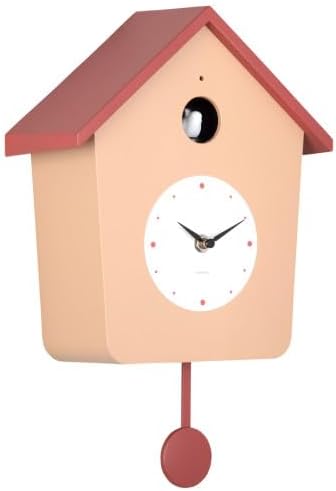
Imej: Depan view of the Karlsson Cuckoo Light Wall Clock, featuring its distinctive house shape, red roof, and pendulum.
Maklumat Keselamatan
- Jauhkan jam daripada cahaya matahari langsung, suhu melampau dan kelembapan tinggi.
- Jangan dedahkan jam kepada air atau cecair lain.
- Use only the specified battery type (4 x AA batteries). Do not mix old and new batteries, or different types of batteries.
- Tanggalkan bateri jika jam tidak akan digunakan untuk tempoh yang lama untuk mengelakkan kebocoran.
- Jauhkan bateri daripada kanak-kanak. Jika tertelan, dapatkan rawatan perubatan segera.
- Jangan cuba membuka atau membaiki jam sendiri. Rujuk kepada kakitangan perkhidmatan yang berkelayakan.
- Ensure the clock is securely mounted to prevent falling.
Kandungan Pakej
Sila semak pakej untuk item berikut:
- Karlsson Cuckoo Light Wall Clock (Model KA6044)
- Bandul
- Manual Pengguna (dokumen ini)
Note: 4 x AA batteries are required and are not included in the package.
Persediaan
1. Pemasangan Bateri
Locate the battery compartment on the back of the clock. Insert 4 x AA batteries, ensuring the correct polarity (+/-) as indicated inside the compartment.
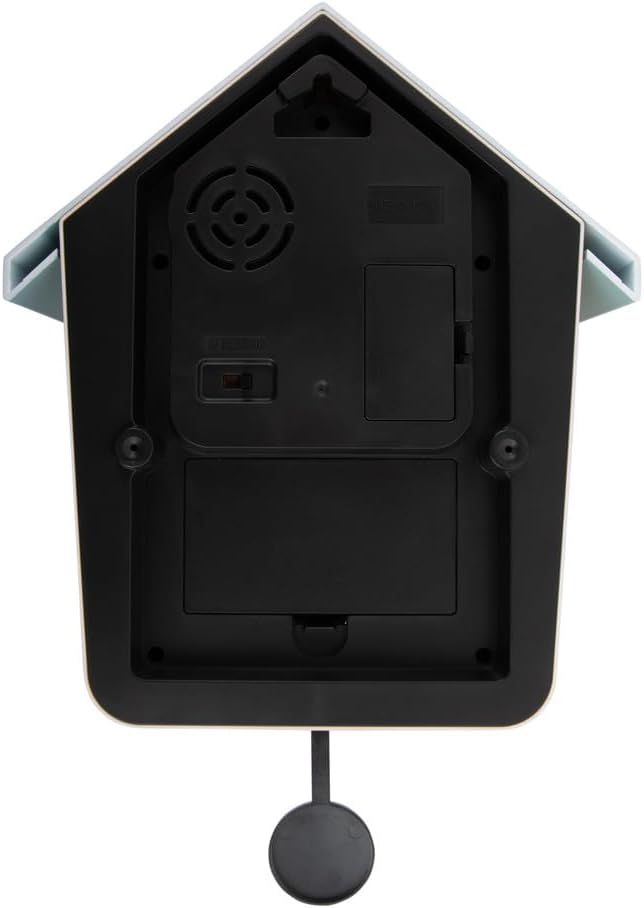
Imej: Belakang view of the clock, highlighting the battery compartments and control switches.
2. Pendulum Attachment
Gently attach the pendulum to the hook located at the bottom of the clock mechanism. Ensure it hangs freely and can swing without obstruction.
3. Menetapkan Masa
Turn the time setting knob (usually located on the back or side of the clock mechanism) clockwise to set the correct time. Avoid turning the hands directly, as this may damage the mechanism.
4. Memasang Jam
Choose a suitable location on a wall. Use a sturdy screw or hook (not included) appropriate for your wall material. Hang the clock securely using the hanging slot on the back. Ensure it is level for proper pendulum operation.
Arahan Operasi
Cuckoo Light Feature
The Karlsson Cuckoo Light Wall Clock features an illuminated bird that appears and announces the hour. This occurs automatically every hour on the hour.

Imej: Jarak dekat view of the clock's upper section, showing the illuminated cuckoo bird.
Sound Control (if applicable)
Refer to the back of the clock (see 'Battery Installation' image) for any switches related to sound control. Some models may include:
- Suis ON / OFF: To enable or disable the cuckoo sound.
- Kawalan Kelantangan: A dial or switch to adjust the volume of the cuckoo sound.
- Penderia Mod Malam: Some clocks have a light sensor that automatically silences the cuckoo sound in low light conditions (e.g., at night). Ensure this sensor is not obstructed if you wish for the sound to operate continuously.
Penyelenggaraan
Pembersihan
Wipe the clock surface with a soft, dry cloth. Do not use abrasive cleaners, solvents, or chemical sprays, as these may damage the finish.
Penggantian Bateri
When the clock starts losing time, the cuckoo light feature becomes dim, or the sound becomes weak, it is time to replace the batteries. Follow the 'Battery Installation' steps to replace all 4 x AA batteries with new ones. Dispose of used batteries responsibly according to local regulations.
Menyelesaikan masalah
| Masalah | Kemungkinan Punca | Penyelesaian |
|---|---|---|
| Jam tidak berfungsi / Jarum tidak bergerak | Bateri mati atau salah dimasukkan. | Check battery polarity. Replace all 4 x AA batteries with new ones. |
| Cuckoo light/sound not working | Batteries low; Sound switch OFF; Light sensor obstructed (if applicable). | Replace batteries. Ensure sound switch is ON. Clear any obstructions from the light sensor. |
| Masa tidak tepat | Low batteries; Clock mechanism issue. | Replace batteries. If problem persists, contact customer support. |
| Pendulum not swinging | Not properly attached; Obstruction; Clock not level. | Ensure pendulum is correctly hooked. Check for obstructions. Adjust clock's position to be level. |
Spesifikasi
| Nombor Model | KA6044 |
| Dimensi (H x W x D) | 26.4 cm x 10.5 cm x 3.81 cm (lebih kurang 10.4 in x 4.1 in x 1.5 in) |
| Berat badan | 200 gram (lebih kurang 0.44 paun) |
| Sumber Kuasa | 4 x Bateri AA (tidak termasuk) |
| bahan | Wood (as per product specifications) |
| warna | Nebula Blue and Army Green (as per product specifications) |
Note: The product images display a clock in brown and red ocher, which may be a different color variant than specified.
Waranti dan Sokongan
Karlsson products are manufactured to high quality standards. For any questions, technical support, or warranty claims, please contact your retailer or visit the official Karlsson weblaman web untuk maklumat khidmat pelanggan.
Sila simpan bukti pembelian anda untuk tujuan waranti.
For more information about Karlsson products, you can visit the Karlsson store: Karlsson Store on Amazon.de


