1. Pengenalan
The LILYGO T-Echo-Lite is a compact and power-efficient development board designed for mesh networking and GPS applications. It features an SX1262 LoRa transceiver, an NRF52840 microcontroller, and a 1.22-inch SPI E-Paper display. This module is a lighter version of the original T-Echo, offering reduced size and lower power consumption, with a deep sleep power consumption as low as 2μA to 10μA. It integrates inertial sensors, a LoRa module, solar charging capabilities (5V), and an external L76K GPS module for multi-system positioning.
This manual provides detailed instructions for setting up, operating, maintaining, and troubleshooting your LILYGO T-Echo-Lite L76K GPS Expansion Module.
2. Produk Lebihview
2.1. Ciri-ciri Utama
- Pengawal mikro: NRF52840
- Ingatan: 1MB Flash, 256KB RAM
- Pemancar-Pemancar LoRa: SX1262 (Julat Jauh, Kuasa Rendah)
- Supported LoRa Bands: 433, 868, 915, 923MHz
- paparan: 1.22-inch SPI E-Paper Display (176 x 192 resolution)
- Modul GPS: L76K Multi-System Positioning GNSS module (GPS, GLONASS, BeiDou, QZSS) - Note: GPS module is optional and may be an expansion.
- Kesambungan Tanpa Wayar: Bluetooth 5, Thread, ANT, Bluetooth Mesh, 802.15.4, Zigbee, 2.4 GHz proprietary
- Kuasa: Solar charging (5V 500mA), 3.7V battery support, low deep sleep power consumption (2μA to 10μA)
- Ciri-ciri lain: Inertial sensors, USB-C port for charging and firmware upload.
2.2. Komponen
The LILYGO T-Echo-Lite L76K GPS Expansion Module typically includes the following components:
- 1 x T-Echo Lite L76K Development Board
- 1 x Antena GPS

Image: LILYGO T-Echo-Lite L76K GPS Expansion Module and included GPS antenna.
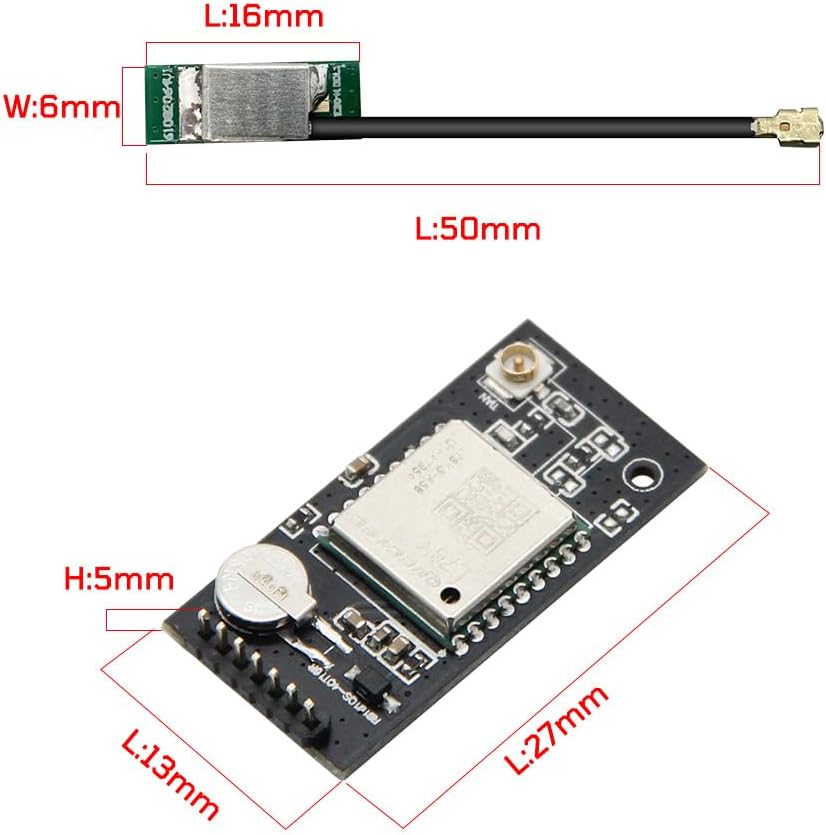
Image: Detailed dimensions of the LILYGO T-Echo-Lite L76K GPS Expansion Module and its antenna.
2.3. Board Layout and Pinout
The T-Echo-Lite Core features a stamp hole design, NRF52840 MCU, battery charge/discharge circuit, solar charging circuit, and LoRa module. The device is housed in a transparent case with an E-ink screen for display.

Image: LILYGO T-Echo-Lite Pinmap and component overview, highlighting NRF52840, E-Paper, LoRa, GPS, and IMU connections.

Image: LILYGO T-Echo-Lite features and specifications, including MCU, Flash, RAM, Programming Platform, Wireless Connectivity, LoRa Transceiver, E-Paper Display, L76K GNSS module, size, and battery charging details.
3. Persediaan
To get started with your LILYGO T-Echo-Lite, you will typically need to flash the Meshtastic firmware and connect it to the Meshtastic mobile application.
3.1. Flashing Meshtastic Firmware
The LILYGO T-Echo-Lite is compatible with Meshtastic, an open-source mesh network communication platform. Follow these steps to flash the firmware:
- Muat turun Perisian Tegar: Visit the official Meshtastic webtapak (meshtastic.org/docs/software/) and navigate to the 'Device firmware' section. Download the appropriate firmware file for the T-Echo-Lite (e.g., 'firmware-t-echo-xxxx.uf2').
- Sambungkan Peranti: Connect your T-Echo-Lite to your computer using a USB-A to USB-C cable.
- Enter Bootloader Mode: The device should appear as a removable disk (e.g., 'TECHBOOT'). If not, you may need to double-click the reset button to enter bootloader mode.
- Copy Firmware: Copy the downloaded '.uf2' firmware file directly into the 'TECHBOOT' disk. The device will automatically refresh and restart after the firmware is copied.
Video: Instructions on how to install Meshtastic firmware to the LILYGO T-Echo-Lite.
3.2. Sambungan Apl Mudah Alih
After flashing the firmware, install the Meshtastic App on your smartphone (available for Android and iOS). Follow these steps to connect your device:
- Pasang Aplikasi: Download the Meshtastic App from your device's app store or from meshtastic.org/downloads.
- Sambung melalui Bluetooth: Open the Meshtastic App. The app will search for nearby Meshtastic devices. Select your T-Echo-Lite from the list.
- Konfigurasikan Peranti: Once connected, you can select the desired frequency band and enter a username.
Video: Demonstrates connecting the T-Echo-Lite to the Meshtastic mobile application and basic messaging.
4. Arahan Operasi
4.1. Basic Device Operation
The T-Echo-Lite features a simple interface with an E-ink screen and a few buttons:
- Lampu Latar Skrin: Press the top button to illuminate the E-ink screen.
- Cycle Screens: Use the bottom button to cycle through different information screens, which typically include:
- Messaging Screen: Displays received messages.
- Nodes Map: Shows the location of other Meshtastic nodes in your network.
- Senarai Nod: Lists detected nodes and their distances.
4.2. Menghantar dan Menerima Mesej
Messages are primarily managed through the Meshtastic mobile application connected to your T-Echo-Lite. The device acts as a transceiver, relaying messages over the LoRa mesh network.
- Menghantar Mesej: Use the Meshtastic app to compose and send messages. You can send to individual nodes or broadcast to channels.
- Menerima Mesej: Messages received by your T-Echo-Lite will be displayed on its E-ink screen and also appear in the Meshtastic app on your connected phone.
4.3. Kefungsian GPS
With the L76K GPS Expansion Module, your T-Echo-Lite can provide location data. This data can be shared across the Meshtastic network, allowing other users to see your position on their node maps.
5. Penyelenggaraan
5.1. Mengecas
The T-Echo-Lite is powered by a 3.7V battery and can be charged via its USB-C port. It also supports solar charging (5V 500mA).
- Connect a standard USB-C cable to the device and a power source (e.g., computer, USB wall adapter).
- Untuk jangka hayat bateri yang optimum, elakkan daripada kerap mencas sepenuhnya bateri.
5.2. Hayat Bateri
Battery life varies significantly based on usage:
- GPS Enabled & Active: Continuous GPS usage and frequent message transmission/reception will consume more power, potentially leading to a battery life of approximately 24 hours.
- GPS Disabled & Passive: If used primarily as a receiving transmitter without active GPS or frequent interaction, the device can last for several weeks on a single charge due to its low deep sleep power consumption.
5.3. Kemas Kini Perisian Tegar
Regularly check the Meshtastic webtapak (meshtastic.org/docs/software/) for the latest firmware updates. Updating your device ensures you have the latest features, bug fixes, and compatibility improvements. The update process is similar to the initial flashing process described in the Setup section.
6. Penyelesaian masalah
6.1. Signal Range Issues
The effective range of LoRa communication depends on several factors:
- Garis penglihatan: LoRa performs best with clear line of sight between devices. Obstructions like buildings, terrain, and dense foliage can significantly reduce range.
- Peletakan Antena: Optimal antenna placement (e.g., higher elevation) can improve range.
- Bilangan Nod: Meshtastic is a mesh network; the more nodes in an area, the better the coverage and message relaying capabilities. In areas with few nodes or significant obstructions (e.g., basements), communication range may be limited.
- Jalur Kekerapan: Ensure your device is configured to the correct frequency band for your region.
6.2. Firmware Update Problems
If you encounter issues during firmware updates:
- Sahkan File Integriti: Ensure the downloaded firmware file tidak rosak.
- Betul File Jenis: Make sure you are using the correct '.uf2' file for your T-Echo-Lite.
- Re-enter Bootloader: If the device doesn't appear as 'TECHBOOT', try double-clicking the reset button again.
- USB Cable/Port: Cuba kabel atau port USB yang berbeza pada komputer anda.
6.3. Connectivity Issues with Mobile App
If your device is not connecting to the Meshtastic mobile app:
- Bluetooth Didayakan: Pastikan Bluetooth didayakan pada telefon pintar anda.
- Kebenaran Apl: Check that the Meshtastic app has necessary Bluetooth and location permissions.
- Device Powered On: Confirm your T-Echo-Lite is powered on and not in deep sleep mode.
- Mulakan semula Peranti: Try restarting both your T-Echo-Lite and your smartphone.
7. Spesifikasi
| Ciri | Spesifikasi |
|---|---|
| Pemproses | ARMv7 (NRF52840) |
| RAM | 256KB |
| kilat | 1MB |
| Pemancar LoRa | SX1262 |
| Jalur Frekuensi LoRa | 433, 868, 915, 923MHz |
| Paparan | 1.22 inch SPI E-Paper (176x192) |
| Modul GPS | L76K Multi-System Positioning GNSS (GPS, GLONASS, BeiDou, QZSS) |
| Teknologi Ketersambungan | LoRaWAN, GPS, USB, GPIO, Bluetooth 5, Thread, ANT, Bluetooth Mesh, 802.15.4, Zigbee, 2.4 GHz proprietary |
| Sistem Operasi | Linux (serasi) |
| Power Consumption (Deep Sleep) | 2μA to 10μA |
| Pengecasan Bateri | 5V 500mA (via USB-C or Solar) |
| Dimensi | 41 x 41 x 14.5mm (T-Echo-Lite Core) |
8. Waranti dan Sokongan
For any questions or suggestions regarding the LILYGO T-Echo-Lite L76K GPS Expansion Module, please feel free to contact LILYGO customer support. We are committed to providing prompt assistance.
Maklumat Hubungan: Please refer to the seller's contact details on the platform where you purchased the product.
Firmware & Development Resources: For the latest firmware, documentation, and community support, visit the official GitHub repository: github.com/Xinyuan-LilyGO/T-Echo-Lite


