Thank you for choosing the ONNAIS Biometric Pistol Gun Safe. This manual provides essential information for the safe and effective use of your new gun safe. Please read all instructions carefully before installation and operation. Proper use ensures the security of your firearm and prevents unauthorized access.
Image 1.1: ONNAIS Biometric Pistol Gun Safe with handgun and spare magazines.
2. Maklumat Keselamatan Penting
Always store firearms unloaded with the safety engaged.
Pastikan peti besi sentiasa berkunci apabila tidak digunakan.
Store mechanical keys in a secure location away from the safe and out of reach of children.
Do not store a chambered firearm in the safe.
Ensure firearms with weapon-mounted lights or lasers are removed before storing, as they may not fit.
This safe is not compatible with revolvers.
Periksa tahap bateri dengan kerap dan cas semula mengikut keperluan.
Kaedah Akses Berbilang: Fingerprint, 4-digit keypad, and mechanical key backup.
Secure Trigger Lock: Internal mechanism blocks trigger access when locked.
Pembinaan Tahan Lama: Made from alloy steel for enhanced security.
Bateri boleh dicas semula: Built-in Lithium Polymer battery with up to 1 year of use per charge, 2-hour recharge time via USB-C.
Pemasangan Serbaguna: Includes pre-drilled holes and screws for wall, desk, under-counter, or vehicle console installation.
Reka Bentuk Ambidextrous: Mounting bracket can be reversed for left or right-handed access.
Magazine Storage: Integrated slots for two spare magazines.
Video 4.1: Tamatview of the ONNAIS Defender Pro Gun Safe's features, including quick access, secure trigger protection, and easy installation.
5. Persediaan
5.1 Pengecasan Awal
Before first use, fully charge the safe's internal battery using the provided USB-C cable. The charging port is located on the bottom of the unit. A full charge takes approximately 2 hours.
Image 5.1: The safe's USB-C charging port for convenient recharging.
5.2 Memasang Peti Keselamatan
The safe can be mounted in various locations using the included bracket and screws. The mounting bracket is ambidextrous and can be reversed to suit left or right-handed access.
Tentukan Lokasi: Choose a secure and discreet location such as a nightstand, desk, cabinet, or vehicle console.
Kurungan Kedudukan: Place the mounting bracket against the desired surface and mark the screw holes.
Gerudi Lubang Juruterbang: Drill pilot holes if necessary, appropriate for your mounting surface.
Kurungan Selamat: Attach the bracket firmly using the provided screws.
Attach Safe: Slide the safe onto the mounted bracket until it clicks securely into place.
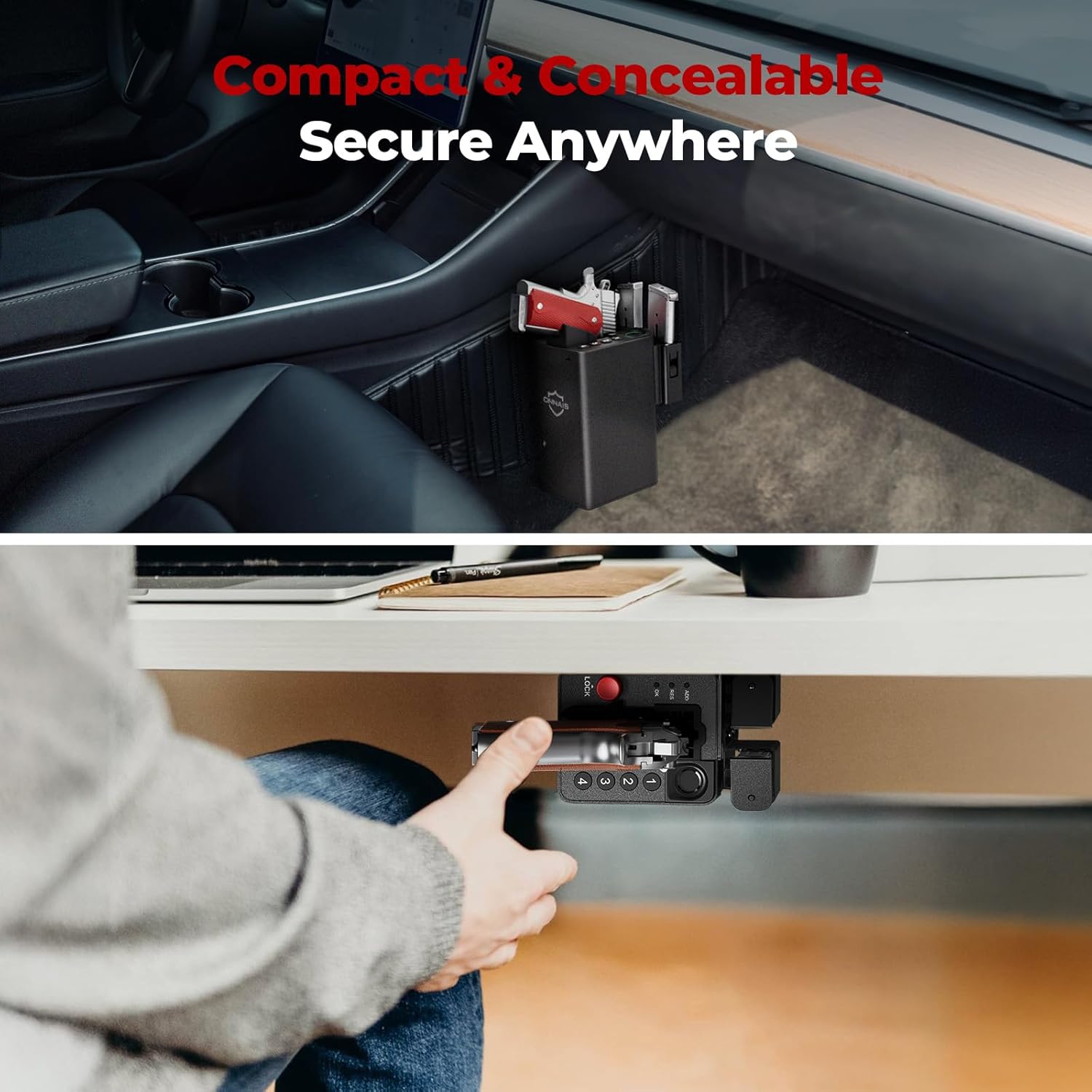
Imej 5.2: Cthamples of the safe mounted under a desk and within a vehicle console.
5.3 Fingerprint Registration
The safe supports up to 80 fingerprints for multiple users or different finger orientations.
Press the 'ADD' button on the bottom of the safe.
Letakkan jari anda pada sensor cap jari. Lampu penunjuk akan berkelip.
Lift and place your finger multiple times, slightly adjusting the position each time, until the indicator confirms successful registration.
5.4 Passcode Setup
Set a personal 5-10 digit passcode for backup access.
Press the 'ADD' button on the bottom of the safe.
Enter your desired 5-10 digit code using the keypad (buttons 1-4).
Press 'OK' to confirm.
Re-enter the same code and press 'OK' again to verify.
6. Arahan Operasi
6.1 Storing a Firearm
Ensure the firearm is unloaded and the safety is engaged before storing.
With the safe unlocked, gently slide the firearm into the designated slot, ensuring the trigger guard is clear.
Press the red 'LOCK' button to engage the trigger lock mechanism. The safe is now secured.
Image 6.1: Proper insertion of a handgun into the safe. Note: Firearms with weapon-mounted lights or lasers are too large to fit. Remove attachments before storing.
6.2 Membuka kunci dengan Cap Jari
For rapid access:
Place a registered finger firmly on the biometric sensor.
The safe will unlock in approximately 0.5 seconds, releasing the trigger lock.
Grasp the firearm's handle and draw it out.
Image 6.2: Quick draw access from the safe, highlighting the exposed grip for immediate retrieval.
6.3 Membuka kunci dengan Kod Laluan
As an alternative access method:
Enter your registered 5-10 digit passcode using the keypad.
Press 'OK' to confirm. The safe will unlock.
Grasp the firearm's handle and draw it out.
Image 6.3: Close-up of the 4-button keypad for passcode entry.
6.4 Unlocking with Mechanical Key
For emergency or battery-depleted situations:
Locate the keyhole on the side of the safe.
Insert one of the provided mechanical keys and turn to unlock.
Grasp the firearm's handle and draw it out.
Image 6.4: The mechanical key and keyhole for emergency access.
7. Penyelenggaraan
7.1 Penyelenggaraan Bateri
Cas semula bateri apabila penunjuk bateri lemah muncul.
Avoid completely draining the battery to prolong its lifespan.
7.2 Pembersihan
Lap bahagian luar peti besi dengan lembut, damp kain.
Jangan gunakan bahan kimia atau pembersih kasar.
Pastikan sensor cap jari bersih dan kering untuk prestasi optimum.
8. Penyelesaian masalah
Masalah
Kemungkinan Punca
Penyelesaian
Cap jari tidak dikenali
Finger is dirty, wet, or improperly placed; fingerprint not registered.
Clean and dry finger; ensure proper placement; re-register fingerprint if needed.
Pad kekunci tidak bertindak balas
Incorrect passcode; low battery.
Enter correct passcode; recharge battery.
Safe does not unlock
Low battery; electronic malfunction.
Recharge battery; use mechanical key for emergency access.
Firearm does not fit
Firearm is too large or has attachments; revolver.
Remove lights/lasers; confirm firearm dimensions (6.5"D x 3.5"W x 7.9"H); safe is not compatible with revolvers.
The ONNAIS Biometric Pistol Gun Safe comes with a Waranti Seumur Hidup. For any questions, troubleshooting assistance, or warranty claims, please contact ONNAIS customer support.
Contact information for support is typically found on the product packaging or the official ONNAIS webtapak.
ONNAIS Iron PRO Biometrik Pistol Cap Jari Panduan Mula Pantas Selamat Panduan ini menyediakan arahan permulaan pantas untuk Peti Safe Pistol Cap Jari Biometrik Besi PRO ONNAIS. Ketahui cara menyediakan peti keselamatan anda, memasang bateri, memprogram kata laluan digital dan cap jari, dan dapatkan jawapan kepada soalan biasa.
Panduan Mula Pantas ONNAIS HX-011: Persediaan dan Operasi Selamat Biometrik Mulakan dengan peti keselamatan biometrik ONNAIS HX-011 anda. Panduan permulaan pantas ini merangkumi pengecasan, membuka kunci, pendaftaran kata laluan, cap jari dan kad RFID, serta penyelesaian masalah dan Soalan Lazim untuk keselamatan optimum.
Panduan Permulaan Pantas Peti Besi ONNAIS HX-010 Panduan HTML yang ringkas dan dioptimumkan untuk SEO untuk Peti Keselamatan Senapang ONNAIS HX-010, meliputi persediaan, operasi dan penyelesaian masalah.
Panduan Permulaan Pantas Kunci Senjata Api ONNAIS TES2 Panduan permulaan pantas yang komprehensif untuk kunci senjata api ONNAIS TES2, yang memperincikan langkah persediaan, operasi, pendaftaran, pembukaan kunci, pemasangan dan penyelesaian masalah.