1. Pengenalan
Thank you for choosing the Hama Ultimate Pro Portable Bluetooth Speaker. This manual provides essential information for the safe and efficient use of your device. Please read it carefully before use and keep it for future reference.
Kandungan Pakej:
- 1x Hama Ultimate Pro Portable Bluetooth Speaker
- 1x Kabel Pengecas USB-C
- 1x Carrying Strap
- 1x Manual Pengguna
2. Arahan Keselamatan
- Do not open the device. Incorrect assembly can lead to electric shock, fire, or damage.
- Keep the device away from extreme temperatures, direct sunlight, and humidity.
- This speaker is rated IPX6, meaning it is protected against strong continuous rain and splashing water. Do not submerge the speaker in water.
- Gunakan hanya kabel USB-C yang disediakan untuk mengecas.
- Jangan gunakan peranti jika ia kelihatan rosak.
- Protect the battery from overheating.
3. Produk Lebihview
Familiarize yourself with the speaker's features and connections.

The Hama Ultimate Pro speaker highlights its key features: 24-hour battery life, IPX6 waterproof rating, Bluetooth connectivity, and 120W sound output.
Panel Kawalan:

Terperinci view of the speaker's top control panel, showing buttons for power, volume adjustment, play/pause, mode selection, and equalizer settings.
- Butang Kuasa: Press and hold to turn on/off. Short press to check battery status.
- Perlahankan suara (-): Kurangkan volum.
- Butang Main/Jeda: Mainkan atau jeda audio.
- Kelantangan Naik (+): Tingkatkan kelantangan.
- Butang Mod (M): Switch between input modes (Bluetooth, AUX, USB).
- Equalizer Button (EQ): Cycle through equalizer presets (Bass Sound, Power Sound, Balanced Sound).
Pelabuhan dan Sambungan:

The speaker's rear port panel includes a USB-C charging port, a USB-A port for external devices, a reset button, and a 6.3mm jack input.
- Port USB-C: For charging the speaker and for Power Bank output.
- Port USB-A: For playing music from USB storage devices or for Power Bank output.
- AUX Input (3.5mm Jack): Untuk menyambungkan peranti audio luaran melalui kabel audio 3.5mm.
- Microphone/Guitar Input (6.3mm Jack): Untuk menyambung mikrofon atau gitar.
- Butang Tetapkan Semula: Use a thin object to press and reset the speaker if needed.
4. Persediaan
4.1 Mengecas Speaker
- Sambungkan kabel pengecas USB-C yang dibekalkan ke port USB-C pada pembesar suara.
- Connect the other end of the USB-C cable to a suitable USB power adapter (not included). A 30W charger is recommended for fast charging.
- The charging indicator will show the charging status. The speaker is fully charged in approximately 2.5 hours.
4.2 Menghidupkan/Mematikan
- To turn on: Press and hold the Power button for a few seconds until you hear an audible prompt.
- To turn off: Press and hold the Power button for a few seconds until you hear an audible prompt.
4.3 Berpasangan Bluetooth
- Ensure the speaker is powered on and in Bluetooth mode (indicated by a flashing blue LED). If not, press the Mode button (M) to switch to Bluetooth mode.
- Pada peranti anda (telefon pintar, tablet, komputer riba), dayakan Bluetooth dan cari peranti yang tersedia.
- Select "Hama Ultimate Pro" from the list of devices.
- Setelah dipasangkan, penunjuk LED akan bertukar menjadi biru pekat dan anda akan mendengar bunyi pengesahan.
4.4 Menyambung melalui Input AUX
- Sambungkan satu hujung kabel audio 3.5mm (tidak disertakan) ke port input AUX pada pembesar suara.
- Sambungkan hujung yang satu lagi ke output audio peranti luaran anda.
- Press the Mode button (M) on the speaker to switch to AUX mode.
4.5 Connecting USB Storage
- Masukkan pemacu kilat USB yang mengandungi audio files into the USB-A port on the speaker.
- Press the Mode button (M) to switch to USB mode. The speaker will automatically begin playing audio from the USB drive.
4.6 Connecting Microphone or Guitar
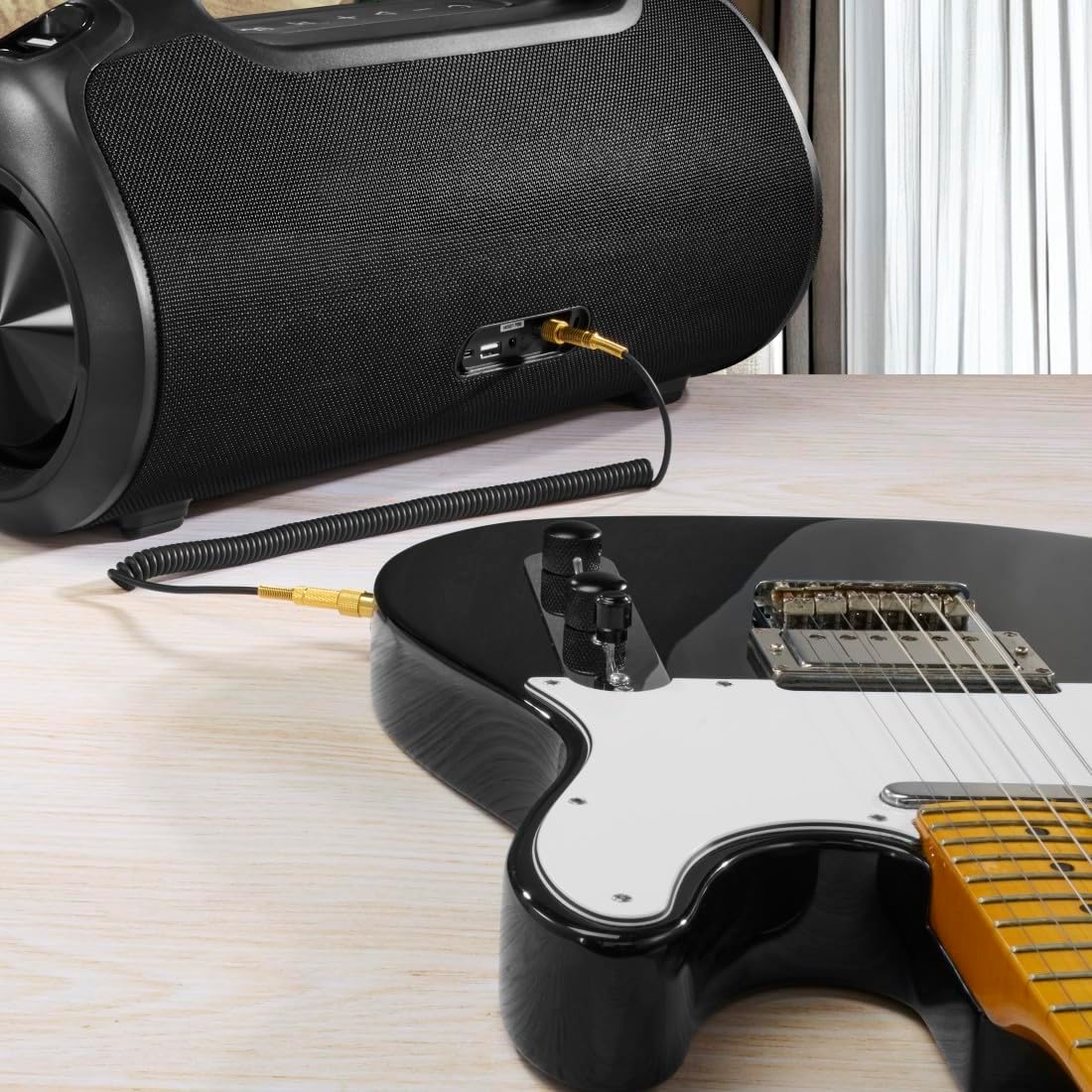
The speaker can be used as an amplifier by connecting an electric guitar via its 6.3mm jack input.

A microphone can be connected to the speaker's 6.3mm jack input for karaoke or public speaking.
- Connect your microphone or guitar to the 6.3mm jack input on the speaker.
- Adjust the volume on your connected device and the speaker as needed.
4.7 Penggandingan Stereo Tanpa Wayar Sebenar (TWS)
The Hama Ultimate Pro supports TWS for connecting two speakers for a stereo sound experience. Refer to the specific TWS pairing instructions in the full manual if available, as this feature typically involves pressing a dedicated TWS button on both speakers simultaneously.
5. Mengendalikan Speaker
5.1 Kawalan Main Semula Asas
- Main/Jeda: Tekan sebentar butang Main/Jeda.
- Kelantangan: Tekan pendek butang Kelantangan Naik (+).
- Perlahankan suara: Tekan pendek butang Kelantangan Turun (-).
- Lagu Seterusnya: Tekan lama butang Naikkan Kelantangan (+).
- Trek Sebelumnya: Tekan lama butang Kelantangan Turun (-).
5.2 Mod Penyamaan
The speaker offers three distinct equalizer modes to optimize your listening experience:
- Bunyi Bes: Enhances low frequencies for a deeper bass response.
- Power Sound: Provides a balanced, powerful sound profile.
- Bunyi Seimbang: Offers a neutral and clear audio output.
To switch between modes, short press the EQ button on the control panel.
5.3 Hama Smart Home App Control

The Hama Smart Home app allows for convenient control and customization of the speaker, including battery status and sound settings.
Download the "Hama Smart Home" app from your device's app store to access additional features:
- Custom equalizer settings.
- Change the speaker's name.
- View precise battery status in percentage.
- Remote control of playback and settings.
5.4 Fungsi Power Bank

The speaker's integrated power bank allows you to charge external devices like smartphones via its USB-C or USB-A ports.
The Hama Ultimate Pro speaker features an integrated power bank function, allowing you to charge other devices:
- Connect your smartphone, tablet, or other USB-powered device to the USB-C or USB-A port on the speaker using a compatible charging cable.
- Bateri dalaman pembesar suara akan mula mengecas peranti anda yang disambungkan.
6. Penyelenggaraan
6.1 Pembersihan
The speaker has a resistant and washable surface. To clean:
- Ensure the speaker is turned off and all cables are disconnected.
- Gunakan yang lembut, damp cloth to wipe the surface. Do not use harsh cleaning agents or solvents.
- Untuk kotoran degil, larutan sabun lembut boleh digunakan, diikuti dengan mengelap dengan kain bersih.amp kain.
- Allow the speaker to dry completely before use.
6.2 Penyimpanan
- Simpan pembesar suara di tempat yang sejuk dan kering jauh dari cahaya matahari langsung dan suhu yang melampau.
- Jika menyimpan untuk tempoh yang lama, cas bateri kepada kira-kira 50% setiap beberapa bulan untuk mengekalkan kesihatan bateri.
6.3 Penjagaan Bateri
- Elakkan menyahcas sepenuhnya bateri dengan kerap.
- Do not expose the battery to heat sources or direct flame.
- Buang bateri mengikut peraturan tempatan.
7. Penyelesaian masalah
Jika anda menghadapi masalah dengan pembesar suara anda, rujuk kepada penyelesaian biasa berikut:
- Tiada Kuasa: Pastikan pembesar suara dicas. Sambungkannya ke sumber kuasa menggunakan kabel USB-C.
- Tidak Dapat Berpasangan melalui Bluetooth:
- Ensure the speaker is in Bluetooth pairing mode (flashing blue LED).
- Make sure Bluetooth is enabled on your device and it is within 10 meters of the speaker.
- Lupakan pembesar suara daripada senarai Bluetooth peranti anda dan cuba pasangkan semula.
- Mulakan semula kedua-dua pembesar suara dan peranti anda.
- Tiada Bunyi:
- Semak tahap kelantangan pada kedua-dua pembesar suara dan peranti anda yang disambungkan.
- Ensure the correct input mode (Bluetooth, AUX, USB) is selected on the speaker.
- Jika menggunakan AUX, pastikan kabel dimasukkan sepenuhnya dan berfungsi.
- Isu Pengecasan:
- Verify the USB-C cable is not damaged and is properly connected.
- Cuba penyesuai kuasa USB yang lain.
- Speaker Unresponsive: If the speaker becomes unresponsive, use a thin object (like a paperclip) to press the Reset button located on the port panel.
8. Spesifikasi

Physical dimensions of the Hama Ultimate Pro speaker for reference.
| Nombor Model | 00188232 |
| Jenama | Hama |
| warna | Hitam |
| Teknologi Ketersambungan | Bluetooth 5.3 |
| Julat Maks | 10 meter |
| Sistem Audio | Stereo |
| Max Music Power | 120 W |
| Jenis Bateri | Lithium-Ion Bersepadu |
| Kapasiti Bateri | 4500 mAh |
| Bateri Voltage | 11.4 V |
| Kuasa Bateri | 51.3 Wh |
| Hayat Bateri Maks | 24 jam |
| Masa Mengecas | lebih kurang 2.5 jam |
| Sokongan PD USB | ya |
| Penarafan IP | IPX6 (Protection against strong continuous rain) |
| Dimensi (L x W x H) | 46.5 x 19.2 x 25.4 cm |
| Berat badan | 5200 g (5.2 kg) |
| Peranti Serasi | MP3 Player, Personal Computer, Smartphone, Tablet, Television |
9. Waranti
Hama GmbH & Co KG provides a warranty for this product. Please refer to the warranty card included in your package or visit the official Hama webtapak untuk terma dan syarat waranti terperinci khusus untuk wilayah anda.
10. Sokongan
For technical support, troubleshooting assistance, or further inquiries, please contact Hama customer service. Contact details can typically be found on the official Hama webtapak atau pada pembungkusan produk.
You can also visit the Hama weblaman web untuk Soalan Lazim dan maklumat produk tambahan: www.hama.com


