1. Pengenalan
This manual provides instructions for the installation, operation, and maintenance of the Haozee WiFi Smart Water Valve. This device is designed to monitor water consumption, detect water flow, and provide automatic shutoff capabilities for DN20 3/4 inch pipe systems.

Image 1.1: The Haozee WiFi Smart Water Valve with an included water leak detector and a smartphone displaying the control app interface.
2. Ciri-ciri Produk
- Kesambungan WiFi: Connects to 2.4 GHz WiFi networks for remote control and monitoring via a smartphone application.
- Penutupan Automatik: Configurable to automatically close the valve based on set water flow alarms or in conjunction with a water leak detector.
- Ultrasonic Flow Measurement: Utilizes W-shaped ultrasonic technology for accurate and reliable water flow detection.
- Smart Water Meter: Monitors daily, monthly, and recent water consumption statistics.
- Bateri boleh dicas semula: Integrated 2600 mAh NiMH battery provides 3-6 months of operation, ensuring functionality during power outages.
- Kawalan Jauh Apl: Allows users to open/close the water valve and monitor water flow in real-time via the app.
- Kaitan Adegan: Compatible with Tuya WiFi water leak detectors (sold separately) for automated responses to detected leaks.

Image 2.1: Visual representation of the main functions including real-time display, app remote control, leak check, total water detection, flow rate detection, ultrasonic measurement, fast response, push notifications, scene linkage, AC/DC adapter, and easy installation.
3. Persediaan dan Pemasangan
3.1 Kandungan Pakej
- Injap Air WiFi
- Pengesan Kebocoran Air WiFi
- Penyesuai Kuasa EU
- DN20 3/4 Inch Adapter
- Pita Pelekat
- Kabel Kuasa
- Manual Pengguna
3.2 Sambungan Rangkaian
Peranti menyokong 2.4 GHz WiFi networks only. If your router operates on both 2.4 GHz and 5 GHz bands, ensure you connect the valve to the 2.4 GHz network SSID.

Image 3.1: Illustration of dual-band network compatibility, emphasizing that the device requires a 2.4 GHz WiFi connection.
3.3 Pemasangan Fizikal
- Ensure the main water supply is turned off before installation.
- Install the valve onto your DN20 3/4 inch pipe. Use the provided adapter and adhesive tape as needed to ensure a secure, leak-free connection.
- Connect the power cable to the valve and plug the EU power adapter into a suitable power outlet.
- Download the Tuya Smart app from your smartphone's app store.
- Follow the in-app instructions to add the device and connect it to your 2.4 GHz WiFi network.
4. Arahan Operasi
4.1 Alat Kawalan Jauh Aplikasi
Once connected to the Tuya Smart app, you can remotely open or close the water valve from your smartphone. The app provides a real-time interface to control the valve's state.

Image 4.1: The smartphone app displaying an on/off toggle for the water valve, along with real-time flow rate and total water consumption.
4.2 Water Flow Monitoring
The valve uses W-shaped ultrasonic technology to detect water flow. The app displays the real-time flow rate and total water consumed. You can set alarms for specific flow rates.
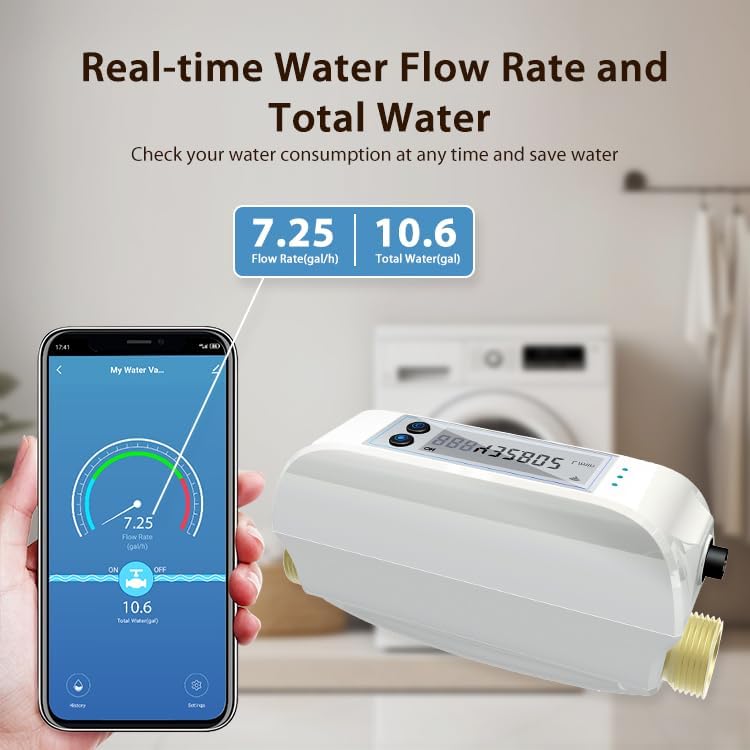
Image 4.2: A cross-section diagram showing how the ultrasonic transmitter and reflectors detect water flow within the valve.

Image 4.3: The app interface displaying current flow rate (e.g., 7.25 gal/h) and total water consumed (e.g., 10.6 gal).
4.3 Water Consumption Statistics
The app provides detailed statistics on your water consumption, including daily, monthly, and historical data. This allows for efficient water management and waste reduction.

Imej 4.4: Cthamples of water consumption graphs within the app, showing usage patterns over different time periods.
4.4 Automated Scenes with Water Leak Detectors
Through the Tuya app, you can set up automated scenes. For example, if a Tuya WiFi water leak detector (sold separately) detects a leak, the smart water valve can be configured to automatically close, preventing significant water damage.
Image 4.5: The app's scene creation interface, demonstrating how to link the water valve with a water sensor for automatic actions.
5. Penyelenggaraan
5.1 Pengurusan Bateri
The valve includes a built-in 2600 mAh NiMH rechargeable battery. This battery provides power for 3-6 months on a full charge, allowing the valve to operate even during power outages. Nota: When operating solely on battery power, the app cannot be used to control or monitor the valve.
5.2 Penjagaan Am
Keep the device clean and free from excessive dust or moisture. Do not use harsh chemicals for cleaning. Ensure the power connection is secure when operating on AC power.
6. Penyelesaian masalah
- Peranti tidak bersambung ke WiFi: Ensure your router is broadcasting a 2.4 GHz network. The device does not support 5 GHz WiFi. Verify your WiFi password and network stability.
- Kawalan aplikasi tidak berfungsi: Check if the device is connected to AC power. In battery-only mode, app control and monitoring are disabled. Ensure your smartphone has an active internet connection.
- Inaccurate flow rate readings: Ensure the valve is installed correctly according to the flow direction. If issues persist after initial setup, a firmware update might be required (check the app for updates). Note that some users have reported minor discrepancies (2-3%) compared to calibrated meters.
- Slow app updates for flow/consumption: The app may update flow rate and consumption data every 60 seconds. This is normal operation and not an indication of a fault.
- Issues with third-party integrations (e.g., Home Assistant): This product is primarily designed for use with the Tuya Smart app. Integration with other smart home platforms may have limitations or require specific configurations not officially supported.
7. Spesifikasi
| Jenama | Haozee |
| Nombor Model | HZ-WF-WV-White-DE |
| UPC | 640712053385 |
| Dimensi Produk | 20 x 9 x 7 cm |
| Berat Barang | 1.7 Kilogram |
| Diameter Paip | DN20 (3/4 inch) |
| Kaedah Kawalan | Apl |
| Jenis Pemasangan | Lantai |
| Teknologi Sensor | Penderia Ultrasonik |
| Sumber Kuasa | Elektrik Bertali |
| Jenis Bateri | NiMH (1 AA battery included) |
| Peranti Serasi | Telefon pintar |
8. Waranti dan Sokongan
For warranty information and technical support, please refer to the documentation included with your product or contact Haozee customer service directly. Contact details can typically be found on the manufacturer's official webtapak atau pembungkusan produk.


