pengenalan
This manual provides detailed instructions for the installation, operation, and maintenance of your Imou Cruiser SC 4G 5MP Outdoor IP Camera. This camera features UHD 3K resolution for detailed images, 4G LTE connectivity for independent operation without Wi-Fi, four spotlights that emit white or infrared light, and two red and blue indicator lights to enhance alarm visibility. Please read this manual thoroughly before use and retain it for future reference.
Maklumat Keselamatan
- Pastikan bekalan kuasa voltage matches the camera's requirements to prevent damage.
- Install the camera in a location where it is protected from extreme weather conditions, unless specifically designed for such environments.
- Avoid placing the camera near heat sources or in direct sunlight for prolonged periods.
- Jangan cuba membuka atau mengubah suai kamera. Rujuk semua servis kepada kakitangan yang berkelayakan.
- Jauhkan kamera dan aksesorinya daripada capaian kanak-kanak.
Kandungan Pakej
Sila semak kandungan bungkusan semasa dibuka. Jika ada barang yang hilang atau rosak, hubungi peruncit anda.
- Imou Cruiser SC 4G 5MP Camera
- Penyesuai Kuasa
- Templat Pemasangan
- Pakej Skru
- Penyambung Kalis Air
- Panduan Mula Pantas
Produk Selesaiview
Familiarize yourself with the main components of your Imou Cruiser SC 4G 5MP camera.
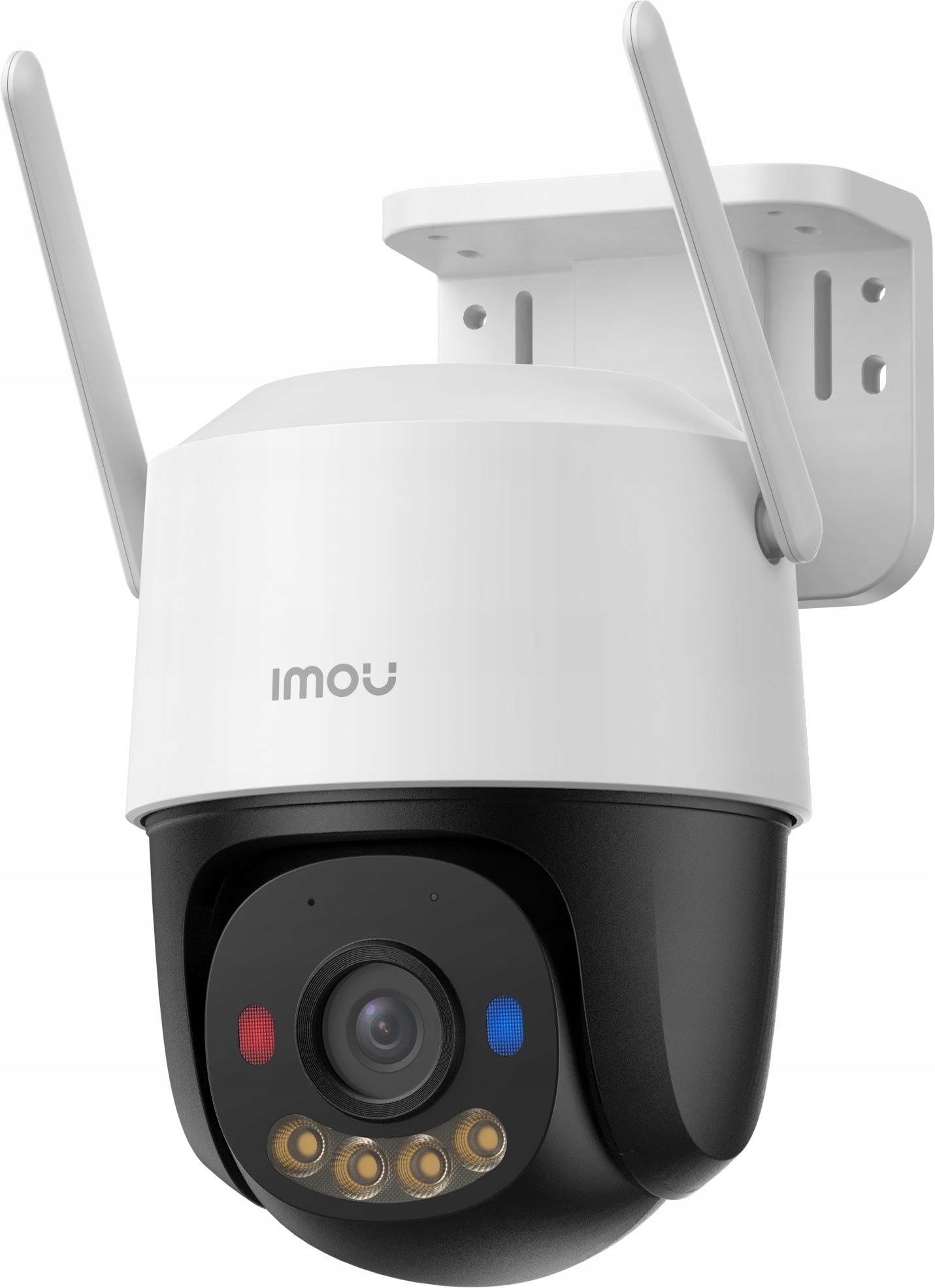
Rajah 1: Imou Cruiser SC 4G 5MP Outdoor IP Camera. This image shows the front view of the camera, highlighting its lens, spotlights, and overall design.
The camera features a high-resolution lens, four integrated spotlights (for both white light and infrared illumination), two prominent red and blue alarm indicator lights, a built-in microphone, a speaker for two-way audio, a SIM card slot for 4G connectivity, a reset button, and a power input port.
Persediaan
1. Bersedia untuk Pemasangan
- Choose a suitable outdoor location with good 4G signal reception.
- Ensure the mounting surface is strong enough to support the camera's weight.
2. Pemasangan Kad SIM
- Locate the SIM card slot on the camera (refer to the Quick Start Guide for exact location).
- Insert a standard 4G LTE SIM card into the slot, ensuring correct orientation.
- Secure the waterproof connector cover if applicable.
3. Hidupkan kuasa
- Sambungkan penyesuai kuasa ke port input kuasa kamera.
- Plug the power adapter into a power outlet. The camera will begin to power on and initialize.
4. App Setup (Imou Life App)
- Download the 'Imou Life' app from your smartphone's app store (iOS or Android).
- Register for an Imou account or log in if you already have one.
- Ketik ikon '+' di penjuru kanan sebelah atas aplikasi untuk menambah peranti baharu.
- Imbas kod QR yang terdapat pada kamera atau pembungkusannya.
- Follow the on-screen prompts to complete the device setup.
5. Pemasangan Fizikal
- Use the provided mounting template to mark screw positions on the wall or ceiling.
- Tebuk lubang pandu dan masukkan penambat dinding jika perlu.
- Secure the camera mounting base with the provided screws.
- Laraskan sudut kamera mengikut keperluan untuk liputan optimum.
Beroperasi
1. Hidup View
- Buka aplikasi Imou Life dan pilih kamera anda daripada senarai peranti.
- The live video feed will appear, allowing you to monitor your property in real-time.
2. Recording & Playback
- The camera supports continuous recording or event-triggered recording (e.g., motion detection).
- Kepada view dirakam footage, access the playback feature within the Imou Life app. You can browse by date and time.
3. Motion Detection & Alarm
- Configure motion detection sensitivity and detection zones in the app settings.
- When motion is detected, the camera can trigger an alarm, activate the spotlights, and flash the red and blue indicator lights to deter intruders.
- You will receive notifications on your smartphone when an alarm is triggered.
4. Bicara Dua Hala
- Semasa dalam live view, tap the microphone icon in the Imou Life app to speak through the camera's speaker.
- The camera's built-in microphone allows you to hear audio from the camera's location.
5. Mod Penglihatan Malam
- The camera automatically switches to infrared (IR) night vision in low light conditions, providing clear black and white images.
- You can also configure the camera to use its white light spotlights for full-color night vision when motion is detected or on a schedule.
Penyelenggaraan
1. Pembersihan
- Bersihkan lensa kamera secara berkala dengan kain lembut dan kering untuk memastikan kualiti imej yang jelas.
- Lap kamera casing dengan iklanamp kain mengikut keperluan. Jangan gunakan bahan kimia yang keras atau pembersih yang kasar.
2. Kemas Kini Perisian Tegar
- Periodically check for firmware updates via the Imou Life app.
- Keeping your camera's firmware updated ensures optimal performance, security, and access to new features.
3. Pengurusan Storan
- If using a local storage card (e.g., microSD), ensure it is functioning correctly and has sufficient space.
- Manage cloud storage subscriptions and settings through the Imou Life app.
Menyelesaikan masalah
- Q: Camera is not powering on.
- A: Check if the power adapter is securely connected to both the camera and the power outlet. Ensure the outlet is functional.
- Q: No 4G connection.
- A: Verify that the SIM card is correctly inserted and activated. Check 4G signal strength in the camera's location. Contact your mobile carrier if necessary.
- Q: Cannot add device to the Imou Life app.
- A: Ensure your smartphone has a stable internet connection. Reset the camera by pressing the reset button for 10 seconds and try adding it again. Make sure you are scanning the correct QR code.
- Q: Poor image quality.
- A: Clean the camera lens. Ensure there are no obstructions in front of the lens. Check network conditions; a weak 4G signal can affect streaming quality.
- Q: Motion detection is not working or is too sensitive.
- A: Adjust the motion detection sensitivity and detection zones in the Imou Life app settings. Ensure the camera's firmware is up to date.
Spesifikasi
| Jenama | Imou |
| Nombor Model | model134 |
| Resolusi | UHD 3K (5MP) |
| Ketersambungan | 4G LTE (independent of Wi-Fi) |
| Lampu sorot | 4 (emit white or infrared light) |
| Lampu Penggera | 2 (red and blue indicator lights) |
| Komponen Termasuk | Delivered as a kit |
| Bilangan Item | 1 |
Waranti dan Sokongan
For warranty information and technical support, please refer to the warranty card included with your product or visit the official Imou website. You can also contact Imou customer service through the Imou Life app for assistance.


