pengenalan
Terima kasih kerana membeliasing the GHB Baby Monitor with Camera. This manual provides essential information for the safe and effective operation of your device. Please read it thoroughly before use and keep it for future reference.
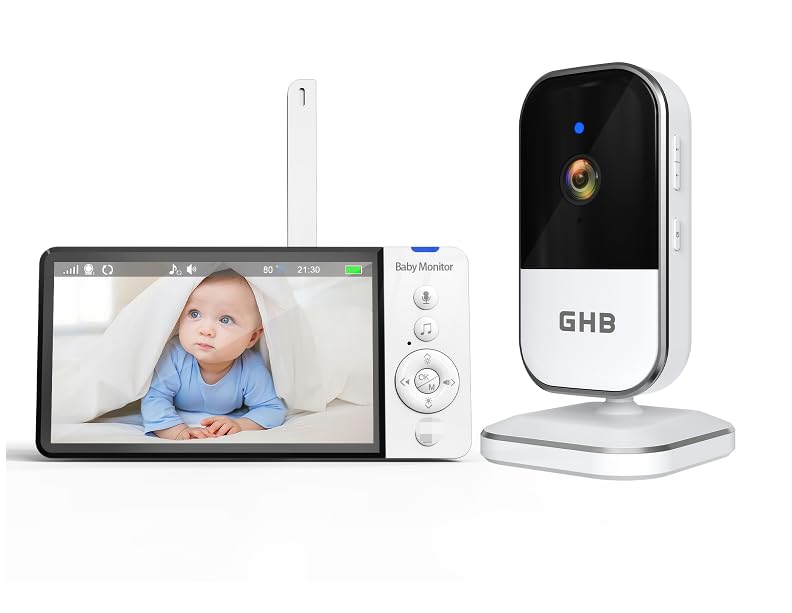
Image: The GHB Baby Monitor system, showing the parent unit with a 5-inch HD screen displaying a baby, and the camera unit. Both units are white and black.
Arahan Keselamatan Penting
- Jauhkan bahagian kecil daripada kanak-kanak.
- Do not place the camera or parent unit within reach of the baby.
- Ensure power cords are not accessible to children to prevent strangulation hazards.
- Gunakan hanya penyesuai kuasa yang disediakan.
- Jangan dedahkan peranti kepada air atau lembapan.
- Elakkan meletakkan peranti berhampiran sumber haba.
- Jangan cuba membaiki peranti sendiri. Hubungi sokongan pelanggan untuk mendapatkan bantuan.
Kandungan Pakej
Sila semak pakej untuk item berikut:
- GHB Baby Monitor Parent Unit (with 5" HD screen)
- GHB Baby Monitor Camera Unit
- Power Adapter (for Parent Unit)
- Power Adapter (for Camera Unit)
- Manual Arahan (dokumen ini)
- Mounting Screws (for camera unit)
Persediaan
1. Charging the Parent Unit
Before first use, fully charge the parent unit for approximately 8 hours. Connect the power adapter to the parent unit and a power outlet. The battery indicator will show charging status.
2. Mengkuasakan Unit Kamera
Connect the power adapter to the camera unit and a power outlet. The camera will automatically power on.
3. Meletakkan Kedudukan Kamera
Place the camera unit at a safe distance from your baby (at least 3 feet / 1 meter away) to avoid strangulation hazards from the cord. Ensure a clear view of the baby's crib or play area. The camera can be placed on a flat surface or mounted to a wall using the provided screws.
Nota: For optimal night vision, avoid placing the camera directly facing a window or strong light source.
4. Pairing (if necessary)
The parent unit and camera unit are pre-paired at the factory. If the connection is lost or you need to add another camera (sold separately), follow these steps:
- Turn on both the parent unit and the camera unit.
- On the parent unit, navigate to the "Camera Pairing" menu.
- Press the pairing button on the back of the camera unit (usually a small button, refer to the camera unit diagram).
- The parent unit will display a confirmation message once pairing is successful.
Arahan Operasi
1. Unit Ibu Bapa Selesaiview
The parent unit features a 5-inch HD display and various control buttons. Familiarize yourself with the buttons for navigation, volume, zoom, and two-way talk.
2. Fungsi Asas
- Hidupkan/Mati Kuasa: Press and hold the power button on the parent unit.
- Kawalan Kelantangan: Use the dedicated volume buttons to adjust the audio level from the camera.
- Pelarasan Kecerahan: Adjust screen brightness via the menu settings.
3. VOX (Voice Operated Exchange) Mode
VOX mode conserves battery by turning off the screen and audio when no sound is detected from the baby's room. The unit will automatically activate when sound is detected.
- Mengaktifkan VOX: Navigate to the VOX settings in the parent unit menu.
- Tahap Sensitiviti: Adjust the VOX sensitivity (Low, Medium, High) to suit your environment. Higher sensitivity means the unit will activate with softer sounds.
4. Digital Zoom (4x)
Use the zoom function to get a closer look at your baby. Press the zoom button on the parent unit to cycle through zoom levels (e.g., 1x, 2x, 4x).
5. Penglihatan Malam
The camera unit is equipped with infrared LEDs for automatic night vision. In low-light conditions, the camera will automatically switch to black and white night vision mode, providing clear images even in complete darkness.
6. Two-Way Talk Function
Communicate with your baby or partner in the baby's room using the two-way talk feature.
- Tekan dan tahan butang mikrofon pada unit induk.
- Bercakap dengan jelas ke dalam mikrofon unit induk.
- Lepaskan butang untuk mendengar bayi anda semula.
7. Lagu pengantar tidur
Some models include pre-programmed lullabies. Access the lullaby menu on the parent unit to play soothing melodies for your baby.
8. Pemantauan Suhu
The camera unit has a built-in temperature sensor. The current room temperature will be displayed on the parent unit's screen, allowing you to ensure a comfortable environment for your baby.
Penyelenggaraan
- Pembersihan: Wipe the units with a soft, dry, lint-free cloth. Do not use cleaning agents or solvents.
- Penjagaan Bateri: For optimal battery life, avoid fully discharging the parent unit battery frequently. If storing the unit for an extended period, charge the battery every few months.
- Storan: Simpan unit-unit di tempat yang sejuk dan kering, jauh daripada cahaya matahari langsung dan suhu yang melampau.
Menyelesaikan masalah
| Masalah | Kemungkinan Punca | Penyelesaian |
|---|---|---|
| No picture/sound on parent unit. | Units are not powered on or not paired. | Ensure both units are powered on and connected to power. Re-pair the units if necessary. |
| Kualiti gambar/bunyi yang teruk. | Units are too far apart or obstructions are present. | Move the parent unit closer to the camera. Remove any large metal objects or thick walls between units. |
| Bateri unit induk cepat habis. | VOX mode is off, or screen brightness is too high. | Activate VOX mode. Reduce screen brightness. Ensure battery is fully charged. |
| Static or interference. | Other 2.4 GHz devices nearby. | Move the baby monitor away from Wi-Fi routers, cordless phones, or microwaves. |
Spesifikasi
- Nombor Model: ABM809
- Saiz Skrin: 5 inci HD
- Resolusi Rakaman Video: 720p
- Teknologi Ketersambungan: 2.4 GHz FHSS
- Ciri Khas: Two-way audio, Portable, HD Resolution, Night Vision, VOX mode, 4x Zoom
- Sumber Kuasa: AC Adapter, Lithium-ion Battery (Parent Unit)
- Jenis Bateri: 1 D (included)
- Dimensi Produk (L x W x H): 28 x 18 x 5.6 cm
- Berat produk: 630 gram
- Jenis Pemasangan: Screw-in (Wall Mount)
- penggunaan: Indoor Baby Monitoring
Pelupusan
Do not dispose of this product with household waste. Please recycle electronic devices at designated collection points. Contact your local authorities for information on recycling and disposal.


