1. Pengenalan
Thank you for choosing the ASD 12 Inch Smart RGBW Flush Mount Ceiling Light. This fixture combines a stylish minimalist design with efficient, versatile lighting solutions. Featuring multicolor RGBW capabilities, smart app control, and remote operation, it offers a wide range of lighting effects for your space. This manual provides essential information for safe installation, effective operation, and proper maintenance of your new lighting fixture.

Figure 1.1: ASD 12 Inch Smart RGBW Flush Mount Ceiling Light with accessories.
3. Kandungan Pakej
Sahkan bahawa semua komponen hadir sebelum memulakan pemasangan:
- ASD 12 Inch Smart RGBW Flush Mount Ceiling Light Fixture (4 units)
- Alat Kawalan Jauh
- Perkakasan Pemasangan (skru, nat dawai)
- Manual Arahan
4. Spesifikasi
| Ciri | Perincian |
|---|
| Jenama | ASD |
| Nama Model | LOFT |
| Nombor Bahagian | A-LFM12D20SRGBW-N-4p |
| warna | 12" | Nickel | RGBW |
| bahan | Alloy Steel, Acrylic |
| Gaya | moden |
| Dimensi Produk | 11.3"L x 11.3"W x 3.4"H |
| Kegunaan Khusus | Penggunaan dalaman sahaja |
| Sumber Kuasa | Berwayar keras |
| Jenis Sumber Cahaya | LED |
| Jenis Selesai | Dilukis |
| Bahan Teduh | plastik |
| Voltage | 120 Volt |
| Wattage | 20 watt |
| Jenis Pemasangan | Flushmount |
| Kehidupan Purata | 50,000 Jam |
| Ciri Khas | 1064/1220LM, Remote Control, RGBW, Smart App, CCT Adjustable 2700-6500K |

Rajah 4.1: Dimensi produk dan ciri utama.
5. Pemasangan
Follow these steps to install your ASD Smart RGBW Flush Mount Ceiling Light:
- Sediakan untuk Pemasangan: Turn off power at the circuit breaker before starting. Ensure the mounting surface is clean and stable.
- Remove the Lens: Gently remove the lens from the fixture by rotating it clockwise. This will expose the mounting holes and wiring connections.
- Pasang Lekapan: Attach the fixture's base to the electrical outlet box using the provided screws. Ensure it is securely fastened.
- Sambungan Wayar: Connect the wires: Black to Black (Live), White to White (Neutral), and Ground to Ground. Secure all connections with wire nuts. Carefully tuck all wires back into the outlet box.
- Attach the Lens: Once wiring is complete and secure, attach the lens by aligning it with the fixture and rotating it counter-clockwise until it locks into place.
- Pulihkan Kuasa: Hidupkan semula kuasa pada pemutus litar.
- Download ASD SMART App: For smart control features, download the "ASD SMART" application from your smartphone's app store. Scan the QR codes below or click the links to download.
Gedung Google Play (Android)
Apple App Store (iOS) - Add Fixture to App: Follow the in-app instructions to add your new ceiling light to the ASD SMART app. This typically involves putting the light into pairing mode and connecting it to your Wi-Fi network.

Figure 5.1: Initial installation steps: removing the lens and wiring.
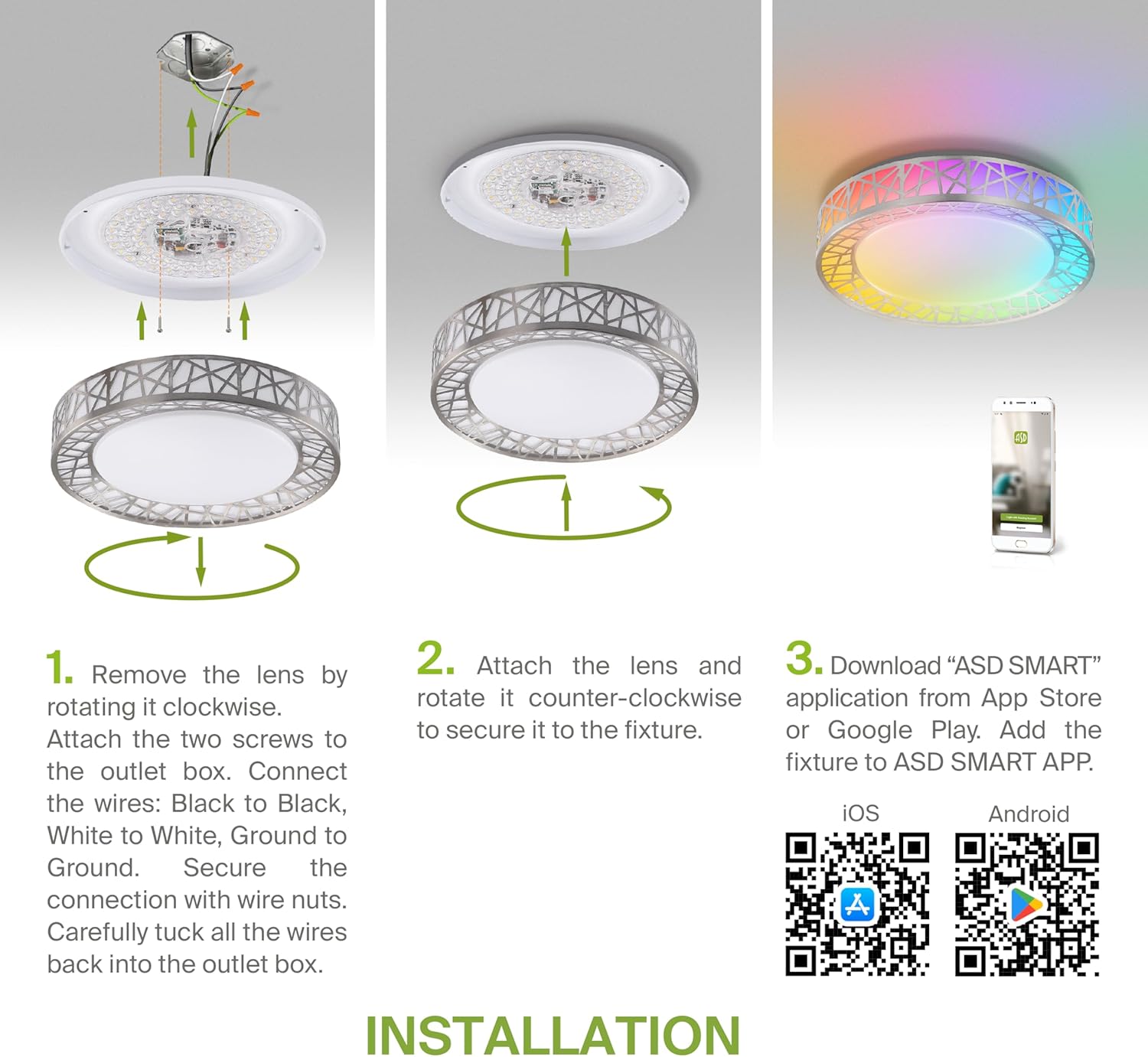
Figure 5.2: Complete installation overview including app download.
6. Arahan Operasi
Your ASD Smart RGBW Flush Mount Ceiling Light offers multiple control methods:
6.1 Alat Kawalan Jauh
Alat kawalan jauh yang disertakan membolehkan fungsi asas:
- Hidup/Mati: Hidupkan atau matikan lampu.
- Peredupan: Adjust brightness levels smoothly.
- Pelarasan CCT: Tukar suhu warna (cth, daripada putih hangat kepada putih sejuk).
- Pemilihan Warna RGB: Cycle through or select specific RGB colors.
6.2 ASD SMART App Control
The ASD SMART app provides full control and advanced features:
- 16.7 Juta Warna: Choose any color from the full RGBW spectrum.
- Smooth Dimming & CCT: Precisely adjust brightness and color temperature (2700K-6500K).
- Lighting Patterns: Select pre-set or custom lighting scenes and effects.
- Pengelompokan: Control multiple fixtures simultaneously.
- Penjadualan: Set timers for lights to turn on/off or change settings automatically.

Figure 6.1: RGBW color capabilities.

Figure 6.2: Control via remote and smart app.

Figure 6.3: Seamless dimming functionality.
6.3 Kawalan Suara (Alexa & Google Assistant)
The fixture is compatible with Amazon Alexa and Google Assistant for convenient voice commands:
- Ensure your ASD SMART app is linked to your Alexa or Google Home account.
- Use commands such as "Alexa, turn on the living room light" or "Hey Google, set the bedroom light to blue."

Figure 6.4: Compatibility with Alexa and Google Assistant.
7. Penyelenggaraan
To ensure the longevity and optimal performance of your ceiling light:
- Pembersihan: Putuskan kuasa sebelum membersihkan. Lap lekapan dengan kain lembut dan kering. Jangan gunakan pembersih atau pelarut yang kasar.
- Penggantian mentol: This fixture uses integrated LED technology and does not require bulb replacement.
8. Penyelesaian masalah
If you encounter issues with your ceiling light, refer to the following common problems and solutions:
| Masalah | Kemungkinan Punca | Penyelesaian |
|---|
| Lampu tidak menyala | Tiada bekalan elektrik, pendawaian longgar, suis rosak | Periksa pemutus litar. Pastikan semua sambungan wayar kukuh. Uji suis dinding. |
| Alat kawalan jauh tidak berfungsi | Dead battery, out of range, interference | Replace remote battery. Ensure you are within range. Remove any obstructions. |
| App cannot connect to light | Incorrect Wi-Fi password, light not in pairing mode, 5GHz Wi-Fi network | Verify Wi-Fi password. Reset light to pairing mode (refer to app instructions). Ensure you are on a 2.4GHz Wi-Fi network. |
| Kawalan suara tidak bertindak balas | App not linked to voice assistant, incorrect device name | Check linking in ASD SMART app and voice assistant app. Verify device name in voice assistant app. |
9. Waranti dan Sokongan
ASD menyediakan a Waranti terhad 5 tahun for this product, guaranteeing top quality and safety. The fixture is ETL certified, ensuring compliance with North American safety standards.
For technical support, warranty claims, or any questions not covered in this manual, please contact ASD customer service. Refer to the product packaging or the official ASD webtapak untuk maklumat hubungan.


