pengenalan
The Yiliaw Bunny Alarm Clock is designed to assist children in developing healthy sleep habits through a combination of gentle light cues, soothing sounds, and an easy-to-use alarm system. This device functions as a sleep training clock, night light, and sound machine, all within a durable, child-safe silicone casing.

Image: The Yiliaw Bunny Alarm Clock, showing its digital display and soft glow, with a hand interacting with the top of the device.
Ciri-ciri Produk Berakhirview
- Gentle Sleep Training: Utilizes light cues (red for bedtime, yellow for pre-wake, green for wake-up) and white noise.
- Bunyi Putih yang menenangkan: Features 6 distinct white noise options with 8 adjustable volume levels.
- Lampu Malam Berwarna-warni: Offers 2 brightness levels for warm light, a color-fade mode, and 7 static color options, activated by tapping.
- Easy Snooze & Adjustable Display: Tap to snooze for 5 minutes (up to 3 times). Screen brightness has 3 adjustable levels.
- Kid-Safe & Durable Design: Constructed from soft, non-toxic silicone, designed to withstand drops.
- Dwi Penggera: Supports setting two independent alarms.
- Format 12/24 Jam: Selectable time display format.

Image: Visual summary of the alarm clock's key features, including dual alarms, white noise, and night light options.
Persediaan
1. Mengecas Peranti
Before first use, fully charge the alarm clock using the provided USB-C cable. Connect the USB-C end to the charging port on the back of the device and the USB-A end to a compatible power adapter (not included), computer, or power bank. The battery indicator on the display will show charging status.

Image: Illustration of the Type-C charging port and compatible charging sources.
2. Hidupkan Awal dan Tetapan Masa
- Press and hold the Power On/Off button (U) untuk menghidupkan peranti.
- To set the time, long press the Time Setting button (@). The hour display will flash.
- Use the Plus (+) dan Tolak (-) buttons to adjust the hour. Press the Time Setting button again to confirm and move to minutes.
- Adjust minutes using the Plus (+) dan Tolak (-) buttons. Press Time Setting to confirm.
- To switch between 12-hour and 24-hour format, short press the Time Setting button (@) while the time is displayed.

Image: The alarm clock displaying time in both 12-hour and 24-hour formats.
Arahan Operasi
1. Setting Alarms (Sleep Training)
The clock features a sleep training function using light cues:
- Sleep Alarm (Red Light): Set a bedtime alarm. The clock will emit a red light and white noise for 30 minutes to signal it's time to prepare for sleep.
- Wake-up Reminder (Yellow Light): 30 minutes before the wake-up alarm, the clock will glow yellow, indicating it's almost time to wake up.
- Wake-up Alarm (Green Light): At the set wake-up time, the clock will glow green, signaling it's time to start the day.

Image: Visual representation of the sleep training light system: green for wake, yellow for pre-wake, and red for sleep.
How to Set Alarms:
- Long press the Alarm Setting button (@ with crescent moon icon) to enter alarm setting mode.
- Use the Plus (+) dan Tolak (-) buttons to adjust the alarm time (hour and minute). Press the Alarm Setting button to confirm each step.
- You can set two independent alarms. Repeat the process for the second alarm.
- To turn an alarm on or off, short press the Alarm Setting button (@ with crescent moon icon). An alarm icon will appear/disappear on the display.
2. Fungsi Lampu Malam
The night light offers various modes and colors:
- Cahaya Hangat: Tap the top of the bunny once for a soft warm light.
- Increased Warm Light Brightness: Tap a second time to increase the warm light brightness.
- Gradual Color-Changing Mode: Tap a third time to activate a soft color-fade mode.
- Static Color Options: Tap a fourth time and subsequent taps to cycle through 7 distinct color options.
- To turn the light off, continue tapping until the light turns off, or short press the Power On/Off and Night Light button (U).

Image: Instructions on how to activate and change the night light colors by tapping the bunny.
3. White Noise Function
The clock includes 6 soothing white noise sounds to aid sleep.
- Selecting White Noise: Short press the White Noise button (♪) to cycle through the 6 available sounds.
- Melaraskan Kelantangan: Long press the Plus (+) atau Tolak (-) buttons to adjust the volume level (8 levels).

Image: A child sleeping with the alarm clock providing white noise, showing various sound icons.
4. Fungsi Tunda
When an alarm sounds, tap the top of the bunny to activate the snooze function. This will provide an additional 5 minutes of sleep. The snooze function can be used up to 3 times.

Image: A child sleeping, with the alarm clock displaying a snooze icon, illustrating the snooze feature.
5. Pelarasan Kecerahan Skrin
The digital display has 3 brightness levels.
- Short press the Plus (+) atau Tolak (-) buttons to cycle through the low, medium, and high brightness settings for the screen.

Image: Comparison of the alarm clock's screen brightness at low, medium, and high settings.
6. Button Overview
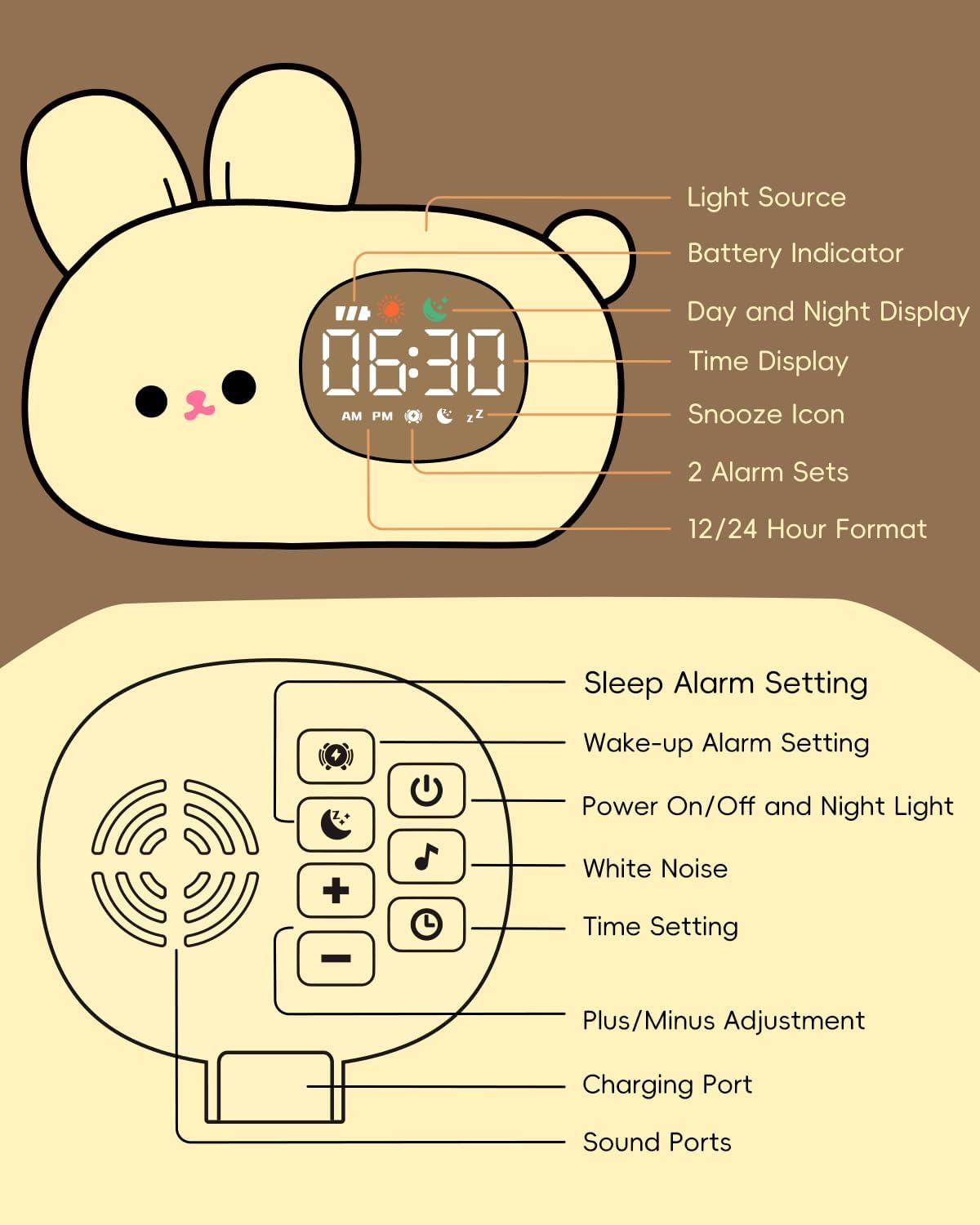
Image: Detailed diagram labeling the light source, battery indicator, display, snooze icon, alarm sets, 12/24 hour format, sleep alarm setting, wake-up alarm setting, power on/off and night light button, white noise button, time setting button, plus/minus adjustment, charging port, and sound ports.
Penyelenggaraan
1. Pembersihan
The Yiliaw Bunny Alarm Clock is made of soft silicone. To clean, gently wipe the surface with a soft, damp cloth. Avoid using harsh chemicals or abrasive cleaners, as these may damage the silicone or electronic components.
2. Penjagaan Bateri
The device contains a rechargeable battery. For optimal battery life:
- Cas peranti sepenuhnya sebelum penggunaan pertama.
- Elakkan daripada mengalirkan bateri sepenuhnya dengan kerap.
- If the device will not be used for an extended period, charge it to about 50% and store it in a cool, dry place. Recharge every few months to prevent deep discharge.
Menyelesaikan masalah
- Alarm not going off or going off at the wrong time:
- Ensure the alarm is correctly set and activated (check for the alarm icon on the display).
- Verify the current time setting is accurate.
- If the battery died, the clock settings might have reset. Recharge and reset the time and alarms. - Night light not staying on (red light for sleep):
- The red light for the sleep alarm is designed to stay on for 30 minutes. If continuous night light is desired, use the manual night light function by tapping the bunny to select a static color or warm light, which will remain on until manually turned off or battery depletes. - Bateri cepat habis:
- Frequent use of the night light, especially at higher brightness, and continuous white noise playback will consume battery faster.
- Ensure the device is fully charged. If battery life remains consistently short, contact customer support. - Screen brightness is too high, even on the lowest setting:
- The lowest screen brightness setting is fixed. If it is still too bright for your preference, consider positioning the clock further away from the bed or facing it away during sleep. - Tapping feature for light changes is too sensitive:
- The tap sensor is designed to be responsive. Be mindful when placing or moving the clock to avoid accidental light changes. If the light changes unexpectedly, simply tap again to cycle to your desired setting or turn it off.
Spesifikasi
| Jenama | Yiliaw |
| Model | Bunny Alarm Clock B0F137TS1Y |
| warna | putih |
| Jenis Paparan | digital |
| Ciri Khas | Cordless, Night Light, Sleep Training, White Noise |
| Dimensi Produk | 3"W x 4.7"H (approx. 7.6cm W x 11.9cm H) |
| Sumber Kuasa | Dikuasakan Bateri (Boleh dicas semula melalui USB-C) |
| Bahan Bingkai | silikon |
| Berat Barang | 0.27 Kilogram (lebih kurang 9.5 auns) |
| Kapasiti Bateri | 1500mAh |

Image: Contents of the product package and key product specifications.
Waranti dan Sokongan
Information regarding product warranty and customer support contact details was not provided in the available product data. Please refer to the product packaging or the seller's information on the purchase platform for specific warranty terms and support contacts.


