1. Pengenalan
Welcome to the user manual for your GPD Pocket 4 Mini Laptop. This document provides essential information for setting up, operating, maintaining, and troubleshooting your device. The GPD Pocket 4 is a high-performance, ultra-portable 2-in-1 device designed for both productivity and entertainment, featuring an AMD Ryzen AI 9 HX 370 CPU and an 8.8-inch 2.5K 144Hz touchscreen display.
Please read this manual thoroughly before using your GPD Pocket 4 to ensure proper operation and to maximize its capabilities.
2. Maklumat Keselamatan
- Bekalan Kuasa: Use only the original power adapter provided with the device. Using unauthorized adapters may damage the device and void the warranty.
- Penjagaan Bateri: Do not attempt to replace the battery yourself. Avoid exposing the device to extreme temperatures (below 0°C or above 35°C) or direct sunlight for prolonged periods.
- Air dan Kelembapan: Keep the device away from water, rain, and excessive humidity. Do not operate with wet hands.
- Pengudaraan: Ensure proper ventilation. Do not block the ventilation openings, especially during heavy use, to prevent overheating.
- Pembersihan: Putuskan sambungan kuasa sebelum membersihkan. Gunakan kain lembut dan kering. Elakkan pembersih cecair atau aerosol.
- Pembongkaran: Do not attempt to disassemble or repair the device yourself. This may cause damage and void the warranty. Contact authorized service personnel for repairs.
3. Kandungan Pakej
Please check the package contents upon unboxing. If any items are missing or damaged, contact your retailer immediately.
- GPD Pocket 4 Mini Laptop
- USB-C Power Adapter (100W PD Fast Charging)
- Kabel USB-C ke USB-C
- Manual Pengguna (dokumen ini)
4. Produk Lebihview
The GPD Pocket 4 is a versatile 2-in-1 device, combining a mini laptop with a tablet. It features a high-resolution touchscreen and a physical keyboard.
4.1 Ciri-ciri Utama
- Pemproses: AMD Ryzen AI 9 HX 370 CPU (up to 5.1 GHz)
- Grafik: AMD Radeon 890M iGPU (RDNA 3.5 architecture)
- paparan: 8.8-inch 2.5K (2560x1600) IPS Touchscreen, 144Hz refresh rate
- Ingatan: 32GB LPDDR5X RAM (7500 MT/s)
- Storan: 2TB M.2 NVMe PCIe 4.0 SSD
- Sistem pengendalian: Windows 11 Home
- Ketersambungan: Wi-Fi 6E, Bluetooth 5.3
- Bateri: 44.8Wh, up to 9 hours video playback
- Pelabuhan: HDMI 2.1, 2x USB-C (full-featured), USB-A, RJ45 Network Port, Earphone/Microphone Ports
- Modular IO: Support for 4G, MicroSD, KVM, and RS-232 modules.
4.2 Susun atur Peranti

Rajah 4.2.1: Bahagian sisi dan belakang view of the GPD Pocket 4 highlighting ports and features.
- Top/Rear: Charge Indicator, USB4, Memory Card Readers, Reset Button, HDMI 2.1, USB A 3.2 Gen 2, Speaker Port.
- Bahagian Kiri: Full-Featured USB-C, Air Outlet, RJ45 Network Port, Lanyard Hole, Earphone/Microphone Ports, USB-A, Power Button/Fingerprint.
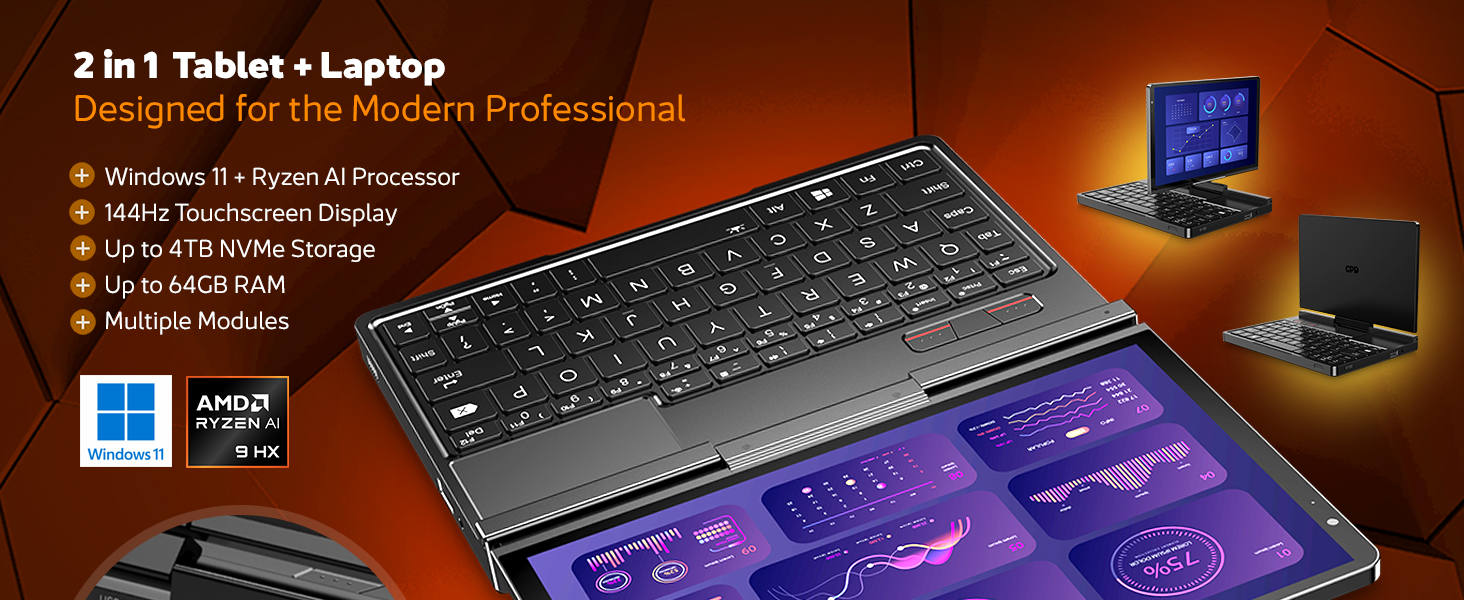
Gambar 4.2.2: Lebihview of the GPD Pocket 4's core specifications and 2-in-1 design.
This image illustrates the device's key technical specifications, including its modular IO, screen, CPU, GPU, RAM, storage, OS, battery, and connectivity, emphasizing its nature as a pocket-sized modular AI PC.

Figure 4.2.3: Modular expansion options for the GPD Pocket 4.
The GPD Pocket 4 supports various modular expansions, including KVM, Memory Card Reader, 4G LTE, and RS-232 modules, enhancing its versatility for different professional needs.
5. Persediaan
5.1 Kuasa Awal Hidup
- Cas Peranti: Before first use, connect the GPD Pocket 4 to the power adapter using the provided USB-C cable. Plug the adapter into a wall outlet. The charge indicator light will illuminate.
- Hidupkan kuasa: Press and hold the Power Button (integrated with the fingerprint sensor) for a few seconds until the GPD logo appears on the screen.
- Persediaan Windows: Follow the on-screen instructions to complete the Windows 11 Home setup process. This includes selecting your region, language, connecting to Wi-Fi, and creating a user account.
5.2 Menyambung Peranti
- Paparan luaran: Connect an external monitor via the HDMI 2.1 port or one of the full-featured USB-C ports.
- Peranti USB: Use the USB-A or USB-C ports for connecting external keyboards, mice, USB drives, or other peripherals.
- Rangkaian: For a wired internet connection, connect an Ethernet cable to the RJ45 network port.
- Audio: Connect headphones or external speakers to the 3.5mm earphone/microphone port.
6. Operating the GPD Pocket 4
6.1 Mod Operasi
- Mod Komputer Riba: Use the integrated keyboard and touchpad for traditional laptop functionality. The 8.8-inch display provides a compact yet clear workspace.
- Mod Tablet: Fold the screen back to transform the device into a tablet. The 10-point multi-touch display allows for intuitive navigation and interaction.

Figure 6.1.1: GPD Pocket 4 in tablet mode, showcasing its touch interface.
The device seamlessly transitions between laptop and tablet modes, offering flexibility for various tasks.
6.2 Papan Kekunci dan Pad Sentuh
- The integrated keyboard is designed for comfortable typing in a compact form factor.
- Pad sentuh menyokong gerak isyarat berbilang sentuh untuk navigasi. Rujuk tetapan Windows untuk penyesuaian.
- The power button doubles as a fingerprint sensor for secure login.

Figure 6.2.1: User interacting with the GPD Pocket 4's keyboard and touchpad.
This image highlights the comfortable keyboard and backlit trackpad, along with the integrated camera and microphone for meetings.
6.3 Pengurusan Bateri
- The GPD Pocket 4 features a 44.8Wh battery.
- For optimal battery life, adjust power settings in Windows.
- The device supports 100W PD fast charging. Use the provided charger for quickest recharge times.

Gambar 6.3.1: Dalaman view showing the 44.8Wh battery and device dimensions.
This image provides a visual representation of the device's internal battery and its compact dimensions, emphasizing its portability and power endurance.
7. Penyelenggaraan
7.1 Pembersihan
- Always power off the device and disconnect the charger before cleaning.
- Use a soft, lint-free cloth to wipe the screen and chassis. For stubborn smudges on the screen, lightly dampbilas kain dengan air atau pembersih khusus skrin (jangan sembur terus pada skrin).
- Use a soft brush or compressed air to clean dust from the keyboard and ventilation openings.
- Elakkan menggunakan bahan kimia yang keras, pembersih yang melelas, atau pelarut.
7.2 Kemas Kini Perisian
- Regularly check for Windows updates to ensure your system has the latest security patches and performance improvements. Go to Tetapan > Kemas Kini Windows.
- Periodically check the GPD official website for driver updates, especially for graphics (AMD Radeon 890M) and chipset drivers, to ensure optimal performance.
7.3 Pengurusan Storan
- Padam secara kerap yang tidak perlu files and applications to free up storage space.
- Consider using cloud storage for large files to reduce local storage consumption.
- The 2TB M.2 NVMe SSD is expandable; consult GPD support for compatible upgrade options if needed.
8. Penyelesaian masalah
| Masalah | Kemungkinan Punca | Penyelesaian |
|---|---|---|
| Peranti tidak dihidupkan. | Bateri lemah; Penyesuai kuasa tidak disambungkan; Isu perkakasan. | Ensure the device is fully charged. Verify the power adapter and cable are securely connected. If issues persist, perform a hard reset (press and hold power button for 15 seconds). |
| Skrin kosong atau berkelip. | Display driver issue; Incorrect resolution; Hardware fault. | Restart the device. Update graphics drivers. Check display settings in Windows. |
| Wi-Fi atau Bluetooth tidak berfungsi. | Wireless adapter disabled; Driver issue; Interference. | Check Wi-Fi/Bluetooth settings in Windows. Restart the device. Update wireless drivers. Ensure no physical obstructions or strong interference sources. |
| Peranti perlahan atau tidak responsif. | Too many applications running; Low storage space; Overheating. | Close unnecessary applications. Free up disk space. Ensure ventilation is not blocked. Check Task Manager for resource-intensive processes. |
| Skrin sentuh tidak bertindak balas. | Software glitch; Driver issue; Physical damage. | Restart the device. Check for touchscreen driver updates. If physically damaged, contact support. |
9. Spesifikasi
| Ciri | Perincian |
|---|---|
| Jenama | GPD |
| Nama Model | Pocket (RM-Pocket-4) |
| Pemproses | AMD Ryzen AI 9 HX 370 (5.1 GHz) |
| Pemproses bersama Grafik | Radeon™ 890M |
| RAM | 32 GB LPDDR5X |
| Penyimpanan | 2 TB NVMe PCIe Gen4 SSD |
| Saiz Skrin | 8.8 Inci |
| Resolusi Skrin | 2560 x 1600 piksel (2.5K) |
| Kadar Segar Semula | 144Hz |
| Sistem Operasi | Windows 11 Home |
| Jenis Wayarles | 802.11ax (Wi-Fi 6E), Bluetooth 5.3 |
| Purata Hayat Bateri | 9 Hours (video playback) |
| Berat Barang | 1.6 paun (725 Gram) |
| Dimensi Produk | 8.11 x 5.67 x 0.87 inci |
| warna | Hitam |
10. Waranti dan Sokongan
GPD products typically come with a limited manufacturer's warranty. Please refer to the warranty card included in your package or visit the official GPD webtapak untuk terma dan syarat waranti terperinci khusus untuk wilayah anda.
For technical support, troubleshooting assistance beyond this manual, or warranty claims, please contact GPD customer support through their official website or the retailer from whom you purchased the device.
GPD Official Webtapak: www.gpd.hk
Please have your product model number (RM-Pocket-4) and purchase information ready when contacting support.


