pengenalan
This manual provides detailed instructions for the setup, operation, and maintenance of your ATTACK SHARK X68PRO HE Rapid Trigger Wireless Keyboard. Designed for high-performance gaming, this keyboard features magnetic switches, adjustable actuation, and multi-mode connectivity.
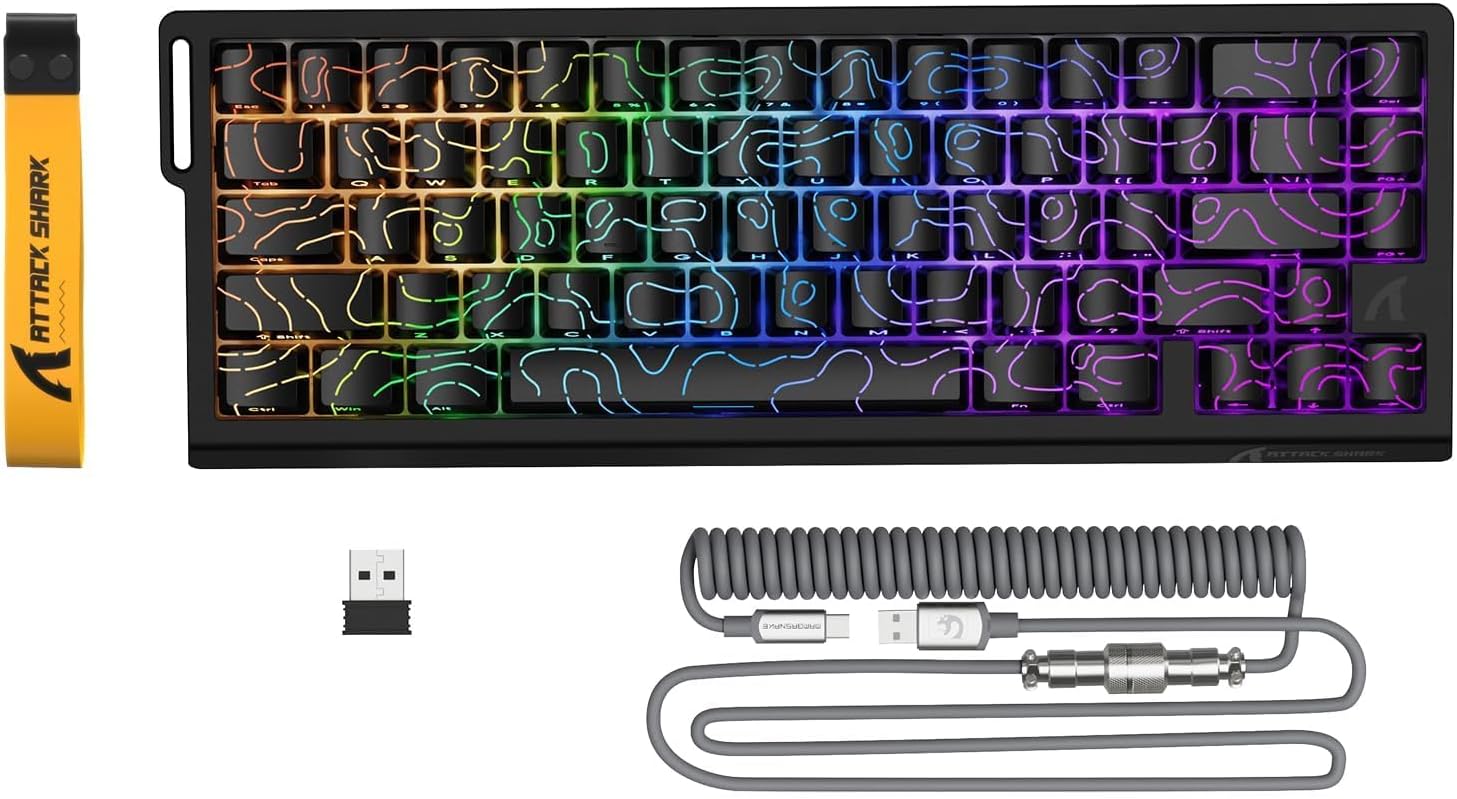
Image: The ATTACK SHARK X68PRO HE keyboard, showing its compact layout, along with the USB receiver and coiled USB-C cable.
Kandungan Pakej
- Papan Kekunci ATTACK SHARK X68PRO HE
- USB-C Coiled Cable
- Penerima Tanpa Wayar 2.4GHz
- Penarik Kekunci
- Manual Pengguna (dokumen ini)
Persediaan
Pilihan Kesambungan
The X68PRO HE keyboard supports three connectivity modes: 2.4GHz wireless, Bluetooth, and USB-C wired.

Image: The keyboard connected to a laptop via USB-C, with icons indicating 2.4G wireless and Bluetooth connectivity options.
1. Sambungan Berwayar USB-C
- Sambungkan kabel gegelung USB-C yang disediakan ke port USB-C papan kekunci.
- Sambungkan hujung kabel yang lain ke port USB yang tersedia pada komputer anda.
- The keyboard will automatically be detected and ready for use. This mode supports an 8000Hz polling rate.
2. Sambungan Wayarles 2.4GHz
- Locate the 2.4GHz wireless receiver (dongle) included in the package.
- Palamkan penerima ke dalam port USB yang tersedia pada komputer anda.
- On the keyboard, switch to 2.4G wireless mode using the side button or by pressing FN + R.
- The keyboard will connect automatically. This mode supports a 1000Hz polling rate.
3. Sambungan Bluetooth
- On the keyboard, switch to Bluetooth mode by pressing FN+Q, FN + W, atau FN + E to select one of three available Bluetooth channels.
- The keyboard's indicator light will flash, indicating it is in pairing mode.
- On your device (computer, tablet, etc.), open Bluetooth settings and search for "ATTACK SHARK X68PRO HE".
- Select the keyboard to pair. Once paired, the indicator light will become solid.
- You can switch between paired Bluetooth devices using FN + Q/W/E. This mode supports a 1000Hz polling rate.
Arahan Operasi
Pencetus Pantas dan Pengaktifan Boleh Laras
The X68PRO HE features Hall Effect magnetic switches with 0.01mm trigger accuracy and adjustable actuation from 0.1mm to 3.4mm. This allows for precise control and rapid key presses, ideal for gaming.

Image: A visual comparison illustrating the difference between a regular switch and a rapid trigger switch, highlighting the instant reset capability of the latter for improved accuracy in games.

Imej: A terperinci view of the adjustable magnetic switch, showing its linear type, 100 million click lifespan, 0.1-3.4mm actuation range, and support for N-pole-down magnetic switches.
Adjustments for Rapid Trigger sensitivity, Dynamic Keystrokes (DKS), Mod-Tap (MT), and Toggle Key (TGL) can be made via the dedicated QMK web driver. Refer to the "Driver Customization" section for more details.
Polling Rate and Latency
The keyboard offers an 8000Hz polling rate in wired mode and 1000Hz in wireless modes, ensuring ultra-low latency of 0.125ms for quick response times.

Image: The keyboard with a graphic illustrating the 8000Hz polling rate and 0.125ms response time, emphasizing its speed.
Kawalan Pencahayaan RGB
The X68PRO HE features south-facing RGB lighting with 16.8 million color options and over 20 dynamic effects. You can customize these effects using the following key combinations:
- FN + \|: Switch Light Mode
- FN + Ruang Belakang: Light on/off
- FN + -/=: Backlit Speed +/-
- FN + Enter: Switch Light Color
- FN + Tab: White Light
- FN + ↑/↓: Backlit Brightness +/-

Image: The keyboard displaying its dynamic RGB lighting effects, with a diagram showing the key combinations for controlling light modes, colors, speed, and brightness.
Driver Customization (QMK Web pemandu)
The keyboard supports customization via a QMK web driver, allowing you to adjust key functions, macros, RGB effects, and more without software downloads. The hot-swappable PCB also allows for changing magnetic switches.
To access the driver, visit: bit.ly/X68HESOFT

Image: Screenshots of the QMK web driver interface, demonstrating options for key settings, stroke settings, shaft settings, macros, and RGB lighting customization.
Penyelenggaraan
- Pembersihan: Use a soft, dry cloth to wipe down the keyboard. For deeper cleaning, use a keycap puller to remove keycaps and compressed air to clear debris.
- Storan: Simpan papan kekunci di tempat yang sejuk dan kering jauh dari cahaya matahari langsung dan suhu yang melampau.
- Penjagaan Bateri: The keyboard is powered by a 3000mAh battery. For optimal battery life, avoid fully discharging the battery frequently. Charge it regularly using the provided USB-C cable.
- Penggantian Suis: The keyboard is hot-swappable. If a switch needs replacement, gently pull it out using a switch puller and insert a new compatible magnetic switch.
Menyelesaikan masalah
| Masalah | Kemungkinan Punca | Penyelesaian |
|---|---|---|
| Papan kekunci tidak bertindak balas (Berwayar) | Sambungan kabel longgar; Port USB rosak; Isu pemacu. | Ensure USB-C cable is securely connected. Try a different USB port. Restart your computer. |
| Papan kekunci tidak bertindak balas (Wayarles) | Low battery; Receiver not plugged in; Incorrect mode selected; Pairing issue. | Charge the keyboard. Ensure 2.4GHz receiver is plugged in or Bluetooth is paired. Switch to the correct mode (FN+R for 2.4G, FN+Q/W/E for Bluetooth). Re-pair if necessary. |
| Pencahayaan RGB tidak berfungsi | Pencahayaan dimatikan; Konflik perisian. | Tekan FN + Ruang Belakang to toggle lighting. Check driver settings for RGB customization. |
| Kunci tidak mendaftar atau menaip dua kali | Debris under keycap; Faulty switch; Software calibration issue. | Clean under the keycap. If hot-swappable, try replacing the switch. Recalibrate actuation points via the QMK web pemandu. |
| Poor wireless range/connection | Interference; Distance from receiver. | Move closer to the receiver. Remove obstacles between keyboard and receiver. Avoid placing near other wireless devices. |
Spesifikasi

Image: The back of the product packaging, displaying key specifications and manufacturer information.
| Ciri | Perincian |
|---|---|
| Model | X68PRO HE |
| Susun atur | 60% ANSI, 66 Keys |
| Jenis Suis | Hall Effect Amber Magnetic Switches |
| Julat Pengaktifan | 0.1mm - 3.4mm (Boleh laras) |
| Trigger Accuracy | 0.01mm |
| Kadar Pengundian (Berwayar) | 8000Hz |
| Polling Rate (Wireless) | 1000Hz (2.4GHz & Bluetooth) |
| Latensi | 0.125ms |
| Ketersambungan | USB-C Wired, 2.4GHz Wireless, Bluetooth |
| Kapasiti Bateri | 3000mAh |
| Pencahayaan latar | RGB (16.8 million colors, 20+ effects) |
| Kekunci Kekunci | PBT sub-pewarna |
| Dimensi | 32.5 x 11.8 x 4 cm |
| Berat badan | 1.12 kg |
| OS yang serasi | Windows, macOS |
Waranti dan Sokongan
ATTACK SHARK products come with a standard manufacturer's warranty. For specific warranty terms and conditions, please refer to the warranty card included with your product or visit the official ATTACK SHARK webtapak.
For technical support, troubleshooting assistance, or warranty claims, please contact ATTACK SHARK customer service through their official channels. You can find contact information on the product packaging or their webtapak.
Manufacturer: ATTACK SHARK
Item Model Number: X68HE
ASIN: B0DZSY3HW4