1. Produk Lebihview
The CHOETECH B695 is a versatile 10000mAh magnetic power bank designed for convenient charging of multiple devices. It features both wireless charging capabilities and multiple wired output options, including built-in USB-C and Lightning cables. Its compact design and integrated safety features make it an ideal portable power solution.

Imej: Depan dan belakang view of the CHOETECH B695 Magnetic Power Bank, showcasing reka bentuknya yang padat dan pelbagai port.
Ciri-ciri Utama:
- Kapasiti 10000mAh: Menyediakan ampkuasa untuk berbilang caj.
- Pengecasan 2-dalam-1: Supports both magnetic wireless charging and wired charging.
- Kabel terbina dalam: Integrated USB-C and Lightning cables for direct device connection.
- Berbilang Output: Includes USB-A, Type-C (input/output), and dedicated wireless charging for phones and watches.
- Penjajaran Magnetik: Ensures secure and efficient wireless charging for compatible devices.
- Paparan Digital LED: Clearly indicates remaining battery percentage.
- Perlindungan Keselamatan Komprehensif: Built-in safeguards against overcharge, overdischarge, overcurrent, overvoltage, temperature, short circuit, overpower, recovery, and electromagnetic field issues.
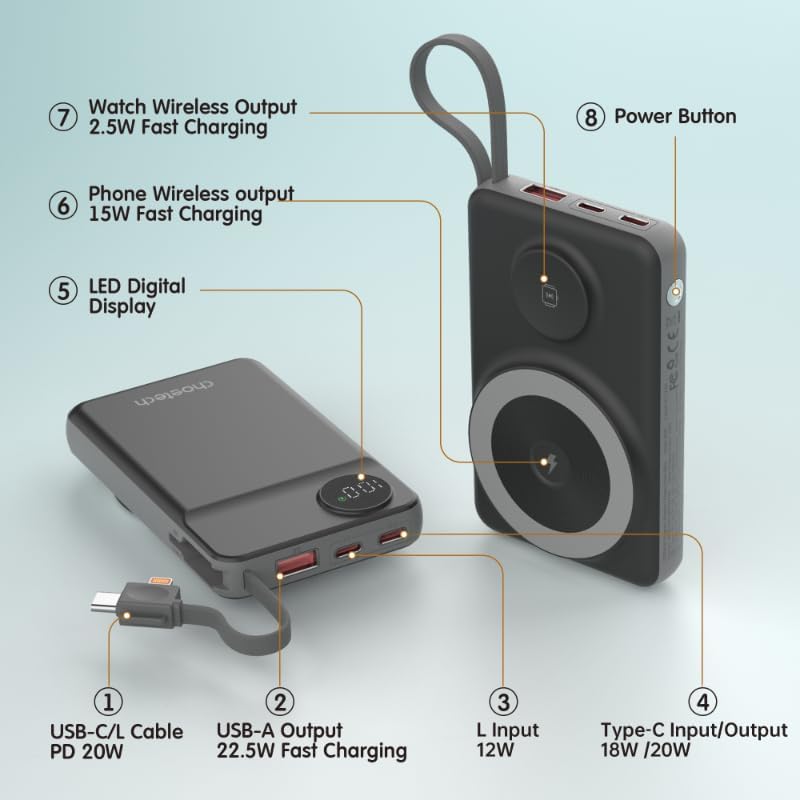
Image: Detailed diagram labeling the ports and features of the CHOETECH B695, including USB-C/L cable, USB-A output, L input, Type-C input/output, LED display, phone wireless output, watch wireless output, and power button.
2. Bermula: Persediaan
2.1 Mengecas Power Bank
Before initial use, fully charge your CHOETECH B695 power bank. This ensures optimal performance and battery longevity.
- Connect a compatible USB-C charging cable (not included) to the Type-C Input/Output port (4) on the power bank.
- Connect the other end of the cable to a USB wall adapter (not included).
- The LED Digital Display (5) will show the charging progress. It will display "100" when fully charged.
- Alternatively, you can use the built-in Lightning input (3) to charge the power bank with a Lightning cable and adapter.
Nota: For fastest charging of the power bank, use a PD (Power Delivery) compatible wall adapter with the Type-C port.
3. Arahan Operasi
3.1 Menyemak Tahap Bateri
Press the Power Button (8) once to activate the LED Digital Display (5), which will show the current battery percentage.
3.2 Pengecasan Berwayar
The CHOETECH B695 offers multiple wired charging options:
- Using Built-in USB-C/L Cable (1):
- Pull out the integrated USB-C or Lightning cable from its storage slot.
- Connect the appropriate cable end to your device's charging port.
- Pengecasan akan bermula secara automatik.
- Using USB-A Output (2):
- Connect your device's USB charging cable to the USB-A Output port (2).
- Sambungkan hujung kabel anda yang satu lagi ke peranti anda.
- Charging will commence.
- Using Type-C Input/Output (4):
- Connect your device's USB-C charging cable to the Type-C Input/Output port (4).
- Sambungkan hujung kabel anda yang satu lagi ke peranti anda.
- Charging will commence.

Image: The CHOETECH B695 power bank connected to a smartphone via its built-in USB-C cable, demonstrating wired charging.
3.3 Wireless Charging (Phone)
The power bank supports magnetic wireless charging for compatible smartphones (e.g., iPhone 12 series and newer, or Android phones with magnetic cases).
- Pastikan bank kuasa dicas secukupnya.
- Align your compatible smartphone with the larger magnetic charging pad (6) on the power bank.
- The phone should snap into place magnetically, and wireless charging will begin.

Image: A smartphone magnetically attached to the larger wireless charging pad and a smartwatch on the smaller pad of the CHOETECH B695, illustrating simultaneous wireless charging.
3.4 Wireless Charging (Watch)
The power bank includes a dedicated smaller magnetic charging pad for smartwatches.
- Pastikan bank kuasa dicas secukupnya.
- Place your compatible smartwatch onto the smaller magnetic charging pad (7).
- The watch should align magnetically, and wireless charging will begin.
3.5 Pengecasan Serentak
The CHOETECH B695 can charge multiple devices simultaneously using a combination of its wired and wireless outputs.

Image: The CHOETECH B695 power bank connected to and wirelessly charging multiple devices, including smartphones and a smartwatch, demonstrating its multi-output capability.
4. Safety Information and Protection Features
The CHOETECH B695 is equipped with multiple safety mechanisms to protect your devices and the power bank itself.
- Perlindungan Lebihan: Menghalang bateri daripada dicas melebihi kapasitinya.
- Perlindungan berlebihan: Melindungi bateri daripada kehabisan sepenuhnya, memanjangkan jangka hayatnya.
- Perlindungan lebihan arus: Perlindungan terhadap aliran arus yang berlebihan.
- Overvoltage Perlindungan: Melindungi daripada voltage melonjak.
- Perlindungan Suhu: Memantau dan mengawal suhu dalaman untuk mengelakkan terlalu panas.
- Perlindungan Litar pintas: Mati secara automatik sekiranya berlaku litar pintas.
- Perlindungan Overpower: Prevents power output beyond safe limits.
- Perlindungan Pemulihan: Allows the device to recover from protection states.
- Perlindungan Medan Elektromagnet: Shields against harmful electromagnetic interference.

Image: An infographic detailing the nine safety protection features integrated into the CHOETECH B695 power bank, including overcharge, overdischarge, overcurrent, overvoltage, temperature, short circuit, overpower, recovery, and electromagnetic field protection.
Penting: Do not expose the power bank to extreme temperatures, direct sunlight, or water. Do not disassemble or attempt to repair the device. Keep out of reach of children.
5. Penyelenggaraan
- Pembersihan: Gunakan kain lembut dan kering untuk membersihkan power bank. Elakkan pencuci cecair.
- Storan: Simpan bank kuasa di tempat yang sejuk dan kering jauh dari cahaya matahari langsung dan suhu yang melampau.
- Kesihatan Bateri: Untuk mengekalkan kesihatan bateri, cas dan nyahcas sepenuhnya power bank sekurang-kurangnya sekali setiap tiga bulan jika tidak digunakan secara tetap.
- Penjagaan Kabel: Handle the built-in cables gently. Avoid excessive bending or pulling to prevent damage.
6. Penyelesaian masalah
6.1 Power Bank Tidak Mengecas
- Ensure the charging cable is securely connected to both the power bank's input port and the wall adapter.
- Sahkan bahawa penyesuai dinding berfungsi dengan betul dan dipasang ke soket kuasa hidup.
- Try a different USB-C or Lightning charging cable and wall adapter.
6.2 Peranti Tidak Mengecas daripada Power Bank
- Pengecasan Berwayar:
- Periksa sama ada power bank mempunyai cas yang mencukupi (rujuk paparan LED).
- Ensure the charging cable is securely connected to both the power bank's output port and your device.
- Cuba kabel pengecasan lain atau port keluaran lain pada bank kuasa.
- Press the power button once to activate output if necessary.
- Pengecasan Tanpa Wayar:
- Pastikan peranti anda serasi dengan pengecasan wayarles magnetik.
- Remove any thick cases or metallic objects from your device that might interfere with wireless charging.
- Ensure your device is correctly aligned with the magnetic charging pad on the power bank.
- Periksa sama ada bank kuasa mempunyai cas yang mencukupi.
6.3 Pengecasan Lambat
- Pastikan anda menggunakan kabel dan penyesuai yang serasi dengan pengecasan pantas untuk mengecas power bank dan juga mengecas peranti anda.
- Some devices may limit charging speed when multiple devices are connected simultaneously.
- Environmental factors (e.g., high temperature) can affect charging efficiency.
6.4 LED Display Not Working
- Tekan butang kuasa dengan kuat.
- Jika bank kuasa habis sepenuhnya, paparan mungkin tidak menyala sehingga ia menerima sedikit cas.
7. Spesifikasi
| Model | B695 |
| Kapasiti Bateri | 10000mAh |
| Output Kabel Terbina dalam | USB-C/L Cable PD 20W |
| Keluaran USB-A | Pengecasan Pantas 22.5W |
| Input/Output Jenis-C | 18W / 20W |
| Input Kilat | 12W |
| Output Tanpa Wayar Telefon | Pengecasan Pantas 15W |
| Tonton Output Wayarles | Pengecasan Pantas 2.5W |
| Dimensions (L x W x Thickness) | 7.7L x 9.7L x 16.2 sentimeter |
| Berat Barang | 0.05 Kilogram (50g) |
| warna | Hitam |
8. Waranti dan Sokongan
CHOETECH products are designed and manufactured to the highest quality standards. For warranty information and customer support, please refer to the warranty card included with your purchase or visit the official CHOETECH webtapak.
If you encounter any issues or have questions regarding your CHOETECH B695 power bank, please contact CHOETECH customer service for assistance.


