1. Pengenalan
This manual provides instructions for the installation, operation, and maintenance of your Leadfan 10.1-inch IPS touchscreen car stereo, Model A, designed specifically for Toyota Camry vehicles manufactured between 2012 and 2014. Please read this manual thoroughly before installation and use to ensure proper function and safety.
Nota Penting:
- This is Model A, which is designed for Toyota Camry vehicles that DO NOT have a large screen navigation system or a J.B.L sound system.
- If your car has a large screen or supports a J.B.L sound system, you require Model B. Ensure you have the correct model for your vehicle configuration.

Image 1.1: Before and After Installation Comparison with Key Features
2. Persediaan dan Pemasangan
2.1 Kandungan Pakej
Sebelum memulakan pemasangan, sahkan bahawa semua komponen terdapat dalam pakej:
- 1280*720 HD IPS Touchscreen Android Radio Headunit
- Kit Radio
- Frame for Toyota Camry 2012 2013 2014
- Kamera Sandaran AHD
- Membalikkan Kabel Input Kamera
- Antena GPS
- WiFi & Bluetooth Signal Booster Cable
- Plug and Play Power Harness
- Mikrofon Luaran
- Manual Pengguna
- 2 Kabel USB
- RCA kabel
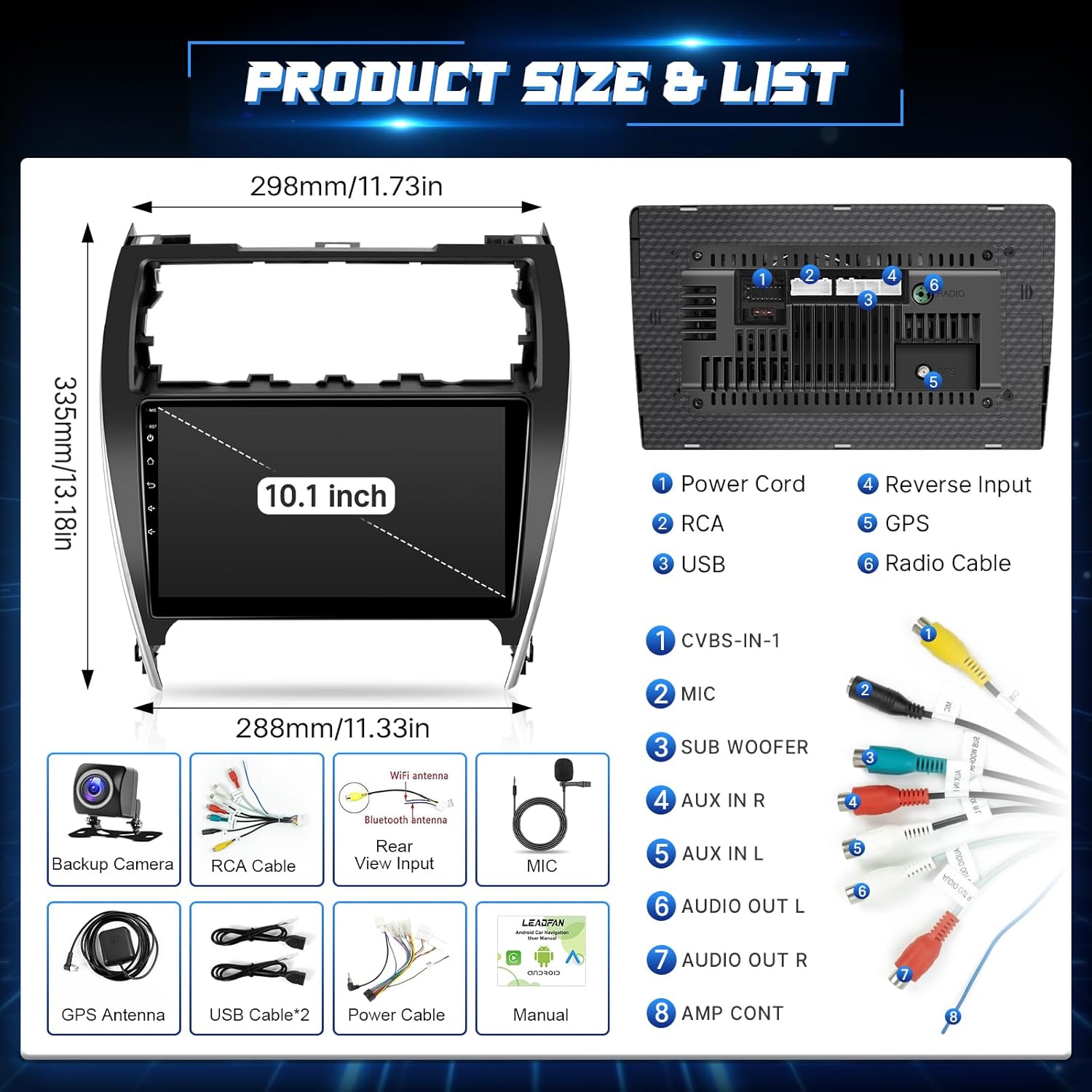
Image 2.1: Product Dimensions and Included Components
2.2 Wiring Connections Overview
The system is designed for plug-and-play installation. Refer to the included wiring diagrams and the image below for specific connections. Ensure all cables are securely connected to prevent functionality issues.
- Kord Kuasa: Connects to the vehicle's power harness.
- Kabel RCA: For audio/video input/output, including subwoofer.
- Kabel USB: For external USB devices and wired Mirror Link.
- Input Terbalik: Connects to the backup camera.
- Antena GPS: Untuk fungsi navigasi.
- Radio Cable: For FM/AM radio reception.
- Mikrofon Luaran: For improved call quality and voice commands.
2.3 Sambungan Kamera Sandaran
Kamera sandaran AHD yang disertakan memberikan yang jelas view when reversing. Follow these steps for connection:
- Connect the reversing camera input cable to the designated port on the head unit (labeled 'Reverse Input').
- Connect the camera's power cable to the vehicle's reversing light positive and negative terminals.
- Ensure the white plug on the video extension line is securely connected to the radio; otherwise, Bluetooth and WiFi functionalities may be unavailable.

Image 2.2: Backup Camera Wiring Diagram
3. Arahan Operasi
3.1 Hidupkan/Mati Kuasa dan Navigasi Asas
To power on the unit, start your vehicle. The unit will typically power on automatically. To power off, turn off your vehicle's ignition. Navigate the interface using the 10.1-inch IPS touchscreen.
3.2 CarPlay Tanpa Wayar dan Android Auto
The car stereo supports wireless Apple CarPlay and Android Auto for seamless smartphone integration. This allows you to access navigation, make calls, send messages, and listen to music directly from your phone's interface on the car stereo screen.
- Pastikan Bluetooth dan Wi-Fi didayakan pada telefon pintar anda.
- On the car stereo, select the CarPlay or Android Auto application.
- Follow the on-screen prompts to pair your phone via Bluetooth and establish the wireless connection.
- Use voice commands (Siri or Google Assistant) for hands-free operation.

Image 3.1: Wireless CarPlay and Android Auto Interface
3.3 Kefungsian Pautan Cermin
Mirror Link allows you to synchronize your smartphone screen with the car stereo display.
- Peranti Android: Supports bidirectional control via wired USB connection or wireless Wi-Fi/hotspot.
- iPhone Devices: Supports unidirectional control (phone screen displayed on stereo) via wireless Wi-Fi/hotspot.

Image 3.2: Mirror Link Connection Methods
3.4 GPS Navigation and WiFi Connectivity
The unit includes a GPS module for navigation. You can use both offline and online maps.
- Peta Luar Talian: Connect to Wi-Fi or your phone's hotspot to download offline maps via the menu.
- Peta Dalam Talian: Use online navigation services when connected to Wi-Fi or a hotspot.
- Muat Turun Apl: With Wi-Fi connected, you can download various applications like YouTube, Spotify, and more from the app store, similar to a smartphone.

Image 3.3: GPS Navigation Interface
3.5 Bluetooth 5.1, FM/RDS Radio, and EQ Settings
- Bluetooth 5.1: Pair your mobile phone for hands-free calling and audio streaming. Access your address book and make voice calls directly from the stereo.
- Radio FM/RDS: Tune into FM radio stations. The RDS function displays station information. You can save your favorite stations.
- Tetapan EQ: Adjust the audio output with the 10-band equalizer options to customize your listening experience.

Image 3.4: FM Radio and DSP EQ Settings
3.6 Kawalan Roda Stereng (SWC)
The unit supports steering wheel control functions, allowing you to manage volume, answer calls, and control media playback without taking your hands off the wheel.
- Access the SWC settings menu on the stereo.
- Ikut arahan pada skrin untuk memprogram setiap butang pada stereng anda ke fungsi yang diingini.

Image 3.5: Steering Wheel Control Setup
3.7 Kefungsian Skrin Pisah
Utilize the split-screen feature to run two applications simultaneously, such as navigation and music playback, enhancing multitasking while driving.

Image 3.6: Split Screen in Use
4. Penyelenggaraan
4.1 Pembersihan Skrin
To clean the touchscreen, power off the unit. Use a soft, lint-free cloth slightly dampened with water or a screen-cleaning solution. Avoid harsh chemicals or abrasive materials that could damage the screen.
4.2 Kemas Kini Perisian
Periksa pengeluar secara berkala website or the unit's settings for available software updates. Updates can improve performance, add new features, and fix bugs. Follow the provided instructions carefully when performing updates.
4.3 Penjagaan Am
Avoid exposing the unit to extreme temperatures, direct sunlight for prolonged periods, or excessive moisture. Ensure proper ventilation around the unit to prevent overheating.
5. Penyelesaian masalah
If you encounter issues with your Leadfan car stereo, refer to the following common problems and solutions:
| Masalah | Kemungkinan Punca | Penyelesaian |
|---|---|---|
| Unit tidak dihidupkan. | Pendawaian salah, fius putus, masalah kuasa kenderaan. | Check power harness connections. Verify vehicle's fuse box for any blown fuses. Ensure the vehicle's ignition is on. |
| Tiada bunyi atau audio yang herot. | Speaker wiring issues, incorrect audio settings, volume too low. | Check speaker connections. Adjust volume and EQ settings. Ensure RCA cables are properly connected. |
| CarPlay/Android Auto tidak bersambung secara wayarles. | Bluetooth/Wi-Fi off on phone, incorrect pairing, white plug on camera cable not connected. | Ensure Bluetooth and Wi-Fi are active on your phone. Re-pair the device. Verify the white plug on the reversing camera input cable is securely connected to the head unit. |
| Isyarat GPS lemah atau tidak tepat. | Penempatan antena GPS, gangguan alam sekitar. | Ensure the GPS antenna is placed in an unobstructed location (e.g., dashboard). Avoid areas with tall buildings or heavy tree cover. |
| Kawalan Roda Stereng tidak berfungsi. | Incorrect wiring, unprogrammed buttons. | Verify SWC wiring connections. Re-program the steering wheel buttons through the unit's settings. |
| Kamera sandaran tidak dipaparkan. | Camera wiring, reverse trigger not connected. | Check the camera's power and video input connections. Ensure the reverse trigger wire is correctly connected to the vehicle's reverse light circuit. |
| Unit is incompatible with my Toyota Camry. | Incorrect model variant purchased. | Confirm your vehicle's specifications (large screen navigation, J.B.L sound system). This is Model A, which is NOT compatible with vehicles having these features. If your car has these features, you need Model B. |
6. Spesifikasi
| Ciri | Perincian |
|---|---|
| Berat Barang | 2.57 paun |
| Dimensi Pakej | 17.09 x 12.28 x 7.56 inci |
| Nombor Model Item | 2012-2014 Toyota Camry Car Play |
| Saiz Paparan | 10.1 Inci |
| Perintah Suara | Mikrofon, Skrin Sentuh |
| Jenama | Leadfan |
| Nama Model | 2012-2014 Toyota Camry Android Radio + AHD Camera + MIC |
| Jenis Perkhidmatan Kenderaan | kereta |
| Saiz Skrin | 10.1 Inci |
| Ciri Khas | 2 USB, Plug-and-play Harness, Steering Wheel Control, Hands-Free Calling, Voice Control, Android 11 touchscreen, split-screen, GPS Module, IP68 AHD backup camera, 1080p video player, video and audio output, AUX audio and video input, external mic jack in RCA cable, Apple CarPlay, Android Auto, Mirrorlink, Bluetooth & WiFi, FM, DSP, RDS, AUX, EQ, RAC Audio/Video Output, Rear View Camera Input, Waterproof, Lane Assist |
| Teknologi Ketersambungan | Wired Connection: USB (Android Phone: Mirrorlink), Wireless Connection: Bluetooth & Wi-Fi (IOS/Android: Carplay & Android Auto & Mirrorlink) |
| Jenis Peta | North America, Street or Road, Worldwide |
| Mod Keluaran Audio | Stereo |
| Jenis Pemasangan | Pemasangan Papan Pemuka |
7. Waranti
This Leadfan car stereo comes with a Waranti 1 Tahun from the date of purchase. Please retain your proof of purchase for warranty claims. The warranty covers manufacturing defects and malfunctions under normal use. It does not cover damage caused by improper installation, misuse, accidents, or unauthorized modifications.
8. Sokongan
For further assistance, technical support, or if you have questions regarding compatibility, please contact Leadfan customer service. You can typically find support options through the retailer's platform where you purchased the product.
Untuk menghubungi perkhidmatan pelanggan:
- Navigate to the product page on the retailer's webtapak.
- Look for the seller information, usually labeled "Sold by" or "Ships from".
- Click on the seller's name (e.g., "Leedfan") to visit their storefront or seller profile.
- Locate the "Ask a question" button or similar contact option to reach customer support.

Image 8.1: How to Contact Customer Service
When contacting support, please provide your car model, year, and a picture of your car's center console for accurate assistance, especially if you are unsure about compatibility.


