1. Pengenalan
This manual provides detailed instructions for the JOMAA 20-Key Macro Programmable Numeric Gaming Keyboard. This device is designed to enhance your gaming and productivity experience with its customizable features and robust construction. Please read this manual thoroughly to ensure proper setup and operation.
Ciri-ciri Utama:
- Kekunci Boleh Tukar Panas: Customize your typing feel by easily changing switches.
- Badan Aloi Aluminium: Provides durability and a premium aesthetic.
- Pencahayaan RGB: Features 12 distinct lighting modes for personalized ambiance.
- Antaramuka Jenis-C: Ensures versatile and reliable connectivity.
- Detachable Cable Design: Meningkatkan kebolehgunaan dan memudahkan penyimpanan.
- Pengaturcaraan Makro: Supports macro definitions for 19 keys, optimizing workflow and gaming efficiency.
- Struktur Gasket: Contributes to a responsive and comfortable typing experience.

Image 1.1: The JOMAA 20-Key Macro Programmable Numeric Gaming Keyboard, showcasinreka bentuk padat dan susun atur kuncinya.
2. Persediaan
Follow these steps to set up your JOMAA 20-Key Macro Programmable Numeric Gaming Keyboard:
- Bongkar: Carefully remove the keyboard and USB-C cable from the packaging.
- Sambungkan Kabel: Insert the USB-C end of the provided cable into the Type-C port on the keyboard.
- Sambung ke Komputer: Plug the standard USB-A end of the cable into an available USB port on your computer (PC, Laptop, or Gaming Console).
- Pengecaman Sistem: Your operating system (Windows XP/Vista/7/8/10, Mac) should automatically detect the device. No additional drivers are required for basic functionality.

Image 2.1: The detachable USB-C cable connecting the keyboard to a laptop, highlighting the keyline separation design for portability.
3. Mengendalikan Papan Kekunci
The JOMAA 20-Key keyboard functions as a standard numeric keypad out of the box. It also features dedicated keys for mode switching and lighting control.
Penukaran Mod:
- The keyboard supports switching between different operational modes, such as 'Game Mode' and 'Office Mode'.
- Locate the dedicated 'Mode Switching Key' (often marked with a gear or sun icon) on the keyboard.
- Press this key to cycle through available modes. Each mode may have different key assignments or lighting profiles.
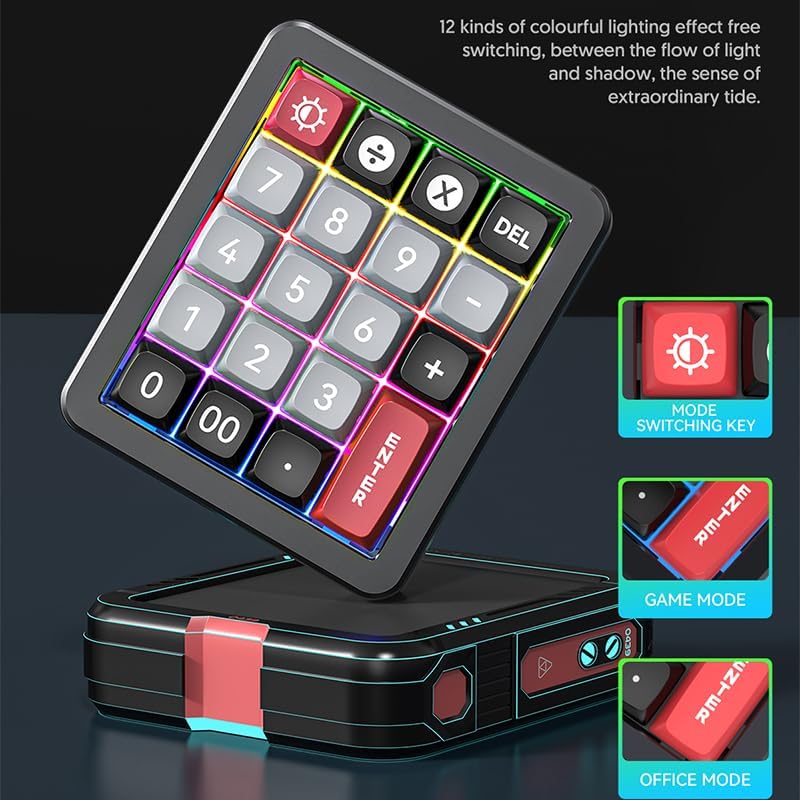
Image 3.1: Illustration of the mode switching key and visual indicators for Game Mode and Office Mode.
4. Macro Programming
The JOMAA 20-Key keyboard allows for macro definition on 19 of its keys, significantly enhancing efficiency for complex tasks or gaming commands.
- Keperluan Perisian: To program macros, you must use the dedicated driver software. This software is compatible with Windows operating systems only.
- Muat turun perisian: Refer to the manufacturer's official website for the latest driver software download.
- Langkah Pengaturcaraan:
- Install and launch the driver software on a Windows computer.
- Connect the keyboard to the Windows computer.
- Within the software interface, select the key you wish to program.
- Define your desired macro sequence or key remapping.
- Save the settings to the keyboard's onboard memory.
- Cross-System Use: Once programmed on a Windows system, the keyboard will retain its macro settings when connected to other compatible systems, including Mac.

Image 4.1: A visual representation of the macro programming software interface, showing options for key assignment.
5. Pencahayaan RGB
The keyboard features dynamic RGB lighting with 12 distinct modes to personalize your setup.
- Mod Kitaran: Use the dedicated lighting control key (often marked with a sun or lightbulb icon) to cycle through the 12 available lighting effects.
- Kecerahan / Kelajuan: Some lighting modes may allow for adjustment of brightness or animation speed through key combinations (refer to the software or quick guide for specific commands).
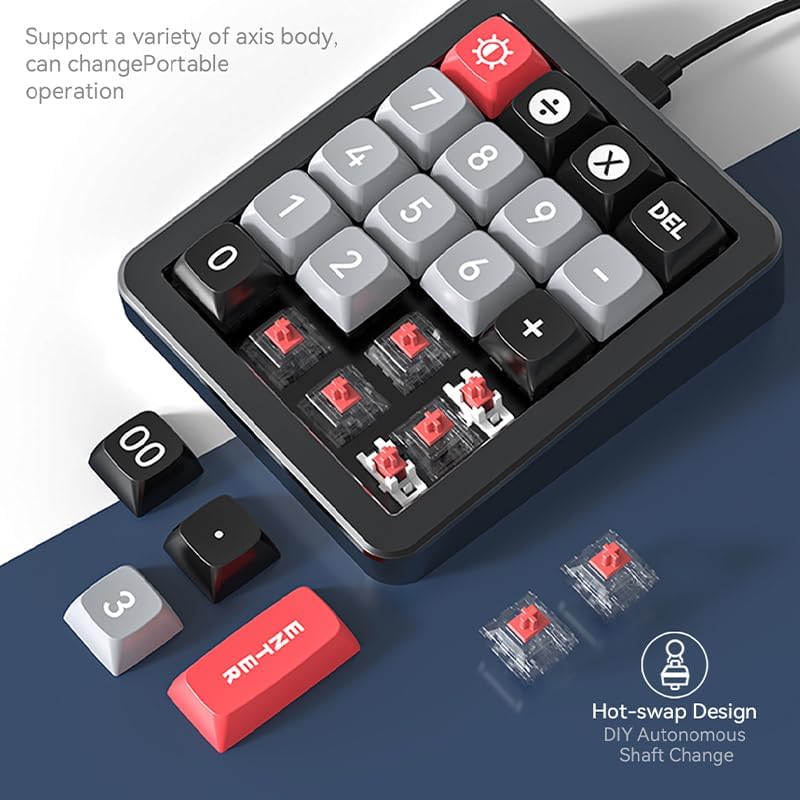
Image 5.1: The keyboard illuminated with various RGB lighting effects, demonstrating the 12 available modes.
6. Hot-Swappable Keys
The hot-swappable design allows you to easily change mechanical switches without soldering, offering a personalized typing experience.
- Alih keluar Keycap: Use a keycap puller to gently remove the desired keycap.
- Alih Keluar Suis: Use a switch puller to carefully extract the mechanical switch from its socket.
- Masukkan Suis Baharu: Align the pins of the new mechanical switch with the holes on the PCB. Gently press the switch into place until it clicks securely. Ensure pins are not bent.
- Gantikan Kekunci: Place the keycap onto the new switch.

Image 6.1: An illustration demonstrating the hot-swap design, showing how switches can be easily changed.
7. Gasket Structure
The keyboard incorporates a gasket structure, which provides a more flexible and cushioned typing feel compared to traditional mounting styles. This design helps to reduce typing noise and offers a more consistent keypress experience.

Image 7.1: A cross-section diagram detailing the components of the gasket structure, including wear-resistant keycaps, superstructure, red shaft, positioner plate, PCB board, and bottom cover.
8. Penyelenggaraan
Penyelenggaraan yang betul memastikan jangka hayat dan prestasi optimum papan kekunci anda.
- Pembersihan: Use a soft, dry cloth to wipe the keyboard surface. For deeper cleaning, gently remove keycaps and use compressed air to clear dust and debris from between switches. Avoid using harsh chemicals or abrasive materials.
- Penjagaan Kabel: When detaching the USB-C cable, always pull from the connector head, not the cable itself, to prevent damage. Store the cable neatly to avoid kinks or bends.
- Storan: Apabila tidak digunakan untuk tempoh yang lama, simpan papan kekunci di persekitaran yang bersih dan kering, jauh daripada cahaya matahari langsung dan suhu yang melampau.
9. Penyelesaian masalah
If you encounter issues with your JOMAA keyboard, refer to the following common solutions:
- Papan Kekunci Tidak Membalas:
- Pastikan kabel USB-C disambungkan dengan selamat pada papan kekunci dan komputer anda.
- Cuba sambungkan papan kekunci ke port USB lain pada komputer anda.
- Uji papan kekunci pada komputer lain untuk menolak isu khusus sistem.
- Kekunci Tidak Berfungsi Dengan Betul:
- If using hot-swappable switches, ensure the switches are fully seated and their pins are not bent.
- If macros are programmed, verify the settings in the driver software.
- Isu Pencahayaan RGB:
- Press the lighting control key to cycle through modes.
- Pastikan papan kekunci menerima kuasa yang mencukupi daripada port USB.
- Macro Programming Software Issues:
- Ensure you are running the software on a Windows operating system.
- Download the latest version of the driver software from the official JOMAA webtapak.
10. Spesifikasi
| Ciri | Perincian |
|---|---|
| Jenama | JOMAA |
| Model | B0DZ24X11F |
| kunci | 20-Key Numeric Pad |
| Ketersambungan | USB-C (Detachable Cable) |
| Bahan Badan | Aloi Aluminium |
| Jenis Suis | Hot-Swappable Mechanical |
| Pencahayaan | RGB (12 modes) |
| Sokongan Makro | 19 Kekunci Boleh Aturcara |
| Keserasian Sistem | Windows XP/Vista/7/8/10, Mac (Driver for Windows only) |
| Dimensi Pakej | 6.3 x 4.72 x 1.97 inci |
| Berat Barang | 15.5 auns |
11. Waranti dan Sokongan
JOMAA products are manufactured to high-quality standards. For warranty information, please refer to the documentation included with your purchase or visit the official JOMAA webtapak.
If you require further assistance or encounter issues not covered in this manual, please contact JOMAA customer support through their official webtapak atau peruncit tempat produk itu dibeli.


