1. Maklumat Keselamatan Penting
Always prioritize safety when operating the Ausom Gallop SR1 Electric Scooter. Read this manual thoroughly before first use. Failure to follow safety guidelines can result in serious injury or property damage.
- Always wear a helmet and appropriate safety gear (knee pads, elbow pads, gloves).
- Jangan menunggang dalam keadaan basah, hujan lebat atau melalui lopak air.
- Pastikan semua bolt dan pelepas pantas diketatkan dengan kukuh sebelum setiap tunggangan.
- Adhere to local laws and regulations regarding electric scooter use.
- Jangan melebihi had berat maksimum 143 paun (65 kg).
- Avoid riding on steep inclines or uneven terrain that exceeds the scooter's capabilities.
2. Produk Lebihview
The Ausom Gallop SR1 is a high-performance electric scooter designed for adults, featuring dual 1000W motors for powerful acceleration and a top speed of up to 41 mph. It boasts a robust aluminum alloy frame, 10"x3" off-road tires, and dual suspension for a stable and comfortable ride across various terrains. Key features include an integrated security system with NFC unlock, a comprehensive lighting system with turn signals, and a smart LCD screen for real-time information and mode control.

Figure 2.1: Ausom Gallop SR1 Electric Scooter in unfolded and folded states.

Figure 2.2: Dual 1000W motors provide powerful acceleration and a 46% climb angle.

Figure 2.3: The 20.8Ah battery offers a cruising range of up to 54 miles.
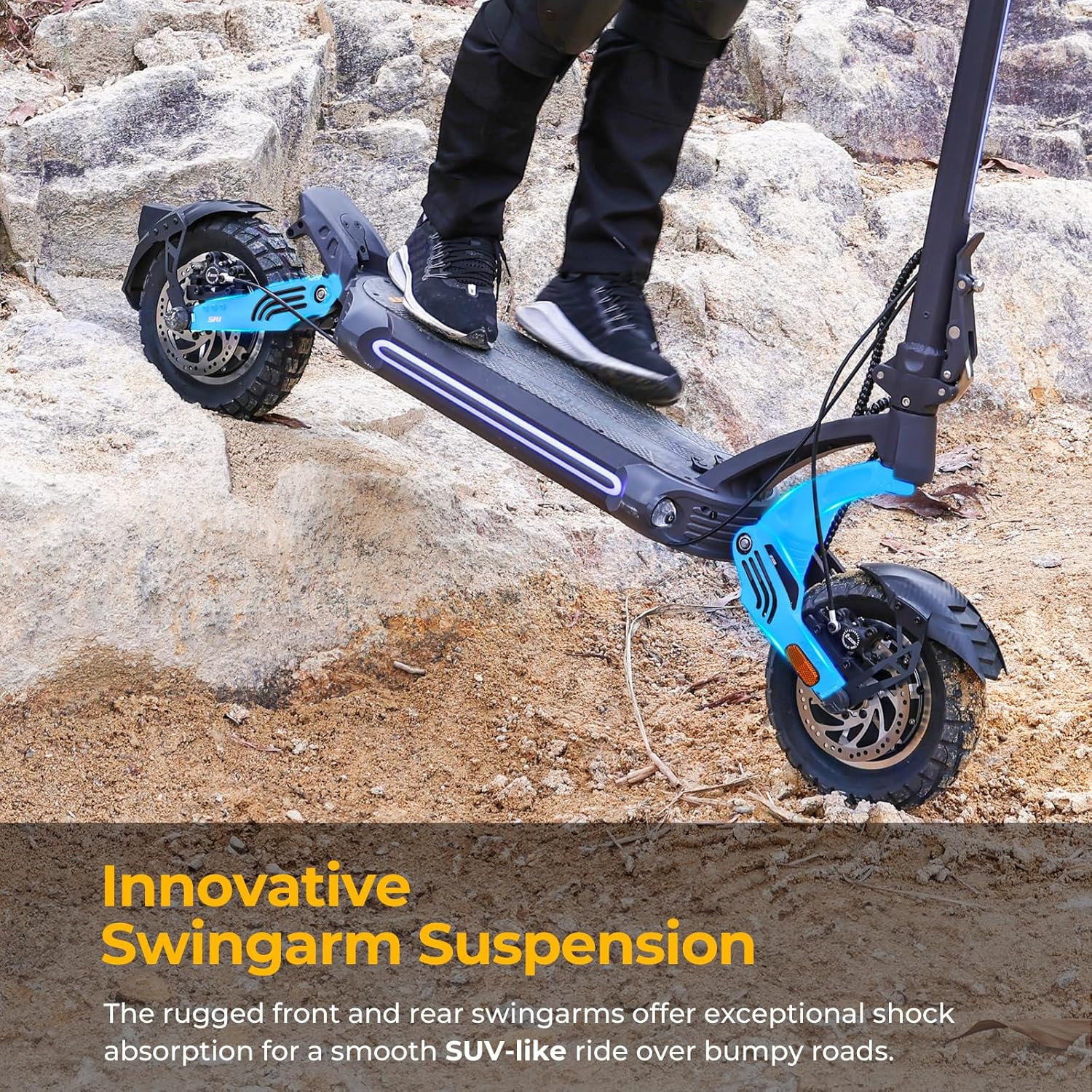
Figure 2.4: Innovative swingarm suspension ensures a smooth ride over bumpy roads.
3. Kandungan Pakej
Upon unboxing your Ausom Gallop SR1 Electric Scooter, please verify that all components are present:
- Ausom Gallop SR1 Electric Scooter (folded)
- Manual Pengguna
- Penyesuai Kuasa
- Kabel Kuasa
- Kit Alat
- Motor Nut Caps (4 pieces)
- Reflectors (2 pieces)
- NFC Card (for unlocking)
Video 3.1: Unboxing of Ausom Gallop SR1 Electric Scooters. This video demonstrates the contents of the package and initial unboxing steps.
4. Arahan Perhimpunan
Follow these steps to assemble your Ausom Gallop SR1 Electric Scooter:
- Step 1: Unfold the Stem
Open the kickstand to make the scooter stand upright. Carefully unfold the stem until it locks into place. - Step 2: Loosen Locking Screw
Turn the locking screw counter-clockwise to loosen it, preparing the folding mechanism. - Step 3: Secure Folding Mechanism
Fit the hook into the slot and push up the folding mechanism until it is attached to the stem. - Step 4: Tighten Locking Screw
Turn the locking screw clockwise to securely fasten the folding mechanism. - Langkah 5: Lampirkan Bar Hendal
Place the handlebar onto the clip at the top of the stem. Ensure the clip is centered on the handlebar. - Step 6: Secure Display
Place the display unit onto the handlebar and secure it with the four M5 screws provided in the tool kit. - Step 7: Attach Reflectors
Peel off the adhesive strip covers from the reflectors and stick them firmly onto the swingarms as shown in the video. - Step 8: Install Motor Nut Caps
Place the motor nut caps onto the motor nuts on both wheels.
Video 4.1: Unboxing and Assembly of Ausom Gallop SR1 Electric Scooters. This video provides a visual guide for the assembly steps.
5. Arahan Operasi
Familiarize yourself with the controls and functions of your scooter for optimal performance and safety.
5.1 Power On/Off and Unlocking
- Hidupkan kuasa: Press and hold the power button on the display until it illuminates.
- Membuka kunci: The scooter will be in Park mode upon startup. To unlock, tap the provided NFC card or your NFC-enabled phone against the NFC detection area on the display.
- Exiting Park Mode: Short press the Plus button on the display to exit Park mode.
5.2 Mod Kelajuan
The scooter features three speed levels: Eco, Sport, and Race. Short press the Plus (+) or Minus (-) buttons on the display to cycle through these speed levels.
5.3 Sistem Pencahayaan
- Ambient Lights: Press the light switch twice to turn the ambient lights on or off.
- Lampu depan: Long press the light switch for 3 seconds to turn the headlight on or off.
- Isyarat Belok: Push the turn signal switch to the left to activate the left turn signal, and to the right for the right turn signal.
5.4 Horn and Motor Modes
- tanduk: Tekan butang hon untuk membunyikan hon.
- Mod Motor: Short press the DDM button to switch between single-motor and dual-motor modes.
5.5 Fungsi Power Bank
The scooter is equipped with USB-A and USB-C outputs, allowing you to charge your mobile phone and other devices directly from the scooter.
Video 5.1: Riding Video of SR1. This video demonstrates the scooter in operation, including speed and handling.
Video 5.2: NFC Connection Instruction. This video details how to use NFC to unlock your scooter with both iPhone and Android devices.
6. Penyelenggaraan
Penyelenggaraan tetap memastikan umur panjang dan operasi selamat skuter anda.
- Pembersihan: Lap skuter dengan iklanamp cloth after each use. Avoid using high-pressure water jets.
- Tayar: Regularly check tire pressure (pneumatic tires) and inspect for wear or damage. Maintain recommended pressure for optimal performance and safety.
- Brek: Periodically check the hydraulic disc brakes for proper function and wear. Adjust or replace brake pads as needed.
- Mekanisme Lipatan: Pastikan mekanisme lipatan bersih dan dilincirkan untuk memastikan operasi yang lancar.
- Bateri: Simpan skuter di tempat yang sejuk dan kering. Jika menyimpan untuk tempoh yang lama, cas bateri kepada kira-kira 50-70% dan cas semula setiap 30-60 hari untuk mengelakkan nyahcas yang banyak.
- Pemeriksaan Am: Regularly inspect all screws, bolts, and connections for tightness.
7. Penyelesaian masalah
If you encounter issues with your scooter, refer to these common troubleshooting tips:
- Skuter tidak boleh dihidupkan: Check battery level. Ensure the power button is pressed correctly.
- Scooter not unlocking with NFC: Ensure NFC is enabled on your phone (refer to Video 5.2). Try repositioning the phone/card on the display.
- Julat/kuasa yang dikurangkan: Check tire pressure. Ensure battery is fully charged. Riding conditions (hills, rider weight, temperature) can affect performance.
- Brakes not responsive: Inspect brake cables and calipers. Adjust or seek professional assistance if needed.
- Bunyi luar biasa: Stop riding immediately and inspect the scooter for loose parts or damage.
For persistent issues not covered here, please contact Ausom customer support.
8. Spesifikasi
| Ciri | Spesifikasi |
|---|---|
| Jenama | Ausom |
| Nama Model | Gallop SR1 |
| warna | Kelabu Gelap |
| Julat Umur (Perihalan) | Dewasa |
| Ciri Khas | Melipat |
| Had berat | 143 paun (65 kg) |
| Dimensi Produk (LxWxH) | 53.5" x 24.8" x 50" (135.9 cm x 63 cm x 127 cm) |
| Bilangan Roda | 2 |
| Bahan Roda | Getah Pneumatik |
| Bahan Bingkai | aluminium |
| Jenis Hendal | Unik |
| Jenis Roda | Pneumatik |
| Jenis Penggantungan | Penggantungan Dwi |
| Jenis Cengkaman | Ergonomik |
| Gaya Brek | Handbrake and Electric Brake |
| Julat Jarak Maksimum | 54 Batu (87 km) |
9. Waranti dan Sokongan
The Ausom Gallop SR1 Electric Scooter comes with a limited warranty. Please refer to the warranty card included in your package for specific terms and conditions. For technical support, replacement parts, or any inquiries not covered in this manual, please contact Ausom customer service through their official webtapak atau peruncit tempat produk itu dibeli.


