Masajoy Wireless Headset User Manual
Model: Spark 06
pengenalan
The Masajoy Wireless Headset with Mic for Work (Model: Spark 06) is designed to provide clear and reliable audio communication for various professional and personal uses. Featuring multiple connection modes, AI noise cancellation, and a comfortable design, this headset is ideal for business video conferencing, online courses, and call center environments.

Figure 1: Masajoy Wireless Headset and included accessories.
Apa yang ada dalam Kotak
Sila sahkan bahawa semua komponen terdapat dalam pakej:
- Wireless Headset with Mic for Work
- USB A / C Dongle
- USB C to 3.5MM Cable
- Kabel Pengecas Jenis C
- Manual Pengguna
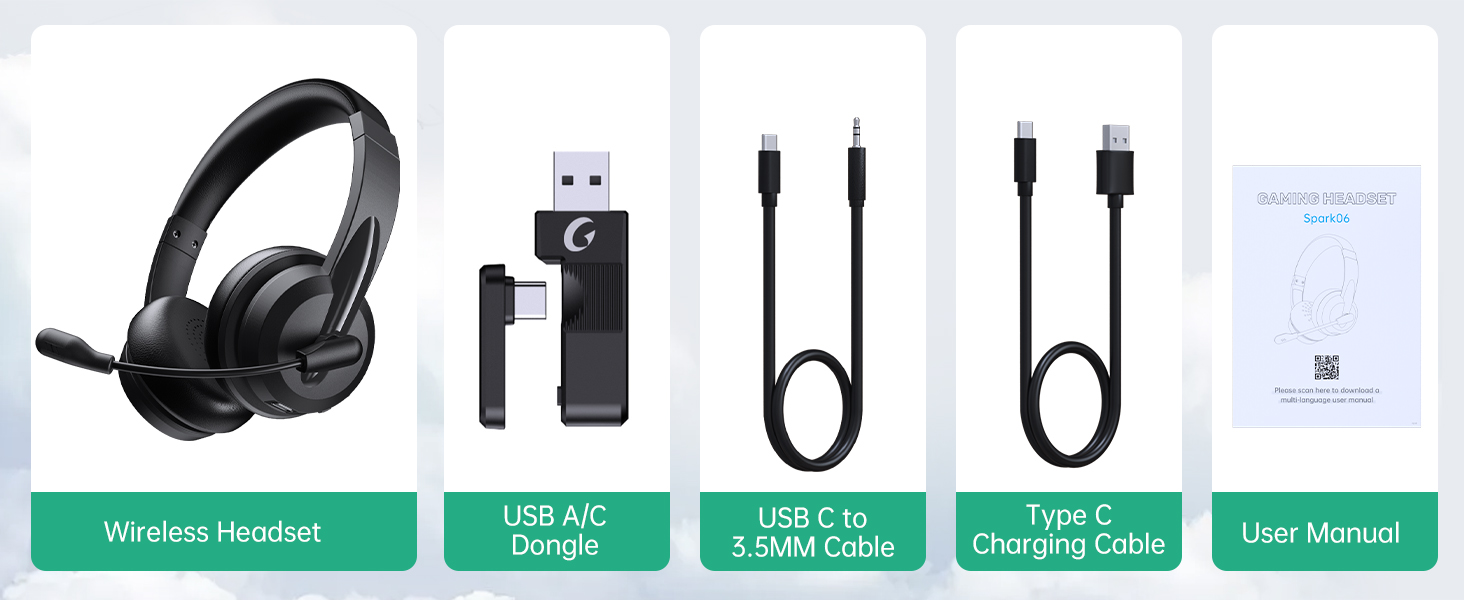
Rajah 2: Kandungan Pakej.
Persediaan
Mengecas Alat Dengar
Before first use, fully charge the headset. Connect the Type C Charging Cable to the headset's charging port and the other end to a USB power source (e.g., computer USB port, wall adapter). The charging indicator light will show the charging status.
- Masa Pengecasan Penuh: Kira-kira 2.5 jam
- Masa Berbual: Sehingga 30 jam
- Masa Main Balik Muzik: Sehingga 25 jam

Figure 3: Long Battery Life for Extended Use.
Mod Sambungan
The Masajoy headset supports three connection modes:
-
Bluetooth V5.3 Connection:
For wireless connection to Bluetooth-enabled devices (e.g., smartphones, laptops). Ensure the headset is in pairing mode (refer to operating instructions for details). Cari untuk "Spark 06" in your device's Bluetooth settings and connect.
-
2.4G Wireless (USB A/C Dongle):
For wireless connection to computers without Bluetooth or for a dedicated connection. Plug the USB A or USB C dongle into an available USB port on your computer. The headset will automatically connect to the dongle.
-
Wired 3.5mm Audio Cable:
For a wired connection to devices with a 3.5mm audio jack. Connect one end of the USB C to 3.5MM Cable to the headset's USB-C port and the other end to your device's 3.5mm audio jack. This mode is useful when battery is low or for devices that do not support wireless connections.

Figure 4: Dual Connection Options (Bluetooth & 2.4G Wireless).
NOTE: This headset does not support dual device connection simultaneously.
Arahan Operasi
Hidupkan/Mati Kuasa
- To Power On: Press and hold the Power button until you hear a voice prompt.
- To Power Off: Press and hold the Power button until you hear a voice prompt.
Kawalan Kelantangan
Use the volume control buttons located on the headset to adjust the listening volume.
AI Noise Cancelling Microphone
The headset features advanced AI noise cancellation to reduce background noise during calls. This feature enhances clarity for the listener.
NOTE: This AI Noise Cancelling feature is only available when connected via Bluetooth.

Figure 5: AI Noise Cancelling in action.
Fungsi Bisu Mikrofon
To mute the microphone, simply rotate the microphone boom to the upright position. A voice prompt will confirm "MIC mute". To unmute, rotate the microphone boom back down.

Figure 6: Microphone Mute Control by Rotation.
Keselesaan dan Reka Bentuk
The headset is designed for all-day wear with protein memory foam ear cups that are soft and breathable, preventing overheating. The adjustable and expandable headband ensures a comfortable fit for most head shapes.

Figure 7: Comfortable and Breathable Design.
Spesifikasi
| Ciri | Perincian |
|---|---|
| Nama Model | Percikan 06 |
| Teknologi Ketersambungan | Wireless (Bluetooth V5.3, 2.4G), Wired (3.5mm) |
| Kawalan Bunyi | AI Noise Cancellation (Bluetooth mode only), Passive Noise Cancellation |
| Hayat Bateri (Masa Berbual) | Sehingga 30 jam |
| Hayat Bateri (Main Semula Muzik) | Sehingga 25 jam |
| Masa Mengecas | lebih kurang 2.5 jam |
| Julat Tanpa Wayar | Up to 36 feet (11 meters) for Bluetooth |
| Saiz Pemacu Audio | 40 Milimeter |
| Kepekaan Mikrofon | 43 dB |
| Jack Fon Kepala | USB-C (for charging/wired audio) |
| Peranti Serasi | PC, Mac, Laptop, Chromebook, tablet, smartphones, MP3 players, PS5, PS4, Xbox one, gaming systems with an aux port |
| bahan | Faux Leather, Polycarbonate (PC), Metal, Acrylonitrile Butadiene Styrene (ABS) |
| Berat Barang | 10.2 auns |
| warna | Hitam |
Penyelenggaraan
- Pembersihan: Gunakan kain lembut dan kering untuk membersihkan set kepala. Jangan gunakan pembersih atau pelarut yang melelas.
- Storan: Simpan alat dengar di tempat yang sejuk dan kering jauh dari cahaya matahari langsung dan suhu yang melampau.
- Penjagaan Bateri: Untuk memanjangkan hayat bateri, elakkan daripada menyahcas sepenuhnya set kepala dengan kerap. Mengecasnya dengan kerap, walaupun tidak digunakan untuk tempoh yang lama.
- Pengendalian: Avoid dropping the headset or subjecting it to strong impacts. Do not twist or bend the microphone boom excessively beyond its intended rotation.
Menyelesaikan masalah
| Masalah | Kemungkinan Punca | Penyelesaian |
|---|---|---|
| Alat dengar tidak dihidupkan. | Bateri lemah. | Charge the headset fully using the provided Type C charging cable. |
| Tidak dapat menyambung melalui Bluetooth. | Headset not in pairing mode; device Bluetooth off; out of range. | Ensure headset is in pairing mode. Turn Bluetooth on your device. Move headset closer to the device (within 36 feet). |
| Tiada bunyi dari set kepala. | Volume too low; incorrect audio output selected on device; headset not connected. | Increase headset volume. Check device's audio output settings. Re-establish connection. |
| Mikrofon tidak berfungsi. | Microphone muted; incorrect input device selected; AI Noise Cancellation issue. | Ensure microphone boom is not in the upright (muted) position. Check device's microphone input settings. Note that AI Noise Cancellation is only active in Bluetooth mode. |
| Poor sound quality / static. | Gangguan; di luar julat; bateri lemah. | Move away from other wireless devices. Move closer to the connected device. Charge the headset. |
Waranti dan Sokongan
Masajoy products are designed for reliability and performance. For warranty information and technical support, please refer to the official Masajoy website or contact customer service using the details provided in the original product packaging or purchase receipt.
Anda juga boleh melawat Masajoy Store on Amazon untuk mendapatkan lebih banyak maklumat produk dan sumber sokongan.


